It’s incredibly frustrating when your iPhone or iPad won’t connect with a Bluetooth accessory. Whether it’s a set of wireless headphones, a smart speaker, or your car stereo, we expect our Bluetooth accessories to work seamlessly, but that isn’t always what happens.
In this article, we’ll talk you through all the best ways to fix Bluetooth problems on your iPhone or iPad. Most of the time, these problems are the result of a software issue, which means you can usually fix them yourself for free.
The easiest way to fix most Bluetooth problems on your iPhone or iPad is to toggle Bluetooth off and on again. This is particularly effective if your device is struggling to pair with a Bluetooth accessory. It’ll also help if you accidentally disabled Bluetooth on your device.
Follow these steps to toggle Bluetooth:
Swipe down from the top-right corner of the screen to open Control Center. If your device has a Home button, swipe up from the bottom of the screen instead.
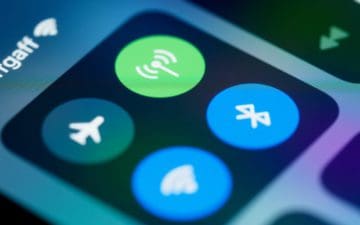
Find the Bluetooth icon in the top-left section of the Control Center, then tap this icon to toggle Bluetooth off. The icon turns white when Bluetooth is turned off.
Wait 30 seconds, then tap the Bluetooth icon to enable it again. The icon turns blue when Bluetooth is turned on.
2. Pair With Your Bluetooth Accessory Again
When it’s working, your iPhone or iPad usually pairs with Bluetooth accessories automatically, as soon as it detects them. But it can help to manually pair your devices together using the Settings app.
Here’s exactly what you need to do:
Make sure your Bluetooth accessory is fully charged and powered on (consider replacing the batteries if it uses any).
Follow the instructions for your Bluetooth accessory to put it in pairing mode. You can often do this by holding down a Bluetooth button on the device.
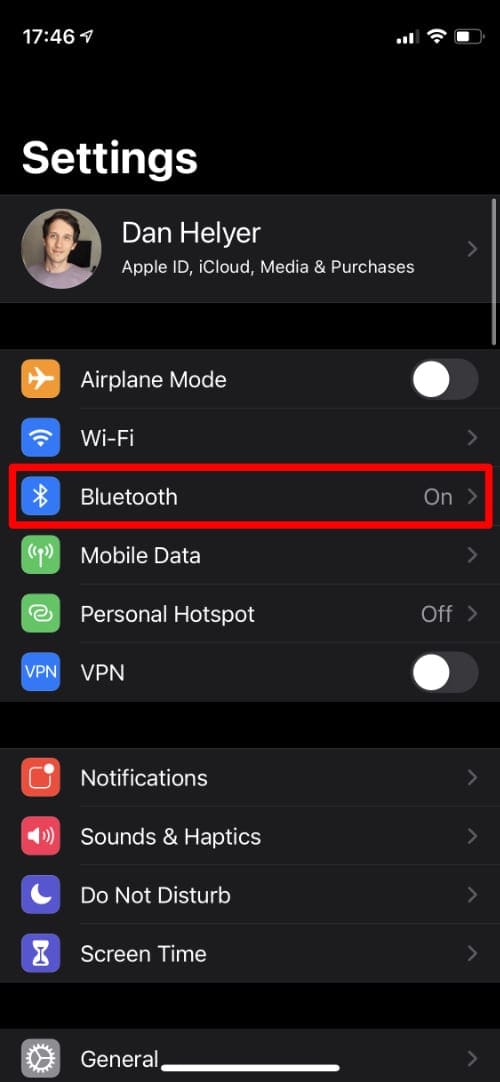
On your iPhone or iPad, go to Settings > Bluetooth.
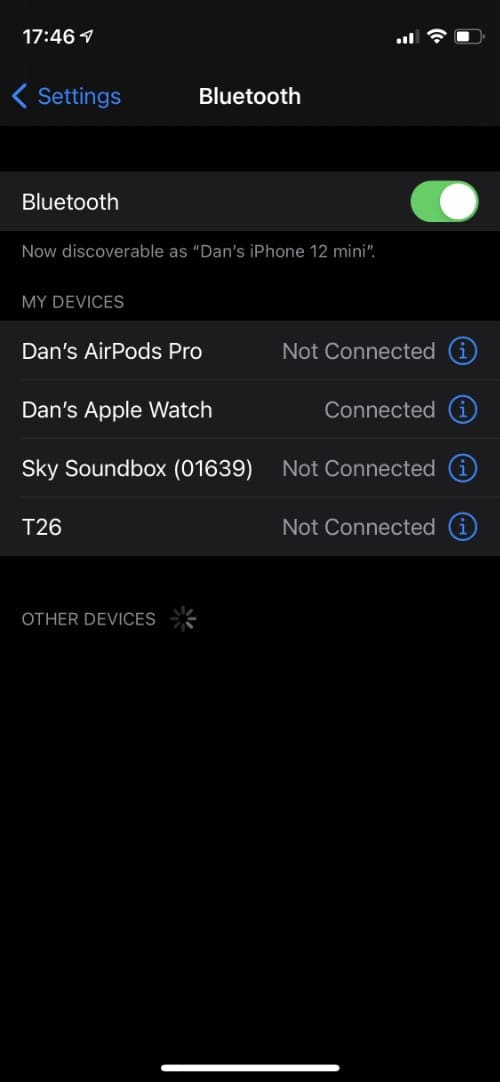
Wait for your Bluetooth accessory to appear in the list of devices, then tap its name to pair with it. If your accessory doesn’t show up, try moving it right next to your iPhone or iPad while it’s in pairing mode.
The Settings app should say Connected next to your Bluetooth accessory when pairing is complete.
Go into the Bluetooth settings.
Tap an accessory to connect again.
3. Enable Bluetooth for Third-Party Apps
If you can pair with a Bluetooth accessory, but you still can’t use it with any apps on your iPhone or iPad, you might need to change your Bluetooth Privacy settings.
On your iPhone or iPad, go to Settings > Privacy > Bluetooth. Tap the toggle to enable Bluetooth for any apps you’re trying to use your accessory with.
Note: Developers can use Bluetooth access to gather information about you, so you should only enable it for apps you trust.
4. Restart Your iPhone, iPad, and Bluetooth Device
One of the most tried and tested troubleshooting techniques is to restart your device. If your iPhone or iPad isn’t working with a Bluetooth accessory, restart the Apple device and the accessory before trying them again.
To restart your iPhone or iPad, press and hold the Side button with either Volume button, then slide to power off. If your device has a Home button, you only need to hold the Side button.
Once your iPhone or iPad powers off, wait 30 seconds before pressing the Side button again to restart it.
Follow the user instructions to restart your Bluetooth accessory.
5. Forget Your Bluetooth Accessory and Pair Again
Even if your iPhone or iPad won’t connect with a Bluetooth accessory right now, it still remembers information about the accessory from the last time it connected. Sometimes, you need to delete this data to fix your Bluetooth problems.
You can do that by telling your iPhone or iPad to Forget a device. Here’s how:
On your iPhone or iPad, go to Settings > Bluetooth.
Tap the i icon next to a Bluetooth accessory to reveal more data about it.
Scroll to the bottom and tap Forget This Device, then confirm you want to Forget Device.
When a Bluetooth device is not connected, your only option is to forget it.
After telling your iPhone to forget a Bluetooth accessory, follow the instructions above to pair them again, like you did the first time you used it.
6. Install the Latest iOS or iPadOS Update
It’s possible the Bluetooth isn’t working on your iPhone or iPad due to a bug in iOS or iPadOS. When this is the case, all you need to do is install the latest iOS or iPadOS update to fix it—provided Apple has released a patch for that bug already.
On your iPhone or iPad, go to Settings > General > Software Update to check for new updates. Download and install any that are available.
7. Reset Network Settings on Your iPhone or iPad
Up to now, none of the solutions we’ve suggested should have resulted in any data loss from your iPhone or iPad. But if Bluetooth still isn’t working, it’s time to start erasing some settings.
When you Reset Network Settings on your iPhone or iPad, it will forget all the Bluetooth devices you’ve connected to, all the Wi-Fi networks you’ve saved, and all the VPNs you may have set up.
As far as data loss goes, this is pretty minor. But you should make sure you’ve got your Wi-Fi password to hand so you can get online again as soon as possible.
To reset your network settings:
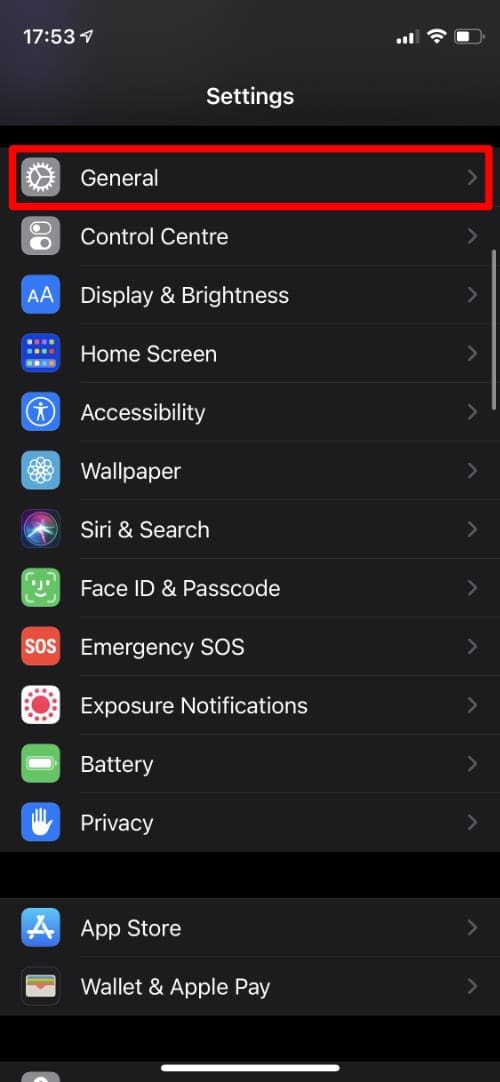
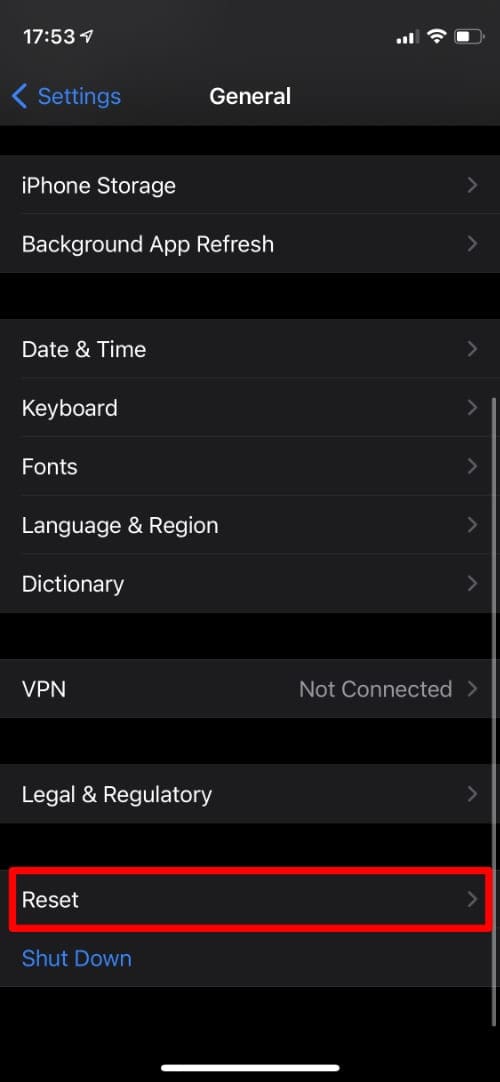
On your iPhone or iPad, go to Settings > General.
Scroll to the bottom and select Reset.
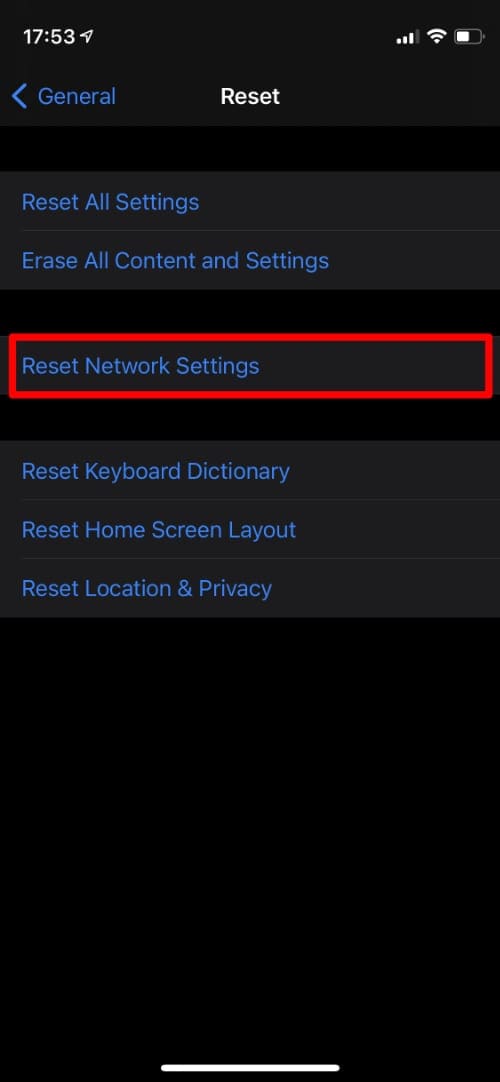
Choose to Reset Network Settings, then enter your passcode and confirm you want to Reset Network Settings.
Go into the General settings.
Scroll down and tap Reset.
Choose to Reset Network Settings.
8. Reset Your Bluetooth Accessory to Factory Settings
Sometimes it isn’t your iPhone or iPad that’s playing up, it’s your Bluetooth accessory. This could be the case for everything from a car stereo to a set of Apple AirPods.
If you still can’t connect to your Bluetooth accessory—or if it doesn’t work properly when you do connect it—follow the user instructions to reset the device back to its factory settings.
For most Bluetooth devices, all you need to do is disconnect it from Bluetooth and restart it. But for other devices, you may need to press a certain combination of buttons or go into the settings. Check with the manufacturer to find out exactly what you need to do.
It’s time for the big guns; if Bluetooth still isn’t working, you need to totally erase and reset your iPhone or iPad to rule out any underlying software problems.
It’s absolutely crucial that you back up your device first, otherwise you’ll lose all the data from it.
Your iPhone shouldn’t display anything on the screen in DFU mode.
However, if you don’t have a computer to use, you’ll need to erase the software from your iPhone or iPad settings instead. This still wipes all the data from your device and resets the software, but it doesn’t have any effect on the firmware so it’s not quite as thorough as using DFU mode.
To erase your iPhone or iPad and reset the software:
Go to Settings > General.
Scroll down and select Reset.
Choose to Erase All Content and Settings. Choose to Back Up and Erase to make a new backup.
Enter your passcode, then confirm you want to Erase Device.
Don’t Restore a Backup Yet!
After erasing your iPhone or iPad, we suggest you choose to set it up as new, without restoring a backup. This way you can test the Bluetooth again without worrying that something in your backup might be causing the problem.
If the Bluetooth still doesn’t work, even though you didn’t restore a backup, then you can be certain that you’re looking at a hardware problem.
If the Bluetooth does work now, erase your device again and restore your backup. Now, test the Bluetooth once more to find out if a problem with your backup is causing your Bluetooth issues. If the Bluetooth still doesn’t work, erase your device one more time and try restoring a different backup, or just set it up as new and try to forget about all your lost data.
10. Get a Hardware Repair
Unfortunately, if you followed all the advice above but Bluetooth still isn’t working on your iPhone or iPad, it means you’re looking at a hardware problem. This is most likely to be an issue with the antenna in your device, which can also affect Wi-Fi connectivity.
Although it’s possible to learn to fix an iPhone yourself with websites like iFixit, for most people we suggest you contact Apple directly. If your iPhone or iPad is still covered by the limited manufacturer’s warranty or consumer law, Apple should repair or replace your device for free.
Visit getsupport.apple.com to get in touch with Apple’s technical advisors, who should be able to schedule a mail-in repair or book an appointment for you at your nearest authorized service provider.
It’s best to go to the Apple Store for a repair.
Unfortunately, if your iPhone or iPad isn’t covered by the warranty or consumer law, you’ll need to pay for this yourself. But still, at least you’ll be able to connect to your Bluetooth accessories after you do so.
How Did You Fix Bluetooth on Your Device?
There are a countless number of different ways that Bluetooth can stop working for your iPhone or iPad and an equally countless number of potential causes for those problems. Because of this, it’s difficult for us to tell you exactly which step you need to follow to fix Bluetooth on your device.
However, we did try to list our solutions in order from the simplest and most likely, to the most drastic and least likely solution.
Let us know in the comments how you fixed Bluetooth on your device! Or, if you still haven’t managed to fix it yet, which methods did you try, and did Apple have anything interesting to say about it?
Dan writes tutorials and troubleshooting guides to help people make the most of their technology. Before becoming a writer, he earned a BSc in Sound Technology, supervised repairs at an Apple Store, and even taught English in China.
I warmed up my cooker ring and put a cardboard on it then the ipad 6th gen
ten mins, reset network, went into wifi and it was back on and getting networks, connected to mine
how warm? not too warm to melt plastic, just enough so your hand on the cardboard is just borderline too hot after a minute
or use hairdryer but not enough general heat for me
I think it should be helpful to differentiate the problem ‘bluetooth” not working more.
In my case the bluetooth is generally working with other devices.
However, one device, a hat with bluetooth speakers, is not found or shown.
Although the hat is correctly found by the iphone.
Both have the latest updates.
Which solution only make sense to try out?
the first 8 options did not work.









I warmed up my cooker ring and put a cardboard on it then the ipad 6th gen
ten mins, reset network, went into wifi and it was back on and getting networks, connected to mine
how warm? not too warm to melt plastic, just enough so your hand on the cardboard is just borderline too hot after a minute
or use hairdryer but not enough general heat for me
hallo,
I think it should be helpful to differentiate the problem ‘bluetooth” not working more.
In my case the bluetooth is generally working with other devices.
However, one device, a hat with bluetooth speakers, is not found or shown.
Although the hat is correctly found by the iphone.
Both have the latest updates.
Which solution only make sense to try out?
the first 8 options did not work.
Alfred