Are you having trouble getting iTunes Home Sharing to work? Don’t understand on to turn on home sharing in iTunes? Or don’t even know what iTunes Home Sharing is? If so, you are not alone! Quite a few of our readers have problems getting iTunes Home Sharing to work!
Simply put, iTunes Home Sharing lets you share and stream your entire iTunes library (music, movies, TV shows, Podcasts, and Audiobooks and even Photos for AppleTVs ) wirelessly over your home network with another computer, Apple TV, or any iOS device like an iPad, iPod Touch, or iPhone.
In some cases, users have experienced issues with Home Sharing (e.g. Home Sharing not showing up in iTunes).
iTunes Home Sharing Specs and Requirements
iPhones, iPads, and iPod Touch using iOS 4.3 and above
Mac and Windows PC with iTunes 9 and above
Apple TV 2nd generation using tvOS 4.2.1 or later OR an AppleTV 3rd generation or later
Devices all connected to the same WiFi network
Use the same Apple ID on all devices
Devices must be awake, with iTunes open
How Do I Turn on Home Sharing in iTunes?
It’s a good idea to check how you set-up iTunes Home Sharing, in case you missed something!
1. Update iTunes and your Devices
First, make sure that you have the latest version of iTunes installed on each Mac or PC using Home Sharing.
And don’t forget to update your Apple TV(s), iPhones, iPads, and iPod Touch as well to their latest iOS or tvOS.
2. Connect All Devices to the Same WiFi Network
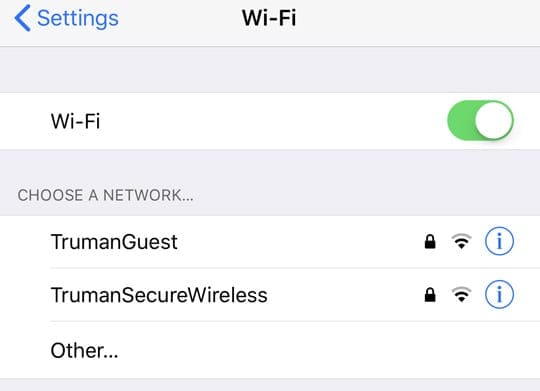
Home Sharing works when all of your devices are on the same WiFi network. So quickly check your devices and make sure they connect to the exact same WiFi network.
For folks with dual-band or tri-band WiFi routers, take note of which bandwidth you want to use–for example the 5 GHz or the 2.4 GHz.
Look for Guest Networks
If you also set up a guest network on your router, check that you are not inadvertently connecting to the guest network instead of your home network.
No VPN Support
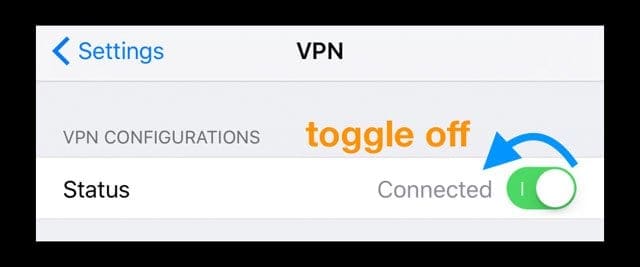
Home Sharing does not work with VPNs, so check that one or more of your devices are not currently connected to a VPN. And if so, toggle your VPN off.
3. Use the Same Apple ID on All Devices
Every computer or device on your Home Sharing network needs to have the same Apple ID signed in.
4. How To Turn On Home Sharing In iTunes For All Devices You Want to Share With
Home Sharing On Your Mac or PC
Open iTunes
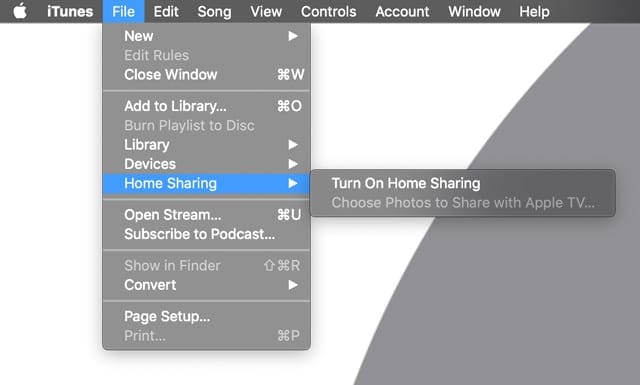
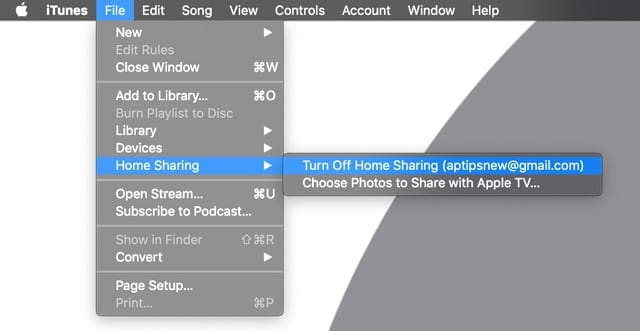
From the menu bar, choose File > Home Sharing > Turn on Home Sharing
If you’re not signed in, sign in with your Apple ID at the prompt
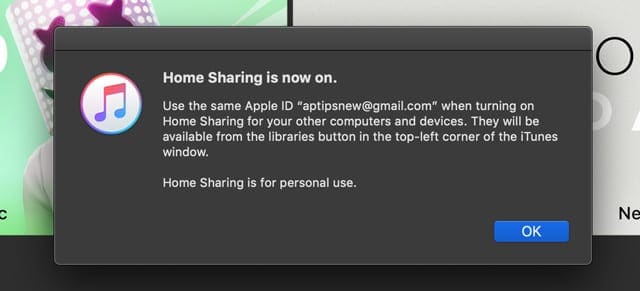
A pop-up indicates that Home Sharing is now on
To add additional computers, follow steps 1-2 and sign in with the same Apple ID
Use Home Sharing with up to five computers on your home network
The computers need to be on and awake, and iTunes needs to be open for Home Sharing to work
To see your shared iTunes Libraries, click Music in the upper-left corner and in the drop-down look for the home icon for the shared libraries
Home Sharing On Your iPhone, iPad, or iPod
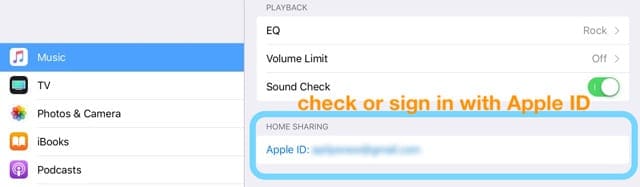
Go to Settings > Music or Settings > TV > iTunes Videos (for older iOS, in the TV App Settings it’s listed as Home Sharing)
Scroll until you find the Home Sharing setting
If you see Sign in, tap it, then enter your Apple ID and password
If you see an Apple ID, confirm it is correct or tap it to sign out and sign back in using a different Apple ID
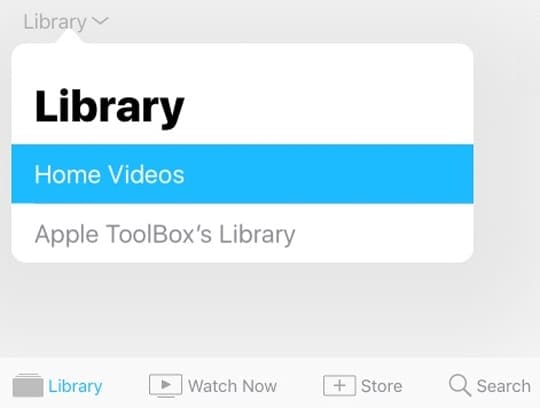
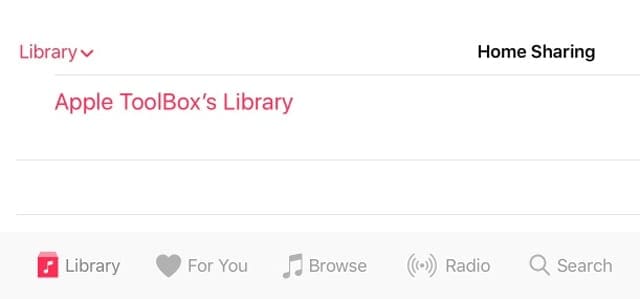
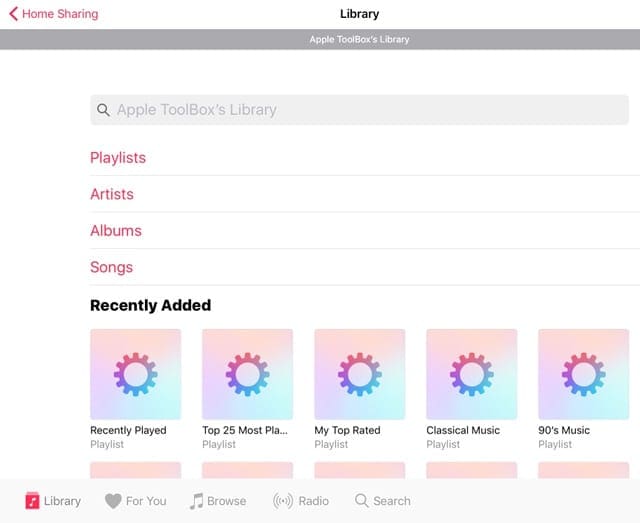
To see your shared iTunes Libraries, tap the Music or TV App and choose Library, then tap Home Sharing or the name of the Shared Library
To see the content, tap the name of the shared library
If you don’t see Home Sharing as an option in the Music App’s Library, tap Edit and select Home Sharing and tap Done
Home Sharing on Your Apple TV
Home Sharing for AppleTV requires that you have an active iTunes Store account
From the Home screen, choose Settings > Accounts > iTunes and App Store
Select Sign In, then sign in with your Apple ID and password
Go to Settings > Accounts > Home Sharing
For older model Apple TVs, go to Settings > Computers
Select Turn on Home Sharing
Enter your Apple ID and password if requested
To see your shared iTunes Libraries, go to the main menu, choose Computers, and select a shared library
iTunes Home Sharing Not Working on Macs and PCs?
Check that your computer is open and not asleep and that iTunes is open
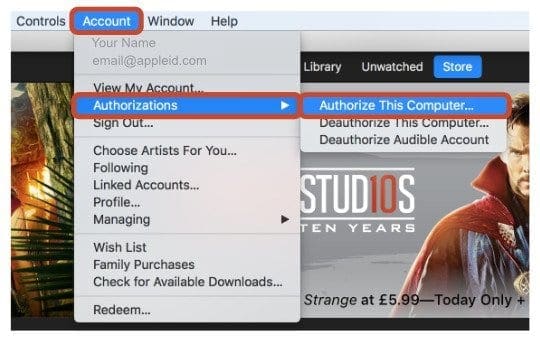
For Macs, from the menu bar at the top of your computer screen, choose Account > Authorizations > Authorize This Computer
From the menu bar at the top of the iTunes window, select Account > Authorizations > Authorize This Computer.
If you don’t see the menu bar, press Control + B on your keyboard
From the menu bar at the top of your computer screen or at the top of the iTunes window, choose File > Home Sharing > Turn on Home Sharing
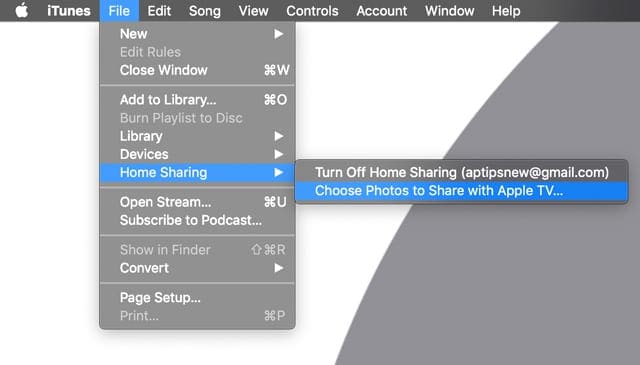
Try turning off Home Sharing in iTunes (File > Home Sharing > Turn Off Home Sharing) wait 20-30 seconds and then turn it back on to fix issues
Restart your Mac or PC AND your WiFi Router
Using a firewall?
Check that you’ve not blocked Home Sharing
Home Sharing uses TCP port 3689 and UDP port 5342. Make sure these are open and accessible on your router
If your Mac’s firewall is blocking all incoming connections or allowing only essential services, go to System Preferences > Security & Privacy > Firewall and edit these settings
If you’re using a PC, or you have another firewall set up on your computer or router, make sure TCP port 3689 and UDP port 5342 aren’t closed or blocked
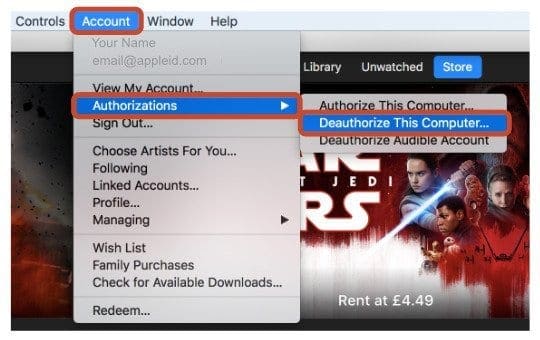
You can only authorize a maximum of 5 computers (Mac & PC combined) at any one time. If needed, deauthorize a computer to add in another
iTunes Home Sharing Tips for iDevices & Apple TVs
Sign into Home Sharing on your device
For iDevices, go to Settings > Music or Setting > TV (or for iOS 10.1 and below, Settings > Videos)
Locate Home Sharing and sign in with your Apple ID, if needed
For Apple TV 4K or Apple TV (4th generation), go to Settings > Accounts > Home Sharing and Select Turn on Home Sharing
On earlier models of Apple TV, go to Settings > Computers and Select Turn on Home Sharing
Log in to the same Apple ID on iTunes, and all iDevice and Apple TVs that you want to use with Home Sharing
Connect all devices to the same WiFi network
Restart all devices, including Apple TVs
Try downloading a movie or show onto one of your devices (any show or movie)
Once the download is complete, folks report that Home Sharing finally pops up as an option. This workaround seems to fix the problem for many folks!
Trying to Share Your Photos With Your Apple TV?
Open iTunes on your computer
Go to File > Home Sharing > and make sure Home Sharing is On
If not follow the instructions above to turn Home Sharing on for your computer
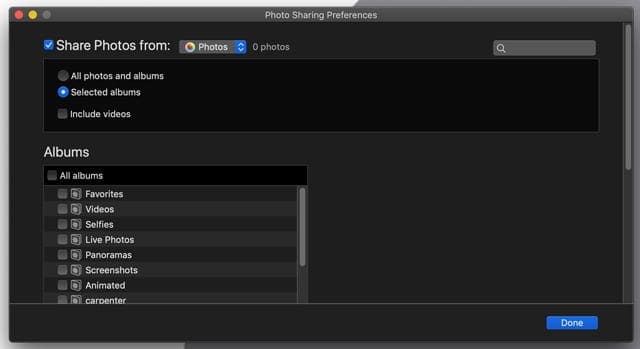
With Home Sharing On, go back to File > Home Sharing > and select Choose Photos to Share with Apple TV
Tick the box for Share Photos From and choose where (the Photos App or pick somewhere else, like your pictures folder)
Make additional selections like choosing all photos and albums or selecting specific albums
If you want videos too, tick the box for include videos
Want to Turn Off iTunes Home Sharing?
In iTunes, go to the top menu and choose File > Home Sharing
Select Turn Off Home Sharing from the options
Additional Troubleshooting tips for Home Sharing
Check if both the iTunes Store is working on both your computer and AppleTV, as it’s needed for successful authentication.
Obsessed with tech since the early arrival of A/UX on Apple, Sudz (SK) is responsible for the original editorial direction of AppleToolBox. He is based out of Los Angeles, CA.
Sudz specializes in covering all things macOS, having reviewed dozens of OS X and macOS developments over the years.
In a former life, Sudz worked helping Fortune 100 companies with their technology and business transformation aspirations.
I am so very fed up with Apple and their inability to fix my Home Sharing issue. The f*****g thing worked fine until January 2023 and now, despite not changing anything – nothing except maybe an OS update, Home Sharing never appears on my iPhone music library menu. I have found nothing to help online. My usernames and passwords are the same. I never had to screw with my firewall before January. What is going on with your products?
Thank you for the article and tips.
Since a last update with iOS 13, Home Sharing doesnt work anymore.
All the processes you gave to check have been done properly. I can share the library on my TV via the AppleTV. But not anymore on the iphone 6s, and even on my old iPad.
I’ve done everything suggested on multiple sites. Here’s the issue. On iphone or on my ipad, when I click iTunes music, click HomeSharing, the “library” I originally set up is there. I click on it. The circular downloading icon revolves, the screen flashes, and iTunes closes without opening the shared library. I can’t find this particular issue listed anywhere…I have Windows 10 on my PC, have uninstalled Norton, have given Windows 10 permission to allow iTunes through firewall…what now? Somebody please help!
I understand how to problem solve Home Sharing. What I don’t understand is why i have to turn it on and off a few times a day so that my Apple TV can access my home videos. It’s annoying.
I’ve been using my model A1625 Apple TV for a couple of years without problems. All of a sudden using home sharing photos as a screen saver is not working. I’ve turned off home sharing on my pc, then back on again.
Apple TV software is up to date.
I’ve powered down Apple TV and brought it back up.
Photos are visible when I select photos in the screen saver option.
However in screen saver preview mode, photos do not display and all I see is a blank screen.
When I again select Home Sharing,, “music” not “photos” is the selected option.
It seems that the “photos” selection is not being retained.
The last time I used Apple TV a couple of weeks ago, the home-sharing using photos as the screen saver worked fine.
iTunes recognizes the library on my other PC when first started, but the option disappears once I click on it, never to return.
If I have to reboot all of my devices every time I want to watch a movie, I am not really in the mood for entertainment by the time they reboot. Face it. Apple products are all hype. They do not work as advertised.
https://support.apple.com/en-us/HT202190 try this link for some basic help
i signed out of my pc and ipad than signed back in, fixed the issue on my ipadof home sharing
I had this problem for a few months now, but after reading something in this article, that I did not see on other discussion threads–problem fixed. The critical item I saw in this article was the reference to VPN and Home Sharing not supporting it. As soon as I turned my VPN off, voila!
It is likely that others may be having this problem and aren’t aware of it. As I said already, the VPN issue is not addressed in any of the online threads I read except for this one (though there may be others).
My particulare issue was not being able to connect my Apple TV (3) to iTunes on my W7 PC.
i got home sharing working on my ipod from windows by using the turn of ipv6 fix
but it only lasts until i switch ipod of when switched on again it has disapeared
Apple TV used to work fine. Today it wouldn’t work and Apple TV icon disappeared from iPad. When I reset and put in my Apple ID it tells me it isn’t recognised even though I reset it so it is correct and I have used the new password to turn on home sharing on PC and iPad
I has iTunes Home Sharing working fine (ATV2, Windows 7 and the latest iTunes version) with IPV6 running. Somehow my iTunes library became corrupted so I completely removed iTunes. I reinstalled iTunes and created a new library. Home sharing no longer worked. After much searching I came upon the IPV6 fix. I now have to disable IPV6 to have home sharing work. Frustrating even though I do not need IPV6.
I’ve done everything on the Apple Support page and disabled the IpV6……Still nothing. I’ve been working on this now for about 6 hours. Seriously frustrated at this point! Any help would be appreciated.
Hey I know this is off topic but I was wondering if you knew of any widgets I could add to my blog that automatically tweet my newest twitter updates… I’ve been looking for a plug-in like this for quite some time and was hoping maybe you would have some experience with something like this… Please let me know if you run into anything.. I truly enjoy reading your blog and I look forward to your new updates. Painting in Houston: Residential Painting, 8834 Andante Dr., Houston, TX, 77040, US, 281-944-5450
After battling for months to get this working your suggestion to disable IPv6 worked like a charm. the easiest way is just to disable it for your NIC card (WiFi card in my case). click the checkbox and click Save. Restart iTunes – WORKS!!!
Had been troubleshooting this for a while and almost lost hope (always had the latest and greatest iTunes running). Disabled IPv6 and BOOM! started working on all devices (iPad, iPhone and AppleTV). Thank you!
Apple TV2 doesn’t see my library when it connects. Home sharing is turned on yet I have to turn it off and then turn it back on to establish a connection. Sometimes I have to do this two or three times. I too get the spinning wheel, sometimes for up to twenty minutes. I am running Mountain Lion on a 2007 iMac 24″ and the network is wired. Can anyone help?
Steve Jobs is dragging apple into the grave after him. Since his demise, the demise of apple itself is plan to see. The ONLY reason people buy Apple stuff is as unlike 99% of hardware launched it worked reliably. With that myth now truly busted there is NO point paying twice the money for Apple stuff that doesn’t work reliably, you may as well buy android stuff that fails to work reliably, equally well!
Hi, We’re constantly getting the spinning wheel of death with Home Sharing.
It happens on each of our 3 Apple TV’s (2 2nd gen, 1 3rd gen).
The iTunes host computer is a 2009 iMac 24″ running Mountain Lion. The network is wired from iMac to Airport Extreme and out to the main Apple TV, other 2 are on wifi. Everything has the latest firmware/version.
The iMac and iTunes are always left on.
When the issue presets itself, it’s like iTunes or Home Sharing isn’t turned on.
The guaranteed fix is to quit iTunes and relaunch it.
Simple as that and we’re up and running.
Ever experience this? Suggestions for a true fix?
thanks!
‘Fish











I am so very fed up with Apple and their inability to fix my Home Sharing issue. The f*****g thing worked fine until January 2023 and now, despite not changing anything – nothing except maybe an OS update, Home Sharing never appears on my iPhone music library menu. I have found nothing to help online. My usernames and passwords are the same. I never had to screw with my firewall before January. What is going on with your products?
Thank you for the article and tips.
Since a last update with iOS 13, Home Sharing doesnt work anymore.
All the processes you gave to check have been done properly. I can share the library on my TV via the AppleTV. But not anymore on the iphone 6s, and even on my old iPad.
Do you have any idea?
Seb
I’ve done everything suggested on multiple sites. Here’s the issue. On iphone or on my ipad, when I click iTunes music, click HomeSharing, the “library” I originally set up is there. I click on it. The circular downloading icon revolves, the screen flashes, and iTunes closes without opening the shared library. I can’t find this particular issue listed anywhere…I have Windows 10 on my PC, have uninstalled Norton, have given Windows 10 permission to allow iTunes through firewall…what now? Somebody please help!
I understand how to problem solve Home Sharing. What I don’t understand is why i have to turn it on and off a few times a day so that my Apple TV can access my home videos. It’s annoying.
Hi
I’ve done all of the above for my iOS devices and pc but home sharing is still not coming up in my iTunes library tools?
What next?
Michael
I’ve been using my model A1625 Apple TV for a couple of years without problems. All of a sudden using home sharing photos as a screen saver is not working. I’ve turned off home sharing on my pc, then back on again.
Apple TV software is up to date.
I’ve powered down Apple TV and brought it back up.
Photos are visible when I select photos in the screen saver option.
However in screen saver preview mode, photos do not display and all I see is a blank screen.
When I again select Home Sharing,, “music” not “photos” is the selected option.
It seems that the “photos” selection is not being retained.
The last time I used Apple TV a couple of weeks ago, the home-sharing using photos as the screen saver worked fine.
Any help is appreciated.
Hi Tom.
There seems to be a random bug in tvOS 13 that’s causing havoc with the photos app and home sharing.
Here’s what has worked for some folks:
1) Instead of restarting your Apple TV, physically unplug all connections (including HDMI) and wait 1+ minute with everything unplugged
2) During the time your Apple TV has cord-cut, go to your Mac and navigate to Home Sharing
3) Turn Home Sharing off
4) Plug in your Apple TV and wait for it to boot
5) Once the Apple TV fully boots, go to Settings and manually check for an Update–do this step even if it’s up to date
6) On your Mac, turn Home Sharing back on and enter your Apple ID credentials
7) Choose selected albums/photos to share with your Apple TV from the Photos app
8) On the Apple TV, go to home-sharing Settings and turn on screensaver
9) Run a test on your Apple TV
Sorry, I have tried all of the suggestions.
iTunes recognizes the library on my other PC when first started, but the option disappears once I click on it, never to return.
If I have to reboot all of my devices every time I want to watch a movie, I am not really in the mood for entertainment by the time they reboot. Face it. Apple products are all hype. They do not work as advertised.
My problem was different wifi networks, thanks!
https://support.apple.com/en-us/HT202190 try this link for some basic help
i signed out of my pc and ipad than signed back in, fixed the issue on my ipadof home sharing
I had this problem for a few months now, but after reading something in this article, that I did not see on other discussion threads–problem fixed. The critical item I saw in this article was the reference to VPN and Home Sharing not supporting it. As soon as I turned my VPN off, voila!
It is likely that others may be having this problem and aren’t aware of it. As I said already, the VPN issue is not addressed in any of the online threads I read except for this one (though there may be others).
My particulare issue was not being able to connect my Apple TV (3) to iTunes on my W7 PC.
This pointed me in the right direction to fix iTunes home sharing.
Thanks for the tips!
Thanks. It’s been bugging me for ages that I couldn’t see the home Sharing option. Wrong Apple ID
Had enough of this, will dump iTunes.
really? cab’t apple just make peripherals that just work all the time?
i got home sharing working on my ipod from windows by using the turn of ipv6 fix
but it only lasts until i switch ipod of when switched on again it has disapeared
help
Apple TV used to work fine. Today it wouldn’t work and Apple TV icon disappeared from iPad. When I reset and put in my Apple ID it tells me it isn’t recognised even though I reset it so it is correct and I have used the new password to turn on home sharing on PC and iPad
Turning off IPv6 worked like a charm.
Mac Mini – 10.10.3
IPhone 5s – 8.3
I has iTunes Home Sharing working fine (ATV2, Windows 7 and the latest iTunes version) with IPV6 running. Somehow my iTunes library became corrupted so I completely removed iTunes. I reinstalled iTunes and created a new library. Home sharing no longer worked. After much searching I came upon the IPV6 fix. I now have to disable IPV6 to have home sharing work. Frustrating even though I do not need IPV6.
I’ve done everything on the Apple Support page and disabled the IpV6……Still nothing. I’ve been working on this now for about 6 hours. Seriously frustrated at this point! Any help would be appreciated.
IPv6 worked ……………. Windows 7.
Home Sharing and pictures are working………
IPv6 worked! Windows 8.1 here. Well at least we know its not a Mac specific issue.
Hey I know this is off topic but I was wondering if you knew of any widgets I could add to my blog that automatically tweet my newest twitter updates… I’ve been looking for a plug-in like this for quite some time and was hoping maybe you would have some experience with something like this… Please let me know if you run into anything.. I truly enjoy reading your blog and I look forward to your new updates. Painting in Houston: Residential Painting, 8834 Andante Dr., Houston, TX, 77040, US, 281-944-5450
Disabling IPV6 seemed to work for me… for now.
I’ve disable IP6 on my NIC, but I’m still not getting anything when it comes to my home sharing. Any other ideas?
Wondering if you ever got it to work and how? I’ve tired everything and still nothing. The IPV6 didn’t work for me either.
Turned off IPV6 on my pc and iTunes home sharing started to work. Big thank you for the post on IPV6.
iTune Version is 11
IOS 6.1 for my iphone 4s
D-Link DIR-655 router with multicast on
After battling for months to get this working your suggestion to disable IPv6 worked like a charm. the easiest way is just to disable it for your NIC card (WiFi card in my case). click the checkbox and click Save. Restart iTunes – WORKS!!!
Thanks a lot!!!
Had been troubleshooting this for a while and almost lost hope (always had the latest and greatest iTunes running). Disabled IPv6 and BOOM! started working on all devices (iPad, iPhone and AppleTV). Thank you!
Apple TV2 doesn’t see my library when it connects. Home sharing is turned on yet I have to turn it off and then turn it back on to establish a connection. Sometimes I have to do this two or three times. I too get the spinning wheel, sometimes for up to twenty minutes. I am running Mountain Lion on a 2007 iMac 24″ and the network is wired. Can anyone help?
After battling this problem for weeks your suggestion to try disabling IPv6 on your PC worked. A big THANK YOU!
Steve Jobs is dragging apple into the grave after him. Since his demise, the demise of apple itself is plan to see. The ONLY reason people buy Apple stuff is as unlike 99% of hardware launched it worked reliably. With that myth now truly busted there is NO point paying twice the money for Apple stuff that doesn’t work reliably, you may as well buy android stuff that fails to work reliably, equally well!
Androids are awesome, you just need better luck with technology
3 years later what you have said rings true. The “Never fixed bugs” mount.
Hi, We’re constantly getting the spinning wheel of death with Home Sharing.
It happens on each of our 3 Apple TV’s (2 2nd gen, 1 3rd gen).
The iTunes host computer is a 2009 iMac 24″ running Mountain Lion. The network is wired from iMac to Airport Extreme and out to the main Apple TV, other 2 are on wifi. Everything has the latest firmware/version.
The iMac and iTunes are always left on.
When the issue presets itself, it’s like iTunes or Home Sharing isn’t turned on.
The guaranteed fix is to quit iTunes and relaunch it.
Simple as that and we’re up and running.
Ever experience this? Suggestions for a true fix?
thanks!
‘Fish