Numerous users have encountered issues with the functionality of their iBooks Store. While they are able to view their personal books on their iPhones and iPads, clicking on the Featured, For You, or even the Library sections only displays a blank screen. This problem appears to occur intermittently, particularly after an iOS or app update, as indicated by the emails and comments we have received from our readers in the forum.
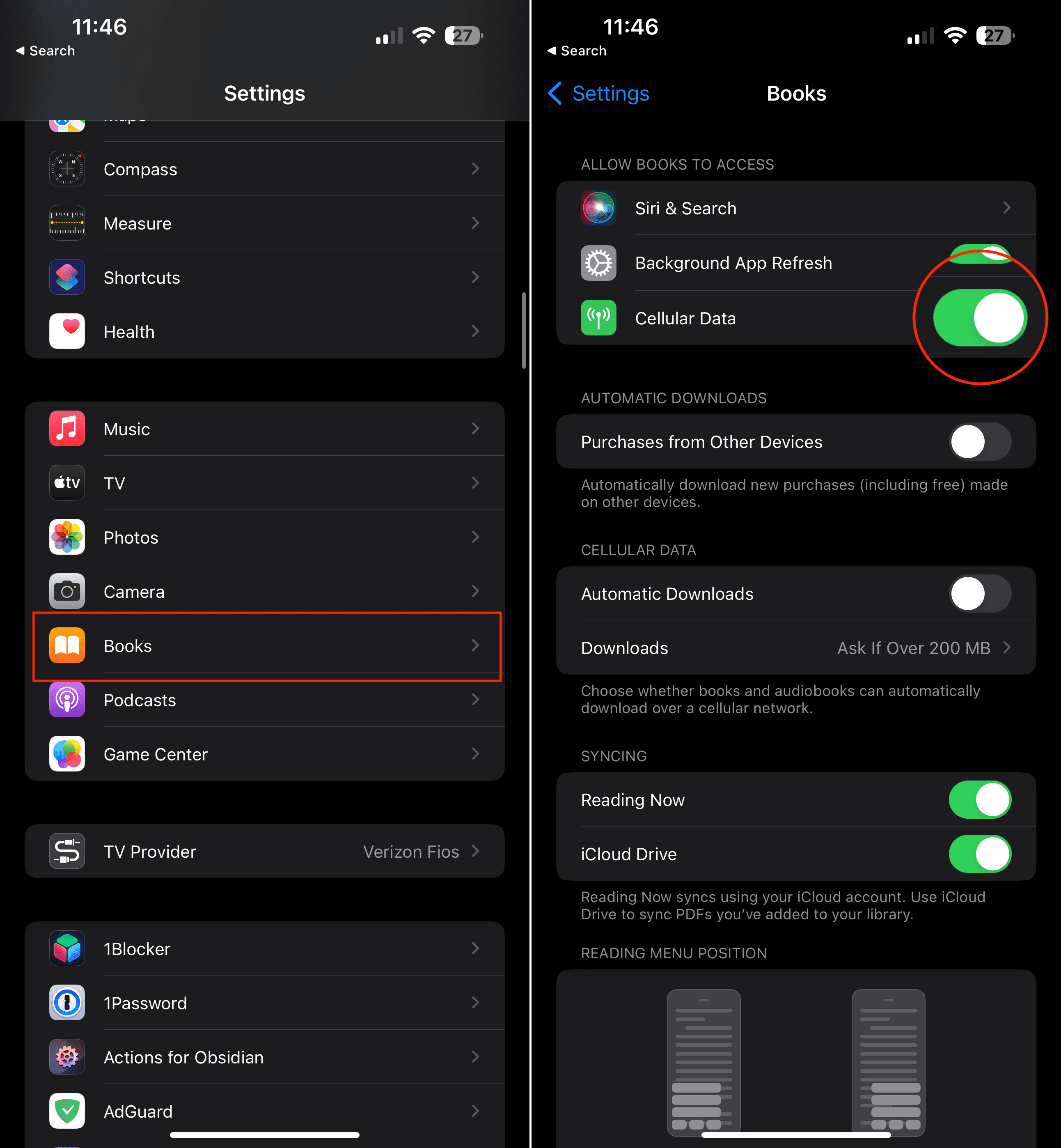
If you recently experienced this issue after an iOS or app update, it’s possible that the Cellular Data access for iBooks was disabled during the update and didn’t automatically re-enable. To resolve this, follow these simple steps:
Open the Settings app on your iPhone or iPad.
Scroll down and tap on Books in the list of apps.
Under the Allow Books to Access section, tap the toggle next to Cellular Data to the On position.
By turning on Cellular Data access for iBooks, you ensure that the app can utilize your cellular internet connection when necessary. This should resolve any issues related to restricted internet access for iBooks following an iOS or app update.
Another way of checking is to visit Settings > Cellular > and toggle on Cellular Data AND under the heading Use Cellular Data For: toggle on iBooks.
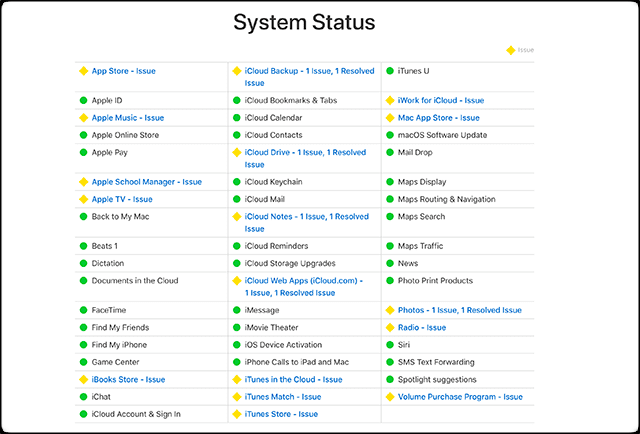
Check Apple System Status Page
Occasionally, the Apple system experiences downtime, either for planned maintenance or unexpectedly. Like any technology, these occurrences are a natural part of life. Instead of immediately delving into troubleshooting steps that may not be necessary, it is advisable to first consult Apple’s System Status page. This will help ensure that there are no ongoing issues with the Apple Book Store before proceeding further.
In the event that issues are detected, it is important to remember that time can be your ally. Patience is key, and it is recommended to check again after an hour or so. Apple works diligently to address and resolve problems, so the downtime of the iBooks Store is likely to be temporary and not last for an extended period.
Troubleshooting Tips for iBooks Store Not Working Shows Blank Screen
Log out of Your iCloud Account
The most common way to fix the problem if the iBooks Store shows blank screen is to log out of your iCloud account and then log back in. This seems to be a pretty good fix for most things, as there are times when syncing can get hung up. Signing out of your iCloud account and then back in should fix those problems.
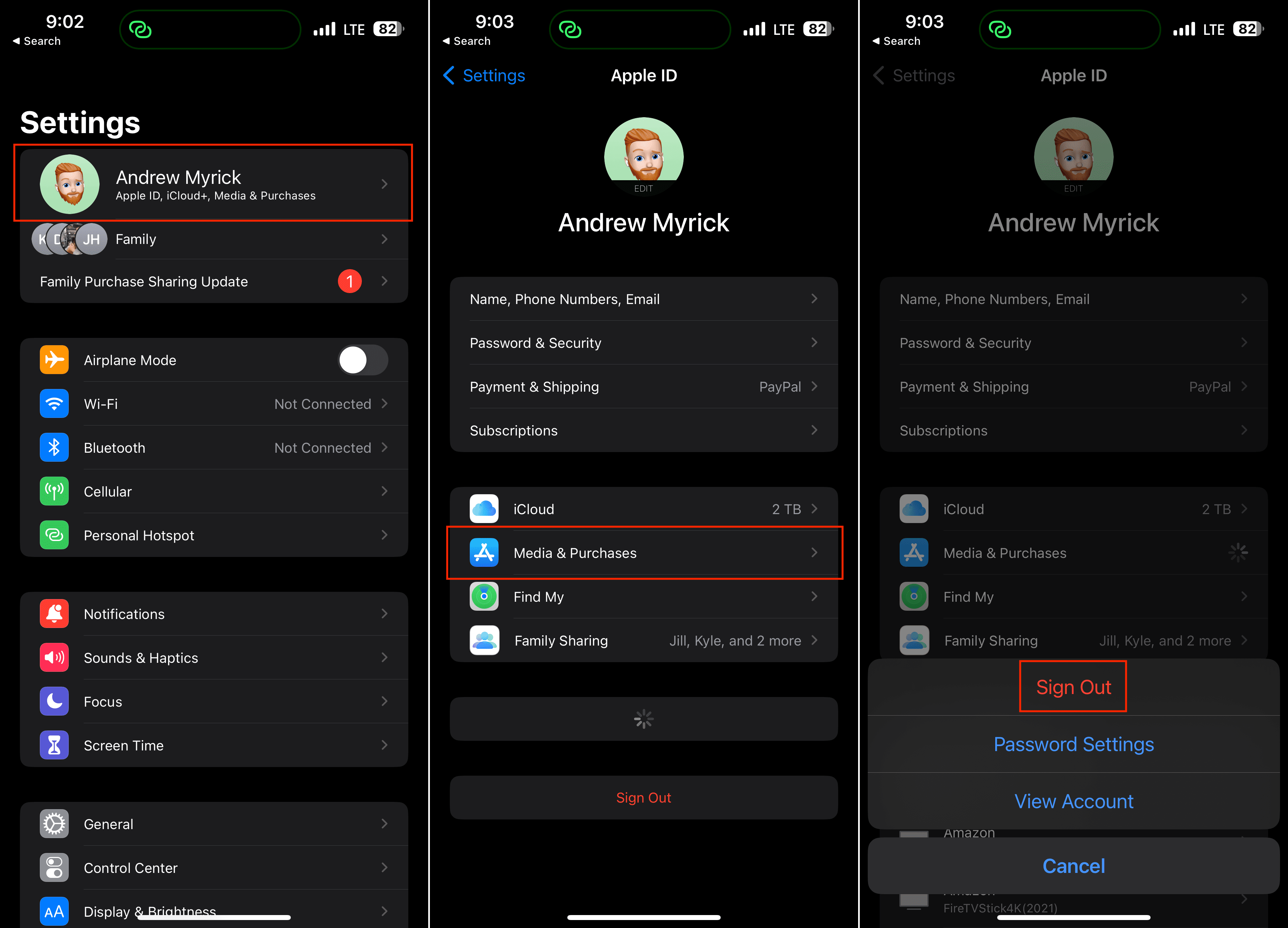
Open the Settings app on your iPhone or iPad.
Tap [Your Name] at the top of the screen.
Scroll down and tap Media & Purchases.
From the menu that appears, tap the Sign Out button.
A pop-up box will appear confirming that this will sign you out of the App Store, Books, Music and Podcasts.
Tap the Sign Out button to confirm.
Restart your iPhone or iPad.
Once restarted, open the Books app to see if the “blank screen” problem still appears.
If everything appears to be working normally again, then you can follow the steps above to sign back into your iCloud account.
Try Opening a Link to the Book Store
Opening a link to the Apple Book Store on an iPhone can potentially help resolve certain problems or issues for a few reasons. By opening a link to the Apple Book Store, you essentially relaunch the Books app or trigger a refresh. This can help clear any temporary glitches or issues that might be affecting the app’s functionality.
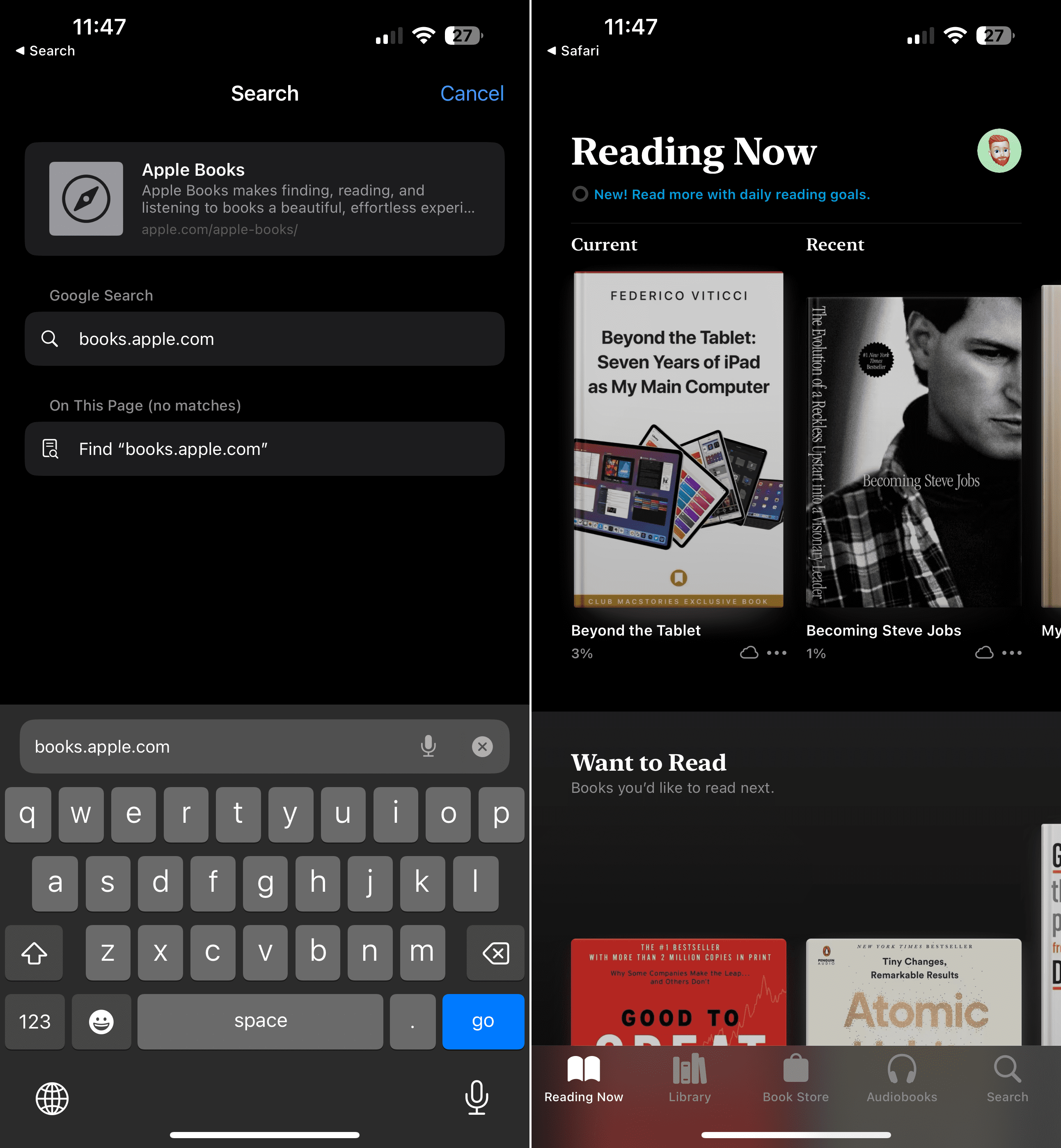
Open the Safari app on your iPhone or iPad.
In the address bar of the browser, type in the URL for the Apple Books Store. The URL is https://books.apple.com/.
Hit the Enter key or Go button on the keyboard to load the webpage.
The web browser will navigate to the Books Store, where you can explore and purchase books.
In the event that you’ve come across this page, the link below will also take you to a listing within the Apple Books Store on whatever device you are currently using.
Opening a link to the Apple Book Store on an iPhone can potentially help resolve certain problems or issues for a few reasons. By opening a link to the Apple Book Store, you essentially relaunch the Books app or trigger a refresh. This can help clear any temporary glitches or issues that might be affecting the app’s functionality.
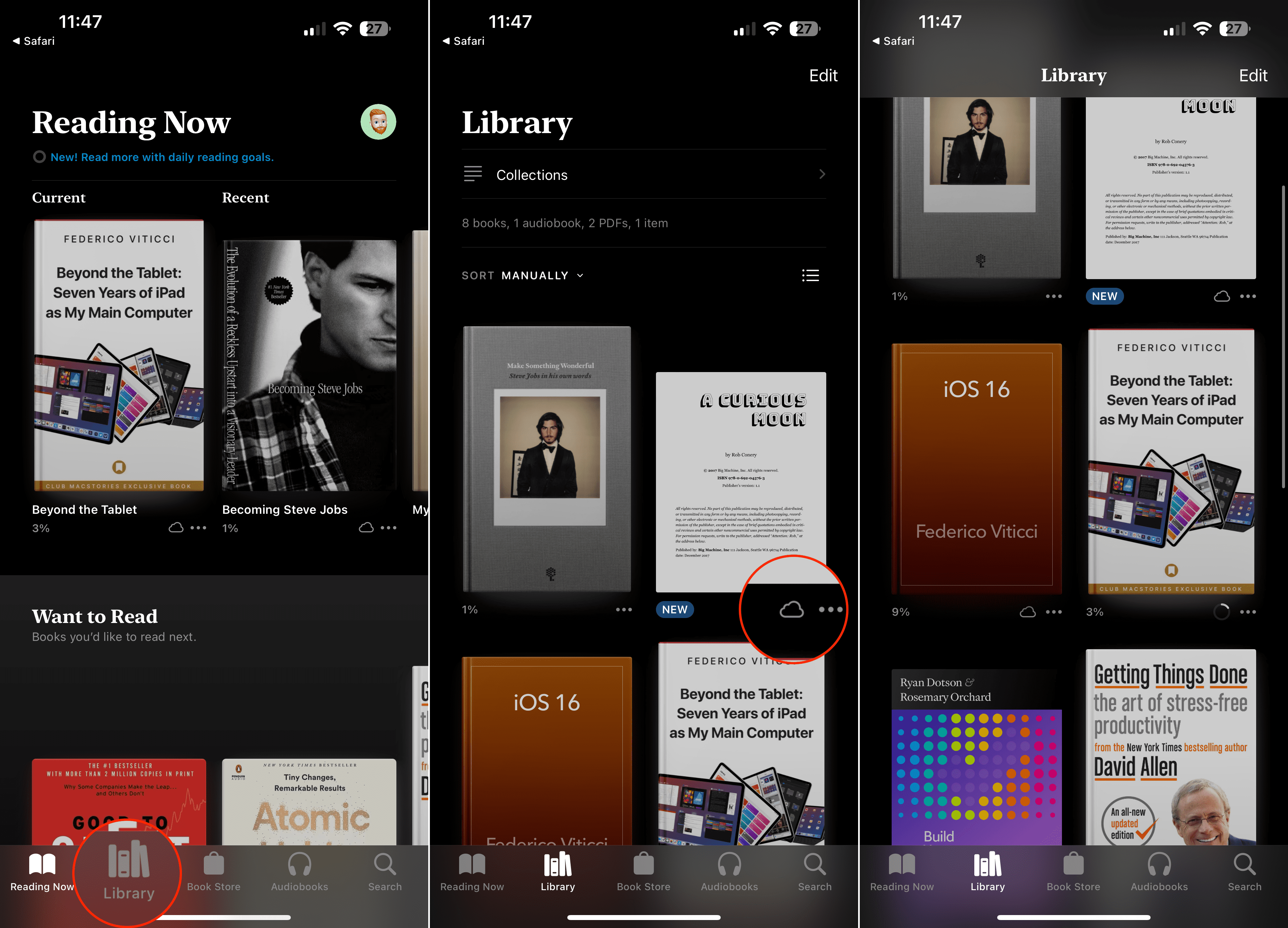
Open the Apple Books app on your iPhone.
Tap the Library tab in the bottom left corner of the screen.
Find the book you want to redownload.
If you are in the All Books view, you will see a list of all your purchased books, including those that are not currently downloaded to your device.
Tap on the download icon (a cloud with an arrow pointing downwards) next to the book’s title. This will initiate the redownload process.
If you are already in the “Downloaded” view and see the book you want to redownload listed, simply swipe left on the book’s title. You will see a red “Delete” button. Tap on it to remove the downloaded book from your device.
Once the book is removed, you can tap on the Download button that appears next to the book’s title. This will start the redownload process.
The book will now be redownloaded to your iPhone and will appear in your book library once the download is complete. You can access and read it from there.
By following these steps, you can easily redownload books on your iPhone using the Books app.
Create a New Collection and Try Again
Creating a new collection in the Apple Books app on an iPhone may not directly fix technical issues within the app itself. However, this has been found to remedy the problem iBooks Store Not Working Shows Blank Screen.
Open the AppleBooks app on your iPhone or iPad.
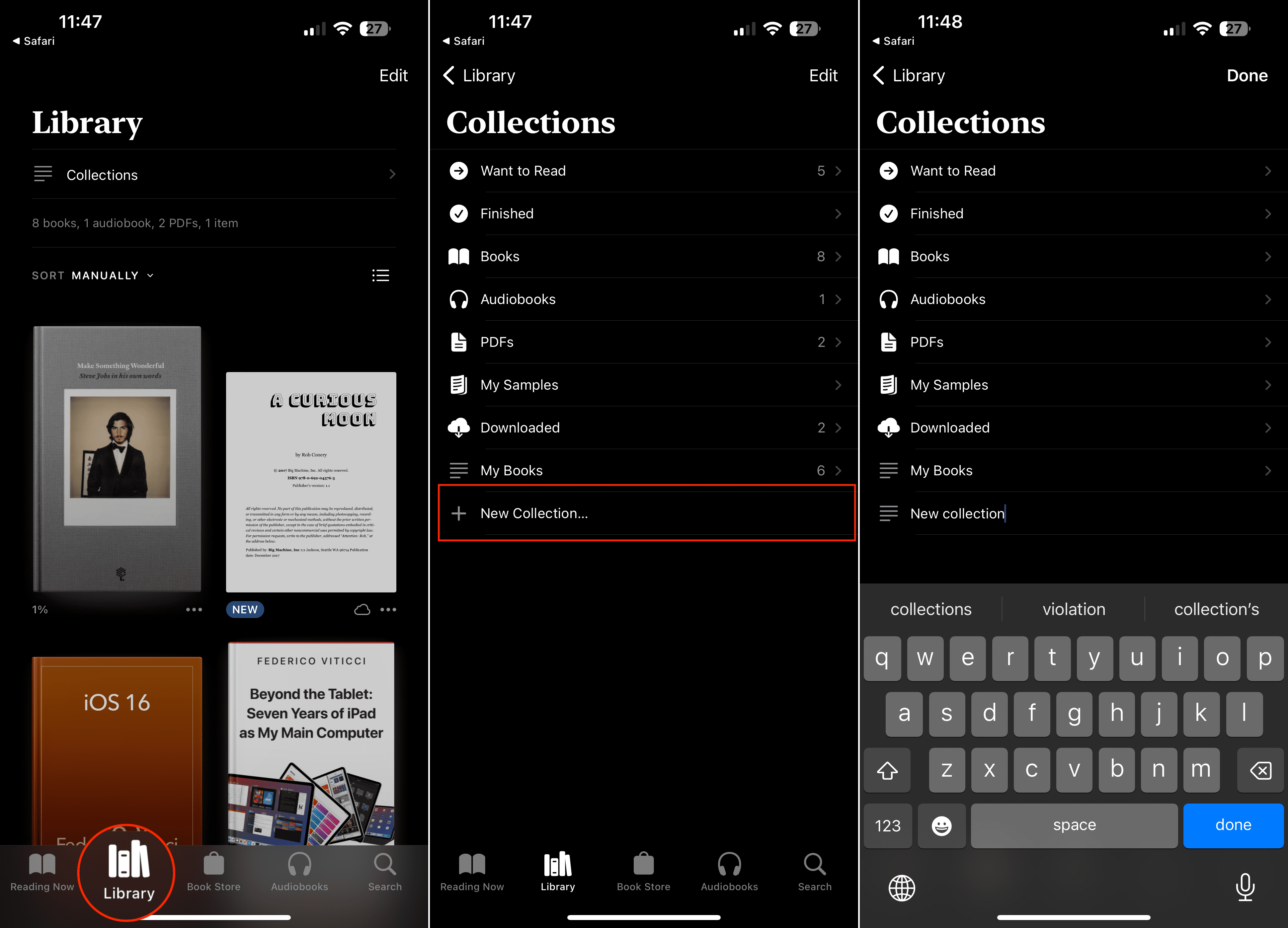
Tap on the Library tab located at the bottom of the screen. This will display your book library.
In the Library view, tap on Collections located at the top of the screen. If you don’t see Collections, tap on Edit in the top-right corner and make sure Collections is selected in the list of options.
You will be taken to the Collections view, where you can see your existing collections (if any). Tap on the + New Collection option at the bottom of the screen.
A text field will appear where you can enter a name for your new collection. Type in a name for your collection and tap on Save or Done (depending on your device) to create it.
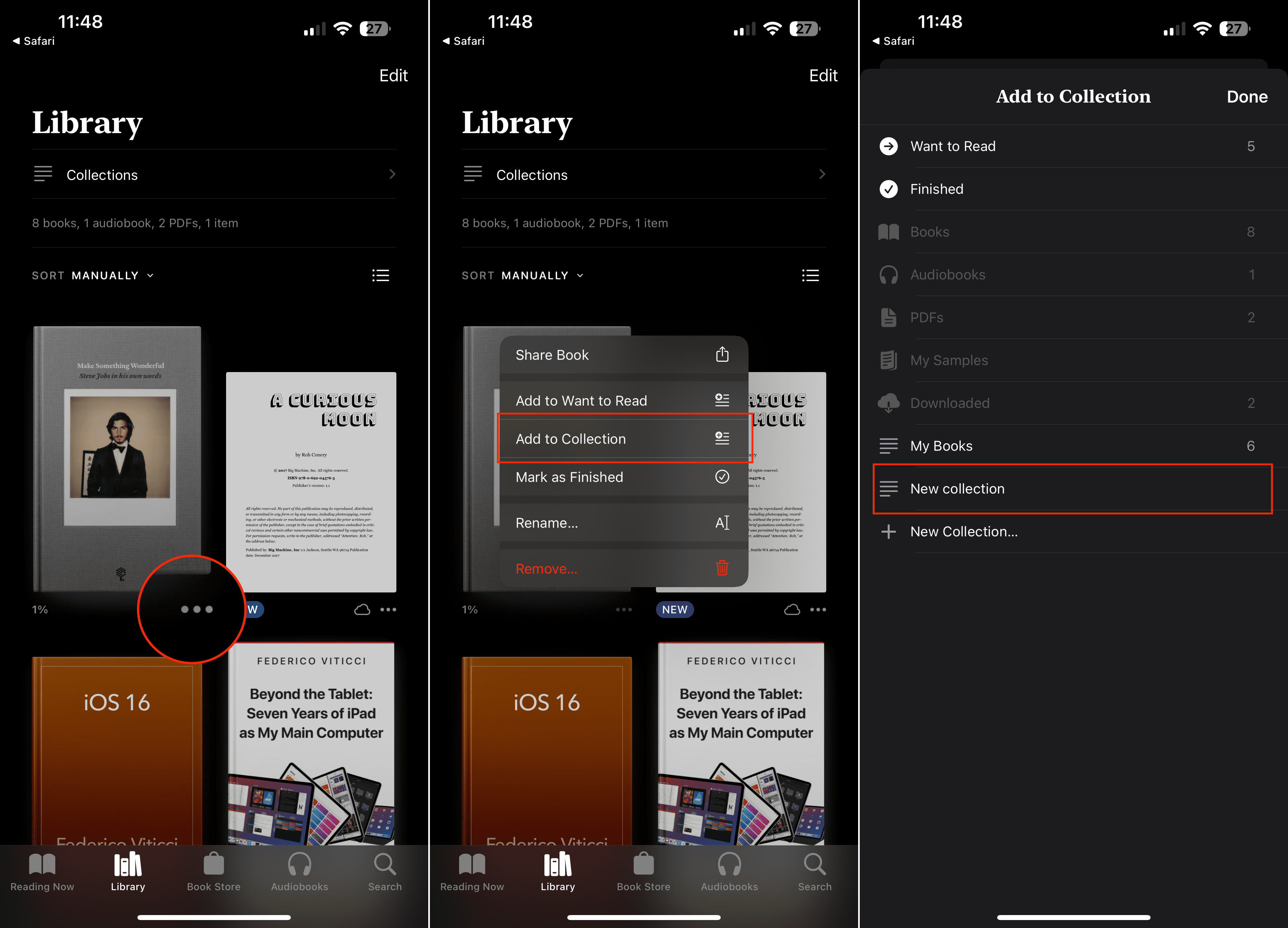
Once the collection is created, you can start adding books to it. To add a book to the collection, go back to your book library by tapping on the Library tab at the bottom of the screen. Find the book you want to add, then tap and hold on the book’s cover until a pop-up menu appears. Tap on Add to Collection and select the collection you just created.
The book will now be added to your new collection. You can access the collection by going back to the Library tab and tapping on Collections. Your newly created collection will be listed there, and you can tap on it to view and read the books within it.
By following these steps, you can easily create a new collection in the Apple Books app on your iPhone or iPad and organize your books more effectively.
Check Your Restrictions and Cookies
Tap on Settings > General > Restrictions and toggle the Restrictions ON and OFF a few times. Make sure that your iBooks store is OFF (No restrictions). Check iBooks and see if there are any changes and if you are now able to access the iBooks Store.
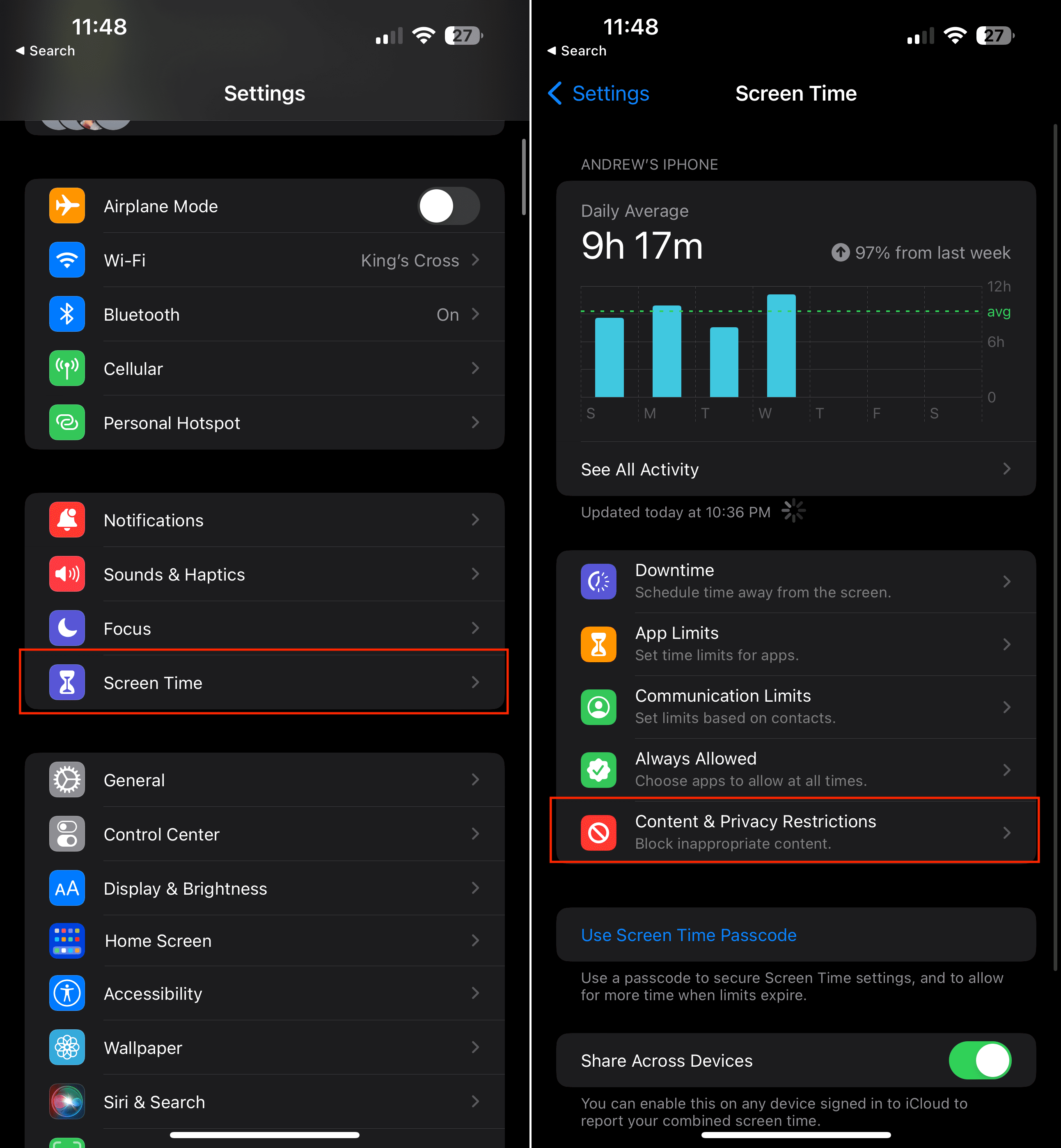
Open the Settings app on your iPhone or iPad.
Tap Screen Time.
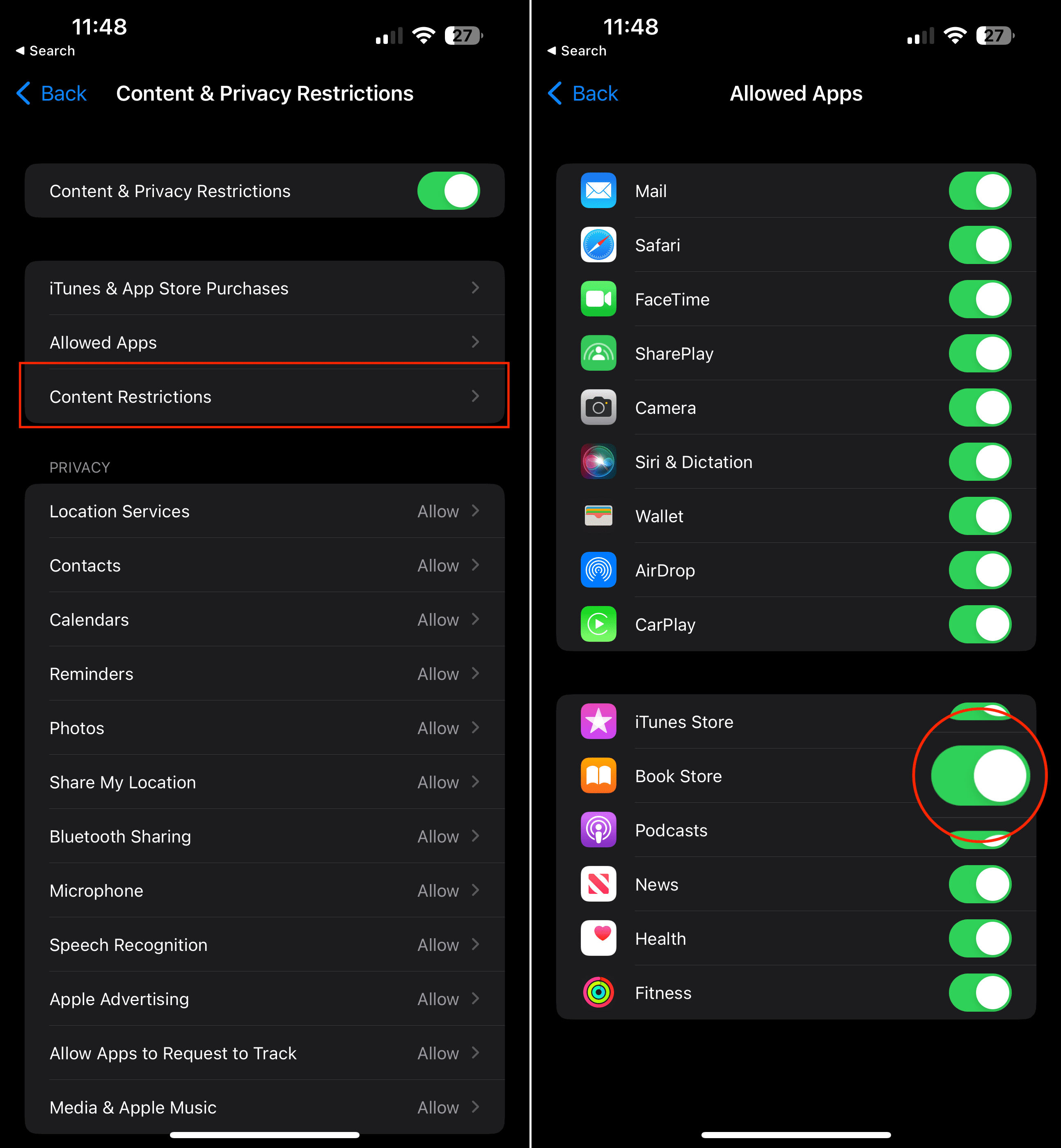
Tap Content & Privacy Restrictions.
At the top of the page, tap Allowed Apps.
Scroll down and make sure that Book Store is enabled.
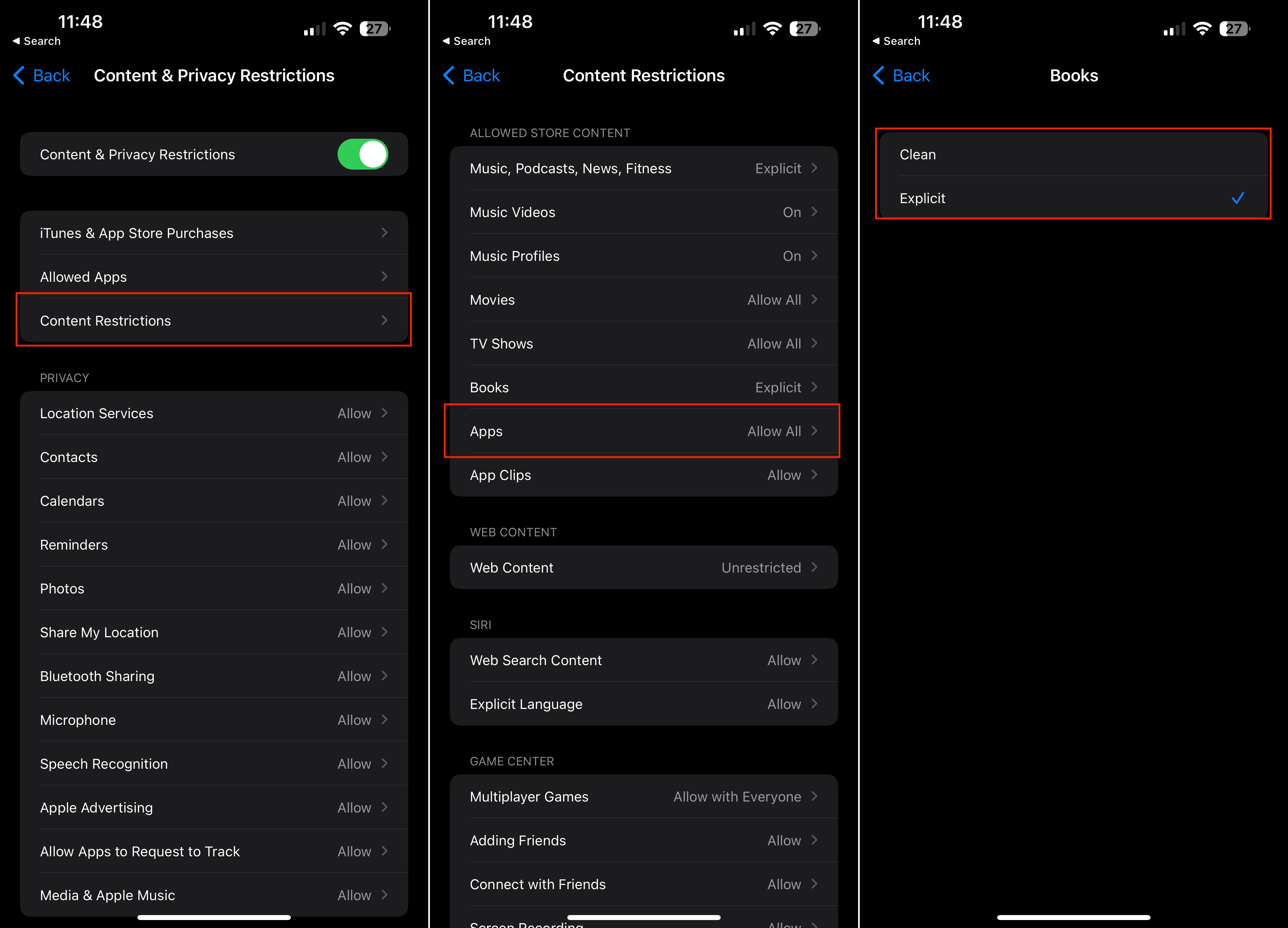
Tap the < Back button in the top left corner.
Tap Content Restrictions.
Under the Allowed Store Content section, tap Books.
Tap either Clean or Explicit.
In the top left corner, tap the < Back button to save your changes.
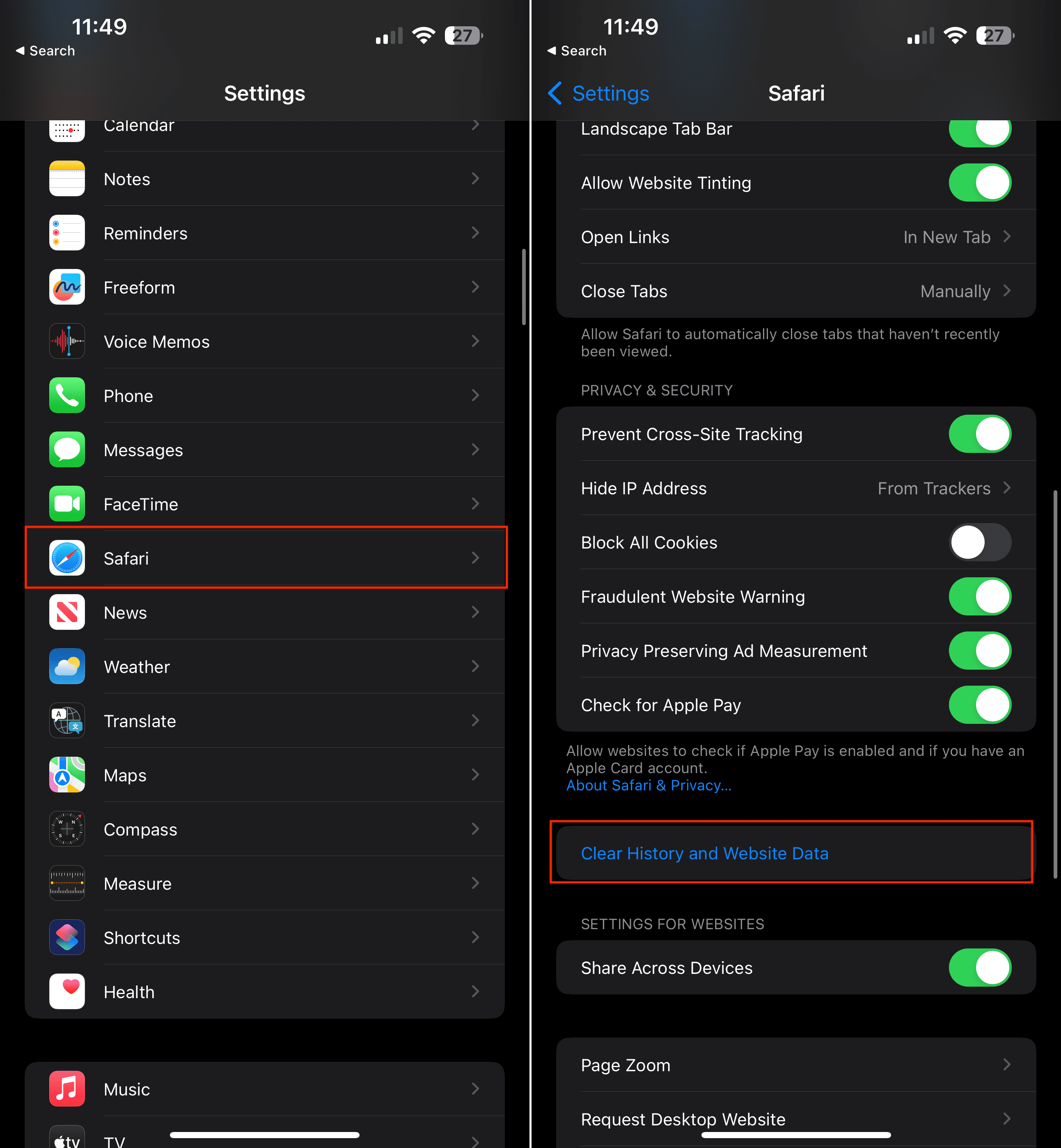
One more thing that you’ll want to do before opening the Apple Books app again is to clear the history and website data on your iPhone or iPad.
Open the Settings app on your iPhone or iPad.
Scroll down and tap Safari.
Under the Privacy & Security section, tap the toggle next to Block All Cookies on and then off.
Tap the Clear History and Website Data button.
Reset Location and Privacy
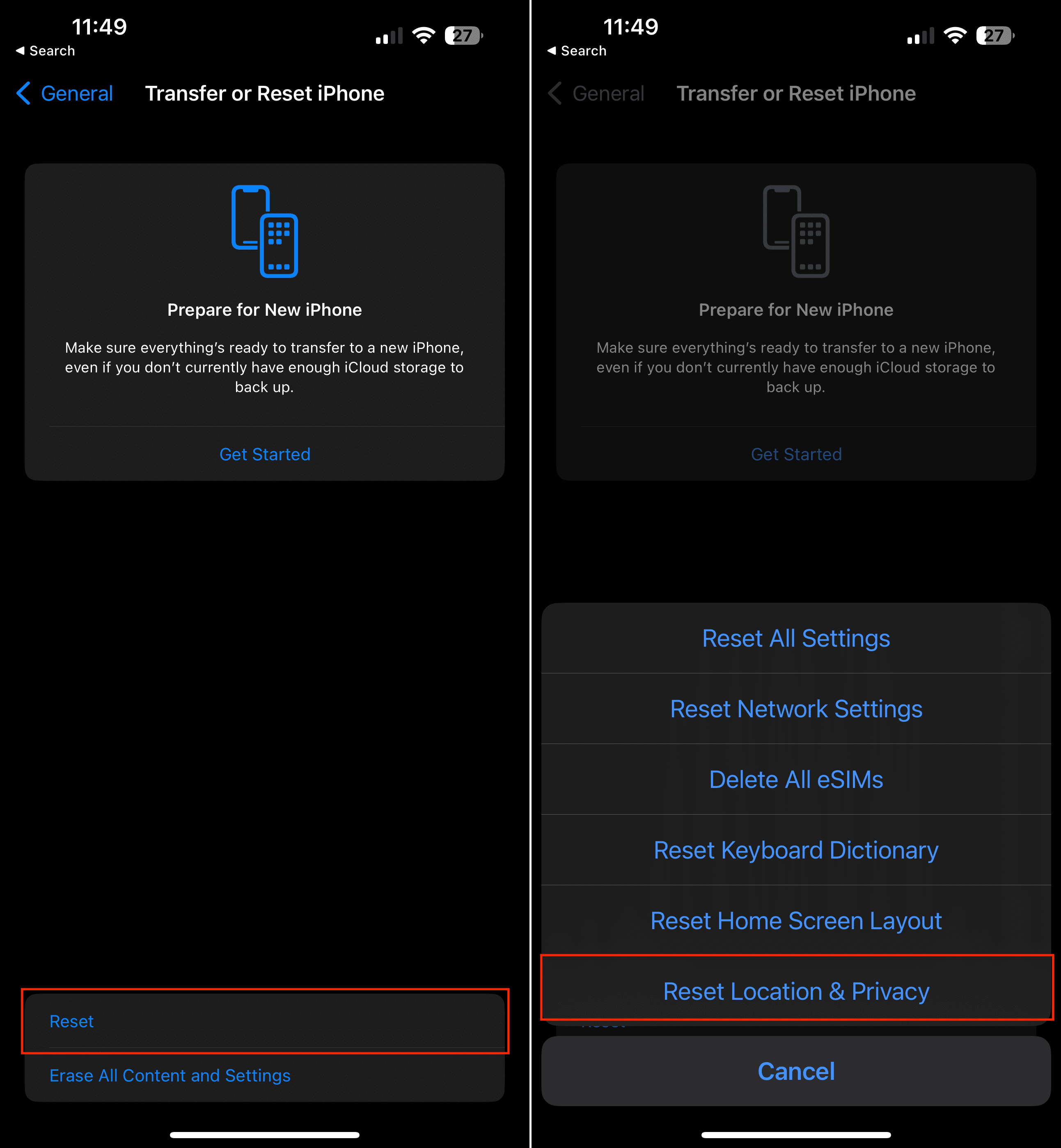
There’s a lot to be said about the state of privacy and security with third-party apps nowadays. Usually, you’ll find yourself needing to provide access to apps, but this could end up draining your battery quickly if an app has gone “rogue”. An easy way to get things back in working order until you find the culprit is to reset the Location and Privacy settings. This revokes any access that third-party apps might have, so you’ll be prompted to permit access after the app is opened again.
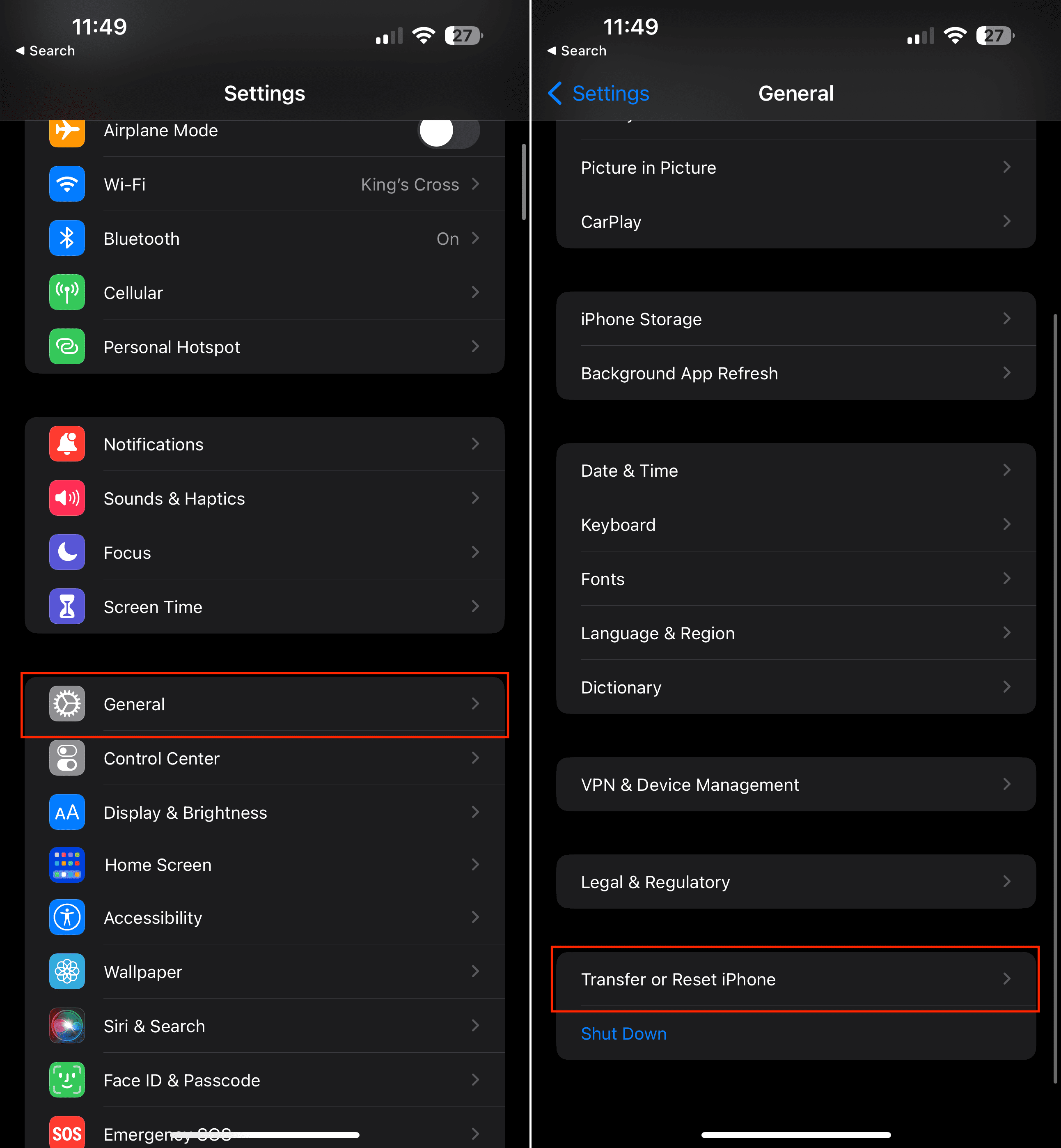
Open the Settings app on your iPhone or iPad.
Tap General.
Scroll to the bottom and tap Transfer or Reset iPhone (iPad).
Tap the Reset button at the bottom of the page.
Tap Reset Location & Privacy.
Enter your passcode if prompted.
When you reset location and privacy, it returns these particular settings back to factory defaults. This means that all your apps immediately stop using your location until you grant them permission again via Location Services (Settings > Privacy > Location Services.)
It appears that the Reset Locations and Privacy option fixed the issue for many but not all. If this tip didn’t work for you, continue in the list below.
Check Your Date and Time
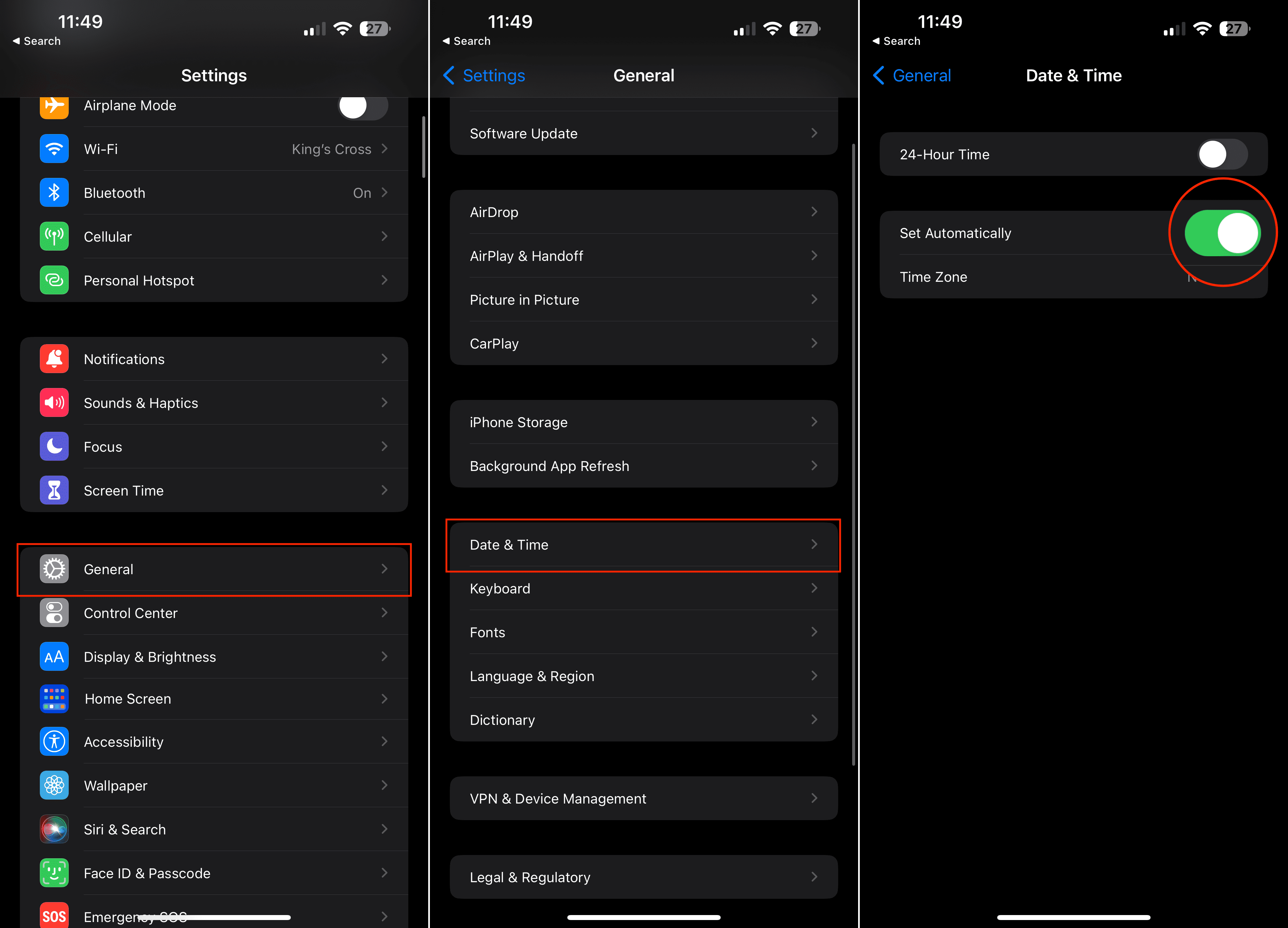
Date and time settings can sometimes be the cause of various issues. To ensure accuracy, let’s verify that they are correctly configured for your current location. Follow these steps:
On your iPhone or iPad, open the Settings app.
Scroll down and tap on General.
In the General settings, select Date & Time.
Toggle the Set Automatically option to ON. This ensures that the day of the week and time are automatically updated based on your current location.
By enabling the “Set Automatically” feature, your device will synchronize the date and time with the correct information for your current location. This can help address any potential problems related to incorrect date and time settings.
Check Your Language and Region
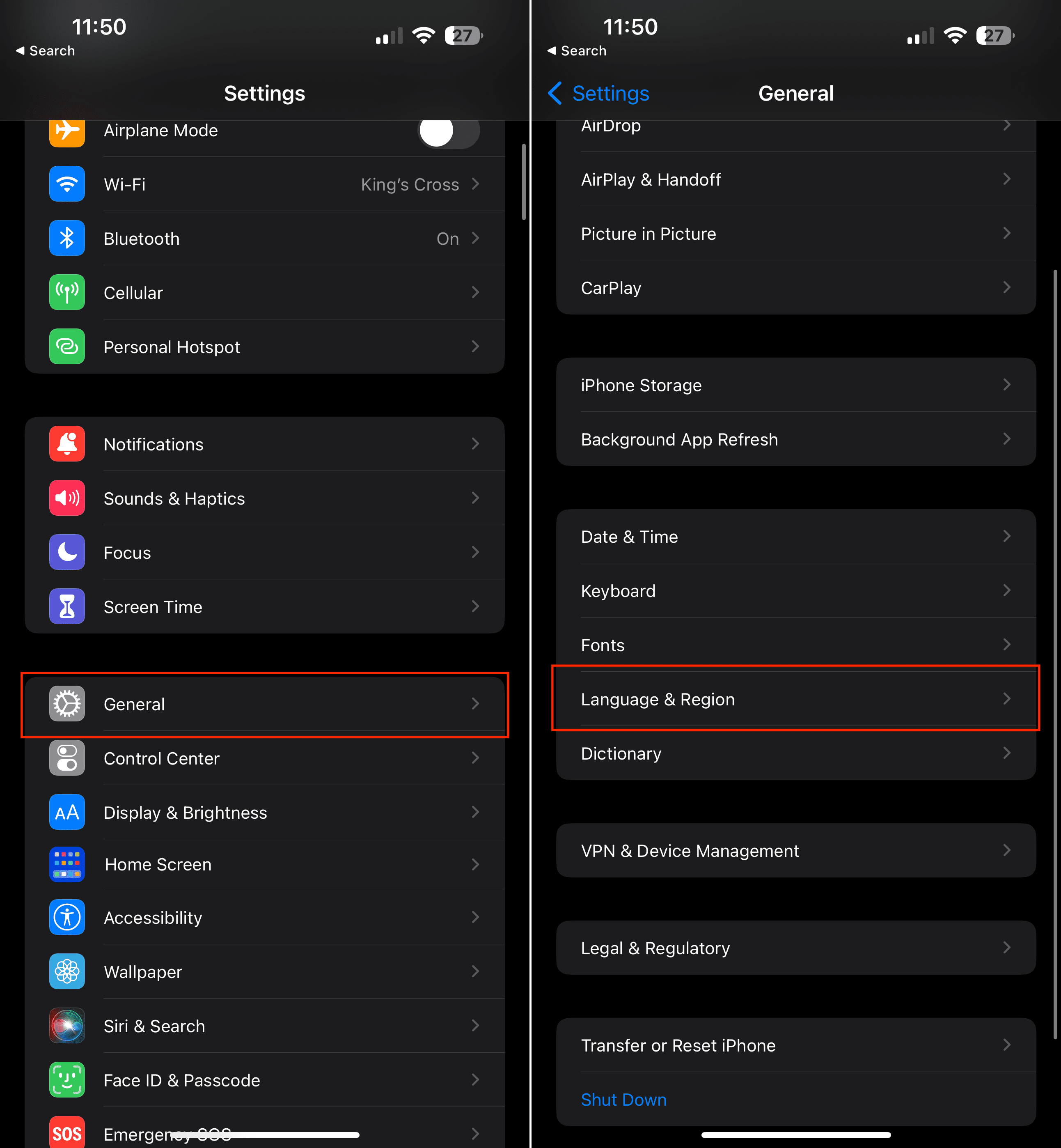
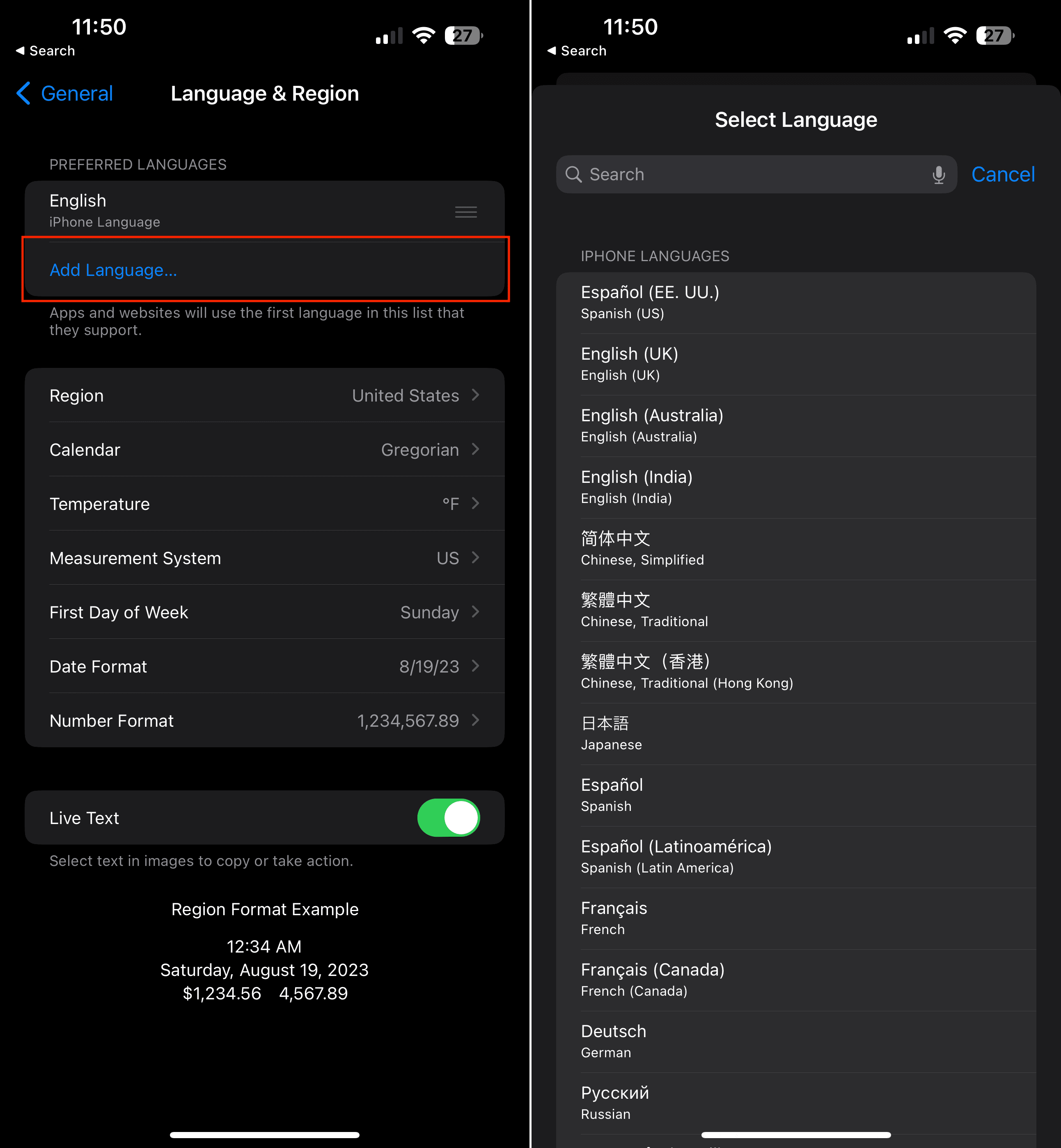
If you encounter persistent issues with the iBooks Store, an unconventional yet effective solution is to change your language or region settings. Follow these steps:
On your iPhone or iPad, open the Settings app.
Scroll down and tap General.
In the General settings, select Language & Region.
Tap on Add Language… and choose a different language that you are familiar with or select a regional variation of your current language, such as English (Canada).
Now, try opening the Apple Books app again and see if the issue is resolved. If the books appear correctly, proceed to the next step.
To revert to your preferred language, return to Settings > General > Language & Region.
Tap Language once again and select your preferred language
By temporarily changing the language or region settings and then switching back, you may be able to resolve any underlying issues affecting the iBooks Store.
Clear the Apple Books/iBooks Store App Cache
Tap on any one of the bottom toolbar buttons (My Books, Featured, Top Authors, Purchased) rapidly 10 times. It sounds strange but it refreshes the iBook Store App and may just solve your problem.
Restart Your iPhone
Restarting your iPhone could be just the ticket to get the Apple Books app working again. And here’s how you can do so:
Press the VolumeUp button and release.
Press the Volume Down button and release.
Press and hold the Side button for 10-15 seconds until your iPhone reboots.
In the event that you followed the steps above and the iPhone doesn’t reboot, you might want to try pressing the buttons in a faster sequence. The timing is key, as you’ll need to make sure the iPhone recognizes what it is that you’re trying to do.
Those who are using an older iPhone (or iPhone SE) that still includes a home button, will need to follow a different series of steps:
Press and hold the Side (Power) and Volume Down buttons at the same time.
Continue holding until the Apple logo appears.
Release both buttons.
Check iBooks and see if there are any changes and if you are now able to access the iBooks Store.
Connect to iTunes or Finder
Connect iDevice to iTunes via Computer and check for available updates. If an iOS update is available, update it using iTunes. Remember to backup with iTunes to your local computer before performing any update. Check iBooks and see if there are any changes and if you are now able to access the iBooks Store.
For most people, either a Reboot or updating to the latest version of iOS for your iDevice fixes the issue. Try steps 3 through 8 and see if it helps you with this problem.
Reader Tips & Tricks for iBooks Store Not Working Shows Blank Screen
For me logging out and back into my account via Settings > iTunes & App Store briefly fixed it (until I next opened a book on my bookshelf), other people appear to have had some success by closing the app via the iPad’s taskbar and/or doing a soft reset/reboot. If you want to leave feedback to Apple about the problem
I had similar issues this AM. When I tapped on any of the store icons, it just showed me a completely blank screen. I had saved a note with links to iBooks Store pages. These were links for books in my future reading list. Upon clicking a link from the list, it opened it up in the iBook Store and seemed to work. I don’t know if it refreshed the store or what, but the link loaded properly in iBooks, and the rest of the store seems to be working. iBooks has been working fine for me since
Essentially, you open for an iBook link in Safari and then click on it so that it can open it in your iBooks app
Renee Riffey tried the following: I just reset my location and privacy settings and iBook is now working!Settings >General > Reset Location and Privacy
Chris suggests: go to iTunes, search for iBooks, when it comes up, select any book and request sample, then hit Store in top right corner, takes you to iBooks, works for me
I fix this problem with my iPad! Go to Purchased in iBooks app. Under books, tap on your Recent Purchases. Look and see if any of your books have the cloud symbol next to them. If so, tap the cloud symbol to manually re-downloaded everything back to your iPad
For those of you connecting to iTunes or iBooks and only seeing a blank white screen, go to your Settings> Safari and change Block Cookies to Allow from Websites I Visit. This worked for me–iBooks Store back
This is how I solved the problem on my iPad. Open iBooks and tap Select from the upper right corner. Tap Select All. The choose Move from the upper-left corner. In the drop-down menu, create a New Collection and call it Move Folder. Then move all selected items from your Bookshelf to that new folder. Once you move all items go back to the main iBooks screen My Books. Now iBooks should connect to the bookstore. If not, restart the app by double tapping Home and swiping up. Once everything is working again, go back into that new Move Folder and return your books to their original location or whatever location you prefer
I asked a friend or family member to share a book link to something in the iBooks Store via iMessage or SMS Text. Just ask them to open the iBooks Store on their phone or computer, find any book, and share the link with you via text. Then all you have to do is open this link and everything works again
Obsessed with tech since the early arrival of A/UX on Apple, Sudz (SK) is responsible for the original editorial direction of AppleToolBox. He is based out of Los Angeles, CA.
Sudz specializes in covering all things macOS, having reviewed dozens of OS X and macOS developments over the years.
In a former life, Sudz worked helping Fortune 100 companies with their technology and business transformation aspirations.
Tried all of the above actions many times, since July 19th, with no fix. But, tried a hard reset (Home and Off/On button at the same time) this afternoon, July 24th at 1:30 pm (PDT), and iBooks, on my iPad 2 Air, now works as expected. Don’t know if this is dumb luck or if Apple actually determined the source of the problem and fixed it. If anyone still has this problem now, I’ll assume it was dumb luck and Apple hasn’t a clue after five days.
Did all of the above without success
Eventually reset privacy and location/downloaded a sample from the store then did the hard reset and it’s working !!!!
ibooks has blanks screens except for my books on iPad Air 2 and iPad mini after updating to IOS 9.3.3. Tried many of the above suggestion with no positive results.
Tried everything in the list on my iPad Pro and was still getting the problem. Contacted apple support and everything they suggested didn’t fix it either. Was looking at the iBooks section in settings to get the version number for submitting feedback to Apple. Saw all the options listed for iBooks, so tried toggling all the options in the iBooks settings to off. This fixed it for me (still works after toggling everything in settings back to what it was before).
Just now! Opened I Book app,….while the wheel was spinning, I pressed the ‘featured’ category down below, then pressed TOP CHARTS, & the store opened. Pressed top authors & that opened. Went back to Library, my books were there. Closed iBooks app, reopened & ALL WAS STILL OPENING. MY LIBRARY & STORE!!!! Yea!!! Hope it works. Good luck
I have iPad Pro 9.7 and an iPad Mini 4. Both were fixed by just syncing with iTunes. I had the issue on my mini prior to updating to 9.3.3. I was reading issues with the iOS update 9.3.3 so I checked my pro and I saw the issue so I looked at mini, which hadn’t been updated, and it had the same issue with iOS 9.3.2. I’m not an iBook user so it wasn’t a big deal for me. I updated mini to 9.3.3. Found this thread of info and synced both to iTunes and issue seems to be resolved for me. Our iPhones weren’t affected.
Read through most of the above and tried pretty much everything, to no avail. On iPad Air. Any new suggestions come up, I’m all ears! What a pain in the ass!
I have the iPad Pro and I did as the author suggested and ‘ reset my location and privacy settings’ then shut down my iPad and restart. iBooks is back on as usual.
Just a side question, what happens when I reset my location and privacy?
I have an iPad Pro 9.7, and nonr of the above has helped. When I tried tapping the features button while the gear was still spinning, it worked. But then I closed the iBooks app and the screens went blank again when I reopened it. And now pressing the features or other icons while the gear is spinning doesn’t work, either.
Follow up to Chris’s suggestion – going to iTunes and searching for iBooks got me to free books but no further, still couldn’t get into the iBooks store. I tried searching for Books and was finally able to get to the iBooks store. Quite a run around but it will work until Apple fixes it.
The last tip on 7/22 (going through iTunes, search for a book, click sample, then click on store on the top Rd corner) worked for me. None of the rest did although the restart did work for me yesterday when this problem started only to have it not work again today. So try the tip from the 7/22 update.
2 iPads – one iPad 4 and one iPad Air both running iOS 9.3.3. The Reset Location and Privacy clue worked on iPad 4 to show the bookstore again. iPad Air resolved itself after update from iOS 9.3.2.
I tried all of the suggestions above, and it only resulted in deleting the majority of books I already had. I had to re-sync with my computer just to get them back. I have an iPad Air 2 and still nothing but a blank screen when I try to go to the iBook Store. Extremely frustrating and time consuming.
Further to my previous report, I tried restarting my Airport Extreme. AND IT WORKED! Until I closed iBooks and re-opened it; blank screens again. So, I experimented with using the personal hotspot on my iPhone 5C. That did not work. Oh well, back to the drawing board.
Thanks SK at AppleToolBox. As stated earlier, I was very happy with my sudden good luck until I went back to iBooks on my iPad Air and the problem was back. Only my downloaded books open. What to do? Thanks! Is Apple doing anything about this?
I can fool it by going to iTunes, putting iBooks in the query and can get a free book that way. Still only loads blank page when trying to load free books from book bub and other free book sites. So leads me to believe it’s not an apple site issue??
Tried everything suggested all to no avail. HOWEVER, just now — 1:10 pm ET — I tried it and, voila! It works. Prices are still substantially higher that on Kindle for iPad. Get with it Apple. Steve Jobs is probably turning in his grave. All in all, I’m happy and I hope and pray others have had their iBooks problem solved. Thanks, AppleTools.
After trying all the other steps mentioned above with no changes, I finally reset my location and privacy and now it works! I guess I should have read farther down the comments first!
This is what I found in another forum and it worked for me.
If you have iBooks open – close them.
Open them again and while little circle on top of iBooks left side (next to Wi-Fi bars) is spinning, (which indicates it’s loading the content) press Feature tab.
It should force the content of Feature tab to start loading.
Once it’s loaded all other tabs start working, but sometimes is reported that is working only until you go to back again to “My books” tab.
For me is still working even I go to My books and than I come back to any other tab.
I tried everything quite a few times and still get blank screen and also get I have update for a book and can not do it because that is also a blank screen
Thanks for the advice, tried it all to no avail. Great advice none the less, discovering iOS update 9.3.3. as a result. An irritant is that the iBook store unavailability for some users can remain so long and is not even listed on Apple Support to boot.
I have tried all of the above suggestions with no success. I am running on an iPad Pro 9.7 with iOS 9.3.3. No problem with my iPhone 5C; no problem with my old iPad 2 running 9.3.3. On my iMac (El Capitan), all is well also, This is very annoying.
Thanks for all the great advice! I’ll bookmark your site as a good reference. Being new to Apple, I recently bought an iPad Mini 2 as my main tablet and internet access and it works beautifully. That is, recently I had Safari crash that needed switching the settings and now the iBooks store blank for quite some time. It reinforces my trust in my reliable Android Moto X phone as go-anywhere always works in a pinch device. The main irritant for me is that the showstoppers I mentioned were not listed at Apple Support, but were listed as having no issues.
A way around the problem.
Go to iTunes, search for iBooks, when it comes up, select any book and request sample, then hit store in top rh corner, takes you to iBooks, works for me.
Tried all above, including resetting location and privacy.. Did not work for me. Still have blank screens on all but my books. I have an iPad Air 1 running 9.3.3. Ack! This is frustrating
The problem still persists even though I have tried all the methods described in other posts: iBooks does not get to the store on an iPad mini even though it works on an iPhone or on an iPad Pro. Updating the software did not help. I therefore contacted the Apple helpline and asked for help. They suggested resetting all settings and waited while I did it; it still didn’t work. Finally, the help-line person, having consulted her supervisor, said that they thought that there was a problem with their server in the UK and told me to try again in a few hours. So one must conclude that it is a central Apple problem.
None of the suggestions working for me either. iPad mini retina, updated to 9.3.3, hard restart, privacy/location options reset another hard reset… still nothing 🙁
It is working fine on my iPhone, but I want to access my purchased books on my iPad!
I am having same problem now. Tried all of these fixes and no luck. Can access iBooks via safari but can’t do anything like search an author. Any new ideas?
Followed all the steps, then tried the reset mentioned at bottom of this, nothing. Then tried the update, then steps 3 through 6, then did the reset location and privacy again after carefully doing Step1 from the correct logout area again, then rebooted, (step 3 method, except I didn’t wait till it restarted, just until it went black, then let go of the buttons. Then manually restarted) and am now back to full functioning iBook store! Likely dumb luck.
Add me to the listed of frustrated customers. I have tried all of the suggestions, nothing has worked. I can only see my books. all other options are blank screens. Not happy.
Add me to the list of frustrated customers. I have 2 iPads (one Air, one Generation 4) and a much older iPod Touch. The Touch is accessing the iBooks store without a problem. Both iPads just display a blank screen. I have installed the most recent software updates on both iPads.
The problem occurred on my iPad Pro (small version) only after updating to iOS 9.3.3. Thus, none of the suggested fixes worked. Hope Apple gets on this soon since we can’t add any new books.












The problem is iBooks is broken on ***BOTH*** the iPad and the MacBook.
Amazing, I reset the language and it finally worked! Would never have figured this out on my own.
iBooks won’t let me buy after checking out a sample. Also when I go to the other tabs I get a white screen. Can only see the books in my library
Resident of UK. Same problems as above – installed 9.3.3, pressed and held Wake/sleep.
After reboot all OK. (29th. July 2016)
Tried all of the above actions many times, since July 19th, with no fix. But, tried a hard reset (Home and Off/On button at the same time) this afternoon, July 24th at 1:30 pm (PDT), and iBooks, on my iPad 2 Air, now works as expected. Don’t know if this is dumb luck or if Apple actually determined the source of the problem and fixed it. If anyone still has this problem now, I’ll assume it was dumb luck and Apple hasn’t a clue after five days.
Today mine is magically working. I didn’t do anything. I guess (??) Apple fixed it?
Did all of the above without success
Eventually reset privacy and location/downloaded a sample from the store then did the hard reset and it’s working !!!!
If you can’t be good – be lucky
Another success story from one who commented earlier. For whatever reason, it iBooks works this evening ( though it wasn’t working this morning).
iBooks working fine now
I had this same problem. I turned off iCloud and it works fine now.
IBooks store is now working on my iPad today (23/7/16) too
ibooks has blanks screens except for my books on iPad Air 2 and iPad mini after updating to IOS 9.3.3. Tried many of the above suggestion with no positive results.
iBooks store is working on my iPad this morning. 7/23/16
Tried everything in the list on my iPad Pro and was still getting the problem. Contacted apple support and everything they suggested didn’t fix it either. Was looking at the iBooks section in settings to get the version number for submitting feedback to Apple. Saw all the options listed for iBooks, so tried toggling all the options in the iBooks settings to off. This fixed it for me (still works after toggling everything in settings back to what it was before).
Reset Location and Privacy and hey presto it worked! But I don’t get the NYT logo at the bottom, it just looks same old.
Just now! Opened I Book app,….while the wheel was spinning, I pressed the ‘featured’ category down below, then pressed TOP CHARTS, & the store opened. Pressed top authors & that opened. Went back to Library, my books were there. Closed iBooks app, reopened & ALL WAS STILL OPENING. MY LIBRARY & STORE!!!! Yea!!! Hope it works. Good luck
Nothing changed. Still blank
Still nothing 🙁
Thanks Ezio. My Air Pad 2 now working.
Same problem on IPad Air 2 . Have tried all suggestions . Nothing works . Really frustrating .
I have iPad Pro 9.7 and an iPad Mini 4. Both were fixed by just syncing with iTunes. I had the issue on my mini prior to updating to 9.3.3. I was reading issues with the iOS update 9.3.3 so I checked my pro and I saw the issue so I looked at mini, which hadn’t been updated, and it had the same issue with iOS 9.3.2. I’m not an iBook user so it wasn’t a big deal for me. I updated mini to 9.3.3. Found this thread of info and synced both to iTunes and issue seems to be resolved for me. Our iPhones weren’t affected.
Still have blank pages. Nothing works.
Read through most of the above and tried pretty much everything, to no avail. On iPad Air. Any new suggestions come up, I’m all ears! What a pain in the ass!
Just reset my Apple ID through settings (second part of #1) and now iBooks is working, Tried everything earlier without success though.
Chris’s tip: after doing it (it brought up the iBook store) and then force-closing iBooks and restarting it, it worked. Thanks Chris!
I have the iPad Pro and I did as the author suggested and ‘ reset my location and privacy settings’ then shut down my iPad and restart. iBooks is back on as usual.
Just a side question, what happens when I reset my location and privacy?
I have an iPad Pro 9.7, and nonr of the above has helped. When I tried tapping the features button while the gear was still spinning, it worked. But then I closed the iBooks app and the screens went blank again when I reopened it. And now pressing the features or other icons while the gear is spinning doesn’t work, either.
Follow up to Chris’s suggestion – going to iTunes and searching for iBooks got me to free books but no further, still couldn’t get into the iBooks store. I tried searching for Books and was finally able to get to the iBooks store. Quite a run around but it will work until Apple fixes it.
The last tip on 7/22 (going through iTunes, search for a book, click sample, then click on store on the top Rd corner) worked for me. None of the rest did although the restart did work for me yesterday when this problem started only to have it not work again today. So try the tip from the 7/22 update.
2 iPads – one iPad 4 and one iPad Air both running iOS 9.3.3. The Reset Location and Privacy clue worked on iPad 4 to show the bookstore again. iPad Air resolved itself after update from iOS 9.3.2.
Although that’s a nice quick force fix, they still need to figure out a per infant solution.
I tried all of the suggestions above, and it only resulted in deleting the majority of books I already had. I had to re-sync with my computer just to get them back. I have an iPad Air 2 and still nothing but a blank screen when I try to go to the iBook Store. Extremely frustrating and time consuming.
Same here. Tried all of the above but no luck.
Further to my previous report, I tried restarting my Airport Extreme. AND IT WORKED! Until I closed iBooks and re-opened it; blank screens again. So, I experimented with using the personal hotspot on my iPhone 5C. That did not work. Oh well, back to the drawing board.
Thanks SK at AppleToolBox. As stated earlier, I was very happy with my sudden good luck until I went back to iBooks on my iPad Air and the problem was back. Only my downloaded books open. What to do? Thanks! Is Apple doing anything about this?
I have tried all suggestions but nothing has worked. Please help. My problem started last night. I just assumed it would be fixed by morning. WRONG
I can fool it by going to iTunes, putting iBooks in the query and can get a free book that way. Still only loads blank page when trying to load free books from book bub and other free book sites. So leads me to believe it’s not an apple site issue??
……….and is now not working again!!!!! Very frustrating !
Discovered update IOS 9.3.3 available to install and having done that all is well
I too have tried all of the above and nothing works! What is being done to fix the problem?
Tried everything suggested all to no avail. HOWEVER, just now — 1:10 pm ET — I tried it and, voila! It works. Prices are still substantially higher that on Kindle for iPad. Get with it Apple. Steve Jobs is probably turning in his grave. All in all, I’m happy and I hope and pray others have had their iBooks problem solved. Thanks, AppleTools.
Thank You Rich. We are glad that it is working for you. Thanks again for taking the time to share your comment. – AppleToolBox
After trying all the other steps mentioned above with no changes, I finally reset my location and privacy and now it works! I guess I should have read farther down the comments first!
Did all that and nothing!!!!
This is what I found in another forum and it worked for me.
If you have iBooks open – close them.
Open them again and while little circle on top of iBooks left side (next to Wi-Fi bars) is spinning, (which indicates it’s loading the content) press Feature tab.
It should force the content of Feature tab to start loading.
Once it’s loaded all other tabs start working, but sometimes is reported that is working only until you go to back again to “My books” tab.
For me is still working even I go to My books and than I come back to any other tab.
I hope it helps !
I tried everything quite a few times and still get blank screen and also get I have update for a book and can not do it because that is also a blank screen
Thanks for the advice, tried it all to no avail. Great advice none the less, discovering iOS update 9.3.3. as a result. An irritant is that the iBook store unavailability for some users can remain so long and is not even listed on Apple Support to boot.
Just bought 2 books from Amazon for my Kindle app on my iPad Air 2.
Done all of the above mentioned and still nothing.
I followed all of the above steps to no avail. The last step with the reset location and privacy worked on both my iPad and iPad mini. Voila!
I have tried all of the above suggestions with no success. I am running on an iPad Pro 9.7 with iOS 9.3.3. No problem with my iPhone 5C; no problem with my old iPad 2 running 9.3.3. On my iMac (El Capitan), all is well also, This is very annoying.
Mine still not working and I’ve tried everything.
Tried above suggestions but still blank screen on all but my books
Thanks for all the great advice! I’ll bookmark your site as a good reference. Being new to Apple, I recently bought an iPad Mini 2 as my main tablet and internet access and it works beautifully. That is, recently I had Safari crash that needed switching the settings and now the iBooks store blank for quite some time. It reinforces my trust in my reliable Android Moto X phone as go-anywhere always works in a pinch device. The main irritant for me is that the showstoppers I mentioned were not listed at Apple Support, but were listed as having no issues.
A way around the problem.
Go to iTunes, search for iBooks, when it comes up, select any book and request sample, then hit store in top rh corner, takes you to iBooks, works for me.
Nothing works on my iPad Air 2
Reset location and privacy: nope. Still busted
Tried all above, including resetting location and privacy.. Did not work for me. Still have blank screens on all but my books. I have an iPad Air 1 running 9.3.3. Ack! This is frustrating
The problem still persists even though I have tried all the methods described in other posts: iBooks does not get to the store on an iPad mini even though it works on an iPhone or on an iPad Pro. Updating the software did not help. I therefore contacted the Apple helpline and asked for help. They suggested resetting all settings and waited while I did it; it still didn’t work. Finally, the help-line person, having consulted her supervisor, said that they thought that there was a problem with their server in the UK and told me to try again in a few hours. So one must conclude that it is a central Apple problem.
None of the suggestions working for me either. iPad mini retina, updated to 9.3.3, hard restart, privacy/location options reset another hard reset… still nothing 🙁
It is working fine on my iPhone, but I want to access my purchased books on my iPad!
Same for me. Will have to buy books from Amazon!
I am having same problem now. Tried all of these fixes and no luck. Can access iBooks via safari but can’t do anything like search an author. Any new ideas?
As suggested, I reset location and privacy, and mine is now working! Thanks so much for the idea – I never would have thought of that on my own!
Tried all of the above and nothing has worked
Also tried all of the above and still a blank screen
Followed all the steps, then tried the reset mentioned at bottom of this, nothing. Then tried the update, then steps 3 through 6, then did the reset location and privacy again after carefully doing Step1 from the correct logout area again, then rebooted, (step 3 method, except I didn’t wait till it restarted, just until it went black, then let go of the buttons. Then manually restarted) and am now back to full functioning iBook store! Likely dumb luck.
Robin
Add me to the listed of frustrated customers. I have tried all of the suggestions, nothing has worked. I can only see my books. all other options are blank screens. Not happy.
Uddated iOS…turned off and on location services. Now working.
Tried all of the above. Still blank screen.
I’m on an iPad Pro 12 inch running iOS 9.3.2 and just experienced this problem. I’ll try rebooting and hope they work ot out soon.
Resetting location and privacy worked!! Thank you !
I did the the 9.3.3 update,did nothing to fix the problem……
Then I did the location and privacy reset and it now works
Resetting location and privacy did NOT work for me. I have tried all other suggestions……nothing. So frustrating.
None of the above worked on my iPad Air 2.
This worked. Thank you Renee and SK. Great Team work here from Appletolbox!
This worked for me too.
I tried all of this as well and got nowhere. I did buy a book on my iPhone and it downloaded to my iPad.
I reset location and privacy and it did start working
Just reset privacy and location settings” updated OS, did a hard reset…not working 🙁
Reset location and privacy worked for me.
Tried all of the steps. Still not working!
I just reset privacy and location settings and is working!
I just reset my location and privacy settings and is now working!
Yep. Having same issue and nothing seems to work.
Followed all the steps numerous times and still no access to iBooks as well.
Add me to the list of frustrated customers. I have 2 iPads (one Air, one Generation 4) and a much older iPod Touch. The Touch is accessing the iBooks store without a problem. Both iPads just display a blank screen. I have installed the most recent software updates on both iPads.
Tried all steps, still no joy
Have followed all the suggestions and still have no access to ibooks
Tried all of above & still no access
Have the same problem even after updating, switching on & off, can access my own books screen but no access to iBook store in general
This needs to be corrected.
Not working and tried all of the recommended steps ☹️
None of these steps has restored my iBook store – glad not just me!
Tried all of the above and still a blank page
Please help us
Thank you
Yes, same for me. Anyone have any other ideas? Is this an Apple issue? Thanks
None of these steps worked.
Tried all steps above. Still cannot access other pages of iBooks. Only my books show up. Everything else blank. 5:25 pm Thursday July 21.
Have tried all of the recommended fixes, still can’t access anything other than the books in my library.
Suggestions did not work for me, either.
Tried above, problem persists.
The problem occurred on my iPad Pro (small version) only after updating to iOS 9.3.3. Thus, none of the suggested fixes worked. Hope Apple gets on this soon since we can’t add any new books.
The problem occurred yesterday and then was resolved by rebooting. Now it has. Occurred again and cannot e iced by anything suggested above.
Updated to IOS 9.3.3, then rebooted, and iBooks still showing blank screen. So annoying. Using my Kindle app and paying Amazon
Followed all steps above, still cannot access bookstore. Very annoying.
me either
Tried all the steps and nothing restored.
Did not work for me either. It was a waste of my time. Then tried to comment and rejected with “This is a duplicate comment.”
None of these steps resolve the issue for me. Very frustrating.
Tried all of above – updated iOS – reboot – still cannot access bookstore.