The conventional advice was that if you wanted a computer that was less prone to hacks and viruses, you got a Mac. That used to be more of the case, but as Macs increase in popularity and computer use becomes more widespread, Macs have become more targeted as well. Between 2018 and 2019, Malwarebytes Labs reported an increase of over 400% of Mac threats. They also saw an average of 11 threats per Mac endpoint, versus the 5.8 threats per Windows user endpoint in 2019.
Macs are susceptible to the same types of threats that PCs are, like ransomware, phishing, trojan horses and adware.
However, Mac computers do still have plenty of security. It makes it hard to download these threats at all. One anti-malware program is called XProtect, which is built into the machine. It inspects every app for malware.
Further, apps you download often have to be from a certified developer or it becomes hard to download the app, due to a program included called Gatekeeper.
Safari itself also comes with anti-phishing technology. You may have seen the warning pop up that you are about to visit a suspicious website and then you have to make the choice to go there.
These are just the highlights. Every update to your Mac always comes with new security updates, so it’s important to keep up on updates. That will go a long way in keeping your Mac protected, whether you choose to use anti-virus software or not.
Using Good Digital Practices
There are, of course, cases where a virus or other malicious program can get around the Mac security protocols. That’s where it can help to know good practices for keeping away from threats:
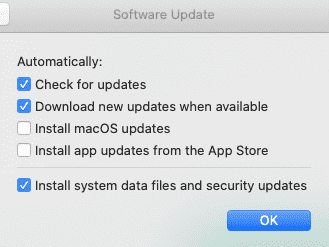
Enable automatic updates if you feel comfortable doing this, otherwise keep up on updates manually. If you click the Apple icon on the top left of the screen, next to System Preferences, it will show if you have updates. You can also go into System Preferences > Software Update and select the box next to Automatically keep my Mac up to date. You can also configure what you want to update by hitting the Advanced… button. Ideally, the two boxes not checked below should be checked:
Connecting to public Wi-Fi networks is a good way to invite hackers. They may set up their own Wi-FI hotspot that looks like a hotel or coffee shop.
Watch out for scams in general. Don’t open suspicious emails. Emails should not ask you for a password or to install things. Don’t give out personal data on social media or click non-trusted links in social media.
You can also learn more about protecting yourself online here.
What Are the Best Anti-Virus Programs for Mac?
As stated above, anti-virus on a Mac isn’t as essential as other types of computers. If you are running an OS that still receives updates, meaning it’s still supported, your system itself has you pretty secure.
However, some people still choose the extra protection out of a “better safe than sorry” mindset. This might especially be true if you use some form of public or work email, making you more at risk for scam emails. If you travel often and can’t avoid other Wi-Fi networks, it might also be a good idea.
Some programs that are worth looking into include:
The go-to program for many, Norton for Mac
Bitdefender
McAfee
Avast
These programs may have free versions or be entirely paid. If you are regularly updating your Mac, a lower-feature free version might suffice. A high-feature paid version might be needed for older machines no longer supporting software updates. More complete malware protection in particular is often offered on paid versions of anti-virus software.
As a warning, be careful when looking for anti-virus or even Mac clean-up programs. These are often malware or other malicious software posing as a legitimate Mac resource. Make sure the software is rated by a reliable outlet like Consumer Reports, and Google whether the product is a scam, as that will often turn up news stories.










Write a Comment