If you use Excel for Mac, you may occasionally get the following error message when you open a spreadsheet: “Compile error in hidden module: This error commonly occurs when code is incompatible with the version, platform, or architecture of this application.” Restarting Excel may not always fix the error. But there are a few solutions that you can use to permanently get rid of this error message.
How Do I Fix “Compile Error in Hidden Module” in Excel for Mac?
Check Your Add-Ins
In 99 percent of the cases, this error indicates some of your add-ins are incompatible with Excel for Mac. Check if there’s an updated add-in version available and install it on your machine. You can also uninstall the problematic add-in and then install an alternative add-in with a similar function.
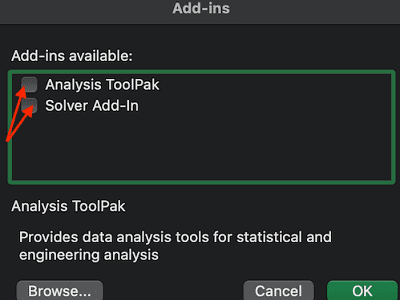
As Microsoft explains, this error message usually occurs when you try to run a 32-bit add-in code version on 64-bit Office for Mac. Go to Tools, select Add-Ins, update the code and check the results.
For example, if you’re using the Adobe Acrobat Pdfmaker.dot or Pdfmaker.xla add-ins, you need to update your Adobe Acrobat version. Go to Adobe’s official website, and download the latest Acrobat release. Then restart Excel and check if the error is gone.
If it persists, you can go back to Tools, select Add-ins, and then uncheck the problematic add-ins, so they don’t run when you launch Excel.
Or, you can simply uninstall the add-ins triggering this error. It seems that Adobe add-ins often break Excel on Mac.
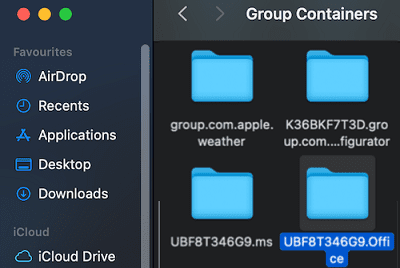
You can also go to Library → Group containers → UBF8T346G9.Office.
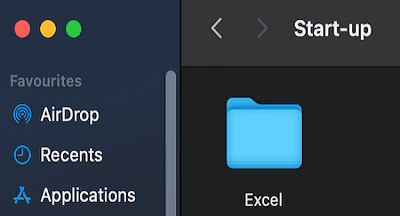
Then navigate to User Content → Startup → Excel and delete the problematic add-ins.
Edit Your Excel Path
A number of users managed to get rid of this error by editing the Excel path. Namely, you need to substitute your user name for ComputerName and UBF8T346G9.Office for “******(ID# assigned during the installation process).Office”. Then, you need to insert User Content before Startup/Word.
So, basically, your new Excel path should be similar to this one: Users/YourUserName/Library/Group Containers/UBF8T346G9.Office/User Content/Startup/Excel.
Disable or Uninstall Your Antivirus
If you’re using an antivirus on your Mac, temporarily disable it and check if the error persists. If it’s gone, you may need to turn off your antivirus every time you launch Excel. Or you can simply uninstall it and use the tips in this guide to prevent viruses and malware from infecting your Mac.
Conclusion
Hidden module errors in Excel usually indicate your add-ins are outdated or incompatible with your Excel for Mac version. To fix the issue, update your add-ins. If the issue persists, disable or uninstall the problematic add-ins, or edit your Excel path. Did these solutions work for you? Let us know in the comments below.
Madalina has been a Windows fan ever since she got her hands on her first Windows XP computer. She is interested in all things technology, especially emerging technologies — AI and DNA computing in particular.












not working at all , still having same issue