The year is drawing to a close, and music lovers are eagerly awaiting the arrival of Spotify Wrapped 2023. This annual tradition offers users a personalized glimpse into their listening habits, unveiling the artists, songs, genres, and podcasts that dominated their year. Whether you’re a die-hard fan of a specific artist or a diverse explorer of musical landscapes, Wrapped provides a fun and informative way to reflect on your musical journey.
This article will be your guide to finding and experiencing Spotify Wrapped 2023. We’ll navigate you through the various ways to access your personalized highlights, explore the interactive features, and share your unique musical story with friends and family. So, put on your headphones, grab your favorite beverage, and get ready to delve into the world of your 2023 Spotify Wrapped!
Spotify Wrapped is an annual feature introduced by Spotify, one of the world’s leading music streaming platforms. It’s typically released in early December and provides users with a comprehensive overview of their music-listening activity over the past year. This feature is accessible both through the Spotify mobile app and the web browser version.
What Information Does Spotify Wrapped Include?
The annual arrival of Spotify Wrapped is a highly anticipated event for music lovers across the globe. This personalized snapshot of your listening habits offers a fascinating glimpse into your musical journey. But what information exactly does Spotify Wrapped reveal?
Personalized Playlist: When you access Spotify Wrapped, the first thing you’ll encounter is a playlist titled “Your Top Songs [Year].” This playlist is a collection of your most-streamed tracks from the year, allowing you to relive your favorite musical moments.
Top Artists and Songs: Spotify Wrapped also reveals your top artists and songs of the year, highlighting the musicians and tracks that made the most significant impact on your listening experience.
Minutes Listened: Users are presented with the total number of minutes they’ve spent listening to music on Spotify throughout the year. This statistic can often be surprising and provides insight into just how much music you’ve enjoyed.
Genre Insights: Spotify Wrapped breaks down your listening habits by genre, revealing which types of music dominated your playlist. This can be eye-opening, especially if you’ve explored new genres over the year.
Podcast Stats: In addition to music, Spotify Wrapped also includes data on your podcast listening habits, showcasing your most-played podcasts and total minutes spent in the world of spoken-word content.
Wrapped Story: One of the most engaging aspects of Spotify Wrapped is the “Wrapped Story.” This is a dynamic, shareable presentation that provides a visual and interactive journey through your music history, including when you discovered new favorite tracks, your most-listened-to artist each season, and more.
So, prepare to unlock a treasure chest of musical insights and discover all the fascinating information Spotify Wrapped has to offer about your unique listening journey.
What’s New in Spotify Wrapped 2023
Every year, Spotify Wrapped brings back the thrill of reliving your musical journey. But this year, the platform goes beyond simply showcasing your top artists and genres. Wrapped 2023 introduces exciting new features that deepen your personalized experience and add a touch of interactive fun.
Me in 2023: This feature unveils the way you listened to music in 2023, assigning you one of 12 specific “listening characters”.
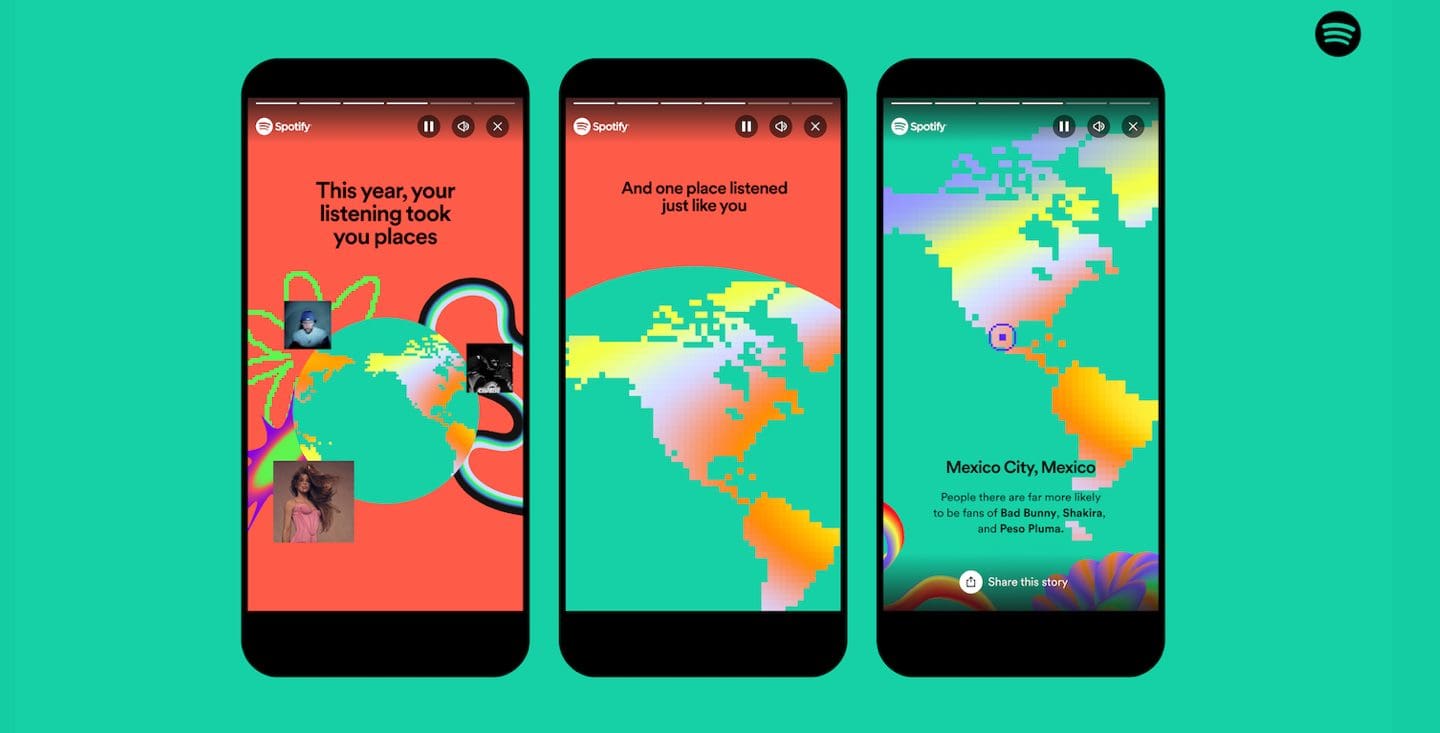
Sound Town: This feature matches you up with the location that listens to the most similar music as you.
Wrapped Blends: For the first time, you can invite your friends to create a Blend playlist of all your top songs of the year.
AI DJ: Spotify launched its AI DJ earlier this year, and now it’s celebrating its first Wrapped. It will run through your top artists, songs, and genres of the year with some additional commentary curated from Spotify’s expert editorial team.
Genre Sandwich: Now your top genres are presented as fillings to a delicious genre sandwich. The bigger the portion of the sandwich, the more you listened to that genre.
How to Find Spotify Wrapped 2023 on iPhone, iPad, and Mac
Whether you’re an iPhone user on the go, an iPad devotee seeking immersive exploration, or a Mac power user yearning for desktop convenience, this guide will ensure you don’t miss a beat of your musical journey. Get ready to dive into the world of Spotify Wrapped 2023 and rediscover your favorite tunes, hidden trends, and surprising discoveries!
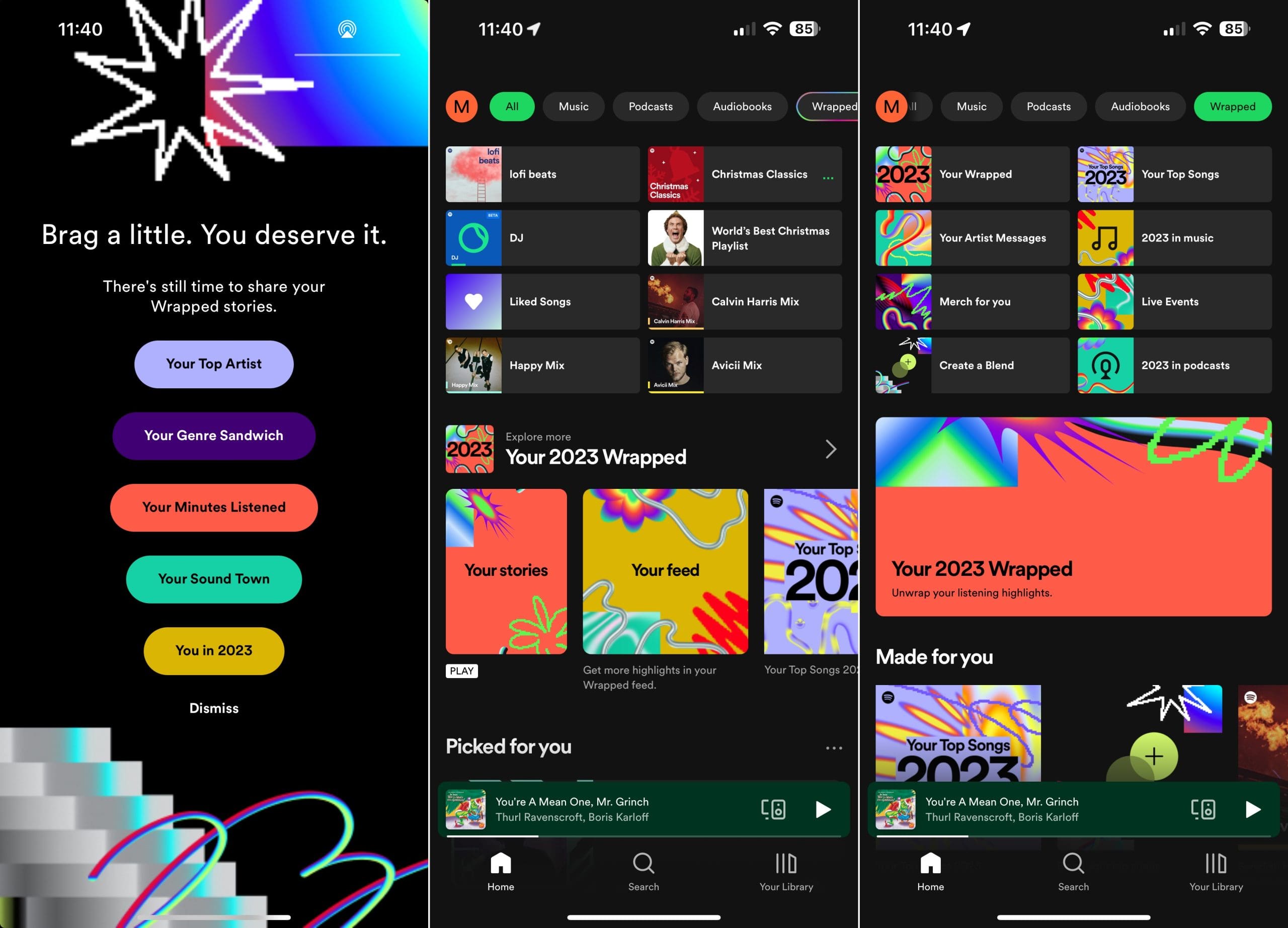
Open the Spotify app on your iPhone or iPad.
Tap the Wrapped bubble on your Home page.
This will start an Instagram Story-like carousel of cards showcasing your listening habits.
Tap the screen on the left or right to move forward or backward through the cards.
For the first time, it’s now also possible find Spotify Wrapped 2023 from your browser, and here’s how you can do so:
Open any browser (Google Chrome, Safari, or Microsoft Edge).
Once the page loads, you’ll be able to see your Spotify Wrapped 2023.
Conclusion
With your Spotify Wrapped 2023 now accessible, you have a personalized soundtrack to your year. Share your musical journey with friends and family, discover new artists and genres, and relive the moments that defined your musical tastes in 2023. Remember, Wrapped is not just a collection of statistics; it’s a celebration of your unique connection with music. So, embrace your musical identity, explore new sonic territories, and keep the music playing until next year’s Wrapped arrives!
Andrew Myrick is a freelance writer based on the East Coast of the US. He enjoys everything to do with technology, including tablets, smartphones, and everything in between. Perhaps his favorite past-time is having a never-ending supply of different keyboards and gaming handhelds that end up collecting more dust than the consoles that are being emulated.










Write a Comment