It’s been a while since iOS 16 came out, and we already have a few updates, fixes, and patches for certain issues that came about from the massive new software overhaul. With the new software came crucial features like Emergency SOS via Satellite, quicker security updates, and more ergonomic changes like customizable lock screens. Obviously, it’s extremely rare for someone to have to use an emergency feature, but it’s always helpful to have one. You don’t need it until you do, and when you do, you’re extremely thankful that you have something like Emergency SOS on your phone. However, the initial rollout of the feature has been met with numerous bugs and false alarms. Read on to find out more about how users trigger Emergency SOS unintentionally and what can be done about it.
Emergency SOS via Satellite came out when Apple released iOS 16 and was met with widespread praise. The idea was brilliant – it provided a safety net for those who need it but may not have access to cellular service or WiFi. For example, imagine a hiker walking up a secluded trail only to encounter a storm or similar circumstance. Traditionally, if you didn’t have cellular service or any means of connecting to 911, you would be in quite a bit of trouble. What Emergency SOS does is provide you with a brief questionnaire detailing the reason for your request and connect you to emergency services via satellite connection.
What’s really impressive about this service is that Apple has a dedicated team to facilitate requests from Apple users to the necessary authorities. The operator can provide the emergency services with specific details about your situation, such as your GPS location, urgency, and other medical information pulled from your Health app. To be fair, Apple has had some form of Emergency SOS for quite a while but allowing users to connect to emergency services via satellite completely changes everything.
What Happens If You Trigger Emergency SOS Unintentionally?
The iPhone 14 brought about Crash Detection, which would take into consideration factors like sudden movements at high speeds, velocity, and GPS location to determine if you’ve been in a serious car crash. Multiple reports have stated that the iPhone 14 triggers Emergency SOS unintentionally on roller coasters and similar harmless situations. In one case, emergency services were called to a theme park multiple times due to Crash Detection. Unintentionally calling 911 can lead to severe implications and could even be illegal in some cases. But these instances weren’t the users’ fault – it was a fault in the software.
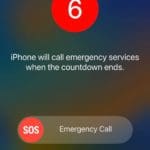
So what happens if you trigger Emergency SOS unintentionally? Generally speaking, you can just hang up the call. Some states and agencies have a call-back policy, where a 911 operator will call you back. You can just inform them that your iPhone triggered the call unintentionally or that it was a mistake, and there shouldn’t be any further implications.
How to Report if You Trigger Emergency SOS Unintentionally
iOS 16.2 beta users are experiencing a new feedback system asking them if they unintentionally triggered Emergency SOS. It gives you a notification informing you of when you triggered Emergency SOS. When you open the prompt, you’re led to a feedback screen. Here, Apple asks if you intentionally pressed Emergency SOS, and you can provide your iPhone diagnosis logs to the company.
It seems as if Apple has a lot of work to do to ensure that this feature remains stable and reliable. If emergency services keep experiencing butt dials and unintentional calls, we might see laws that would require Apple to change the feature. Hopefully, in the next few iOS 16 patches and updates, we can begin to see the feature function properly and as intended.







Write a Comment