With podcasts becoming more popular, streaming platforms like Spotify have taken the initiative and introduced numerous features to accommodate this form of media. One criticism that some people have had is that Apple Podcasts hasn’t been as quick with its updates, but iOS 17 represents a huge change.
After downloading iOS 17, you’ll notice a broad number of changes in Apple Podcasts. Finding your favorite shows will become much easier, and you’ll have no problems finding out what’s next on your list.
In this guide, you’ll discover the most important changes coming to Apple Podcasts in iOS 17. Let’s get started.
If you’ve previously found it quite difficult to discover your favorite shows in Apple Podcasts, you might rejoice a little at changes coming to iOS 17. Like with the Mail app in iOS 16, Apple Podcasts’ search-related features are receiving an update in the fall of 2023.
When you search for podcast episodes, you’ll see how much time is left on shows you’ve already started. On top of that, you can look for your search results in different filters – such as Channels and Top Rated.
These new changes will bring the search functionality in Apple Podcasts much closer to what you’ll find in Spotify.
Slight Changes to the Duration Button
Image Credit: Brandon Butch/YouTube
One small cosmetic change in the iOS 17 version of Apple Podcasts comes to the duration button. In iOS 16 and before, you can see “[number] min” when looking for how long a specific episode lasts for. Moreover, the play button is in a different bubble from that number.
In iOS 17, you will see the “[number]m” instead – so, if a podcast lasts for 38 minutes, you’ll see “38m”. On top of that, the play button will be in the same bubble as the number of minutes your podcast lasts for.
Podcast Queues
Image Credit: Apple
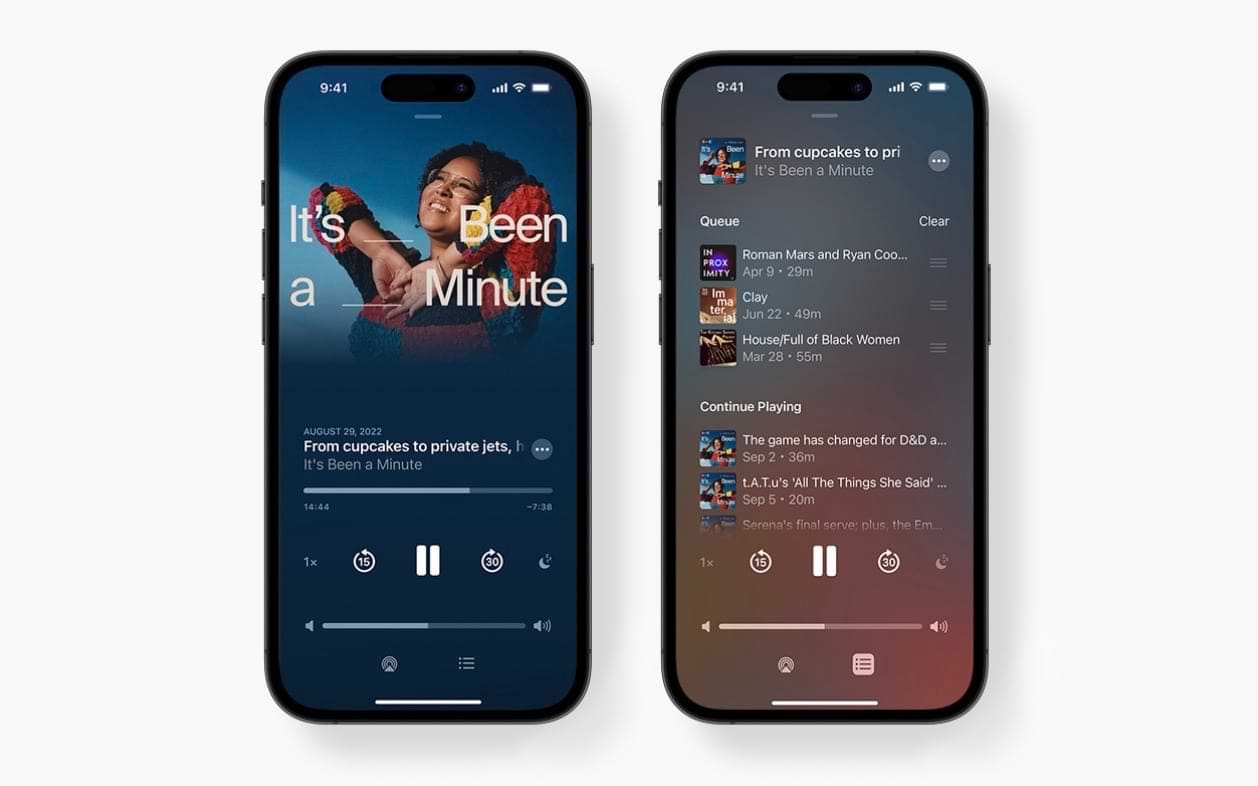
Being able to see what’s in your queue on Spotify is one of the handiest tools, and Apple Podcasts is getting a similar feature in iOS 17. After upgrading your iPhone software, you’ll be able to see a list of what’s up next in your queue. Here, you’ll be able to reorganize what’s up next on your list. And if you want to clear your queue, simply tap the Clear button.
The podcast episode that’s currently playing will feature at the top of your screen.
Playback Synchronization
Another common complaint that some Apple Podcasts users have had in the past is that playback wasn’t consistent across all devices. In some instances, you may have experienced one device starting on a different section of your podcast episode – compared to where you began listening.
In iOS 17, Apple Podcasts seeks to solve that problem. You should, after upgrading your software, have much better synchronization across devices where you’re signed in with the same Apple ID. As a result, listening to your favorite episodes after switching to your iPhone from your iPad or Mac should be simpler.
Episode Artwork Is Now Available for Creators
Image Credit: Apple
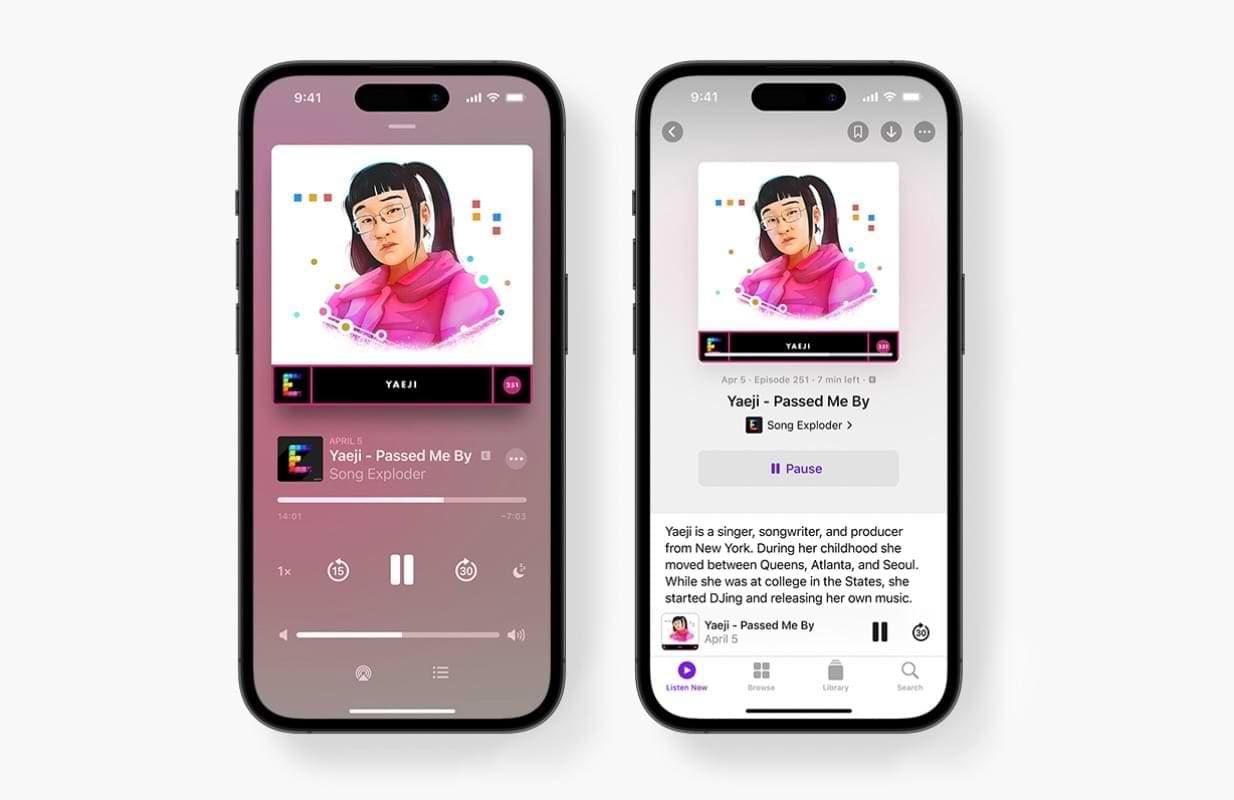
In iOS 16 and before, you can currently see the artwork for each podcast show as a whole. But unlike Spotify, you haven’t – until now – been able to see or use different artwork for each episode. In iOS 17, Apple Podcasts will change that and allow creators to customize their content better.
If the podcast host wants to, they can design new artwork for each episode. And for you, as the end user, you’ll hopefully be able to enjoy more of a stimulating experience when listening to your favorite creators.
Apple Podcasts Is Getting a Suite of Changes in iOS 17
Apple Podcasts in iOS 17 will get a lot of useful changes, and these will bring the platform much closer to Spotify in terms of competition. Creators can benefit from uploading unique artwork for each episode, and you’ll likely enjoy the ability to sift through your podcast queues more efficiently.
After downloading to iOS 17, you’ll also see a couple of small cosmetic changes. On top of that, the search functionality is much better than what you have in Apple Podcasts on iOS 16 and before.
Danny has been a professional writer since graduating from university in 2016, but he’s been writing online for over a decade. He has been intrigued by Apple products ever since getting an iPod Shuffle in 2008 and particularly enjoys writing about iPhones and iPads. Danny prides himself on making complex topics easy to understand. In his spare time, he’s a keen photographer.












Write a Comment