Many Mac users complained about not being able to boot up their devices after installing macOS Monterey. Ending up with a bricked device after installing the latest OS updates is not fun. If you’re experiencing similar problems, make sure your Mac is fully powered. Unfortunately, resetting SMC and NVRAM, and booting into Safe Mode or Recovery Mode doesn’t work. To fix the problem, you need to revive your device.
What to Do if Your Mac Won’t Boot Up After Installing macOS Monterey
Revive Your Mac
First, check if you can revive your Mac. Basically, you need to update the firmware on the Apple T2 Security Chip. Rest assured, data stored on the startup volume or any other volumes won’t be affected.
If you don’t have a second machine running macOS Catalina or newer, go to an Apple Store and have Apple’s experts revive the chip for you.
How to Revive Your Mac
Use a USB-C cable to connect the two macOS computers.
Go to the Applications folder and launch Apple Configurator 2.
Then restart the bricked Mac using a special key sequence: press and hold down the Power button for one second, then press and hold down the right Shift key, left Control key, and left Option key. Hold all four keys down for ten seconds.
Note: The Apple logo should briefly appear on the screen while you’re holding down the four keys.
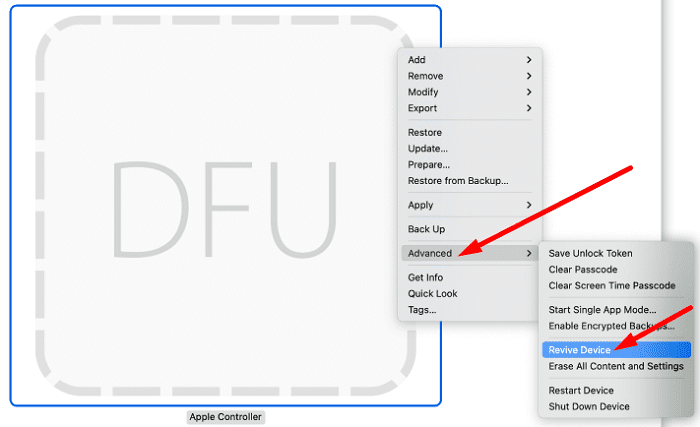
The DFU Mode window should pop up on the screen of the functional Mac.
Right-click on DFU Mode, and select Advanced.
Select Revive device to bring the dead Mac back to life.
Wait until the Apple Configurator downloads and install the chip firmware (bridgeOS) from Apple’s servers.
The process shouldn’t take more than five minutes to complete. If the revive method doesn’t work, select the Restore option when prompted. This will reinstall bridgeOS and erase your drive. Select this option only if the revive process doesn’t work and your Mac is still dead.
If your MacBook won’t turn on after installing macOS Monterey, revive your chip using the Apple Configurator. Use a USB-C cable to connect the bricked device to a fully functional macOS device. Then, enter DFU Mode and select the “Revive device” option.
Have you ever experienced similar issues after upgrading to the latest macOS version? Did you manage to solve the problem by yourself or did you have to visit your local Apple Store? Let us know in the comments below.
Madalina has been a Windows fan ever since she got her hands on her first Windows XP computer. She is interested in all things technology, especially emerging technologies — AI and DNA computing in particular.
THANK YOU so much for this article. My MacBook Pro was bricked and not responding at all. Your suggestions worked perfectly and it’s now up and running again – very much appreciate your recommendations!









My mac wont boot up after installing the MACOS monterey; and i do not have another mac to revive it; i only have iphone XS MAX; what should i do???
THANK YOU so much for this article. My MacBook Pro was bricked and not responding at all. Your suggestions worked perfectly and it’s now up and running again – very much appreciate your recommendations!
Yes, my computer is now screwed, thanks again apple for forcing updates that don’t work.