• Skip to primary navigation
  • Skip to main content
  • Skip to primary sidebar
  • Skip to footer

AppleToolBox

Tools and Fixes for Mac, iPad, iPhone & iWatch

Search posts

  • About
  • Contact

CONNECT WITH US

CATEGORIES

  • iPhone
  • iPad
  • iPod
  • Apple Watch
  • Mac/MacBook
  • AirPods
  • Apple TV
  • News
  • Apple Services
  • HomePod
  • Reviews

SITE

  • Home
  • About Us
  • Contact
  • Advertise

Search posts

You are here: Home / iPhone / What to Do if You Keep Getting Logged Out of Apps After iPhone Update

What to Do if You Keep Getting Logged Out of Apps After iPhone Update

By Louis Roundtree 0 comments Last updated March 20, 2026

Things to Know
  • Some users get repeatedly logged out of apps on iPhone after updates of software.
  • Usually, this is temporary, but if the problem continues, the app usually needs an update.
  • You can also check that your storage isn’t full, as this can cause login details to disappear.

Logged out of apps on iPhone after update? Updating your software regularly is an essential part of being an Apple device user, but it can lead to some annoying glitches. Having to repeatedly log back into account-based apps is one of them.

This guide explains how to fix the logging-out problem by updating apps and checking your device’s storage.

Keep Getting Logged Out Of Apps iPhone Fix #1: Update Apps

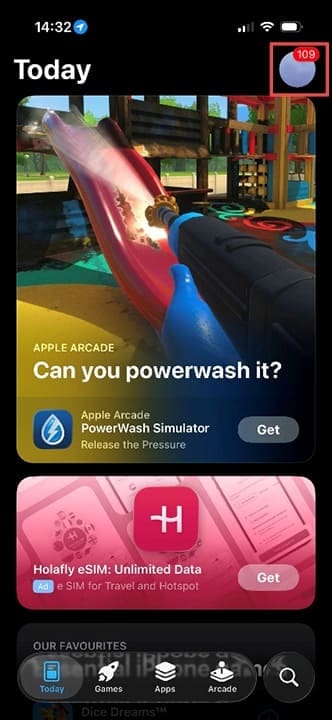
Step 1. Go to the app store. You’re looking for the small, grey circle in the top-right corner that probably has your initials in it. It will also have a red icon with numbers in it if you have pending app updates.

What to Do If You Keep Getting Logged Out of Apps After iPhone Update 1

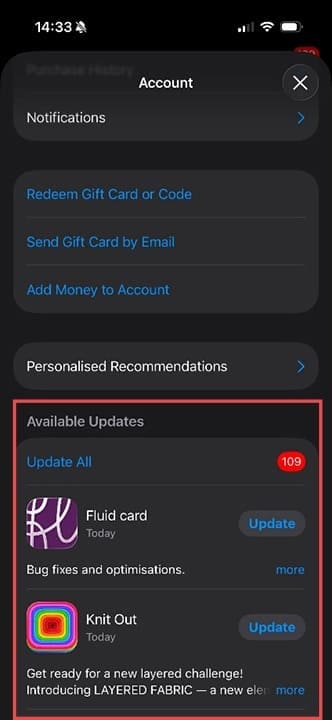
Step 2. Tap the account icon and scroll down until you see Available Updates.

What to Do If You Keep Getting Logged Out of Apps After iPhone Update 2

Step 3. There is a red button with numbers in it next to Update All. Press on this, and you’ll start to see spinning progress wheels next to your apps. Wait until they’re all complete, which can take a few minutes.

What to Do If You Keep Getting Logged Out of Apps After iPhone Update 3

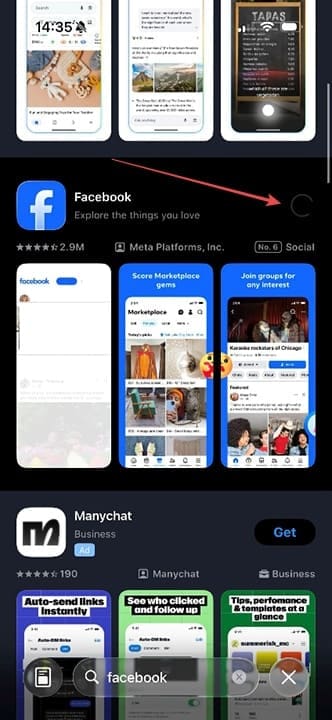
Step 4. Alternatively, search for the specific app giving you a problem in the App Store. There will be an update button if it needs updating. Press here, and the same type of progress wheel will appear.

What to Do If You Keep Getting Logged Out of Apps After iPhone Update 4

Keep Getting Logged Out of Apps iPhone Fix #2: Check Storage

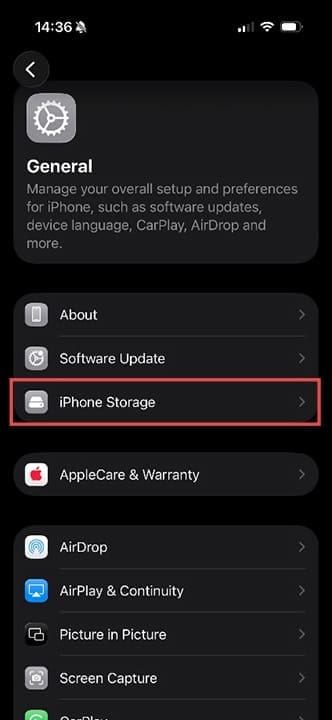
Step 1. If your storage is full, your iPhone may offload non-permanent data, such as login details, to save space. Check this by heading to Settings > General > iPhone Storage.

What to Do If You Keep Getting Logged Out of Apps After iPhone Update 5

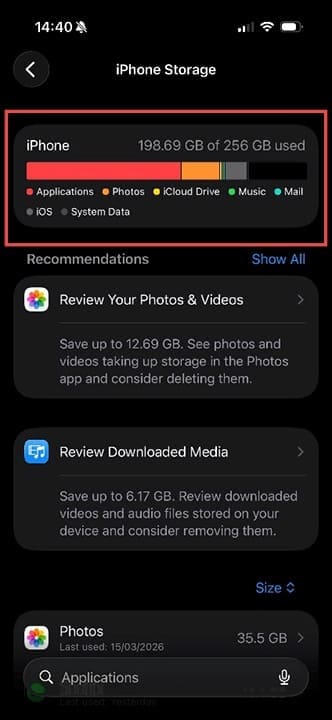
Step 2. Wait a few seconds for the storage bar graphic to appear. You can now see exactly what is taking up space and how much space you have available. If you have less than 1GB of free space remaining, you may find that details are getting dumped to provide more processing space. You may also notice that your phone is slow and lags when using apps.

Consider deleting apps you no longer use and offloading photos and videos to cloud storage services, such as iCloud. You’ll see recommendations for saving space on this page if your software is up to date.

Other tips you can try if you’re logged out of apps on iPhone after update:

  • Remove the app, then reinstall it.
  • Check app reviews and forums to ensure it’s not a widespread issue.
  • Ensure you have a strong Wi-Fi or cellular data connection.
  • Disable or delete iPhone cleaning apps – they remove cache data to free up space, but this often includes your login details for various apps and accounts.
  • Alternatively, if the app has an option to leave cache data in place, select that option.

You may also be able to report the problem to the app developer via the app’s website. They may simply not have updated their app to match the requirements of the latest iOS update.

Related Posts:

  • 2023 Mac Studio lifestyle - 1
    macOS Could Not Be Installed, How-To Fix
  • 2022 Mac Mini with Studio Display and Accessories
    Mac Tips For New Users In 2023
  • 14 Best Mac Cloud Storage for Home, Work, and School in 2023
    14 Best Mac Cloud Storage for Home, Work, and School in 2023
  • Update Apple ID settings on your iPhone, iPad, or Mac after changing your password
    Getting a Message to Update Apple ID Settings on…
  • Photo of someone using Apple Music on their smartphone
    How to Fix Apple Music Not Working on iPhone / iPad
  • How to Upload 4K Pictures to Twitter Hero
    What Is Twitter Circle and How to Use It
  • sidecar on iPadOS and macOS
    Sidecar not working in iPadOS and macOS? How to fix…
  • 0E4A6A0B-65E8-4184-B0C9-16C2179A1256
    The Best Weight Loss Apps For iPhone In 2021
  • photo of an iphone with ios 16 downloaded on it
    iOS 16 Tips and Tricks: The Definitive List
Louis Roundtree
Louis Roundtree

As an avid gamer, I’ve run into my fair share of error codes and weird faults that have forced me to find fixes to problems I never anticipated. That gave me a passion for sharing those fixes with others so we can all game without feeling like our hardware is rebelling against us.

Reader Interactions

Write a Comment Cancel reply

Primary Sidebar

Recent Posts

  • How to Manage Your iPhone Call Log
  • Are Apple’s Safety Precautions Enough for AirTags?
  • How to Hide Username and Photo on the Mac Lock Screen
  • Microsoft Resume vs. Apple Handoff – Which Wins for Cross-Device Work?
  • How to Export iTunes Library to New Computer
  • What the Gemini Desktop App Will Bring to Mac

Connect with us

Footer

ABOUT

  • About Us
  • Contact us
  • Advertise
  • Privacy
  • Terms of Use

GUIDES

  • iOS & iPadOS
  • Apple ID
  • iCloud
  • App Store
  • iTunes
  • FaceTime
  • iMessage
  • Siri
  • Books and iBooks
  • Game Center
  • AirPlay

CONNECT

  • Facebook
  • Twitter
  • FeedBurner
  • YouTube

© Copyright 2010-2024 Guiding Tech Media · All Rights Reserved

This site and its content are in no way affiliated or endorsed by Apple, Inc. · Reproduction without explicit permission is prohibited

Last Updated on March 21, 2026 by Louis Roundtree