Wondering why does my AirPlay not show up? Some readers report issues where the AirPlay icon missing for streaming music and video to AirPort Express base stations and Apple TVs. All of a sudden, AirPlay is missing from various apps on iPod touch, iPad or iPhone.
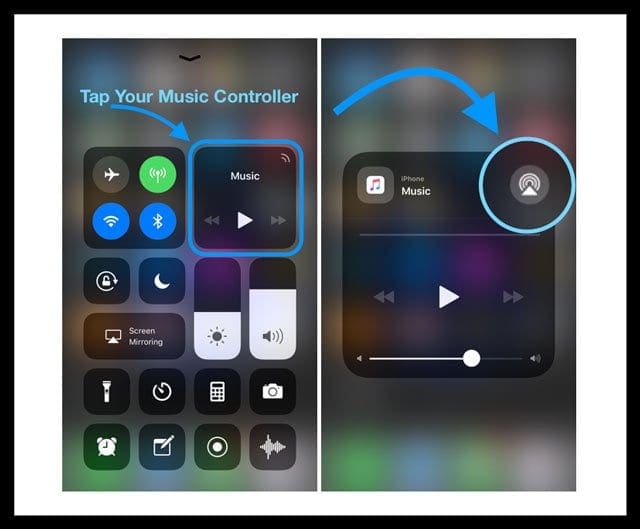
Remember that AirPlay is only available within apps that support it. So, with your app open, swipe up the control center and check for AirPlay. In those apps, the AirPlay icon appears when it’s available.
Before attempting any of the troubleshooting tips below, try a restart or forced restart. This is often enough to get things working again. Alternatively, try rebooting your router. For many readers, their AirPlay icon appeared instantly following a router reboot!
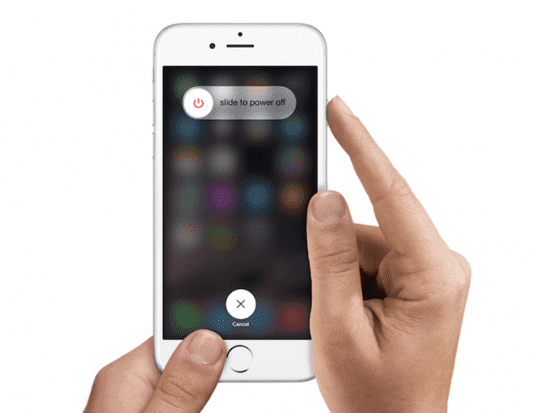
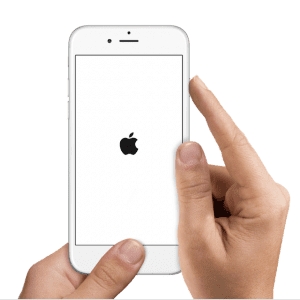
Press and hold the Sleep/Wake button until the red slider appears
Drag the slider to turn your device completely off
After the device turns off, press and hold the Sleep/Wake button again until you see the Apple logo
Restart your iPhone X and above and iPad without home buttons
Press and hold the Side button and either volume button until the slider appears
Drag the slider to turn your iPhone completely off
After your iPhone turns off, press and hold the Side button again until you see the Apple logo
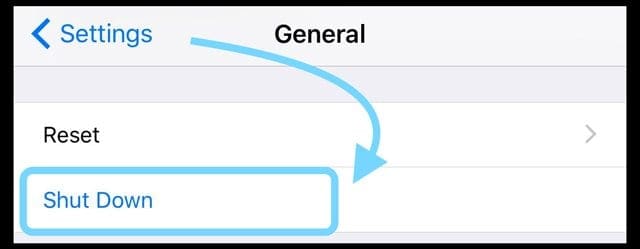
Alternative Way to Restart on iOS 11 or later
Turn off your device by going to Settings > General> Shut Down
Restart Apple TV
Restart the Apple TV by going to Settings > General > Restart
How to Restart Your Router and Modem
Reset your router by unplugging, waiting at least 20 seconds, and then plugging back in. See if the Airplay icon comes back
How to force restart iPhones, iPad, and other iDevices
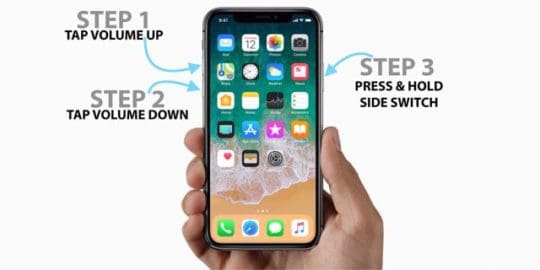
On. iPhone 8+ and iPads with no home button: Press and quickly release the Volume Up button. Press and quickly release the Volume Down button. Then, press and hold the Side button until you see the Apple logo
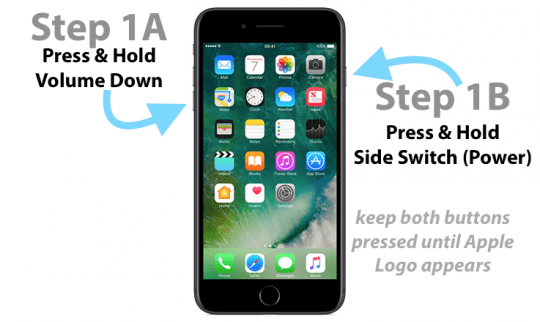
On an iPhone 7 or iPhone 7 Plus and iPod touch 7th generation: Press and hold both the Sleep/Wake and Volume Down buttons for at least ten seconds, until you see the Apple logo
On an iPhone 6s and earlier, iPad with home buttons, or iPod touch 6th generation and below: Press and hold both the Sleep/Wake and Home buttons for at least ten seconds, until you see the Apple logo
How To Force Restart Older Model iPhones
Check for AirPlay Support
Not all apps support AirPlay. When an app supports it, the AirPlay icon appears. That’s why the AirPlay icon is visible at some times and not others.
With your app open, swipe on Control Center and tap the Music (or for older iOS, the AirPlay tile) to check for AirPlay compatibility.
You can AirPlay content only to an Apple TV or AirPlay-enabled speaker or receiver. You can’t AirPlay content from your iOS device to another iOS device or to a Mac.
Turn on Bluetooth
Go to Settings > Bluetooth and toggle it ON
If already on, toggle it off, wait 20 seconds, and toggle back on
Check Your WiFi Connections
Go to Settings>Wi-Fi
Toggle WiFi OFF
Wait 20-30 seconds
Turn WiFi back ON
Now, check that both devices are on the same network (for Apple TV, go to Settings > General > Network)
If your iDevice is on one WiFi network, but the AirPlay device on another, the AirPlay icon won’t appear
Change Language Preferences
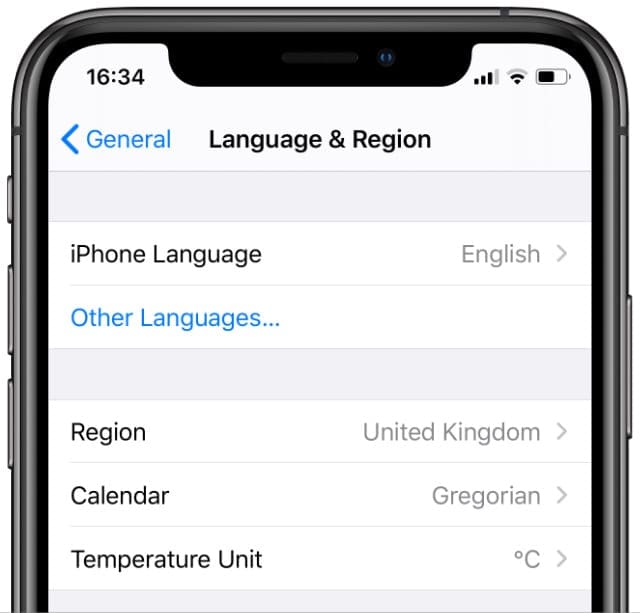
On your iPad, iPhone or iPod touch, navigate to Settings > General > Language & Region (if you don’t see this option, look for International > Language)
Change to a different iPhone or iPad language temporarily.
Change to a different language (e.g. if you are using English, switch to French)
Your iDevice goes through a language switch/reset process and your AirPlay icon should restore
Next, navigate back to Settings > General > Language & Region (translated into the new language, of course) and switch back to your original language
Change WiFi Router GHz Setting
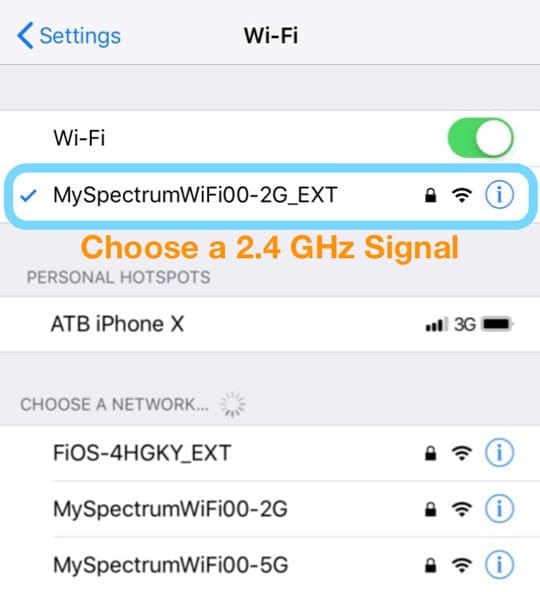
Switched your WiFi from the 5GHz signal to the 2.4GHz signal
Check if Airplay icon returns
Switch back to the 5GHz and see if it’s still available
AirPlay and Apple TV
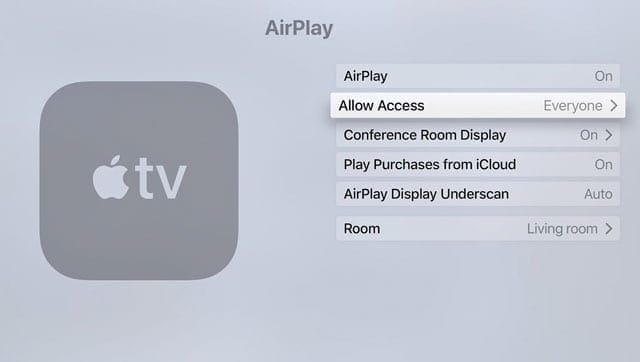
Turn AirPlay On your Apple TV
Go to Settings > AirPlay and make sure it’s turned on
Set Allow Access to Everyone. Anyone can see and AirPlay to your Apple TV.
Cycle Your Apple TV Off and On
Try power cycling your Apple TV. Disconnect it from power for at least 30 seconds, then reconnect
If your Apple TV supports Ethernet, plug your Apple TV into the router with an ethernet cord
AirPlay Mirroring only works with Apple TV, not other devices!
Airplay doesn’t show up in your control center?
Make sure AirPlay is turned on for all your devices
For Apple TV, go to Settings > AirPlay
If you notice that AirPlay is visible only some times
Update to the latest version of the iOS — check that you’re running the latest version of the iOS
Turn on WiFi – AirPlay only works over WiFi, not cellular and mobile networks, so connect to WiFi
Use AirPlay-compatible devices — Not all devices are compatible with AirPlay. Make sure you’re connecting to devices that support AirPlay
Use the SAME WiFi network for BOTH iDevice and AirPlay device — Communication with AirPlay depends on both being connected to the same WiFi network. If your iDevice is on one network but the AirPlay device on another, the AirPlay icon won’t show up
Check that AirPlay is enabled on Apple TV – When connecting to an Apple TV, verify that AirPlay is enabled on the Apple TV by going to Settings > AirPlay and make sure it’s on
AirPlay Mirroring officially only works with Apple TV — If AirPlay mirroring isn’t available, even when AirPlay is available, chances are you’re trying to connect to non-supported device. Officially, the only device that supports AirPlay mirroring is Apple TV
For Apple TVs, if your Apple TV is in Sleep mode and uses Ethernet, you need to wake your Apple TV with your remote or the remote app before you AirPlay content
WiFi problems and router issues for AirPlay icon missing
Sometimes your iDevice doesn’t communicate with your AirPlay device when there’s interference on your WiFi network. Things like baby monitors, microwaves, direct satellite services, cordless phones, wireless speakers, and other wireless devices that operate in the 2.4 GHz or 5 GHz bandwidths cause interference with WiFi. Even your neighbor’s WiFi device might cause issues!
Reduce the effects of interference from other wireless devices
Change channels on your wireless network. For AirPort Base Stations or AirPort Time Capsule, reset the base station and it will attempt to use the 2.4 and 5 GHz channels with the least interference when it starts up
Connect to a 5 GHz wireless network (if possible)
Move your computer and WiFi router (like your AirPort Base Station) closer to each other
Minimize the number of active Bluetooth wireless devices you have connected to your iDevice or computer or those nearby
Use macOS’s Wireless Diagnostics to help evaluate your WiFi environment
Quit any apps that are open, and connect to your Wi-Fi network
Hold down the Option key and choose Open Wireless Diagnostics from the WiFi status menu icon
Enter your administrator name and password when prompted
Follow on-screen instructions
AirPlay icon missing on Apple TV or “Looking for Apple TV” message
Restart your iDevice and Apple TV (or another AirPlay-enabled device)
If your Apple TV uses Ethernet, check that the cable is plugged into the router that you use for WiFi
On your iDevice, go to Settings > WiFi and check that you’re on the same Wi-Fi network as your Apple TV or other AirPlay-enabled device
Then check the WiFi network on your Apple TV (or another AirPlay-enabled device)
For Apple TV (4th generation), go to Settings > Network and check that you’re on the same Wi-Fi network
For Apple TV (2nd or 3rd generation), go to Settings > General > Network
On your Apple TV, make sure that AirPlay is turned on in Settings > AirPlay
AirPlay and Music or iTunes
When an AirPlay-enabled device is available, the AirPlay icon shows up below the volume slider in Music or to the right in your computer’s iTunes. Tap the AirPlay icon to see a list of available devices.
AirPlay icon missing in iTunes or the Music app
Some AirPlay devices include an on/off option for AirPlay. Look for the option in Settings and make sure the feature is on. For more information, check the device’s user guide
Check that you have the latest version of iTunes, macOS, and Apple TV software
Connect your iDevice or computer and your other device to the same WiFi network
Restart your iDevice, computer, AirPlay device, and your network router
For computers
If you’re using Ethernet, connect both devices to the same router or hub
If you’re using both WiFi and Ethernet, connect your AirPlay device to the same router that your computer uses for WiFi
Make sure that your Mac or PC can communicate using port 3689, which AirPlay uses to communicate with other devices on your network
Obsessed with tech since the early arrival of A/UX on Apple, Sudz (SK) is responsible for the original editorial direction of AppleToolBox. He is based out of Los Angeles, CA.
Sudz specializes in covering all things macOS, having reviewed dozens of OS X and macOS developments over the years.
In a former life, Sudz worked helping Fortune 100 companies with their technology and business transformation aspirations.
I upgraded to iOS 15 and thought the Airplay Icon was “gone”. Turns out Apple changed the icon. Thus, it was “user error”, because I was not born knowing this; kudos to Apple, making change for its own sake!
This looks like an ongoing problem through several years. I just bought a new unsmart tv today and a 4th generation Apple TV. I had the icon on my iPad, the icon just left today to welcome my newbies. But as much as I wanted a Apple TV I guess I’ll exchange it for a Roku. Any big problems there? I can’t set up my Apple TV without the AirPlay. I only have a ipadmini to work with. What else is there to do. I don’t know what most of the terminology means, hard reboot? Is that just turning off the power to everything you own and restarting? Upgrade the router, what the heck. This is depressing me. I’ve been at this all day. I guess a lot of you know the feeling. Yes I tried the language change, unplugged everything waited 30 minutes. Re-plugged in, nothing. I’ve never had any problem with my iPhone 5c, yet it didn’t have the icon either. I guess I’ll cont for some answers, before date I have to return this.
On your Apple TV, make sure that AirPlay is turned on in Settings > AirPlay. Also check Settings > Network and check that you’re on the same Wi-Fi network as your iOS device. For older generation Apple TV go to Settings > General > Network.
After a reset of my Time Capsule I lost the Airplay icon. Did the language swop but still no icon. Then I restarted my MacMinis and opened Airserver again – and voila, Airplay icon came back
It’s funny how Apple and other similar help sites missed this. For the longest time I knew there was something MORE that could be done to get this to work – especially since it worked at one time in the past. Worked like a charm! Thanks for sharing this “out of the box” FIX!
I have an iPhone 6 with the most current iOS (8.3). I was experiencing the same problem with the airplay icon not appearing on two devices, my iPhone and iPad. it was appearing on my wife’s iPhone however. Hard rebooting, holding both the home button and the “start-up” button at the same time, worked to restore the airplay icon a few times but then that “fix” stopped working altogether. One other interesting occurrence was that my airport utility stopped locating any base stations even though all the airport expresses and the airport extreme were working just fine. Additionally, the airplay icon appeared in iTunes on my mac pro, so the problem was definitely with the devices. Switching languages solved the problem on the iPhone and the iPad. I did a hard reboot after switching to French, then I switched back to English and both the airplay and airport utility began working again. I should also comment that the language switch worked to correct a problem with foreign language words appearing or replacing English words in random places on the iPhone. This seems to be a problem with Apple’s IOS software – not applications (apps) and the problem has continued through several upgrades to iOS.
Hello everyone! I had this problem with my iPhone 6, I tried every thing but nothing seems to work for me. After weeks of looking for a solution I decided to restart my router so I unplugged it for 5 min, when I pluggedit again and it connected to Internet and voila the icon appeared on my iPhone and everything is fine now. Hope it might help you
I have been working with everything and everyone on this. My iPad Air and iPad mini show icon without any problems, but I cannot get the iPhone 5 or 5S to show. Everything is on same WiFi and routers are set to multicast. I tried the language change and no luck. I would use Chromecast to my receiver, but iTunes does not work with that. I wonder why?
It appears that if I had an Apple TV, this would not be a problem. I wish the support for Airplay was consistent across at least all the Apple devices. Will Apple either fix this or allow Chromecast stream from iTunes? I guess I could do Bluetooth, which works for everything.
iphone 3GS, Airport Express, Apple TV ~ the language changey thing did not work. btw ~ WHERE is the airplay icon supposed to physically appear on iphone 3GS ?
I’m using a new iPod touch 5th generation and two Apple TVs (2 & 3). I lost the Apple TV icon altogether, too, after first losing the use and name of the AppleTV I was using. Restarting and even a hard reset of the iPod touch did not work, then changing the language didn’t work for me, but restarting the router and Airport restored the icon and the function of Apple TVs.
For the record, I had to restart the router and airport just hours ago when the iPod touch lost Wi-Fi connection as well. I’ll be keeping an eye on this. Meanwhile, I love my new iPod touch and Airplay is fantastic! (This is all just dictated… yay!)
Second hand iPhone does not display AirPlay, even though my iPod and ipad2 work just fine. I have changed language and re-boot suggestions and they do not work. Also can not get iTunes home sharing. However all works with the remote app where I control my mac and apple T.V, AirPlay icon appears and home sharing. Just can not play music or videos directly to atv or airport express.
Can not be my router as all other devices work including friends and family iPhone. Why this one?
Reset Internet and router and still no icon for AirPlay? I have 2 iPhone 4s and 2 new iPads, just bought the 3 gen apple tv today and can’t connect any device via AirPlay still! Have remote app and it works but still no AirPlay? I’m about to take the stupid apple tv back! This is dumb!
Newest iPad. No AirPlay icon. This fix did not work. Further research has not resulted in a solution. Steve passes away, and apple falls apart.. Frustrating.
All the above did not work for my iPad 2 .
The real fix came when I switched of my Internet modem and router.
On again and all is good again.
AirPlay shows again
It works also for me. ipad 2, everywhere the Icon but after update I think missing on my Ipad2. Changing the language to English and back to netherlands has fixed the problem. Thanks verry much.
David..our Ipods were not working as well. Updated both Apple TV and Ipods today. There is now a section on Apply TV under setting once you do this, and airplay has to be turned on for the icon on the Touch to work. Try this?
sounds obvious ya. but, i just got two iphones for my wife and myself. unbeknownst to me my wife turned off her wifi because it kept autoconnecting at her office (ya, i know you can disable that but she didnt)…and, she didnt want the IT guys watching her traffic.
fast forward home and i can’t figure out why my airplay works fine and hers doesnt.
had to soft-reboot the phone after turning on wifi and it works fine.
one more note, good idea to change it to language you can at least semi-understand in order to navigate back again. Also, I noticed that my safari “search” was the charming “recherché” even after I had swapped the international setting back to english. I had to delete the french keyboard that had been created in the iPad settings.
Fantastic. Worked for me. I lost the airplay after pairing with a Bluetooth speaker. Hmm. I’d been torturing my iPad and my poor brain trying to get my “real” speakers back. Thanks so much!




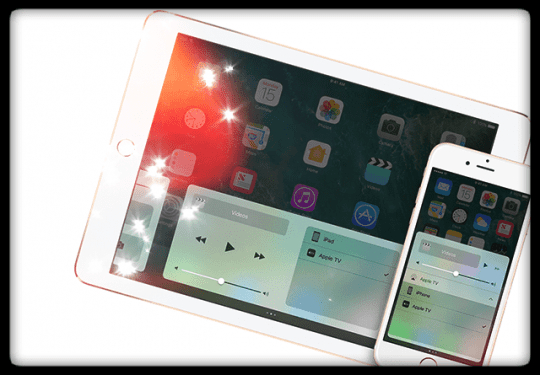
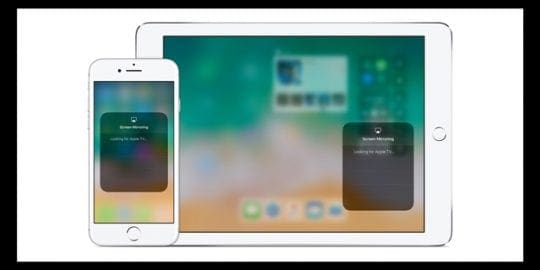










LOL the icon changed.
I upgraded to iOS 15 and thought the Airplay Icon was “gone”. Turns out Apple changed the icon. Thus, it was “user error”, because I was not born knowing this; kudos to Apple, making change for its own sake!
The new icon looks like two overlapping screens.
Thanks. It works! A reboot of everything did the trick for me using iOS 11.2.1–including iPhone, Apple TV, and router/modem. Not elegant but works!
Cannot get this to work no matter what I do……
At iPad Air 2 and iOS 9 this workaround still works!!!
Outstanding advice! I’ve tried Apple Support, Apple Forums, Google articles, etc. Nobody was able to provide a solution but you!
Thanks so much!
This looks like an ongoing problem through several years. I just bought a new unsmart tv today and a 4th generation Apple TV. I had the icon on my iPad, the icon just left today to welcome my newbies. But as much as I wanted a Apple TV I guess I’ll exchange it for a Roku. Any big problems there? I can’t set up my Apple TV without the AirPlay. I only have a ipadmini to work with. What else is there to do. I don’t know what most of the terminology means, hard reboot? Is that just turning off the power to everything you own and restarting? Upgrade the router, what the heck. This is depressing me. I’ve been at this all day. I guess a lot of you know the feeling. Yes I tried the language change, unplugged everything waited 30 minutes. Re-plugged in, nothing. I’ve never had any problem with my iPhone 5c, yet it didn’t have the icon either. I guess I’ll cont for some answers, before date I have to return this.
I have the iPhone 6s, this did not fix my problem. I still do not have AirPlay.
On your Apple TV, make sure that AirPlay is turned on in Settings > AirPlay. Also check Settings > Network and check that you’re on the same Wi-Fi network as your iOS device. For older generation Apple TV go to Settings > General > Network.
I tried everything and still my airplay icon show anyone have any other ideas?
After a reset of my Time Capsule I lost the Airplay icon. Did the language swop but still no icon. Then I restarted my MacMinis and opened Airserver again – and voila, Airplay icon came back
This fix worked for me using Spanish! Thanks a ton.
It’s funny how Apple and other similar help sites missed this. For the longest time I knew there was something MORE that could be done to get this to work – especially since it worked at one time in the past. Worked like a charm! Thanks for sharing this “out of the box” FIX!
brilliant fix
I have an iPhone 6 with the most current iOS (8.3). I was experiencing the same problem with the airplay icon not appearing on two devices, my iPhone and iPad. it was appearing on my wife’s iPhone however. Hard rebooting, holding both the home button and the “start-up” button at the same time, worked to restore the airplay icon a few times but then that “fix” stopped working altogether. One other interesting occurrence was that my airport utility stopped locating any base stations even though all the airport expresses and the airport extreme were working just fine. Additionally, the airplay icon appeared in iTunes on my mac pro, so the problem was definitely with the devices. Switching languages solved the problem on the iPhone and the iPad. I did a hard reboot after switching to French, then I switched back to English and both the airplay and airport utility began working again. I should also comment that the language switch worked to correct a problem with foreign language words appearing or replacing English words in random places on the iPhone. This seems to be a problem with Apple’s IOS software – not applications (apps) and the problem has continued through several upgrades to iOS.
I tried it twice with two different languages. It did not work. Still no icon
I found after trying everything turn the router off and on again brought back the icons.
Hello everyone! I had this problem with my iPhone 6, I tried every thing but nothing seems to work for me. After weeks of looking for a solution I decided to restart my router so I unplugged it for 5 min, when I pluggedit again and it connected to Internet and voila the icon appeared on my iPhone and everything is fine now. Hope it might help you
No AirPlay ico on my iPad air. Tried the language change still nil fix
I have been working with everything and everyone on this. My iPad Air and iPad mini show icon without any problems, but I cannot get the iPhone 5 or 5S to show. Everything is on same WiFi and routers are set to multicast. I tried the language change and no luck. I would use Chromecast to my receiver, but iTunes does not work with that. I wonder why?
It appears that if I had an Apple TV, this would not be a problem. I wish the support for Airplay was consistent across at least all the Apple devices. Will Apple either fix this or allow Chromecast stream from iTunes? I guess I could do Bluetooth, which works for everything.
Didn’t work with my iPhone 4S (OS 7.1)
GREAT! IT works 🙂 THank you very much!
does anybody have the problem solved?
gsofer@carlowcoco.ie
my airplay icon is missing from my ipad mini..how do you get it back?
Worked a treat. If you don’t speak any other language but English changing to/from British English to/from English works!
iphone 3GS, Airport Express, Apple TV ~ the language changey thing did not work. btw ~ WHERE is the airplay icon supposed to physically appear on iphone 3GS ?
Isn’t there a permanent solution for this? Turning odd and on works on my iPod touch butbibhave to so it every time I connect.
None of these solutions work.. I miss Steve Jobs.. Apple is becoming microsoft. this is ridiculous
I’m using a new iPod touch 5th generation and two Apple TVs (2 & 3). I lost the Apple TV icon altogether, too, after first losing the use and name of the AppleTV I was using. Restarting and even a hard reset of the iPod touch did not work, then changing the language didn’t work for me, but restarting the router and Airport restored the icon and the function of Apple TVs.
For the record, I had to restart the router and airport just hours ago when the iPod touch lost Wi-Fi connection as well. I’ll be keeping an eye on this. Meanwhile, I love my new iPod touch and Airplay is fantastic! (This is all just dictated… yay!)
I had the same problem. Icon disappeared, had to reboot the device(s) or router in order to get it back. Quite annoying.
Upgrading the router firmware to latest version solved the issue for me (dlink615 router)
Just turn the unit off (hold down the power button) and on again. Airplay icon back.
Second hand iPhone does not display AirPlay, even though my iPod and ipad2 work just fine. I have changed language and re-boot suggestions and they do not work. Also can not get iTunes home sharing. However all works with the remote app where I control my mac and apple T.V, AirPlay icon appears and home sharing. Just can not play music or videos directly to atv or airport express.
Can not be my router as all other devices work including friends and family iPhone. Why this one?
Just switch wifi on and off…. Icon back yeah
worked for me 🙂
Reset Internet and router and still no icon for AirPlay? I have 2 iPhone 4s and 2 new iPads, just bought the 3 gen apple tv today and can’t connect any device via AirPlay still! Have remote app and it works but still no AirPlay? I’m about to take the stupid apple tv back! This is dumb!
Newest iPad. No AirPlay icon. This fix did not work. Further research has not resulted in a solution. Steve passes away, and apple falls apart.. Frustrating.
yea i have the new ipad too and it still doesnt work. icon is no where to be found. so frustrating…..
Still did not work for my ipad2 and still looking
I changed to French, won’t change back to English. NOW what do I do?
I’ve had nothing but trouble with this IPad. Every day I have to fix something.
PLEASE HELP. I don’t read French !!!! HELP …
The real fix came when I switched of my Internet modem and router.
On again and all is good again.
AirPlay shows again
All the above did not work for my iPad 2 .
The real fix came when I switched of my Internet modem and router.
On again and all is good again.
AirPlay shows again
It didn’t work for my iPad2.
It works!! Thank you!
It works also for me. ipad 2, everywhere the Icon but after update I think missing on my Ipad2. Changing the language to English and back to netherlands has fixed the problem. Thanks verry much.
Did not work for me. iPod Touch. Extremely bothersome.
David..our Ipods were not working as well. Updated both Apple TV and Ipods today. There is now a section on Apply TV under setting once you do this, and airplay has to be turned on for the icon on the Touch to work. Try this?
just a reminder to make sure your wifi is on :-O
sounds obvious ya. but, i just got two iphones for my wife and myself. unbeknownst to me my wife turned off her wifi because it kept autoconnecting at her office (ya, i know you can disable that but she didnt)…and, she didnt want the IT guys watching her traffic.
fast forward home and i can’t figure out why my airplay works fine and hers doesnt.
had to soft-reboot the phone after turning on wifi and it works fine.
Thanks for the easy fix!
Absolutely goofy thing to have to work around…
Thanks so much for the fix! Your iQuirk-Fu is awesome.
one more note, good idea to change it to language you can at least semi-understand in order to navigate back again. Also, I noticed that my safari “search” was the charming “recherché” even after I had swapped the international setting back to english. I had to delete the french keyboard that had been created in the iPad settings.
Fantastic. Worked for me. I lost the airplay after pairing with a Bluetooth speaker. Hmm. I’d been torturing my iPad and my poor brain trying to get my “real” speakers back. Thanks so much!
great fix, and so easy! thanks
Thanks for the info. This was driving me crazy and there
was nothing on the Apple site that I could find.
After latest update i got airplay after sync icon gone then
came back now gone again after latest sync £100 wasted on Apple
tv.
Didn’t work for me, also the icon is missing in iTunes as
well.
I am having the same problem no air play icon in itunes or ipod if you get a fix let me know
Didn’t work for me, also the icon is missing in iTunes as
well.
Great fix… Thanks…. Really seems a strange problem and
fix!!!