• Skip to primary navigation
  • Skip to main content
  • Skip to primary sidebar
  • Skip to footer

AppleToolBox

Tools and Fixes for Mac, iPad, iPhone & iWatch

Search posts

  • About
  • Contact

CONNECT WITH US

CATEGORIES

  • iPhone
  • iPad
  • iPod
  • Apple Watch
  • Mac/MacBook
  • AirPods
  • Apple TV
  • News
  • Apple Services
  • HomePod
  • Reviews

SITE

  • Home
  • About Us
  • Contact
  • Advertise

Search posts

You are here: Home / iPhone / Can I delete VIP mailbox (iOS)?

Can I delete VIP mailbox (iOS)?

By Sudz Kar 3 comments Last updated January 2, 2023

VIP inbox can be vey useful feature for those who receive a lot of emails from a lot of different people. For others however, this feature may not be practical. We receive a lot of questions from iPad / iPhone users regarding the VIP mailbox: “How can i delete the VIP Mailbox from the mail screen?”

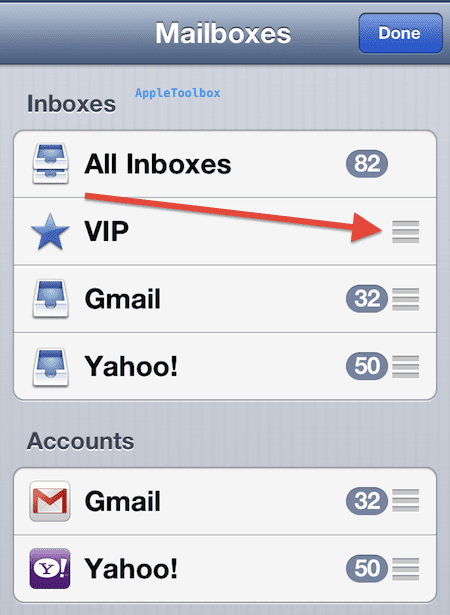
If you want to delete the vip inbox, as of now, there is no way to disable / remove / hide it. However what you can do is move the VIP box to the bottom of the mailbox list. This way you can re-arrange the order of the mailboxes. You can move it by tapping the edit button at the top right. A 3 horizontal line icon will appear beside each mailbox, then tap and hold on the icon that appears next to “VIP” on the right and drag it where you want it then tap done. Please note that moving only works if you have multiple e-mail accounts on your iPhone or iPad. If you just have one account, VIP will still be there but tapping EDIT will not let you move.

Mailbox edit button

VIP mailbox move

Related:

How to manage your email better with VIP lists and VIP notifications in iOS

Related Posts:

  • photo of an iphone with ios 16 downloaded on it
    iOS 16 Tips and Tricks: The Definitive List
  • Rows of shelves of archive boxes in a warehouse
    How to Archive and Back Up Emails on Your Mac
  • photo of a person taking a picture with the camera on their iphone
    How to Hide Photos on iPhone, iPad, and Mac
  • photo of an iphone open
    How to Use the Mail App on iOS: A Step-by-Step Guide
  • sidecar on iPadOS and macOS
    Sidecar not working in iPadOS and macOS? How to fix…
  • Screen Shot 2021-08-21 at 6.58.10 PM
    DuckDuckGo's Email Privacy Features Might Beat Apple
  • 2022 Mac Mini with Studio Display and Accessories
    Mac Tips For New Users In 2023
  • WWDC 2021 Hero
    WWDC21 Recap: Everything You Missed In Apple's 2-Hour Event
  • pexels-cottonbro-5082579
    Getting Started With iOS 15: Everything Good And Bad
sudz - apple
Sudz Kar

Obsessed with tech since the early arrival of A/UX on Apple, Sudz (SK) is responsible for the original editorial direction of AppleToolBox. He is based out of Los Angeles, CA.

Sudz specializes in covering all things macOS, having reviewed dozens of OS X and macOS developments over the years.

In a former life, Sudz worked helping Fortune 100 companies with their technology and business transformation aspirations.

Reader Interactions

Write a Comment Cancel reply

Show 3 Comments

  1. Robert nadeausr says

    October 31, 2021 at 3:21 PM

    I can delete people on my vip list but want to clean them all out I have a 1050 of the I don’t do e mails anymore do chat room my passion I not a computer geek help want them all gone believe it’s dragging my I pad down Thear must be a simple way now complacted

    Reply
  2. Vicki says

    January 24, 2014 at 1:23 AM

    My mailbox is full and I don’t know why! How do I get back on track?

    Reply
  3. Cindy says

    September 5, 2013 at 8:56 PM

    Thank you!

    Reply

Primary Sidebar

Recent Posts

  • How to Stop Sharing Analytics in iOS 26
  • How to Manage Your iPhone Call Log
  • Are Apple’s Safety Precautions Enough for AirTags?
  • How to Hide Username and Photo on the Mac Lock Screen
  • Microsoft Resume vs. Apple Handoff – Which Wins for Cross-Device Work?
  • How to Export iTunes Library to New Computer

Connect with us

Footer

ABOUT

  • About Us
  • Contact us
  • Advertise
  • Privacy
  • Terms of Use

GUIDES

  • iOS & iPadOS
  • Apple ID
  • iCloud
  • App Store
  • iTunes
  • FaceTime
  • iMessage
  • Siri
  • Books and iBooks
  • Game Center
  • AirPlay

CONNECT

  • Facebook
  • Twitter
  • FeedBurner
  • YouTube

© Copyright 2010-2024 Guiding Tech Media · All Rights Reserved

This site and its content are in no way affiliated or endorsed by Apple, Inc. · Reproduction without explicit permission is prohibited

Last Updated on January 2, 2023 by Mitch Bartlett