If you can’t forward text messages on iOS, don’t rush to perform a factory reset just yet. This glitch can affect the text messages you forward to non-iOS users, as well as the message sent to iOS and macOS users. Let’s see what you can do to solve this problem.
Why Is Text Message Forwarding Not Working on iPhone?
Quick Fixes
Let’s start off with a series of quick workarounds that may work wonders.
Check your AppleID. Go to Settings, select Messages, and tap Send & Receive. Make sure the Apple ID you’re using for Messages is the same ID that you’re using on your other devices.
Sign out of iCloud. Sign out of your iCloud account, wait for one minute, then log back into your account. Check if you can forward text messages now.
Update your iPhone. Go to Settings, select General, and tap Software Update. Install the latest iOS version on your device, and check if the issue persists. If this glitch is caused by a software bug, installing the latest iOS updates may help you fix it.
Force-restart your iPhone. Press and hold the Sleep/Wake button and the Home button until the Apple logo appears on the screen. Release both buttons and wait until your device restarts.
Reset Your Settings
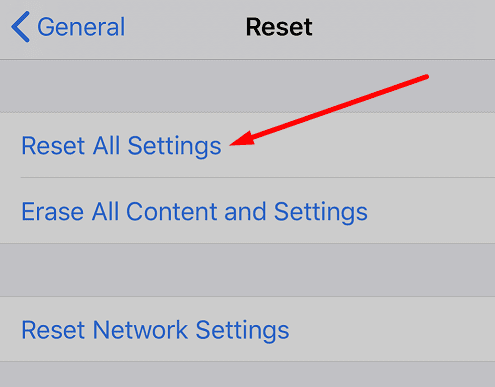
Try resetting your network settings, and check if you notice any improvements. If the SMS forwarding issue persists, reset all your settings.
Go to Settings, select General, and tap Reset. Then tap Reset Network Settings. If you still can’t forward text messages, go back to Reset and tap Reset All Settings. Restart your iPhone, and check the results.
Restore Your iPhone to Factory Settings
If you still can’t forward text messages, try restoring your iPhone to factory settings. Keep in mind that a factory restore erases all the data on your device, and installs the latest version of iOS. Don’t forget to back up important data before resetting your iPhone.
Connect your iPhone to your computer, click Restore and wait until your device restores to factory settings. Set it up as new and check if the SMS forwarding issue is gone. If the issue persists, contact Apple Support.
Conclusion
If SMS forwarding is not working on your iPhone, sign out of iCloud. Then update your iPhone to the latest iOS version and force-restart the device. If the glitch persists, reset your settings, and restore your iPhone to factory settings. If none of these solutions work, contact Apple Support.
Did you manage to solve the problem? Let us know in the comments below.
Madalina has been a Windows fan ever since she got her hands on her first Windows XP computer. She is interested in all things technology, especially emerging technologies — AI and DNA computing in particular.












Write a Comment