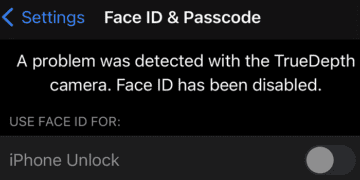
If Face ID stopped working, most likely this is because your iPhone has detected a problem with the TrueDepth camera. If you go to Settings, and tap Face ID and Passcode, you’ll notice the device says Face ID has been disabled due to an unknown TrueDepth camera issue. Let’s explore how you can troubleshoot this problem.
iPhone Detected a Problem With the TrueDepth Camera
Enable Airplane Mode, Restart and Update the Device
Put your iPhone into Airplane Mode, wait for 30 seconds, and then turn it off. Wait again for another 30 seconds, and then turn on the device. Check if the error persists. Hopefully, resetting your connection to Apple’s servers solves the problem.
If you still can’t use Face ID, go to Settings, tap General and select Software Update. Update your iPhone to the latest iOS version, and restart it. Check if Face ID works as expected.
Set up Face ID in Airplane Mode
Other users said they solved the problem after resetting Face ID while in Airplane Mode.
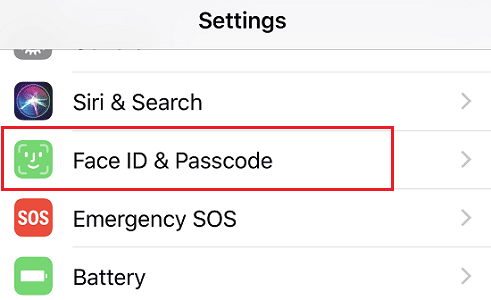
Go to Settings and select Face ID & Passcode.
Then select Face ID and tap the Delete Face option.
Restart your iPhone, enter your passcode, and go back to Settings.
Put the device in Airplane Mode, and set up Face ID again.
Then turn Airplane Mode off and check the results.
Reset iPhone Settings
Erase all of your iPhone’s settings, and check if this method solves the problem.
Go to Settings, and select General.
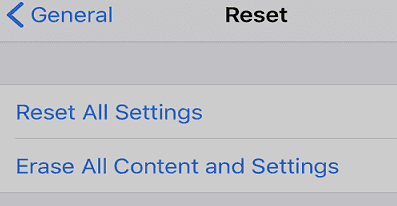
Select Reset iPhone, and tap Reset All Settings.
Confirm your choice, enter your passcode, and tap Reset All Settings.
Wait until your iPhone finishes clearing all of your settings.
Your iOS device should restart automatically.
Check if you’re still getting the same TrueDepth error message.
Restore Your iPhone via iTunes
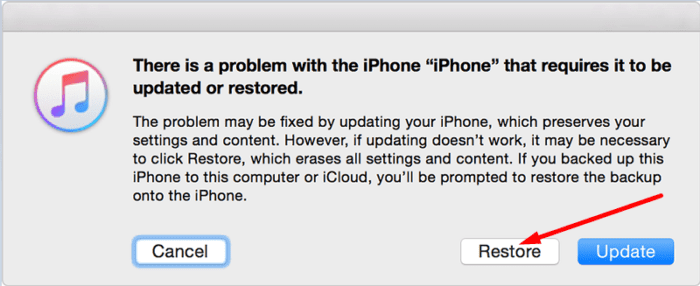
Try restoring your iPhone using iTunes. If this is a software-related issue, restoring your device should strike the software problem off the list. Some users suggested not using the backup option when restoring your device. Sometimes, your backup can get corrupted. If you use corrupted backup data to restore your device, the problem won’t go away.
Try restoring your iPhone as new without your backup. If the issue persists, this indicates your hardware is the culprit. Rest assured, if setting up your iPhone as new doesn’t solve the problem, you can always use the backup to restore your data.
As Apple explains, if your iPhone malfunctions, iOS may automatically disable the TrueDepth camera for safety reasons. Of course, you’ll still be able to use your device. It’s just that you might not be able to use Face ID. But you can still use your passcode.
Well, the bad news is that your iPhone may sometimes fail to recognize your passcode. If you’re locked out, the only option you got left is to go to the nearest Apple Store or authorized repair center.
Go to Apple Store
If you suspect the TrueDepth camera issue is caused by faulty hardware, book a Genius Bar appointment. Hopefully, Apple’s skilled technicians will be able to fix the problem.
The same thing happened to me, went to the Apple Store and they say we need to pay to replace the phone and there’s nothing they can do to solve this problem. Awesome that we update and they make us pay for the problems it causes.
Many users preferred to stick to the good old passcode than pay hundreds of dollars to get a new device. They disapproved of Apple’s solution calling it an upselling strategy. Comment down below if the Genius Bar technician said you needed a new phone to get rid of the TrueDepth error.
Conclusion
If your iPhone’s TrueDepth camera stopped working and you can’t use Face ID anymore, reset Face ID, enable Airplane Mode, and set up Face ID in Airplane Mode. Additionally, reset your iPhone settings and restore your device via iTunes. If nothing’s working, book a Genius Bar appointment.
Did you find other ways to troubleshoot your TrueDepth camera issues? Do share your ideas in the comments below. Your solutions may save the day for many fellow iPhone users experiencing the same problem.
Madalina has been a Windows fan ever since she got her hands on her first Windows XP computer. She is interested in all things technology, especially emerging technologies — AI and DNA computing in particular.
My iPhone Xs Max started doing this a few days ago. I was trying to get something done when the first error message popped up and didn’t read it. Right after that, I started getting the TrueDepth camera message. Other people below have mentioned water as a possible culprit. I had been caught in a rain storm when this problem started for me. My phone is in an Otterbox case that provides some additional protection from water, but this does seem to be a repeating theme. Anyway, I tried all of the above suggested steps through disabling Face ID and restarting the phone. After putting the phone into Airplane Mode, I then go to the Face ID settings to try to enable Face ID, but it’s grayed out. I don’t want to risk resetting my phone back to default settings and then restoring from iCloud. That’s just too risky.
I’ll miss using FaceID, but at least I’m not receiving error messages about the TrueDepth camera while I have FaceID disabled.
I also don’t want to go to Apple to have them tell me that I need to replace my iPhone. I will be happy to continue to use this older phone until I have a more disastrous problem to overcome.
Thank you so much for your tips! My Face ID completely stoped working so I tried to reset it but it wouldn’t take my face. I went to apple and they told me it was my True depth camera that needed to be repaired and that it was going to cost $270! I left apple with the plan of never using face ID again because I was not going to pay that amount for something that I didn’t break! I found your website and tried the airplane mode trick and it worked!!! Thank you so much!!!
HERES HOW I FIXED IT!
(Do note I had no physical damage to my phone)
I switched my phone over to airplane mode and removed the SIM card tray and took the sim out and closed the tray, restarted my phone and put the Sim back in and it worked. I don’t live in the US so I have the SIM card tray. But it stopped working whenever I mess with smth in the Face ID and passcode section in settings and have done this a couple of times.
My iPhone 12 pro max has a never been damaged and has never been worked on. I fail to see why out of nowhere I would get a Truedepth camera fault. I’ve gone through all the steps above and nothing worked.
After trying to reset several times, I set up Face ID in airplane mode and that took care of the problem, great advice! FYI I do believe water started the problem. Battery had also been replaced about a month ago. Just for added information
This happened after having my battery replaced and the IOS updated. My camera works fine and the phone has been well taken care of. I am not replacing it until something else fails, it will not be another iPhone when I do replace it.
Oh my gosh! Thanks for this article. Putting the phone into airplane mode before cycling power did the trick to get faceID working again. Really wish Apple’s help had offered this nugget of information instead of saying I needed to bring the phone in! They just recommended cycling power and/or making sure the phone is up to date.
Had a similar problem with my XS. iPhone message told me that the TrueDepth camera had been disabled and that i should head to the apple store. Genius technicians told me it would be £400+ for a repair or I could trade it in. Even more frustrating that it was a week out of it’s 2 year warranty and there was nothing they could do – not best pleased.
Phone was working perfectly until I updated. Then I was told a non-genuine device had been detected (my screen which I had replaced a month prior), that there was a problem with my true depth camera, and that face id had been disabled. Took the phone to Apple only to be told I needed to buy a new device for some $400 and change. So frustrating when there was absolutely no problems with the phone before the upgrade.
Apple told me I needed to replace my phone. Very disappointed this feature stopped working when my phone got wet. Very disappointed with apple, I was going to buy an M1 laptop and media creation workstation but I will stick with Windows.
My Face ID stopped working, I booked an appointment with the Genius Bar and they said they simply can’t do anything and that I would have to pay to replace my phone. My phone is only 4 years old, in pristine condition , smells like an upselling strategy to me.
Having problem with my face ID since 2 week but it was cost myself I put my phone in the water since then the iphone give me a chance to set it up once and I was having trouble with it still then I reserted face ID from one screen came there is problem found in the truedept camera up to now .
Having problem with my face ID since 2 week but it was cost myself I put my phone in the water since then the iphone give me a chance to set it up once and I was having trouble with it still then I reserted face ID from one screen came there is problem found in the truedept camera up to now .
I have the same problem my face id doesn’t work now when I was at 14.7 was working well now no at 15.1 i talk to support he said it will work on 15.2 now they said to me go to store for repair it ..
My true depth camera stopped working last week. I had installed 15.1 recently. The apple store told me it couldn’t be fixed and recommended a new one, just as you said.
I tried your first fix and when i turn it back on it and go to Settings and select Face ID & Passcode.face-ID-and-passcode
Then select Face ID and tap the Delete Face option I don’t see the option for Delete Face. If I try to set up Face ID it says the camera as been disabled.
Apple said I need yo replace my phone, even though after updating my phone to latest IOS my face Id stopped working. This is the one type of ripoff to customers by apple the same they did couple years ago by slowing iphone and required to change battery. That’s how they become the worlds most valuable company by ripping off the customer.
I had a pretty deep scratch on my fairly new IPhone 12 pro max. I noticed the screen wasn’t working right in the area of the scratch. I have Apple care plus, so I made an appointment through AppleCare at Best Buy’s geek squad service center to get the screen repaired. Walked in expecting to pay $30, only for them to tell me they were getting fault codes in my true depth camera as well as the area of the screen that was scratched and that the whole phone would need to be replaced. My Face ID hasn’t been an issue at all for me. It works flawlessly, as well as with my mask on when I’m wearing my watch. I don’t get it. They said it’s Apple’s policy that they have to replace the entire phone if the TrueDepth camera is failing. I don’t even understand how it could be failing considering I have legitimately NEVER dropped it and am really careful with my phone. I definitely think it’s annoying that I’m having to pay $100 for a refurbished replacement when I just paid $1,300 for this phone 3 months ago and the TrueDepth “failure” isn’t even affecting my ability to use Face ID. Seems sketchy to me. I’ll be calling Apple to complain.










What a scam!!! Anything to make them more money! This is BS!!! Phone was fine until the update! Thinking of going to Google phone.
Hi,
Thank you for the solution!
Now I have fixed my true depth camera very easy.
Regards,
My iPhone Xs Max started doing this a few days ago. I was trying to get something done when the first error message popped up and didn’t read it. Right after that, I started getting the TrueDepth camera message. Other people below have mentioned water as a possible culprit. I had been caught in a rain storm when this problem started for me. My phone is in an Otterbox case that provides some additional protection from water, but this does seem to be a repeating theme. Anyway, I tried all of the above suggested steps through disabling Face ID and restarting the phone. After putting the phone into Airplane Mode, I then go to the Face ID settings to try to enable Face ID, but it’s grayed out. I don’t want to risk resetting my phone back to default settings and then restoring from iCloud. That’s just too risky.
I’ll miss using FaceID, but at least I’m not receiving error messages about the TrueDepth camera while I have FaceID disabled.
I also don’t want to go to Apple to have them tell me that I need to replace my iPhone. I will be happy to continue to use this older phone until I have a more disastrous problem to overcome.
my face id issue for a truedepth camera give me solution on mail
website helped a lot and saved me a trip to the apple store, thanks!
Well I have done everything in this and the camera is still not working. It looks like it will be cheaper to get a new phone
Thank you so much for your tips! My Face ID completely stoped working so I tried to reset it but it wouldn’t take my face. I went to apple and they told me it was my True depth camera that needed to be repaired and that it was going to cost $270! I left apple with the plan of never using face ID again because I was not going to pay that amount for something that I didn’t break! I found your website and tried the airplane mode trick and it worked!!! Thank you so much!!!
I have a 14 pro and I got the msg.
HERES HOW I FIXED IT!
(Do note I had no physical damage to my phone)
I switched my phone over to airplane mode and removed the SIM card tray and took the sim out and closed the tray, restarted my phone and put the Sim back in and it worked. I don’t live in the US so I have the SIM card tray. But it stopped working whenever I mess with smth in the Face ID and passcode section in settings and have done this a couple of times.
Good luck!
My iPhone 12 pro max has a never been damaged and has never been worked on. I fail to see why out of nowhere I would get a Truedepth camera fault. I’ve gone through all the steps above and nothing worked.
After trying to reset several times, I set up Face ID in airplane mode and that took care of the problem, great advice! FYI I do believe water started the problem. Battery had also been replaced about a month ago. Just for added information
This happened after having my battery replaced and the IOS updated. My camera works fine and the phone has been well taken care of. I am not replacing it until something else fails, it will not be another iPhone when I do replace it.
Oh my gosh! Thanks for this article. Putting the phone into airplane mode before cycling power did the trick to get faceID working again. Really wish Apple’s help had offered this nugget of information instead of saying I needed to bring the phone in! They just recommended cycling power and/or making sure the phone is up to date.
what do u mean by cycling power?
My iPhone XR is updated and I have restart my phone including all the procedures stated it but there is still problem with true depth camera,,,why?
Had a similar problem with my XS. iPhone message told me that the TrueDepth camera had been disabled and that i should head to the apple store. Genius technicians told me it would be £400+ for a repair or I could trade it in. Even more frustrating that it was a week out of it’s 2 year warranty and there was nothing they could do – not best pleased.
Phone was working perfectly until I updated. Then I was told a non-genuine device had been detected (my screen which I had replaced a month prior), that there was a problem with my true depth camera, and that face id had been disabled. Took the phone to Apple only to be told I needed to buy a new device for some $400 and change. So frustrating when there was absolutely no problems with the phone before the upgrade.
I was told by Apple to buy new phone.
Apple told me I needed to replace my phone. Very disappointed this feature stopped working when my phone got wet. Very disappointed with apple, I was going to buy an M1 laptop and media creation workstation but I will stick with Windows.
My Face ID stopped working, I booked an appointment with the Genius Bar and they said they simply can’t do anything and that I would have to pay to replace my phone. My phone is only 4 years old, in pristine condition , smells like an upselling strategy to me.
Having problem with my face ID since 2 week but it was cost myself I put my phone in the water since then the iphone give me a chance to set it up once and I was having trouble with it still then I reserted face ID from one screen came there is problem found in the truedept camera up to now .
Same here, dropped mine in the hot tub, did not work after that, it is supposed to handle 30 min under water……
Same problem after updating my iPhone XS version.
Having problem with my face ID since 2 week but it was cost myself I put my phone in the water since then the iphone give me a chance to set it up once and I was having trouble with it still then I reserted face ID from one screen came there is problem found in the truedept camera up to now .
I have the same problem my face id doesn’t work now when I was at 14.7 was working well now no at 15.1 i talk to support he said it will work on 15.2 now they said to me go to store for repair it ..
Face ID just stopped working after 15.1 update on iphone 11
My true depth camera stopped working last week. I had installed 15.1 recently. The apple store told me it couldn’t be fixed and recommended a new one, just as you said.
I tried your first fix and when i turn it back on it and go to Settings and select Face ID & Passcode.face-ID-and-passcode
Then select Face ID and tap the Delete Face option I don’t see the option for Delete Face. If I try to set up Face ID it says the camera as been disabled.
I have not tried Resetting it yet.
Apple said I need yo replace my phone, even though after updating my phone to latest IOS my face Id stopped working. This is the one type of ripoff to customers by apple the same they did couple years ago by slowing iphone and required to change battery. That’s how they become the worlds most valuable company by ripping off the customer.
I had a pretty deep scratch on my fairly new IPhone 12 pro max. I noticed the screen wasn’t working right in the area of the scratch. I have Apple care plus, so I made an appointment through AppleCare at Best Buy’s geek squad service center to get the screen repaired. Walked in expecting to pay $30, only for them to tell me they were getting fault codes in my true depth camera as well as the area of the screen that was scratched and that the whole phone would need to be replaced. My Face ID hasn’t been an issue at all for me. It works flawlessly, as well as with my mask on when I’m wearing my watch. I don’t get it. They said it’s Apple’s policy that they have to replace the entire phone if the TrueDepth camera is failing. I don’t even understand how it could be failing considering I have legitimately NEVER dropped it and am really careful with my phone. I definitely think it’s annoying that I’m having to pay $100 for a refurbished replacement when I just paid $1,300 for this phone 3 months ago and the TrueDepth “failure” isn’t even affecting my ability to use Face ID. Seems sketchy to me. I’ll be calling Apple to complain.