It’s not often that we write about specific applications or one-off extensions for your Mac. But when there’s utility that is just so useful that it can be ignored, we feel compelled to write about it. That brings us to ActiveTab and the ongoing “problem” with Safari. At WWDC 2021, Apple attempted to bring a unified experience to Safari across the iPhone, iPad, and Mac. We’ve been moving in this direction across the board, with the process being streamlined after the introduction of the M1 chipset.
However, as soon as the first developer betas hit the internet, Apple continues to field complaints. Apple has been forced into offering more options than it probably would like, along with having to abandon ship with some features. The biggest complaint continues to be how tabs are handled primarily on the iPad and Mac. Originally, Safari 15 moved the tabs into the unified bar at the top of the Safari window. This isn’t a great idea considering that things like active window indicators are gone, and you can’t just press the “x” to close out tabs.
But thanks to the renewed focus on Safari extensions with iOS 15 and iPadOS 15, this also opens the door for developers to attempt to fix problems on the Mac too. There are a lot of great extensions that are already on the App Store and work across all of your Apple devices. And with the one we’re looking at today, it’s been designed to be used specifically on the Mac with Safari 15.
View Your Active Safari Tabs
Admittedly, I had not heard of ActiveTab until John Voorhees over at MacStories wrote about it. Since then, I’ve seen the extension covered or mentioned by many in the Apple community. The premise of ActiveTab is simple, but I’ll let the developer answer the question of “what does it do”:
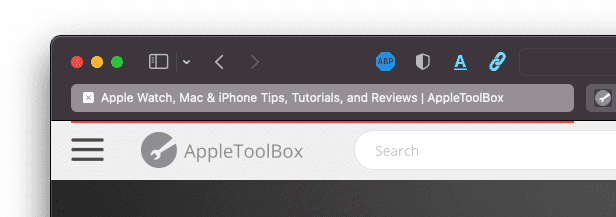
ActiveTab makes it easier to spot the active tab in Safari on Mac by drawing a line below it. It works by predicting the position of the active tab based on the size of your browser window and the number of tabs.
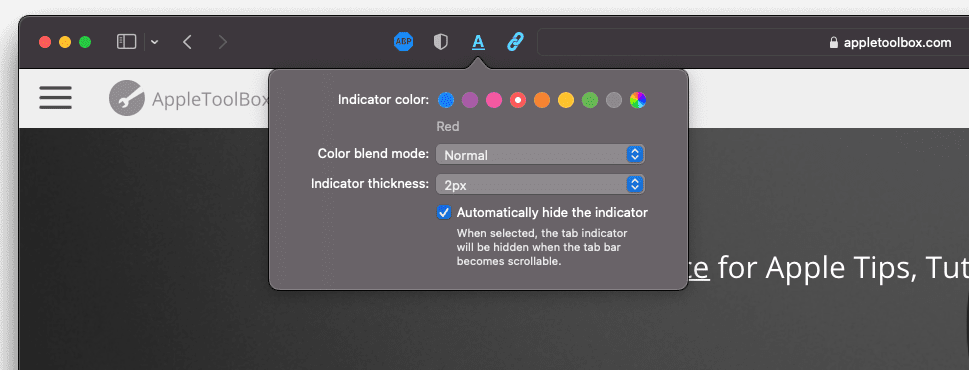
Pretty ingenious concept right? Well, as soon as I saw the first screenshot, ActiveTab became my latest Mac App Store purchase. After installed and activated, you are provided with a few different options thanks to the Extension button found in the URL bar. Clicking the underlined “A” icon, shows a pop-up menu with several different features. In fact, going into this, there was a gripe that I was going to flesh out about it, but that’s since been remedied with the latest ActiveTab update.
As for the options that you are provided, here’s the list:
Indicator color
Color blend mode
Indicator thickness
Automatically hide the indicator
With the last version of ActiveTab, you were limited to being able to pick from just eight different colors. But thanks to version 1.0.3, that is no longer the case as you can now “set the indicator to any colors you want”. This latest update even added the ability to automatically hide the indicator if you end up having a slew of tabs open, leaving you with a scrolling tab bar.
There are still some features that could be added, such as a light and dark mode for the tab colors, as Vorhees suggested in his ActiveTab overview. And if you have colored tabs enabled (which it is by default), you may have to deal with a bit of color clashing based on the color of your active window compared to the color provided by Safari.
Nevertheless, ActiveTab is one of those simplistic, yet powerful, apps that showcase the power of being able to use an extension to solve a problem. Here’s to hoping that the development continues, or maybe this can be the next “sherlocked” feature as Apple continues to fix a frustrating Safari experience.
Andrew Myrick is a freelance writer based on the East Coast of the US. He enjoys everything to do with technology, including tablets, smartphones, and everything in between. Perhaps his favorite past-time is having a never-ending supply of different keyboards and gaming handhelds that end up collecting more dust than the consoles that are being emulated.











Write a Comment