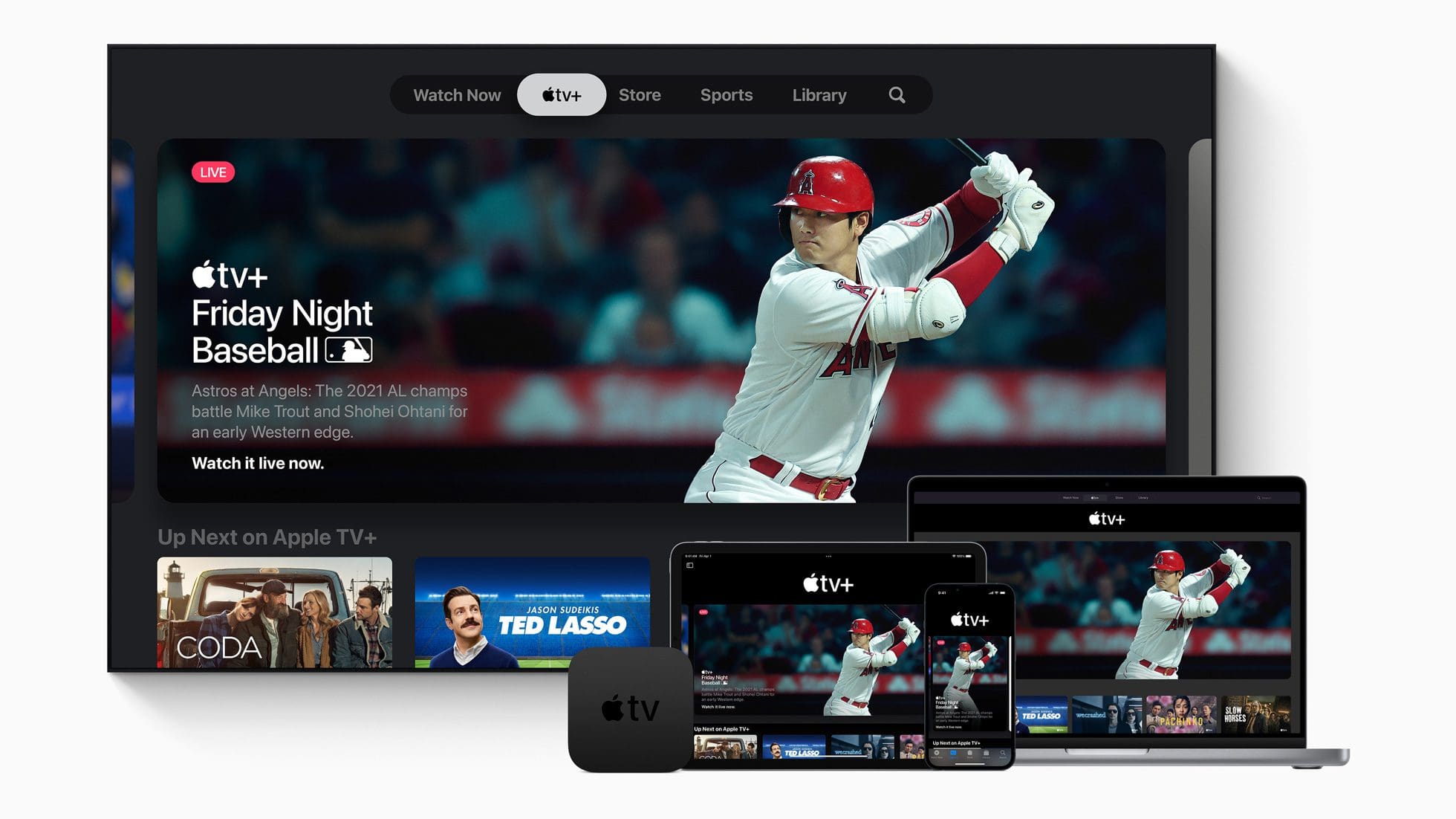
One of the surprise announcements that came out of Apple’s Peek Performance event was the introduction Friday Night Baseball. What made this announcement so bizarre was that, at the time, Major League Baseball had just canceled the first two weeks of games due to the end of the previous collective bargaining agreement (CBA). Thankfully, a deal was finally put in place between owners and players, giving us the opportunity to enjoy another summer filled with baseball all day and night.
With Friday Night Baseball on Apple TV, this partnership provides everyone to enjoy two games for free every Friday night. Of course, the teams that are playing will be different from week to week, but you’ll be able to watch baseball even if you don’t have a cable subscription. Starting on April 8, here’s how you can watch Friday Night Baseball on Apple TV.
Open the Apple TV app on your Apple device.
Navigate to the Apple TV+ tab.
At the top of the page, select Friday Night Baseball.
If the banner is not visible, you might need to swipe left until it’s revealed.
Select one of the games to start watching.
Just as a reminder, Friday Night Baseball is not limited to just those with an Apple TV. Pretty much anyone with access to the Apple TV+ app is able to enjoy Friday Night Baseball right from their devices. This includes the likes of the Amazon Fire TV Stick, your iPhone, iPad, Mac, and anything else that can download Apple’s streaming application.
Friday Night Baseball on Apple TV Schedule
As we mentioned previously, Friday Night Baseball will consist of two games being streamed for free, every week. The only “catch” is that this promotion will last for the first 12 weeks of the season before you’ll need to find another option if you want to enjoy more baseball. Here’s the entire schedule of games that will appear as part of Friday Night Baseball:
Friday, April 8
New York Mets vs Washington Nationals @ 7 p.m. ET
Houston Astros vs Los Angeles Angels @ 9:30 p.m. ET
Friday, April 15
Tampa Bay Rays vs Chicago White Sox @ 7 p.m. ET
Cincinnati Reds vs Los Angeles Dodgers @ 10 p.m. ET
Friday, April 22
St. Louis Cardinals vs Cincinnati Reds @ 6:30 p.m. ET
Texas Rangers vs Oakland Athletics @ 9:30 p.m. ET
Friday, April 29
New York Yankees vs Kansas City Royals @ 8 p.m. ET
Washington Nationals vs San Francisco Giants @ 10 p.m. ET
Friday, May 6
Chicago White Sox vs Boston Red Sox @ 7 p.m. ET
Tampa Bay Rays vs Seattle Mariners @ 9:30 p.m. ET
Friday, May 13
San Diego Padres vs Atlanta Braves @ 7 p.m. ET
Chicago Cubs vs Arizona Diamondbacks @ 9:30 p.m. ET
Friday, May 20
St. Louis Cardinals vs Pittsburgh Pirates @ 6:30 p.m. ET
Texas Rangers vs Houston Astros @ 8 p.m. ET
Friday, May 27
Baltimore Orioles vs Boston Red Sox @ 7 p.m. ET
Toronto Blue Jays at Los Angeles Angels @ 9:30 p.m. ET
Friday, June 3
Detroit Tigers vs New York Yankees @ 7 p.m. ET
Atlanta Braves vs Colorado Rockies @ 8:30 p.m. ET
Friday, June 10
Tampa Bay Rays vs Minnesota Twins @ 8 p.m. ET
New York Mets vs Los Angeles Angels @ 9:30 p.m. ET
Friday, June 17
Chicago White Sox vs Houston Astros @ 8 p.m. ET
Cleveland Guardians vs Los Angeles Dodgers @ 10 p.m. ET
Friday, June 24
Chicago Cubs vs St. Louis Cardinals @ 8 p.m. ET
Detroit Tigers vs Arizona Diamondbacks @ 9:30 p.m. ET
Even More Baseball Content
As if being able to watch a couple of MLB games every week for free wasn’t enough, Apple is also bringing a few extra goodies to the masses. On Thursdays, “Countdown to First Pitch” is a new show that provides a preview for the upcoming games. MLB Daily Recap provides condensed highlights of games played the day (or night) before. You’ll even find a new curated group of stories in the Apple News app, giving you plenty of choices if you want to keep up with what’s going in the world of baseball for the 2022 season.
Finally, you’ll also find a new series of curated playlists in the Apple Music app. These are comprised of some of the walk-up songs that are played when different batters step up to the plate. It’s actually pretty unique, so you won’t have to try and remember what song was playing and can just jump right into the Apple Music app on your iPhone, iPad, Mac, or Apple TV.
Andrew Myrick is a freelance writer based on the East Coast of the US. He enjoys everything to do with technology, including tablets, smartphones, and everything in between. Perhaps his favorite past-time is having a never-ending supply of different keyboards and gaming handhelds that end up collecting more dust than the consoles that are being emulated.








Write a Comment