Several users have reported that their iPad / iPhone home button is not working. They notice that, without any warning signs, their Homes suddenly stop being responsive to touch–any touch, gentle or forceful.
And it’s a real problem! For most iDevice models especially those older ones, we use the Home Button all the time!
Before you troubleshoot, make sure you remove any protective films and cases that might block your Home. Make sure these aren’t causing your issues.
If your device’s screen was recently repaired, it’s entirely possible the problem is that the home button was not correctly aligned or paired with the logic board.
If the repair was an Apple Support job, contact Apple immediately and let them know there is a problem with your Home Button not working or malfunctioning since the repair. Ask for a diagnostic.
When a third-party repaired your screen, contact them for further inspection.
Tips to fix home button is not working (try each step until you solve this issue)
First clean the screen, paying particular attention to the Home Button–if you see any dirt or grease trapped in the crevice around the Home Button, try to clean that area thoroughly–you made need a clean screen solution to break down any oil
Make sure your device is off when you clean the Home Button and area around it!
Try “burping” the back of your iPad or iDevice, near where the Home Button is located on the opposite side.
Wrap the iDevice in a towel, then pat its backside (near the Home button) like you are burping a baby–so not too strong but also not too light
Move Safari out of the Dock and then restart your device
Return Safari to the Dock when your home button works again
Recalibrate your Home by doing the following:
Open ANY app
Press down your iPad’s or iDevice’s Power Button
When slide to power off appears, release power and hold down home
Hold your home button down until the app closes, the screen flashes, and your home screen appears
Try your Home button again and see if it works. If not, repeat the above procedure once more
Perform a Forced Restart (if possible)
On an iPhone 6S or below plus iPads with Home Buttons & iPod Touches, press Home and Power at the same time until you see the Apple logo
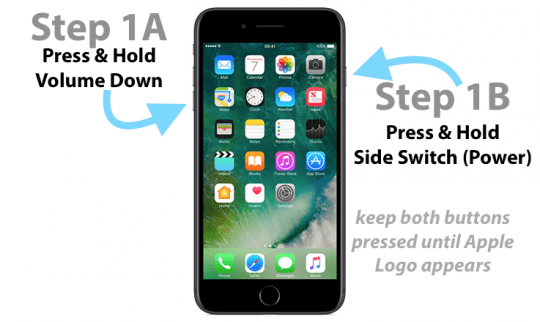
For iPhone 7 or iPhone 7 Plus: Press and hold both the Side and Volume Down buttons for at least 10 seconds, until you see the Apple logo
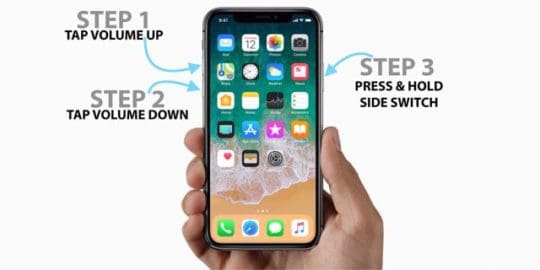
On an iPhone X Series, iPad with no Home Button, or iPhone 8 or iPhone 8 Plus: Press and quickly release the Volume Up button. Then press and promptly release the Volume Down button. Finally, push and hold the Side or Top button until you see the Apple logo
Disable Any Accessibility Shortcuts
Tap Settings > General > Accessibility > Accessibility Shortcut (also called in older iOS, Triple-click Home), and uncheck any selections or disable it, so it doesn’t show any selected shortcut
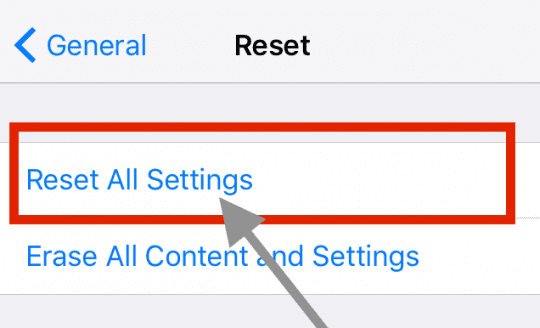
Reset All Settings on Your iDevice
Go to Settings > General > Reset>Reset All Settings.
This action does not delete any data but does return any personalized features like WiFi passcodes, wallpapers, and accessibility settings back to defaults
Use a Virtual Home Button Instead!
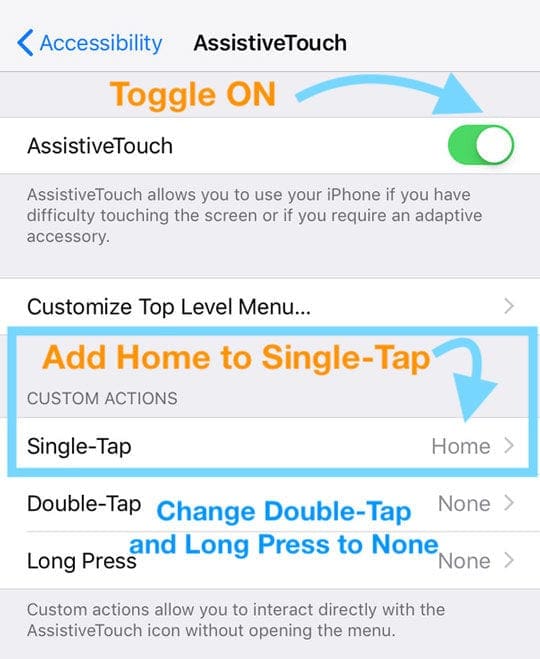
If none of those tips help, add an on-screen Home Button by using your iPad’s accessibility setting. Go to Settings > General > Accessibility > AssistiveTouch.
Toggle this feature ON, and then set your Custom Action for a Single-Tap to Home.
Set all other Custom Actions to None. Now that on-screen button is your home button for now.
Using an Older iOS?
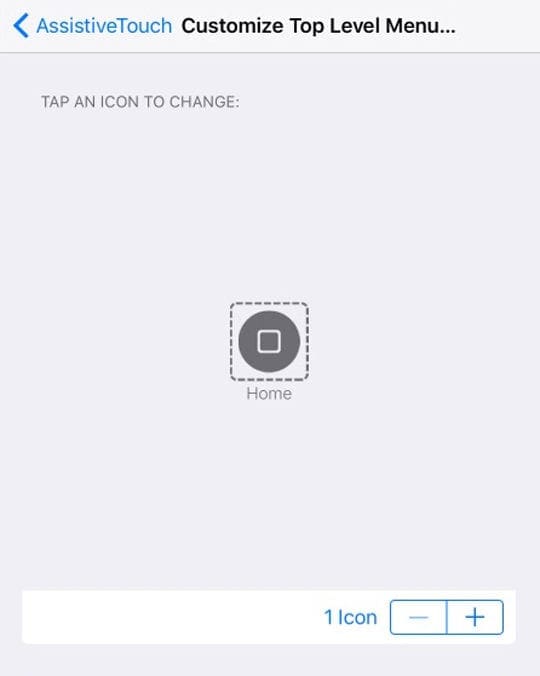
For older iOS that don’t see options for custom actions, instead, tap Customize Top Level Menu and set the Home Button as a single icon.
Can’t Restart Your Device Without the Home Button?
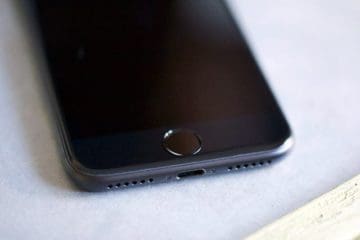
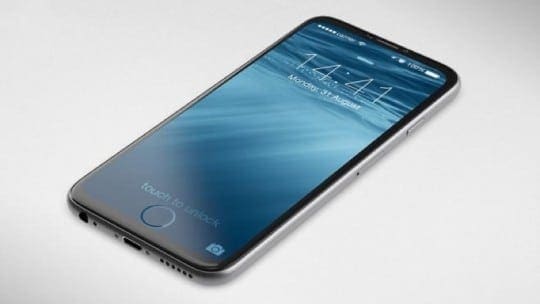
The Home Button on the iPhone has gone through a series of evolutions over the years. What started as simple mechanism to allow an user to go back to the home screen or assist during a reboot operation, evolved into a home button with Touch ID functionality along with tactile support for the button for the new devices.
This evolved functionality of tactile support and integrated touch-id on the home button sometimes makes it a hard repair if you have issues.
iPhone Home Button Not Working On iPhone 7 or iPhone 8 models
Here is a list of issues to check for when you have issues with your iPhone Home Button. Some of these can be managed via the Settings App while others may require professional repair options.
Touch-ID via the iPhone Home Button Not Responsive
These iPhone models also included a tactile sensor along with the touch-id functionality for authentication.
Are you experiencing Touch-ID issues on your iPhone? If your touch-id functionality is not working via the home button, it may be a simple setting issue where you may have turned it off by mistake.
Its good to rule this out by verifying it in the Settings app.
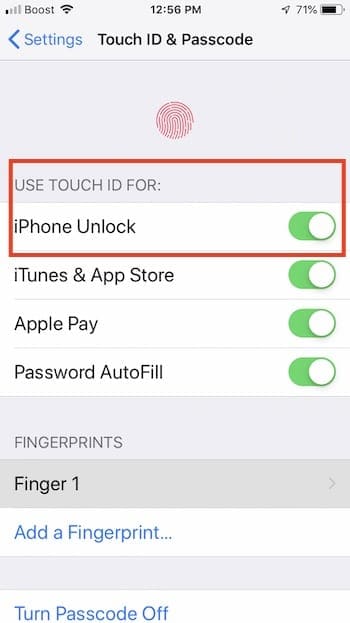
Tap on Settings > TouchID & Passcode
Enter your Password
Check if iPhone Unlock is enabled.
Touch-ID on the Home button also doesn’t work well if your finger is wet or if the home button has dust on it.
You may want to clean the Home Button on your iPhone as well as your thumb with a clean piece of cloth and then try again.
No Clicking Sound from iPhone Home Button
If your iPhone is not having any issues with the touch-id functionality but you are unable to feel the ‘clicking’ sound when you press on it, you may want to explore the taptic settings on your device.
This is where the taptic engine on the iPhone 7 / iPhone 8 variants come into play. In these New iPhone models, the intensity of the home button response can be adjusted. Start by checking it via your iPhone Settings.
Open Settings App on your iPhone
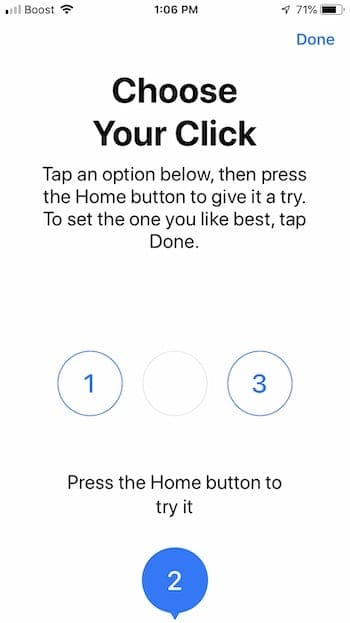
Tap on General > Home Button
Adjust the Home Button feedback intensity here to your preference
Adjust the feedback to level ‘3’ and see if it makes a difference in clicking behavior of the home button.
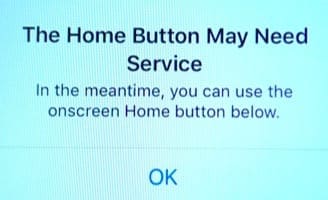
Home Button Needs Service Message on iPhone 7 or iPhone 8
Apple has engineered feedback on the iPhone 7 and iPhone 8 models, where if there is a hardware issue, it shows the message and automatically sets up a virtual Home Button much like the assistive touch functionality.
You can continue to use this functionality until you take the iPhone to the Apple Genius Store for checking it out.
We wouldn’t recommend trying to repair it by opening the iPhone for these advanced iPhones. You are best making an appointment with Apple Support and having them look at it.
The only other suggestion we have when you see this message is to try restoring your iPhone 7/ iPhone 8 into factory settings and checking if it resolves the issue.
iPhone Home Button Broken
On these new iPhone models such as the iPhone 7/7+ or the iPhone 8 variants, there is not much that you can do other than trying some of the basic troubleshooting procedures to rule out the obvious.
Start with a Simple force restart of the iPhone and see if it fixes the Home Button issue.
If you started noticing these problems following an iOS update to your device, check for any latest pending iOS upgrades and apply them to your iPhone.
Tap on Settings > General > Software Update and if you see a pending update, you can apply the latest iOS update and check if it solves your issue.
Restore iPhone using iTunes
Here are few ideas that can go a long way to fix Home button issues if it is more of a software related issue.
Start by making sure to take a complete backup of your iPhone
Restore your iPhone by using iTunes and your computer
If a Simple restore didn’t yield you the results, you may want to reset the iPhone 7/8 into factory settings and see if it solves your issue
Between the Restore and the Factory settings, the issue is resolved if it is related to iOS software. Here are two guides that walk you through the complete resetting process for your iPhone or iPad
Now, if your home button is not working due to a hardware related issue, you can try some of the basic checks before you look for professional options.
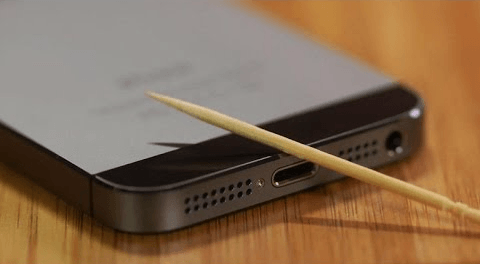
Home Button Contacts and Charging Port
Sometimes, the contacts between the Home button and the rest of the logic board can get loose. Check for the following
Although there are many repair kits sold online that claim to easily replace the iPhone home button, We can tell you from our experience that replacing the home button on the newer iPhone 7/iPhone 8 or the iPad Pros is not for the faint of heart.
There is a lot of adhesive inside these new iPhone and iPad models that make it extremely cumbersome to isolate the part and replace it yourself.
How Much Does it Cost to Replace the Home Button
On an older iPhone such as iPhone 5 or iPhone 6 models, you can try replacing this yourself if you have some experience in the art.
Here is a sample kit that we found on ebay via iFixit that sells for $40. This is for replacing the home button assembly on an iPhone 6S Plus.
image via ebay
A good number of users who have tried to replace the home button via cheaper options have noticed that their device looses the touch-id functionality after the replacement. Please make sure to check this issue with the repair shop or kit seller before you attempt at replacing.
Please note that you cannot replace the iPhone 7 or iPhone 8 home button assemblies by yourself using DIY kits.
You will need to take it/send it to Apple Support and have them take a look and provide you an estimate.
Apple Repair Cost for Home Button
If your iPhone 7/8 is still under AppleCare+ plan, the repair may cost you about $99. Out of Warranty repairs of the home button may cost you somewhere between $320 and $360 for your iPhone 7 and iPhone 8 models.
The main reason for the high price from Apple is because Apple replaces the entre front assembly in most cases as opposed to just the home button itself.
Third Party DIY Home Button Kits
Things are a little easier when it comes to locating spare parts for the iPad Home Button.
Usually the Home Button assembly is available for $15 and the bracket that holds the Home button can be found for less than $10. It’s not the cost of these parts, but the specialized labor involved that makes it harder.
via iFixit
When it comes to DIY repair, you will need to explore the reviews of the offered kit and make your decisions.
Consumers Report had looked at some popular DIY iPhone screen repair kits and found the process to be cumbersome and error-prone.
PRO-TIP:
If your iPhone Home button started having issues after a battery replacement, it is very likely that the home button contacts (there are two gold contacts that are shorted) were not positioned correctly. We have seen this reparability issue when it comes to repairing the Home Button of an older iPad. You may want to take it in to the shop and have them re-check.
If you want to pursue this route, we would definitely recommend starting with iFixit since they have some of the best kits and guides when it comes to DIY repairs for your idevice.
We also suggest that you start with your local Apple store or authorized reseller and get estimates around the repair.
If your iPhone or iPad is old and you are having other issues on it as well besides the Home button issue, you may think about replacing the device with a new or refurbished Apple device. You should also check if your older device qualifies for a trade-in when buying a new device.
iPad Pro Home Button Feels Hot
Several iPad Pro users have found that sometimes their iPad’s Home button on the iPad Pro 12.9 inch and the recent iPad Pro 9.7 inch feels warm to touch.
Its usually the lower 1/3 section of the iPad Pro that feels warm to touch both around the Home Button area on the front of the display and on the rear side of the device.
If you are seeing this issue with your iPad Pro home button, you may want to restore the iPad Pro using iTunes and check if the problem goes away.
The other major item to check for is the iPad Pro case. Make sure that there are holes in the case to allow for heat dissipation. This is true if you use your iPad Pro for gaming or other resource intensive apps such as video editing et al.
We also suggest that you perform a Network Reset on the device, especially if the heat is related to some Wi-Fi / Cellular issues.
Make a Note of your Wi-Fi ID and password and then tap on Settings > General > Reset > Reset Network Settings.
Once the device starts up, check and see if it makes a difference to the home button issue and warm temperature.
4 key Workarounds for a broken Home Button on your iPad or iPhone
If your iPad or iPhone’s home button is not functioning and you want to wait it out on the repairs, here are FOUR key workarounds that will help you until you are able to repair the device.
The most common option that users use when facing a broken home button issue is to use the Assistive Touch Feature under Accessibility in order to use the Virtual Home Button
The second and a lesser known tip is to use the Five Finger pinch gesture on your iPad to get back to your home screen. This functions almost like a home button. Irrespective of which app you are currently on, use five fingers and perform a pinch gesture on your iPadand it will bring you back to the Home Screen
If you are working on an iPad with broken home button and using a smart keyboard, you can use the ‘Command+H’shortcut to access the home screen instead of the Home Button
If your device is on the more recent iOS versions (iOS 11/12), You can use the Settings app to bring up the ‘Slide to Power Off Feature’. Tap on Settings > General and scroll all the way down and you will find ‘ShutDown’ here. Use this to Power off your device
Get Help From Apple!
If the button or switch still isn’t working, is damaged, or works intermittently, you might need to set up service for your device. It’s possible that your device’s problem is due to a hardware defect that requires the Home Button (or its adjacent parts) to be replaced.
It’s possible that your Home Button is broken and needs repair, usually, your Home Button’s bracket comes loose, or the digitizer flex cable is somehow kinked or damaged. If that’s the case (or you think it is), follow up with Apple Support or an Apple Service Provider for repair.
If your iPad is still covered by Apple’s 1-year warranty or you opted for Apple Care to extend the warranty and are still in that policy’s window, take it to an Apple Store for evaluation.
To check your current warranty status, open this check coverage page. You need to enter your device’s serial number located in Settings > General > About.
Reader Tips
Try downloading and installing the latest ipsw and do a fresh install on your device (remember to backup all your data via iTunes or iCloud first.)
I restored by iPhone in DFU Mode, and that apparently fixed the problem for me!
Calibrate your home button following these steps:1. Launch any app such as Weather or Stocks that come natively with your iPhone or iPad. 2. Press and hold the Power button until “slide to power off” appears on the screen. 3. Release the power button and then press and hold the Homebutton until that “slide to power off” slider goes away and all you see is your Home Screen or that App
Obsessed with tech since the early arrival of A/UX on Apple, Sudz (SK) is responsible for the original editorial direction of AppleToolBox. He is based out of Los Angeles, CA.
Sudz specializes in covering all things macOS, having reviewed dozens of OS X and macOS developments over the years.
In a former life, Sudz worked helping Fortune 100 companies with their technology and business transformation aspirations.
Hi I need help about my home button,I try everything but the home button doesn’t work and I have IOS 10 is it the IOS a problem if yes,how to solve it?please help me.
If you do not want to spend the time/money for an inspection, the next best thing is to enable the virtual home button on your iDevice.
For iOS 10, go to Settings App > General > Accessibility. Scroll down the list for Assistive Touch and tap it.
In the AssistiveTouch Menu, toggle AssistiveTouch on. You should see a transparent dark box on your screen with a light circle in its center.
Next, tap Customize Top Level Menu. Change the icon number to just 1 icon and then tap that one icon and choose Home as its assignment.
You should now have a button on-screen to always reach your Home Screen from any app.
If you need to restart your device, reset your network’s settings by going to Settings > General > Reset > Reset Network Settings.
Resets all your network connection options and sets your device’s network settings back to the factory defaults. Clears your current cellular (if applicable) and WiFi networks including saved networks, WiFi passwords, and VPN settings.
Before you reset your network’s settings, be sure have your WiFi network name and passwords available for re-entry.
If you don’t have your WiFi passcode available to re-enter, you can also switch on Bold Text to reset your iDevice.
Go to Settings > General > Accessibility > Bold Text and automatically you see a message to restart your iPad.
I have the same problem when I leave it on charge and it reaches100% and don’t take off charge straight away it then shows the connect to your battery as though it is flat after leaving iPad for a few weeks it will then switch on again showing 100%
If I don’t let the charge reach 100% and take it off charge before that at say90% it continues to work fine at odd times I’ve forgot to take it off charge it will freeze up on me again the I am back to square one and have to leave it again for a few weeks
Hope this helps
Ok thank you sooo much!! I powered my iPad off and I waited for like a minute or so and then I turned it back on and tested everything that didn’t work before and everything was working!! Thanks so much!!
Sorry to hear about your ipad Mini. First clean the screen, paying particular attention to the Home Button–if you see any dirt or grease trapped in the crevice around the Home Button, try to clean that area thoroughly–you made need a screen clean solution to break down any grease.
Please try a forced restart if you haven’t already by pressing both the Home and Power buttons at the same time, only release when you see the Apple Logo on-screen.
Next, recalibrate your Home by doing the following:
1. Press down your iPad’s Power Button
2. When slide to power off appears, release power and hold down home
3. Hold your home button down until your home screen appears
4. Try your Home button again and see if it works. If not, repeat above procedure once more
If that didn’t help, add an on-screen Home Button by using your iPad’s accessibility setting. Go to Settings > General > Accessibility > AssistiveTouch. Toggle this feature ON, and then set your Custom Action for a single tap to Home. Set all other Custom Actions to None. Now that on-screen button is your home button for now.
It’s possible that your Home Button is broken and needs repair, if that’s the case (or you think it is), follow up with Apple Support or an Apple Service Provider for repair.
I found a post on cnet.com with a solution to bypass the home button. I wish that I had known this sooner.
Simply take all 5 fingers & pinch the screen. This will take you home.
I use always press the home button to go back home to exit the browser & check my email. I figured out that all you have to do is take 4 fingers & swipe to the side & you can go for one open application to another without ever pressing the home button again!
I tried all the ” fixes” but nothing worked.. Great tip you gave of pinching the screen with all five fingers.. At least I can use it until I can take it in! Thanks!!!
Wow, the blowing air into the charging port really worked.. I had the same non responsive home button on iPad.. I didn’t have a can of air so I simply blew in it with my mouth and it worked like a charm.. Thanks
1. Open an original application on your device (pre-installed) like iTunes, Calculator, Stocks etc.
2. Press the power (top right) and hold it down until the power off prompt appears
3. Without doing anything else, press and hold down the home (middle) key until the prompt goes away.
This will recalibrate the home button
My iPhone4 home button reacts but I have to press it very hard, I have had the accessibility button on for a while, however I am sick of it and want the iPhone to work normally again. I have tried the compressed air a few times and blowing into the USB slot with a sunglasses cloth covering it. Any more suggestions? Thanks
My iPad2 home button stopped working all of a sudden, and then less than a week later it stopped charging at the usual rate (e.g. when I charge it overnight using a 10W charger it will nowonly increase the battery by another 10% or so, whereas until recently it would charge up to 100% overnight). Could these two problems be related, in anyone’s experience?
Hi jess,
if you have noticed your iphone’s home button started showing unresponsiveness gradually than dust could be the reason, so try air blowing once again. If you find it suddenly not working than it could be the problem related to hardware.. like the push button under the home button… so you might have to get a replacement with new button. If still anything doesn’t works out let me know.
Since electronic devices attract dust all the time and unfortunately Apple did not test the iPad in dusty areas, so it gets unresponsiveness often. You just have to watch out for dust and clean it often.
well if that doesn’t work then go to general-accesibility-assistive touch-on
next a little white dot pops up somewhere on the screen- u click it and it gives u options the home button, the device itself, favorites, and gestures…
Why is general-assecibility – assistive touch-on? I don’t have that on my iPod. And my home button isn’t working at all. U have to press it extra hard and it still doesn’t work.
Thanks Pruthviraj. I just received my new IPad and the home button refused to work. I did the rotation thing, the force quit thing, the flat surface thing, and finally your suggestion. I had to do it a couple of times. Glad to report that it worked. Must be a lot of dust in China!
well if that doesn’t work then go to general-accesibility-assistive touch-on
next a little white dot pops up somewhere on the screen- u click it and it gives u options the home button, the device itself, favorites, and gestures.
Guys… i suddenly encountered my iPads home button responseless … i just followed the following steps which i used to do for my computer mouse… Trust me it fixes!
1. Turn off your iPad.
2. Blow air(dry) from dust cleaner or from your mouth(if you can kiss your iPad)(hold a piece of dry cloth when blowing air from your mouth so as to input dry air into the device)
3. Now turn on your iPad and continue pressing your working home button.
If any issues can contact me.
(Most of the times home button unresponsive behaviour is not software issue)
Maintining iPad in a proper way keeps your device working properly.
The home button on my iPhone is not working. I don’t think it’s stuck as it does depress on pushing it. Blowing dry air hasn’t worked either. Any other suggestions?
well if that doesn’t work then go to general-accesibility-assistive touch-on
next a little white dot pops up somewhere on the screen- u click it and it gives u options the home button, the device itself, favorites, and gestures.
This works perfectly – even when trying everything else folks have suggested didn’t. Great that at least there are a number of options. Thanks everyone!
I have tried the blowing but nothing is happening, it won’t respond I have to keep switching the iPad off every time I need to go to a different programme, can you help
I’ve had persistent but sporadic problems with the home button for a few months. I do leave the Accessibility widget up simply as assurance that I’ll have a home button.
I did note this morning based on a few older posts that it might be a dirt/dust problem. I had a can of compressed air handy, and my iphone was having the problem. -so- A puff of air on at the button and another in the connector slot, and ta-da. The button started working again.
This falls in the YMMV category, but, I’ll be trying it again the next time.
Actually if u turn your calculator on then hold lock button until power off slide comes up and then hold home button until calculator force shuts off , it doesn’t matter if your home button works or not















Hi I need help about my home button,I try everything but the home button doesn’t work and I have IOS 10 is it the IOS a problem if yes,how to solve it?please help me.
Hi Rana,
It sounds like your Home Button issue is hardware related rather than software.
It’s best to schedule an inspection with Apple Support or an Apple Service provider in your home country.
If you do not want to spend the time/money for an inspection, the next best thing is to enable the virtual home button on your iDevice.
For iOS 10, go to Settings App > General > Accessibility. Scroll down the list for Assistive Touch and tap it.
In the AssistiveTouch Menu, toggle AssistiveTouch on. You should see a transparent dark box on your screen with a light circle in its center.
Next, tap Customize Top Level Menu. Change the icon number to just 1 icon and then tap that one icon and choose Home as its assignment.
You should now have a button on-screen to always reach your Home Screen from any app.
If you need to restart your device, reset your network’s settings by going to Settings > General > Reset > Reset Network Settings.
Resets all your network connection options and sets your device’s network settings back to the factory defaults. Clears your current cellular (if applicable) and WiFi networks including saved networks, WiFi passwords, and VPN settings.
Before you reset your network’s settings, be sure have your WiFi network name and passwords available for re-entry.
If you don’t have your WiFi passcode available to re-enter, you can also switch on Bold Text to reset your iDevice.
Go to Settings > General > Accessibility > Bold Text and automatically you see a message to restart your iPad.
Hope this helps.
Sam
Hi I have cleaned and reset the home button but it’s still not as it should be.also the home button ow appears on the home screen please help.
Hi,
Your article works and solved my iPad problem, thanks for sharing this information.
I have the same problem when I leave it on charge and it reaches100% and don’t take off charge straight away it then shows the connect to your battery as though it is flat after leaving iPad for a few weeks it will then switch on again showing 100%
If I don’t let the charge reach 100% and take it off charge before that at say90% it continues to work fine at odd times I’ve forgot to take it off charge it will freeze up on me again the I am back to square one and have to leave it again for a few weeks
Hope this helps
Hi Colin,
Thanks for sharing your experience and insight. It’s a strange problem indeed!
SK
Ok thank you sooo much!! I powered my iPad off and I waited for like a minute or so and then I turned it back on and tested everything that didn’t work before and everything was working!! Thanks so much!!
Thank you for keeping us posted FPC!! We appreciate.
My IPad home button just stoped working…I have a mini ipad. Help… TU.
Hi Gayla,
Sorry to hear about your ipad Mini. First clean the screen, paying particular attention to the Home Button–if you see any dirt or grease trapped in the crevice around the Home Button, try to clean that area thoroughly–you made need a screen clean solution to break down any grease.
Please try a forced restart if you haven’t already by pressing both the Home and Power buttons at the same time, only release when you see the Apple Logo on-screen.
Next, recalibrate your Home by doing the following:
1. Press down your iPad’s Power Button
2. When slide to power off appears, release power and hold down home
3. Hold your home button down until your home screen appears
4. Try your Home button again and see if it works. If not, repeat above procedure once more
If that didn’t help, add an on-screen Home Button by using your iPad’s accessibility setting. Go to Settings > General > Accessibility > AssistiveTouch. Toggle this feature ON, and then set your Custom Action for a single tap to Home. Set all other Custom Actions to None. Now that on-screen button is your home button for now.
It’s possible that your Home Button is broken and needs repair, if that’s the case (or you think it is), follow up with Apple Support or an Apple Service Provider for repair.
SK
Thank you for the blow job, it worked on the first try! thanks again
It worked! Thank you so much! I thought I was in for a trip to the Apple Store or mailing it out for repair.
Triple click not working
I found a post on cnet.com with a solution to bypass the home button. I wish that I had known this sooner.
Simply take all 5 fingers & pinch the screen. This will take you home.
I use always press the home button to go back home to exit the browser & check my email. I figured out that all you have to do is take 4 fingers & swipe to the side & you can go for one open application to another without ever pressing the home button again!
Hope this helps!
I tried all the ” fixes” but nothing worked.. Great tip you gave of pinching the screen with all five fingers.. At least I can use it until I can take it in! Thanks!!!
holy cow…the blowing dry air really works!!
Thank you very much, my ipad 3 home button is now working again !!!
Never happen with my first iPad (1st gen)!
allen, Damgeo, Saad, Stacey, ashley, Prasanna, Gdwtch, Paula, piyush, Dav, Misha… your welcome guys 🙂
Wow, the blowing air into the charging port really worked.. I had the same non responsive home button on iPad.. I didn’t have a can of air so I simply blew in it with my mouth and it worked like a charm.. Thanks
I’ve tried all the above, my iPad home button still isn’t working.
@Pruthviraj that worked very well, thanks! 🙂
home button only works when charging. any fixes?
How are you gonna reset your ipad by holding the home and sleep button when your home button is broken!
1. Open an original application on your device (pre-installed) like iTunes, Calculator, Stocks etc.
2. Press the power (top right) and hold it down until the power off prompt appears
3. Without doing anything else, press and hold down the home (middle) key until the prompt goes away.
This will recalibrate the home button
My iPhone4 home button reacts but I have to press it very hard, I have had the accessibility button on for a while, however I am sick of it and want the iPhone to work normally again. I have tried the compressed air a few times and blowing into the USB slot with a sunglasses cloth covering it. Any more suggestions? Thanks
My iPad2 home button stopped working all of a sudden, and then less than a week later it stopped charging at the usual rate (e.g. when I charge it overnight using a 10W charger it will nowonly increase the battery by another 10% or so, whereas until recently it would charge up to 100% overnight). Could these two problems be related, in anyone’s experience?
Tried the air into usb and still doesn’t work. Can’t use home button at all so I’m stuck in one place on my iPhone and can’t do anything. Help?
Hi jess,
if you have noticed your iphone’s home button started showing unresponsiveness gradually than dust could be the reason, so try air blowing once again. If you find it suddenly not working than it could be the problem related to hardware.. like the push button under the home button… so you might have to get a replacement with new button. If still anything doesn’t works out let me know.
Since electronic devices attract dust all the time and unfortunately Apple did not test the iPad in dusty areas, so it gets unresponsiveness often. You just have to watch out for dust and clean it often.
Wow wow wow. Amazing simple thing. It worked rili well
Blowing on it worked!
My ipad2 home key button is man functioning, just but it a month ago, have blow air severally through the USB still yet no good result. Apple why?
Thanks Prithvi…
Its working now….
Cheers mate…
using the pressured air in charging area solved the problem for me.
Well now I have to blow into the USB port every time I need to use the home key. Ridiculous guess I’ll be exchanging!!!
well if that doesn’t work then go to general-accesibility-assistive touch-on
next a little white dot pops up somewhere on the screen- u click it and it gives u options the home button, the device itself, favorites, and gestures…
Why is general-assecibility – assistive touch-on? I don’t have that on my iPod. And my home button isn’t working at all. U have to press it extra hard and it still doesn’t work.
Thank you so much for that info!!! It worked….
Thanks Pruthviraj. I just received my new IPad and the home button refused to work. I did the rotation thing, the force quit thing, the flat surface thing, and finally your suggestion. I had to do it a couple of times. Glad to report that it worked. Must be a lot of dust in China!
I tried your suggestion but my home key still won’t respond. Any other ideas?
Thanks!
well if that doesn’t work then go to general-accesibility-assistive touch-on
next a little white dot pops up somewhere on the screen- u click it and it gives u options the home button, the device itself, favorites, and gestures.
1) Carefully place your right ankle behind your neck
2) Do the same with your left ankle
From this position you should be able to kiss your ass.
I place this advice here as it is as useful as the above as far as fixing the problem of broken hardware.
i forgot to mention that blow air into the USB slot.
thanks pruthriviraj it works well
Blowing into the USB slot worked. I think it may have been picking up dust from the docking station I use. Thanks!
Thank you very much for the trick you shared. Well I too tried blowing through the usb port on my IPAD and its working. Great!
Guys… i suddenly encountered my iPads home button responseless … i just followed the following steps which i used to do for my computer mouse… Trust me it fixes!
1. Turn off your iPad.
2. Blow air(dry) from dust cleaner or from your mouth(if you can kiss your iPad)(hold a piece of dry cloth when blowing air from your mouth so as to input dry air into the device)
3. Now turn on your iPad and continue pressing your working home button.
If any issues can contact me.
(Most of the times home button unresponsive behaviour is not software issue)
Maintining iPad in a proper way keeps your device working properly.
Wow! The blowing works. Home button fixed 🙂
THANKS
The home button on my iPhone is not working. I don’t think it’s stuck as it does depress on pushing it. Blowing dry air hasn’t worked either. Any other suggestions?
well if that doesn’t work then go to general-accesibility-assistive touch-on
next a little white dot pops up somewhere on the screen- u click it and it gives u options the home button, the device itself, favorites, and gestures.
This works perfectly – even when trying everything else folks have suggested didn’t. Great that at least there are a number of options. Thanks everyone!
thank u so much it helped alot but one question will it stop working later on
Still not working bro…
Hi Pruthviraj, Wow. Try your way. It work. Superb. Thanks.
thanks a lot and it really worked….
Thanks Prithvi…Your tip helped me also to clear the home button not working issue…Thanks a lot
I have tried the blowing but nothing is happening, it won’t respond I have to keep switching the iPad off every time I need to go to a different programme, can you help
Worked for me also, thank you, a great help!
@Ben
if you read the post properly it says to clean first, these people are trying to help you no need to be rude to them
I’ve had persistent but sporadic problems with the home button for a few months. I do leave the Accessibility widget up simply as assurance that I’ll have a home button.
I did note this morning based on a few older posts that it might be a dirt/dust problem. I had a can of compressed air handy, and my iphone was having the problem. -so- A puff of air on at the button and another in the connector slot, and ta-da. The button started working again.
This falls in the YMMV category, but, I’ll be trying it again the next time.
Idiots my home button isn’t working I cantnholdnthat and sleep down to reset it only sees me pushing the sleep button
Thats what mine does!!!!! And i cant fix it!!
Same here
Actually if u turn your calculator on then hold lock button until power off slide comes up and then hold home button until calculator force shuts off , it doesn’t matter if your home button works or not
You don’t have to use the home button to turn off your ipad.
My camera and sound doesn’t work. Where do I get them fixed at.