Many of our readers report that they’re unable to send emails on their iPhones. And they receive this error message, “a copy has been placed in your Outbox. The recipient [email address] was rejected by the server because it does not allow relaying.”
And this relaying email error appears to happen regardless of the recipient.
We don’t know precisely why this starts to become a problem. In most cases, your account details (username and password) has not changed and remains set up the same as ever.
Go to Settings> Passwords & Accounts> Your Email Account> Account> Outgoing Mail Server. Tap the server name next to SMTP and check that the primary server lists your correct username and password. Make sure you type the password even if it says that the password is optional
Check the recommended settings for your email account using Apple’s Mail Settings Lookup Tool. Verify that these settings match those on your iDevice. If not, update your iDevice manually
Usually, you see this message when there is a conflict or inadequate information for the email account.
The problem is almost always due to issues with your outgoing mail server settings.
Your iOS device cannot send any email without you entering (or confirming) your correct email username and/or password for your outgoing mail.
How-To Fix Server Does Not Allow Relaying Email Error
If this is an AOL issue
Go Settings > Accounts & Passwords (for older iOS: Mail)> and select your AOL.com account > Account > SMTP from the Account Info Page > SMTP from the SMPT Page
Make sure that the Server is ON
And make sure that the Host Name is smtp.aol.com.
Further, make sure your username and password are correct and added to the Outgoing Mail server
Make sure that Authentication is set to Password and make sure that Server Port is 587
If nothing works, delete your AOL account from your iPhone, then add it back
Remove your AOL account having the error message, turn off WiFi, re-add the account and test with and without WiFi
If this is not an AOL email
First try to remove the account having the error message, turn off WiFi, re-add the account and test with and without WiFi
Go Settings > Passwords & Accounts (Mail for older iOS)> Your Email Account > Account> SMPT> turn off the primary server, turn on other (e.g. AT&T) SMTP server
Or Try Settings > Passwords & Accounts > Your Email Account > Account > Outgoing mail Server SMTP > Primary Server
Turn the Server ON
Fill in both User Name and Password under Outgoing Mail Server
For most iFolks, simply turning off the primary server is the most common fix that works!
Need Another Option?
Delete the account and add it back in again. Many readers report this works when the other methods fail.
Go to Settings > Passwords & Accounts > Your Email Account > Delete Account.
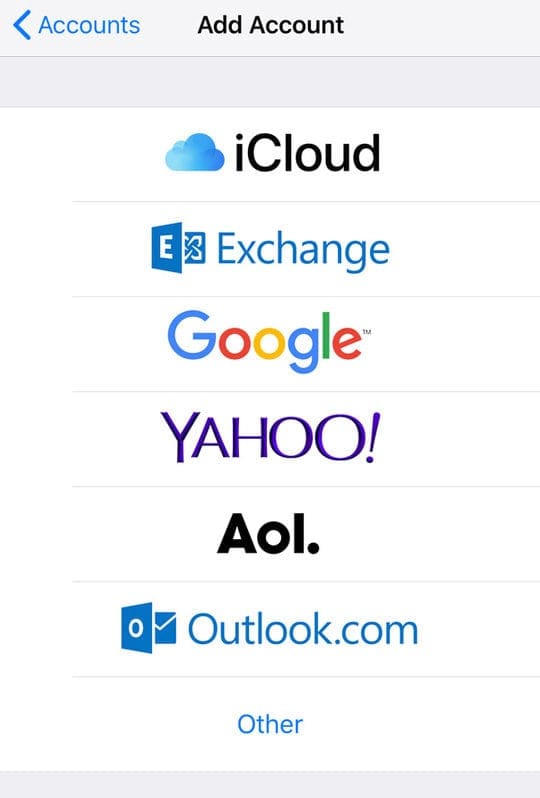
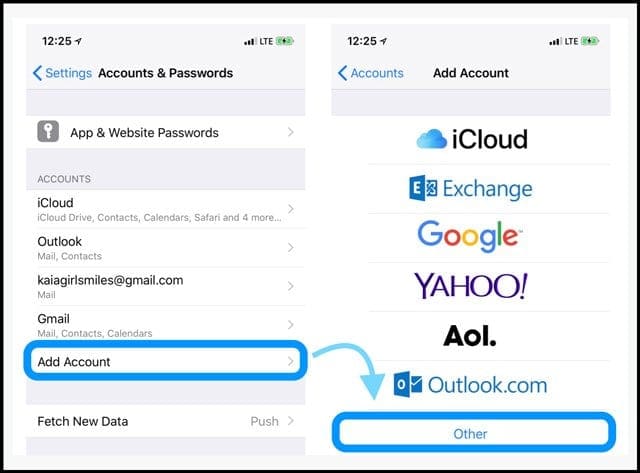
Once you confirm the deletion, restart the device and then return to Settings > Passwords & Accounts> Add Account.
Adding Account Manually Using Other Option?
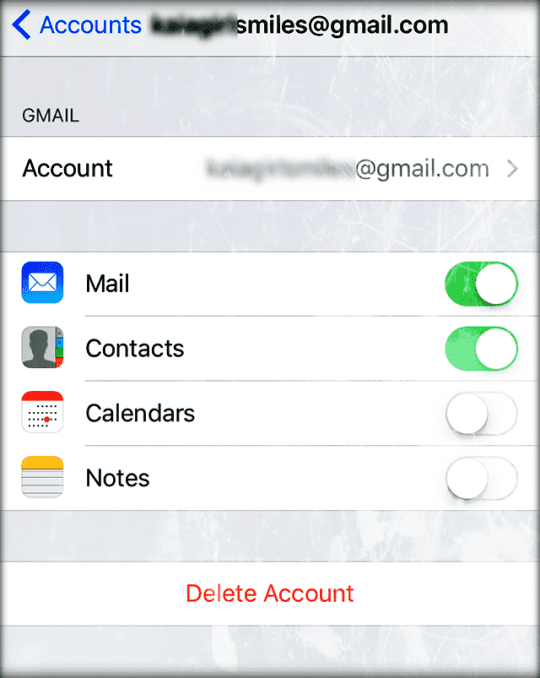
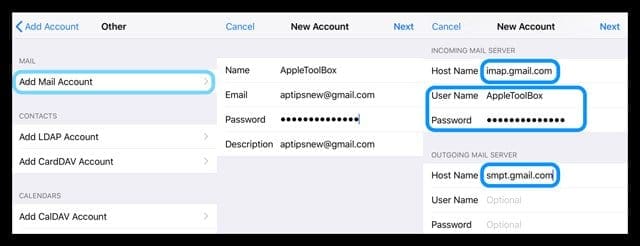
If you decide to enter your email account manually, check that you entered your username and password for both the outgoing mail server settings and the incoming server settings.
You need to enter your username and password twice when manually configuring your email account–once for the incoming and again for the outgoing.
Considerations
You must enter your user id and password for the outgoing mail server as well as for the incoming mail server.
That means you set up most email accounts by entering your user id and password twice, once for incoming, and again for the outgoing (SMTP) server.
Microsoft Exchange and iCloud are exceptions, but most other ISPs and email providers require this.
If you are still experiencing problems, check with your email service provider or with Apple Support.
Obsessed with tech since the early arrival of A/UX on Apple, Sudz (SK) is responsible for the original editorial direction of AppleToolBox. He is based out of Los Angeles, CA.
Sudz specializes in covering all things macOS, having reviewed dozens of OS X and macOS developments over the years.
In a former life, Sudz worked helping Fortune 100 companies with their technology and business transformation aspirations.
Hi, I keep getting the message it can’t send my email the recipient was rejected by the server because it does not allow relaying. I have tried the above steps and it still isn’t working. I even went into passwords and settings and into my email account and it will not let me click on anything in the outgoing mail section
The problem is simpler than most people think. The relay gets out of sync if you change your password on your phone before changing on your desktop or laptop. Change your yahoo/ATT/AOL password on a desktop or laptop first. Then on your phone delete and re-add your email account with new password. done. It may get hung up and say password incorrect when you send an email from your phone. If this happens, follow the prompt provided. It will show a settings box. Re-enter the new password (again) and it is solved. This addresses the relaying issue. The phone is always secondary. The phone’s email syncs with your original email which was not created on your phone.
I tried to delete my Yahoo account and re-add to my iPhone 7, but still get the same email about “Unable to send email as it was rejected by the server because it does not allow relaying”?
Worked great for me…. Entering password on outgoing server instead of the default optional was the trick for fixing my problem….. Thank you so very much
Good Informations so dare.
But does anyone have ever seen an issue that replay or forward of an email is not possible while using cellular in an Echange environment?
Wlan works well. Other carriers are working and new email works also fine. Any thoughts?
Thanks
Check the firewall settings in your router. Sometimes there is a global email spam protection filter which blocks your device to use the icloud smtp server.
Depending on your iOS version, check and see if there is a button called Server and set this to ON. Also, make sure your device doesn’t have any restrictions enabled (Settings > General >Restrictions.) Another thing to try is toggling off iCloud Mail sync–go to Settings > Apple ID Profile > iCloud > and toggle off Mail. If this is a work or business email account (rather than a major email player like Yahoo, AOL, Gmail, etc.) contact your company’s network admin or IT Department–there seems to be an issue with serial numbers on the ssl certificate authorities not being listed on Apple’s Lists of available trusted root certificates in iOS.
If none of these are applicable or work, try deleting the email account and adding it back in. This often solves these types of problems!
If still no joy, take the time to provide feedback to Apple about this issue.
I can’t create an iPad account, because when asked for my emai address, it states “e mail is TAKEN”. This the ONLY email I use, therefore I am at a loss……all I want to do is Send and receive IMessages!!
I have tried all the work-arounds for this that I can find on this website and on the internet. My brand new iPhone 8 is worthless to me. Apple first screwed me over because they did not reveal that the iPhone 6 glitch was something they knew about, and now I have a new iPhone 8 that doesn’t do e-mail and I cannot get help for it.
There should not have to be a “fix” or “work-around”—this in itself proves there is a problem! Just let people who have a “normal” account (yahoo, google, etc) send emails to whomever they wish. Some of us are conducting business here and don’t have time or patience for this! Not acceptable
This is so messed up!!! I just want to be able to click on a business’s email link and send an email—-I gotta email without getting this ridiculous message and having to retune my long email AGAIN thru my RELIABLE email system. I have just wasted over an hour reporting this!!
Hi I bought a ipad air for my father and he uses it for his work he uses outlook but has his name with kier.co.uk as default he has no patience and has been stressed sins he got it I have tried to do it buy it’s greyed out and he tries to send picture attached to email and it isn’t working can u please help me it would be much appreciated thanks in advance William Balmer
I had the same error with my GVTC.com email server, “Server does not allow relaying email”. The problem occurs when you have more than one email account. The main account sends and receives mail OK, but any secondary accounts could only receive email. When I tried to send a message from the secondary account, it would get stuck in my outbox and give the the error message about not relaying email.
Here’s the fix for iPhone or iPod: In Settings, go to Mail, Contacts, Calendars and tap on your primary email account. Then tap on the Email name. You should see the name of your email account with “Add Another Email…” below that. Tap on Add Another Email and add the names of any secondary email accounts. Then tap Back. Once you add the names of the secondary email accounts to your main account, you should be able to send and receive email messages.
I had to change my password for my AOL account. Was not able to send e mail after that from my iPhone 6. Received mail just fine. My outgoing server page was grayed out. I happened on your solution in my search for a cure so I could send e mail again. WOW! Thanks so much. A quick 5 minute fix with your solution!
Thank you Simon! Your explanation was so clearly written. That helps a lot. I’m just wondering why this relay problem started in the first place? I’ve had my ipad for two years, and it just started NOT sending mail. With both my email accounts. I just fixed both of them with your instructions. THANK YOU!! You have a lot of good karma coming your way, young man.
THANK YOU!! No one else could fix this but this WORKED!!! iphone6, cannot sent mail on a q.com account. went to smtp.q.com outgoing mail server and clicked there, on the primary server space i clicked there. This took me to a page and all i had to do was enter my password in the field, even though i had done it on the prior set up page. WHEW!!!!
Precise and effective instructions!
It worked for an IPad “not AOL”, changing “Primary Server” for “the same address and server” (as secondary) and introducing the password in the outgoing mail.
I hope it stays with no more “relay denials” …
Thanks a lot! Precise and effective instructions!
It worked for an IPad “not AOL”, changing “Primary Server” for “the same address and server” (as secondary) and introducing the password in the outgoing mail.
I hope it stays with no more “relay denials” …
my bst rgrds
The above fix did NOT work on my iPhone, so I tried something else. I deleted the email account and created it from scratch. This time, however, as an IMAP email instead of a POP email. After that it works perfectly. Those of you who were not able to solve the issue using the above fix should try this also.
had same problem recently after years of accessing 2 gmails without a problem
lost only 1 email access (go figure)
after much research this worked for me:
go to Mail etc tab under on iPad Settings
click on email Account affected
click on email address
in Outgoing Mai Server fields click on Advanced
if IMAP Path Prefix is blank type in: imap.gmail.com
thats it
you may have to restart the iPad but this works
I had this same problem on my ipad4. It went from sending without difficulty to this message for no apparent reason. I was able to fix it by powering down and restarting the ipad. I actually tried to do the above suggestion first, but the field for username and password were in grey scale and already completed. Also, it wouldn’t let me turn off the primary server— when I manually switched it to off, it had DONE only in grey scale, and when I hit the left sided option (not sure what it was) it reverted to ON.
Excuse me but HOW exactly do I turn off my Primary Server? I am using iOS 7…I CAN’T!!!! I brag about Apple all the time, but what a ****ing SNAFU this is for something so simple (having developed mail servers in the old days).
I have tried a dozen ways to get this working and NO luck.
I get to this part successfullly:
SMPT> turn off primary server, turn on other (e.g. AT&T) SMTP server
but I’m stuck here; when I toggle primary server to OFF position, the options below are grayed out and DONE is not an option above, only CANCEL, which of course does not save my change.
Neither my iPhone nor my iPad will allow me to turn off my primary (gmail) server. When I try to do so, the “Done” button is grated out, and the only active link is the “Cancel” button. Also, I can’t write in any field of the primary server, even when it is turned on. Any ideas for me? Thanks!
Do you have any other ideas? this is not working for me with gmail as many of the features are disabled under primary server for gmail. I tried making a new connection for gmail but it did not work either.
This worked!!! I am extremely “technology-challenged,” however the instructions to fix this problem were simple enough for me to follow and fix! Thank you!
Thank you for the particular auspicious writeup. Them in fact once was any amusement profile the item. Glimpse elaborate to considerably released flexible from you! Mind you, how should we keep up to date some sort of communications?
Receiving/sending emails from my iphone4 has always worked perfectly, until inexplicably in the last couple of days (without having touched/changed any settings) I now cannot send emails. I’m getting the “unable to send email – sender address was rejected by the server” error message. Why, can anyone tell me? And how do I fix what i didn’t break. I’ve deleted and added the account but to no avail.
My emails kept getting stuck in my outbox. Struggled for ages then Quickly managed to fix the problem after reading the instructions…!!! My sanity is saved! Thank youuuuu!!!
Yes! Actually works now! Thankyou!! I’d deleted and reprogrammed several times too, my settings were correct but could not send mail. My servers advice was useless as always lately! So glad I found this from apple! Follow instructions to the LETTER then close and restart your email prog. Then it worked for me 🙂
I have uninstalled and reinstalled my work email on my iPhone dozens and dozens of times in the last 11 days. NOTHING helps with sending. I get the “copy placed in outbox, your server does not allow relaying” EVERY time, but my incoming email works perfectly. I have followed our IT department’s instructions to the letter with no success. I have followed your advice as well, with no success. I am 100% certain I have typed my user name & password correctly. I am using the correct SSL codes. Is there ANY OTHER fix? If it matters, I have a 2+ year old iPhone 4.
I have a yahoo account and my outgoing mail will not work, even with the above suggestions. I have had this account for years and only stopped working about 3 weeks ago. I’ve made no changes to my settings. Can you help me?
Every time I go overseas I cannot send emails from my iphone or macbook. I get the message the sever does not allow relaying. When I am home in Australia I don’t have any problems sending mail!
email address and passwords are correct. Can you help me please?
FIANLLY………SOMETHING THAT WORKED!!! Have a “OTHER” email “POP” account
and ever since upgrading to the the OS7, I could GET email, but couldn’t SEND OR REPLY to any. FRUSTRATING to say the least. I’ve been fussing with different setting for DAYS and nothing. AGAIN, THANK YOU!!!
As I am overseas I am using the wifi in the hotels. My iPad 2 will receive email but won’t send. Have tried all the suggestions but to no avail. A least I can contact via FB or messages. Anna
didnt work for me. im still having relaying issues, guess cause im trying to connecto to my companies exchange server for my email. I can read them and my folders come up but just cant send!! However, everyone else in the company can set up there email on there iPhone except me!! what the HEll!! I have tried setting it up manually and also by my username password and email address like everyone else.
I get to the very last step, but you say “make sure the server port is 587. However, my server port says 465, and it’s grayed, so I can’t change it. What do I do now? Thanks for any help.
you could set the server port by adding a colon “:” and the port number to the server name, e.g. smtp..com:587
you may need to copy the colon from an app that supports text and then paste it into the server name. The colon character was not on the keyboard displayed to enter the server name.
Have to add my name to this long list of Thanks, Simon. I was showing my wife how easy it was to add and/or delete email accounts on her iphone, when I inadvertantly disabled her ability to send out AOL emails. Through your posting I was able to regain that ability (not to mention regain some credibility in her eyes).
Thanks again, Diego
When I apply this, the email I have sent appear to come from my second email address, the one attached to the other smtp server. This doesn’t fix the problem, I am still one email address down…
After a conversation with the IT manager in charge of my account, I have added some security to the SMTP configuration and now I can send all my emails without any problems.
Conclusion, have a word with your email provider and ask for the correct smtp settings for apple products, they are different from the pc products. But it works !
Thanks so much!!!! That worked. I have been able to recieve emails from my business account, but never able send them from my ipad. I have had this issue for months. You just savied my life!!! LOL
Hi
I have tried all the above solutions for ipad2.
my ipad, iphone and mac are all set up the same way and were all working perfectly.
yesterday, just the iPad started not sending emails saying ‘the recipient was rejected by the server because it does not allow relaying’
I have performed all of the above and it still does not work
have you any ideas please?
thank you
Mik I have the same problem. I went thru all the steps outgrowing mail works but the relay problems still exist. All the outbox mail will not send, what has anyone told you to fix this. Problem. Can you send me an email as I don’t know how I even got here I have searched so much I almost feel crazy. Thank you for any help. Elizabeth
Simon what genius! I have struggled with this issue for 12 months and even spent time at apple in NY to see if they can help. They told me to create a new account!
Your fix ends 12 months of frustration. I could kiss you right now.
Sara
I pleased that so many have made this work but not me- the route to account settings is simply not available and after various variations on these suggestions I’m back to square 1 on my iPod touch…
joe
I have since found a fix for this – it involves turning off the AOL “primary server” (which has the greyed out information) and then adding an “Other SMTP Server”, using “smtp.aol.com”, my aol username (without the “@aol.com” suffix) and password. This then sets up automatically as “On” under the “Other SMTP servers” which has now cleared my Outbox
All of the above is correct but make sure the PRIMARY SERVER IS TURNED OFF, and the OTHER SMTP SERVERS are turned ON. This does work and thank you for finding out how to get this to work.
What a simple fix for something that no one I asked knew how to fix. They all had the problem but had not addressed it. I had a typed a lengthy email on my phone and didn’t want to retype.
You Rock!
Simon Osborn please tell all of us what to do. PLEASE HELP US. I am almost sick because no one can tell us what to do. I can’t believe Apple can’t fix this us as there are so many having the same problem. Why has this happened? I have an iPad 2 and all was fine and then one day all went to the hand basket. Someone print out the directions so we can read them when we read the Thank You.
Thanks so much for this info. I looked on the support page for apple and could not find anything to resolve this issue. I am now able to send email from my iPhone. Great info here!
Find this blog article curious. Parts 2 and 3 are exactly the same yet you’ve bolded it and used different words to make it look similar.
You’re basically saying turn it off and on again. That advice on it’s own doesn’t work. Maybe this is useful for people with AOL accounts but if you’re trying, say, to get your own website’s email working, then look elsewhere.
Maybe you should re read what you’ve written and come up with something clearer or explain the difference between
Go into Settings > Mail, Contacts, Calendars > Your Account > Outgoing mail Server SMTP >
As there is no option called “account info”,
The reality is you go to Settings > Mail, Contacts, Calendars >
Then you don’t have any choices after that unless you choose an account. “Accounts” is a heading there, but not an option worthy of it’s own bread crumb as you can’t select it.
Just wanted to add my thanks as well. Only taken 7 months on my Iphone 4 to sort this out and Apple had no idea at all. Simon, you are a genius and I can finally email again. Best wishes. Kev
Hi I’m with ozemail or iinet, I’ve tried putting in there settings but I can’t get it to work. Any suggestions. Ready to hand my phone back to Telstra I’m so annoyed.
Why do I need to go through another server to send email? Shouldn’t the phone just send through the email server i am currently using rather than trying to access a different email server? There has to be a better answer, because all you are doing is sending through another email server. It is a bypass not a fix.
I have got this problem on my ipod touch, where AOL is not my primary email. All the info in the smtp.aol.com section is as it should be here, but it is also greyed out so I couldn’t amend. I have tried deleting the AOL account and readding it but it still has the same problem. Equally, it makes no difference whether the “other SMTP Servers” are on ON or OFF. Can you help?
I have since found a fix for this – it involves turning off the AOL “primary server” (which has the greyed out information) and then adding an “Other SMTP Server”, using “smtp.aol.com”, my aol username (without the “@aol.com” suffix) and password. This then sets up automatically as “On” under the “Other SMTP servers” which has now cleared my Outbox.
Thank-you thank-you thank-you!!! Finally a simple solution! All the spiel that’s out there I’m so glad I stumbled across your fix! Brilliant! I run a charity web-site for my daughter and my email has just been dumped in outbox for weeks – now this is fixed by following your iphone solution I can carry on with the fund-raising! It really was as simple as that – nobody seemed to have a clue – including local apple shop “genius” bars!
Genius! The Primary Server addition solution appears to have worked after months of frustration. I thank you (the other solution didn’t seem to work for me).
I have since found a fix for this – it involves turning off the AOL “primary server” (which has the greyed out information) and then adding an “Other SMTP Server”, using “smtp.aol.com”, my aol username (without the “@aol.com” suffix) and password. This then sets up automatically as “On” under the “Other SMTP servers” which has now cleared my Outbox
All of this is right but make sure you turn off the PRIMARY SERVER OFF, and have the OTHER SMTP SERVERS swirched ON, i hope this helps.
Hi, I have done as you have suggested but still does not work, is there anything else I can try as been on it nearly all day!
thanks sarah
jimsays
I am the biggets dummy in the world when it comes to computers. I can not sent a reply to anyone, I hope this goes through. They all say the same thing didn’t go through. Its the same with emails when i TRY TO SEND ONE.Ok I have a google account, I use aspire-acer labtop. Can you help. jamesspoon29305@gmail.com
Jadesays
Ah finally A solution! Thanks a million! 🙂
Elizabethsays
Darren I have tried all of this. Question. When you finish the Steph and tap save does it go to verifying and you wait a time and then it verifys the account? Some times it does and others it does not. I have had my emails with aol for years only started having this problem on my iPad in the last couple of weeks. Do you know Why this has happened? I am just sick over this as it has stressed me and as I read I am not alone. Can’t the “great apple” do something for this problem? THANK ALL OF YOU FOR HELPING US.
Sharonsays
Thank you so much!!! What a simple and effective solution 🙂
Omg at last. Thankyou ever so much Simon. Its been driving us mad. I just spent half hour on the phone to aol and they were useless. Doing what you put was 5mins. THANKYOU
Darren thanks for this, just saved me copying and pasting from one e-mail account to another on my I-Phone 4. My AOL account has been out of action for months as I could not send e-mail but could receive them.Thanks
OMG! Thank you Simon!!! I have been struggling with this for months!!! All it took was correcting my username to not include the aol.com part!!!! THANK YOU!!!!!!!
After installing your fix for outgoing mail, not only can I not send messages on my IPhone4, I now get a message “Cannot Get Mail” The username or password for AOL is incorrect. Any ideas for a fix? Thanks.
Thank u so much. This worked. I found a website just b4 I found this one and they wanted $39 for a tech to answer and u just answered for free. Thanks again.
this or nothing works for me. In Australia we obviously hav different servers but I cannot send any mail from my iPad now no matter what I change or add. I tried putting in user name and password and it comes up our server does not support authentication or something. Just nothing is working to send mail at all
Help!!!
excellent – fixed my problem – but with hotmail you need to add the suffix xxxx.xxxx@hotmail.co.uk (or hotmail.com) in the user name box
thanks its been driving me mad and has caused some serious unpleasantness, me thinking I have responsed to someone and them not getting anything












Thank you for providing problem-solving information!
Fixed! Thank you!! 🙂
Hi, I keep getting the message it can’t send my email the recipient was rejected by the server because it does not allow relaying. I have tried the above steps and it still isn’t working. I even went into passwords and settings and into my email account and it will not let me click on anything in the outgoing mail section
The problem is simpler than most people think. The relay gets out of sync if you change your password on your phone before changing on your desktop or laptop. Change your yahoo/ATT/AOL password on a desktop or laptop first. Then on your phone delete and re-add your email account with new password. done. It may get hung up and say password incorrect when you send an email from your phone. If this happens, follow the prompt provided. It will show a settings box. Re-enter the new password (again) and it is solved. This addresses the relaying issue. The phone is always secondary. The phone’s email syncs with your original email which was not created on your phone.
I tried to delete my Yahoo account and re-add to my iPhone 7, but still get the same email about “Unable to send email as it was rejected by the server because it does not allow relaying”?
Any other suggestions to remedy this? Thank You
Sick of not being able to forward emails!!! FIX IT!!Guess if I didn’t pay my acc would soon hear about it !! Sloppy !!!
Worked great for me…. Entering password on outgoing server instead of the default optional was the trick for fixing my problem….. Thank you so very much
Thanks so much, Fred! Been trying for months to fix this, but didn’t think to look at the “outgoing server”.
Good Informations so dare.
But does anyone have ever seen an issue that replay or forward of an email is not possible while using cellular in an Echange environment?
Wlan works well. Other carriers are working and new email works also fine. Any thoughts?
Thanks
This worked great. Thank you so much.
Check the firewall settings in your router. Sometimes there is a global email spam protection filter which blocks your device to use the icloud smtp server.
When I go to the page to make sure”server” is turned on, I’m not able to input the User Name or Password, blocked in gray, no access
Help please!
Hi David,
Depending on your iOS version, check and see if there is a button called Server and set this to ON. Also, make sure your device doesn’t have any restrictions enabled (Settings > General >Restrictions.) Another thing to try is toggling off iCloud Mail sync–go to Settings > Apple ID Profile > iCloud > and toggle off Mail. If this is a work or business email account (rather than a major email player like Yahoo, AOL, Gmail, etc.) contact your company’s network admin or IT Department–there seems to be an issue with serial numbers on the ssl certificate authorities not being listed on Apple’s Lists of available trusted root certificates in iOS.
If none of these are applicable or work, try deleting the email account and adding it back in. This often solves these types of problems!
If still no joy, take the time to provide feedback to Apple about this issue.
SK
I can’t create an iPad account, because when asked for my emai address, it states “e mail is TAKEN”. This the ONLY email I use, therefore I am at a loss……all I want to do is Send and receive IMessages!!
Wow this is 2018 and there’s this problem still going on with apple? I don’t get it.
I have tried all the work-arounds for this that I can find on this website and on the internet. My brand new iPhone 8 is worthless to me. Apple first screwed me over because they did not reveal that the iPhone 6 glitch was something they knew about, and now I have a new iPhone 8 that doesn’t do e-mail and I cannot get help for it.
There should not have to be a “fix” or “work-around”—this in itself proves there is a problem! Just let people who have a “normal” account (yahoo, google, etc) send emails to whomever they wish. Some of us are conducting business here and don’t have time or patience for this! Not acceptable
This is so messed up!!! I just want to be able to click on a business’s email link and send an email—-I gotta email without getting this ridiculous message and having to retune my long email AGAIN thru my RELIABLE email system. I have just wasted over an hour reporting this!!
Hi I bought a ipad air for my father and he uses it for his work he uses outlook but has his name with kier.co.uk as default he has no patience and has been stressed sins he got it I have tried to do it buy it’s greyed out and he tries to send picture attached to email and it isn’t working can u please help me it would be much appreciated thanks in advance William Balmer
I had the same error with my GVTC.com email server, “Server does not allow relaying email”. The problem occurs when you have more than one email account. The main account sends and receives mail OK, but any secondary accounts could only receive email. When I tried to send a message from the secondary account, it would get stuck in my outbox and give the the error message about not relaying email.
Here’s the fix for iPhone or iPod: In Settings, go to Mail, Contacts, Calendars and tap on your primary email account. Then tap on the Email name. You should see the name of your email account with “Add Another Email…” below that. Tap on Add Another Email and add the names of any secondary email accounts. Then tap Back. Once you add the names of the secondary email accounts to your main account, you should be able to send and receive email messages.
I had to change my password for my AOL account. Was not able to send e mail after that from my iPhone 6. Received mail just fine. My outgoing server page was grayed out. I happened on your solution in my search for a cure so I could send e mail again. WOW! Thanks so much. A quick 5 minute fix with your solution!
Thanks.
more options for fix:
shudhtech.blogspot.in/2015/04/iphone-5-can-not-send-emails-email.html
Thank you Simon! Your explanation was so clearly written. That helps a lot. I’m just wondering why this relay problem started in the first place? I’ve had my ipad for two years, and it just started NOT sending mail. With both my email accounts. I just fixed both of them with your instructions. THANK YOU!! You have a lot of good karma coming your way, young man.
THANK YOU!! No one else could fix this but this WORKED!!! iphone6, cannot sent mail on a q.com account. went to smtp.q.com outgoing mail server and clicked there, on the primary server space i clicked there. This took me to a page and all i had to do was enter my password in the field, even though i had done it on the prior set up page. WHEW!!!!
Worked – thanks!
Thanks! Worked awesome!
Excellent. Worked for me on my iPhone 5 and my iPad.
Worked. You are a genius!
Brilliant! Thank you very much!
It worked on my iphone 6 plus
Precise and effective instructions!
It worked for an IPad “not AOL”, changing “Primary Server” for “the same address and server” (as secondary) and introducing the password in the outgoing mail.
I hope it stays with no more “relay denials” …
Thanks a lot! Precise and effective instructions!
It worked for an IPad “not AOL”, changing “Primary Server” for “the same address and server” (as secondary) and introducing the password in the outgoing mail.
I hope it stays with no more “relay denials” …
my bst rgrds
Awesome fixed ipad 4 using Bordernet server
I have a Iphone 5c and it worked! Thanks
Thx a bunch.
Worked as advertised on my iPad mini.
Worked! Thanks.
Doesn’t work for me either. I’m using an iPad
I have Iphone 5, above fix does not work for me. ” not allow relay”
Please help.
Thank you. The fix worked.
thanks, the instructions worked.
The above fix did NOT work on my iPhone, so I tried something else. I deleted the email account and created it from scratch. This time, however, as an IMAP email instead of a POP email. After that it works perfectly. Those of you who were not able to solve the issue using the above fix should try this also.
I am not tech savvy at all, but followed those instructions and it worked. Thanks alot mate, it was doing my head in.
had same problem recently after years of accessing 2 gmails without a problem
lost only 1 email access (go figure)
after much research this worked for me:
go to https://accounts.google.com/b/0/DisplayUnlockCaptcha and hit Continue
go to Mail etc tab under on iPad Settings
click on email Account affected
click on email address
in Outgoing Mai Server fields click on Advanced
if IMAP Path Prefix is blank type in: imap.gmail.com
thats it
you may have to restart the iPad but this works
Yeahhhh, after struggling for ages, your fix worked!!! Sooooo happy!!! ThankYOU xxx
My iPad will not send messages,but my aol will send from my ipad? Weird not sure how to fix
This flopped miserably. I still can’t send e-mail.
I had this same problem on my ipad4. It went from sending without difficulty to this message for no apparent reason. I was able to fix it by powering down and restarting the ipad. I actually tried to do the above suggestion first, but the field for username and password were in grey scale and already completed. Also, it wouldn’t let me turn off the primary server— when I manually switched it to off, it had DONE only in grey scale, and when I hit the left sided option (not sure what it was) it reverted to ON.
Excuse me but HOW exactly do I turn off my Primary Server? I am using iOS 7…I CAN’T!!!! I brag about Apple all the time, but what a ****ing SNAFU this is for something so simple (having developed mail servers in the old days).
I have tried a dozen ways to get this working and NO luck.
I get to this part successfullly:
SMPT> turn off primary server, turn on other (e.g. AT&T) SMTP server
but I’m stuck here; when I toggle primary server to OFF position, the options below are grayed out and DONE is not an option above, only CANCEL, which of course does not save my change.
Anyone else have this issue? Any solves?
It wont allow me to turn off my primary server…any fixes for that?
My boxes are grated out so I can’t re enter name and password – help??
I meant greyed out- cant adjust or change them
*grayed* out! not grated out. . .
Neither my iPhone nor my iPad will allow me to turn off my primary (gmail) server. When I try to do so, the “Done” button is grated out, and the only active link is the “Cancel” button. Also, I can’t write in any field of the primary server, even when it is turned on. Any ideas for me? Thanks!
Do you have any other ideas? this is not working for me with gmail as many of the features are disabled under primary server for gmail. I tried making a new connection for gmail but it did not work either.
This worked!!! I am extremely “technology-challenged,” however the instructions to fix this problem were simple enough for me to follow and fix! Thank you!
Many thanks for this. This works with CompuServe, too, with the appropriate smtp address.
I tried it on my iPhone5s. No luck. Now it says ‘The SMTP server does not support password authentication.’ #FML
Thank you for the particular auspicious writeup. Them in fact once was any amusement profile the item. Glimpse elaborate to considerably released flexible from you! Mind you, how should we keep up to date some sort of communications?
Receiving/sending emails from my iphone4 has always worked perfectly, until inexplicably in the last couple of days (without having touched/changed any settings) I now cannot send emails. I’m getting the “unable to send email – sender address was rejected by the server” error message. Why, can anyone tell me? And how do I fix what i didn’t break. I’ve deleted and added the account but to no avail.
My emails kept getting stuck in my outbox. Struggled for ages then Quickly managed to fix the problem after reading the instructions…!!! My sanity is saved! Thank youuuuu!!!
Thanks!! After ages finally I can send an email using my account in my iphone.
🙂
Yes! Actually works now! Thankyou!! I’d deleted and reprogrammed several times too, my settings were correct but could not send mail. My servers advice was useless as always lately! So glad I found this from apple! Follow instructions to the LETTER then close and restart your email prog. Then it worked for me 🙂
Thank you, thank you, thank you!!!!!
Thanks for the FIX!!! Worked on this old iPad 1.
You are the “All-being, master of time, space, and reality!”
Fantastic….after days of trying this worked for me straight off. Many thanks.
Thank you so much. This solved my other half’s problem. 🙂
Thanks!!! Works perfectly!
Excellent. Thanks
This saved the day for my daughter’s iphone 5s using Verizon servers. Thank you
This worked also for an iPAD.
Many thanks
I have uninstalled and reinstalled my work email on my iPhone dozens and dozens of times in the last 11 days. NOTHING helps with sending. I get the “copy placed in outbox, your server does not allow relaying” EVERY time, but my incoming email works perfectly. I have followed our IT department’s instructions to the letter with no success. I have followed your advice as well, with no success. I am 100% certain I have typed my user name & password correctly. I am using the correct SSL codes. Is there ANY OTHER fix? If it matters, I have a 2+ year old iPhone 4.
Debbie I have same problem, have you resolved yours please help!
Did you ever figure out a fix? Like you, this isn’t working for me unortunately.
This worked instantly!
I have a yahoo account and my outgoing mail will not work, even with the above suggestions. I have had this account for years and only stopped working about 3 weeks ago. I’ve made no changes to my settings. Can you help me?
Make sure your password is updated or correct on the outgoing mail server. I updated that and now it works. Thanks!
Nice!!!! Thanks .. Genius!!!!
Mine won’t let me turn the primary server off. Any ideas?
Thank you.
same here… were you able to fix it ?
I have the same problem. Did you find a solution to this?
Thanks!
Tried this on my ipad but did not work for me 🙁 now what?
Apparently the ‘optional’ for username and password in outgoing mail server isn’t, thank you
Every time I go overseas I cannot send emails from my iphone or macbook. I get the message the sever does not allow relaying. When I am home in Australia I don’t have any problems sending mail!
email address and passwords are correct. Can you help me please?
Tried for two days with Apple and Verizon tech and couldn’t figure it out. This worked instantly! Thank you.
FINALLY!!!! Thank you thank you !!!
FIANLLY………SOMETHING THAT WORKED!!! Have a “OTHER” email “POP” account
and ever since upgrading to the the OS7, I could GET email, but couldn’t SEND OR REPLY to any. FRUSTRATING to say the least. I’ve been fussing with different setting for DAYS and nothing. AGAIN, THANK YOU!!!
What did you do? I have Yahoo, and can’t find an answer to this problem that works for me.
Finally worked after I followed the steps and then rebooted!
“YOU” fixed it ! Nothing else had worked for hours… Thank you
This did not work for me. Do you have any other ideas?
Wow it worked, after all this time – I agree you’re a GENIUS!!
Thank you so much! This fixed it completely 🙂
You are a GENIUS! Thank you so much I had tried everything… This worked!
Works perfectly for outgoing mail!
How simple fantastic thank you for the easiest fix ever
As I am overseas I am using the wifi in the hotels. My iPad 2 will receive email but won’t send. Have tried all the suggestions but to no avail. A least I can contact via FB or messages. Anna
didnt work for me. im still having relaying issues, guess cause im trying to connecto to my companies exchange server for my email. I can read them and my folders come up but just cant send!! However, everyone else in the company can set up there email on there iPhone except me!! what the HEll!! I have tried setting it up manually and also by my username password and email address like everyone else.
Thanks a lot.. It works 😉
Thank you.
Your solution No.2 solved my problem.
I get to the very last step, but you say “make sure the server port is 587. However, my server port says 465, and it’s grayed, so I can’t change it. What do I do now? Thanks for any help.
you could set the server port by adding a colon “:” and the port number to the server name, e.g. smtp..com:587
you may need to copy the colon from an app that supports text and then paste it into the server name. The colon character was not on the keyboard displayed to enter the server name.
Good luck!
Now mine says it needs an IMAP Path prefix, what is that?
Yay,
A fix, a fix, my kingdom for a fix.
THANK YOU.
Well done what a relief to find a solution.
Have to add my name to this long list of Thanks, Simon. I was showing my wife how easy it was to add and/or delete email accounts on her iphone, when I inadvertantly disabled her ability to send out AOL emails. Through your posting I was able to regain that ability (not to mention regain some credibility in her eyes).
Thanks again, Diego
When I apply this, the email I have sent appear to come from my second email address, the one attached to the other smtp server. This doesn’t fix the problem, I am still one email address down…
After a conversation with the IT manager in charge of my account, I have added some security to the SMTP configuration and now I can send all my emails without any problems.
Conclusion, have a word with your email provider and ask for the correct smtp settings for apple products, they are different from the pc products. But it works !
Thanks so much!!!! That worked. I have been able to recieve emails from my business account, but never able send them from my ipad. I have had this issue for months. You just savied my life!!! LOL
thanks very mcuh its a problem ive had to deal with for a while until i found this solution.
Hi
I have tried all the above solutions for ipad2.
my ipad, iphone and mac are all set up the same way and were all working perfectly.
yesterday, just the iPad started not sending emails saying ‘the recipient was rejected by the server because it does not allow relaying’
I have performed all of the above and it still does not work
have you any ideas please?
thank you
Mik I have the same problem. I went thru all the steps outgrowing mail works but the relay problems still exist. All the outbox mail will not send, what has anyone told you to fix this. Problem. Can you send me an email as I don’t know how I even got here I have searched so much I almost feel crazy. Thank you for any help. Elizabeth
I forgot to say I am referring to an iPad. Do the instruction cover all the Apple productions , pads, phones etc ? I am desperate. See the hour?
Wonderfull easy it was the name and pasword working well now
Simon what genius! I have struggled with this issue for 12 months and even spent time at apple in NY to see if they can help. They told me to create a new account!
Your fix ends 12 months of frustration. I could kiss you right now.
Sara
I pleased that so many have made this work but not me- the route to account settings is simply not available and after various variations on these suggestions I’m back to square 1 on my iPod touch…
joe
Thank you so much- I’ve had this problem for months with my iPhone 4 and this has sorted it! Thanks again!
Much slower than the default but works much better. Could just be my connection i guess
Unfortunately this does not work with my iPad 2
Any other suggestions
So awesome! Thank you a million times over (one for each unsent email).
works great thanks i have been without being able to send emails for 6 months
Thanks is all I can say
It works. Thank you very much.
This is the solution that worked for me. Thank you sooooo much.
Thank your- brilliant fix for a nagging problem.
Excellent. After four months of frustration not being able to send i-Pad emails from my domain account, it now works. Thanks!
I have since found a fix for this – it involves turning off the AOL “primary server” (which has the greyed out information) and then adding an “Other SMTP Server”, using “smtp.aol.com”, my aol username (without the “@aol.com” suffix) and password. This then sets up automatically as “On” under the “Other SMTP servers” which has now cleared my Outbox
All of the above is correct but make sure the PRIMARY SERVER IS TURNED OFF, and the OTHER SMTP SERVERS are turned ON. This does work and thank you for finding out how to get this to work.
Worked! Many thanks!
What a simple fix for something that no one I asked knew how to fix. They all had the problem but had not addressed it. I had a typed a lengthy email on my phone and didn’t want to retype.
You Rock!
Thank you Simon Osmond , you are brilliant! x
Simon Osborn please tell all of us what to do. PLEASE HELP US. I am almost sick because no one can tell us what to do. I can’t believe Apple can’t fix this us as there are so many having the same problem. Why has this happened? I have an iPad 2 and all was fine and then one day all went to the hand basket. Someone print out the directions so we can read them when we read the Thank You.
Thanks so much for this info. I looked on the support page for apple and could not find anything to resolve this issue. I am now able to send email from my iPhone. Great info here!
need to add my thanks…. works brilliantly. Thank you
BRILLIANT!!! I live in Australia and have just used this to help my mum in the UK who has been struggling for ages! Thank you!!!!!
Thank you for posting this fixed my issue.
Simple. Worked straight away. Thank you!
Find this blog article curious. Parts 2 and 3 are exactly the same yet you’ve bolded it and used different words to make it look similar.
You’re basically saying turn it off and on again. That advice on it’s own doesn’t work. Maybe this is useful for people with AOL accounts but if you’re trying, say, to get your own website’s email working, then look elsewhere.
Maybe you should re read what you’ve written and come up with something clearer or explain the difference between
Settings > Mail, Contacts, Calendars > Accounts >Account Info > SMPT>
and
Go into Settings > Mail, Contacts, Calendars > Your Account > Outgoing mail Server SMTP >
As there is no option called “account info”,
The reality is you go to Settings > Mail, Contacts, Calendars >
Then you don’t have any choices after that unless you choose an account. “Accounts” is a heading there, but not an option worthy of it’s own bread crumb as you can’t select it.
I have the same problem as you- the route suggested does not exist in my iPod touch and fails when I select an existing account…duh
joe
Wow… ive tried everything to get my email working… i put in the above info and what a suprise it works… many many thanks
I want the aol IMAP feature and not SMTP. Any suggestions.
Thanks a million for the easy fix. Been using my iphone for a year now and been so frustrated not being able to return mail. Well pleased 🙂
Thank you so much for the fix and clearing up an annoying problem for all of us. Genius!
Thank you so much Simon osmond!! Finally I can send emails! 🙂
Thank you soooooo much, this has been driving me crazy for so long!! And it was so simple to fix. Thank you!
Just wanted to add my thanks as well. Only taken 7 months on my Iphone 4 to sort this out and Apple had no idea at all. Simon, you are a genius and I can finally email again. Best wishes. Kev
thank you so much, also worked for ipad1 – much appreciated!
Hi I’m with ozemail or iinet, I’ve tried putting in there settings but I can’t get it to work. Any suggestions. Ready to hand my phone back to Telstra I’m so annoyed.
this fixed my problem to, thank you very much
Why do I need to go through another server to send email? Shouldn’t the phone just send through the email server i am currently using rather than trying to access a different email server? There has to be a better answer, because all you are doing is sending through another email server. It is a bypass not a fix.
You don’t I got the same message all I did was delete my account and make it again and it worked
I tried the easy fix you suggested on my iPad 2 and it worked. Thanks
Thank you Simon!!!! I’ve been searching for diffrent fixes and nothing has worked until this!
Absolutely brilliant. The solution with the second server worked perfectly following 2 hours of trying other solutions. Thank you
I have got this problem on my ipod touch, where AOL is not my primary email. All the info in the smtp.aol.com section is as it should be here, but it is also greyed out so I couldn’t amend. I have tried deleting the AOL account and readding it but it still has the same problem. Equally, it makes no difference whether the “other SMTP Servers” are on ON or OFF. Can you help?
I have since found a fix for this – it involves turning off the AOL “primary server” (which has the greyed out information) and then adding an “Other SMTP Server”, using “smtp.aol.com”, my aol username (without the “@aol.com” suffix) and password. This then sets up automatically as “On” under the “Other SMTP servers” which has now cleared my Outbox.
https://discussions.apple.com/message/17415848?tstart=0#17415848
Thank-you thank-you thank-you!!! Finally a simple solution! All the spiel that’s out there I’m so glad I stumbled across your fix! Brilliant! I run a charity web-site for my daughter and my email has just been dumped in outbox for weeks – now this is fixed by following your iphone solution I can carry on with the fund-raising! It really was as simple as that – nobody seemed to have a clue – including local apple shop “genius” bars!
Thank you so much i can finally send emails from my iphone!!!
You are a genius! Works perfectly…
Thank you so much for this very simple fix!! My iPhone finally works!!
thanks! works
Genius! The Primary Server addition solution appears to have worked after months of frustration. I thank you (the other solution didn’t seem to work for me).
Thank you so much. I have tried various ‘fixes’ for one year and this works first time.
Much appreciated, had this problem for months and so easy to fix…… Thanks
This has not worked for me 🙁 am i doing something wrong?
I have since found a fix for this – it involves turning off the AOL “primary server” (which has the greyed out information) and then adding an “Other SMTP Server”, using “smtp.aol.com”, my aol username (without the “@aol.com” suffix) and password. This then sets up automatically as “On” under the “Other SMTP servers” which has now cleared my Outbox
All of this is right but make sure you turn off the PRIMARY SERVER OFF, and have the OTHER SMTP SERVERS swirched ON, i hope this helps.
Hi, I have done as you have suggested but still does not work, is there anything else I can try as been on it nearly all day!
thanks sarah
I am the biggets dummy in the world when it comes to computers. I can not sent a reply to anyone, I hope this goes through. They all say the same thing didn’t go through. Its the same with emails when i TRY TO SEND ONE.Ok I have a google account, I use aspire-acer labtop. Can you help.
jamesspoon29305@gmail.com
Ah finally A solution! Thanks a million! 🙂
Darren I have tried all of this. Question. When you finish the Steph and tap save does it go to verifying and you wait a time and then it verifys the account? Some times it does and others it does not. I have had my emails with aol for years only started having this problem on my iPad in the last couple of weeks. Do you know Why this has happened? I am just sick over this as it has stressed me and as I read I am not alone. Can’t the “great apple” do something for this problem? THANK ALL OF YOU FOR HELPING US.
Thank you so much!!! What a simple and effective solution 🙂
Tried it 🙁 it sent my email but not I can’t view them.
Thank you it worked.
Thank you so much it worked!
Thanks so much mine now works :£
)
At last, a solution that works. Tried every one I could find but only yours worked. What a relief, thank you so much.
Omg at last. Thankyou ever so much Simon. Its been driving us mad. I just spent half hour on the phone to aol and they were useless. Doing what you put was 5mins. THANKYOU
Darren thanks for this, just saved me copying and pasting from one e-mail account to another on my I-Phone 4. My AOL account has been out of action for months as I could not send e-mail but could receive them.Thanks
OMG! Thank you Simon!!! I have been struggling with this for months!!! All it took was correcting my username to not include the aol.com part!!!! THANK YOU!!!!!!!
Just found your solution – worked first time !
Thank you
After installing your fix for outgoing mail, not only can I not send messages on my IPhone4, I now get a message “Cannot Get Mail” The username or password for AOL is incorrect. Any ideas for a fix? Thanks.
Been struggling for days, Vodafone, couldn’t help, nor could aol but this fix made it work straight away – thank you so much x
Works – brilliant, thanks.
Thank you soooo much this has been driving me crazy!! do you know why this primary just stops working though in the first place?
Tell me instructions how to sort the server out and relaying
Tell me instructions how to sort the server out and relaying Out on my I phone
Oh wow something that finally works thank you sooooooooo much!. The phone almost was thrown off a high cliff the other day. THANK YOU 🙂
Brilliant, after weeks of frustration your suggestion actually works.
Thank you so much
Many Thanks, after trying everything any many other suggestions, this is the fix that worked, many thanks
Thank you.
Simon, well done. This has been baffling me for weeks and couldn’t find the solution until I read your post. thanks mate.
Thank u so much. This worked. I found a website just b4 I found this one and they wanted $39 for a tech to answer and u just answered for free. Thanks again.
You are a life saver. I can’t thank you enough!
this or nothing works for me. In Australia we obviously hav different servers but I cannot send any mail from my iPad now no matter what I change or add. I tried putting in user name and password and it comes up our server does not support authentication or something. Just nothing is working to send mail at all
Help!!!
same here for me
excellent – fixed my problem – but with hotmail you need to add the suffix xxxx.xxxx@hotmail.co.uk (or hotmail.com) in the user name box
thanks its been driving me mad and has caused some serious unpleasantness, me thinking I have responsed to someone and them not getting anything