Let’s face it, additional chargers for cellular data overages is how carriers make money. For those of us with monthly data allowances, or for folks that travel and use data roaming, it’s important to know exactly how we’re consuming that data and how to limit cellular data use.
Cellular data on your iDevices lets you use the Internet wirelessly without a WiFi connection. While almost all carriers offer unlimited data plans, most people choose limited data plans.
That’s why it is a good idea to keep an eye on your cellular data use
Luckily most iOS versions offer great features to track and limit cellular data usage. You can do a few things in order to monitor and limit your data in the future. Here is what you can do.
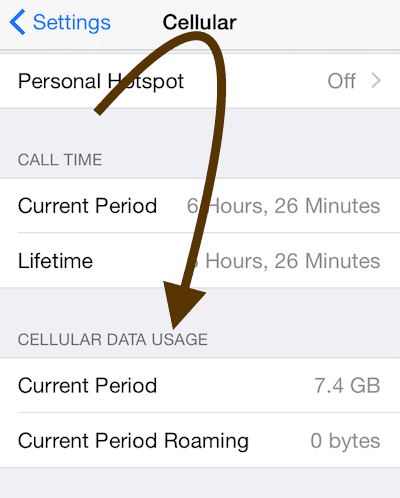
First, figure out how much data you are using. To view this, tap Settings > Cellular.
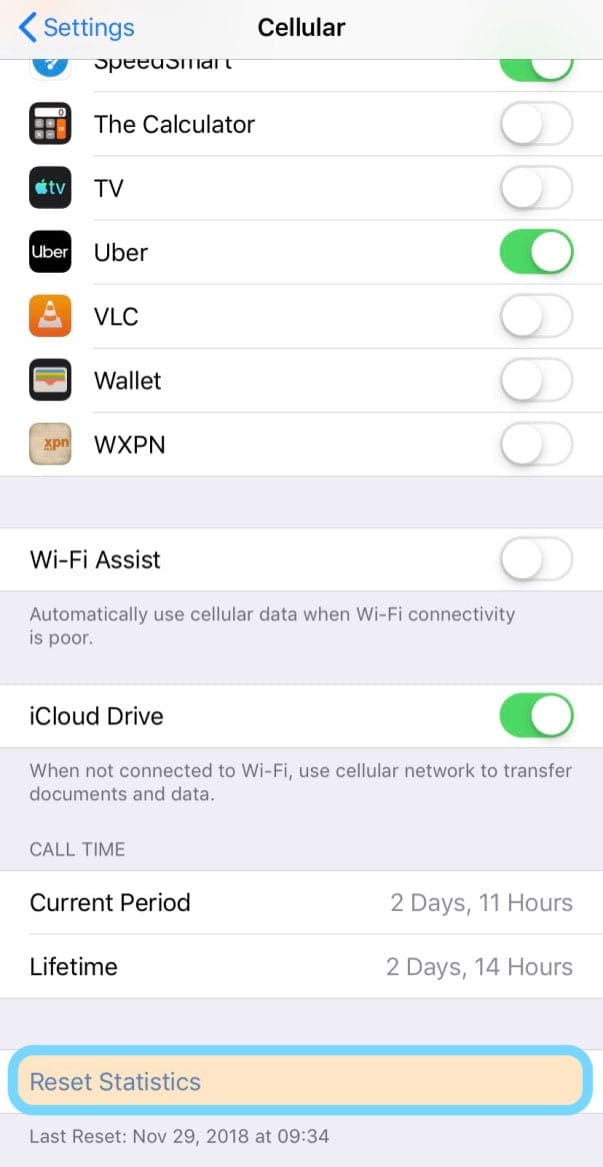
For users with monthly data caps, it’s a good idea to reset these usage statistics monthly so you can see your monthly data use. Go to Settings > Cellular and scroll all the way down, past the apps section, to Reset Statistics
View cellular data use for your apps by going to Settings > Cellular. For each app that is installed on your device, turn off or on cellular data so you can control what apps have access to cellular data.
Look at how you use location services
Let’s be smart about how our iPhones and cellular iPads use Location Services!
Location services often drain your battery AND eat up cellular data unnecessarily. Only a few apps really need to use location services, so it’s better to organize and manage those settings.
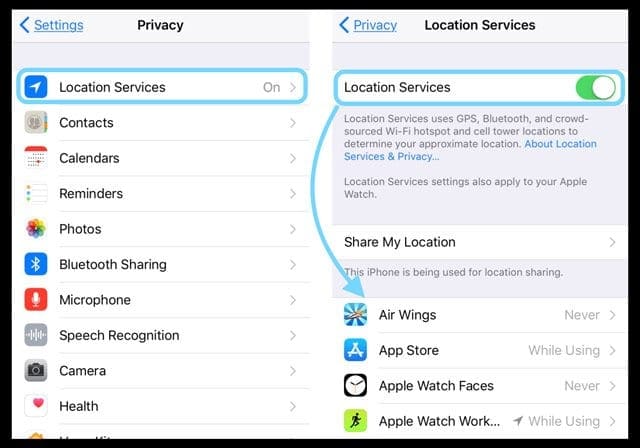
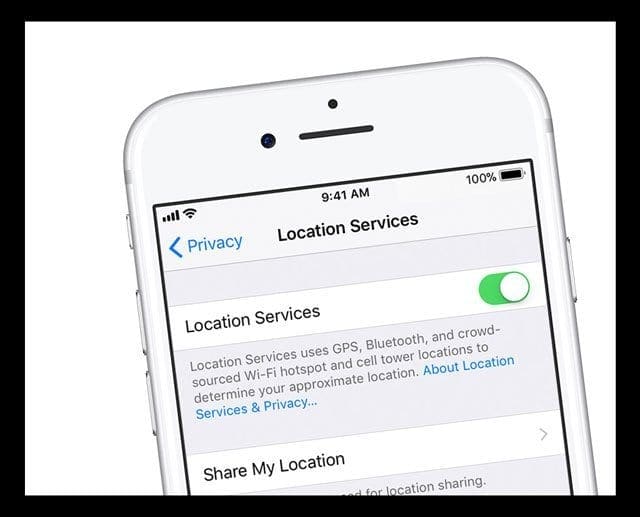
Head over to Settings > Privacy > Location Services
Tap on each app, one by one and change the setting to Never or While Using. Do not select Always
You can also completely turn off Location Services for all apps by toggling off Location Services entirely.
Turn off some notifications
Some of your apps may also use push notifications (e.g. badges, sounds or custom text alerts) that use cellular data.
Even though each notification is limited to a maximum size of 256 bytes, you may still want to turn off push notifications by going to Settings > Notifications
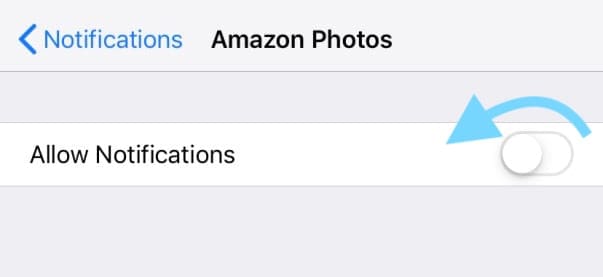
Tap on each app that you don’t want to receive notifications
Toggle off the switch next to Allow Notifications
Turn off background app refresh
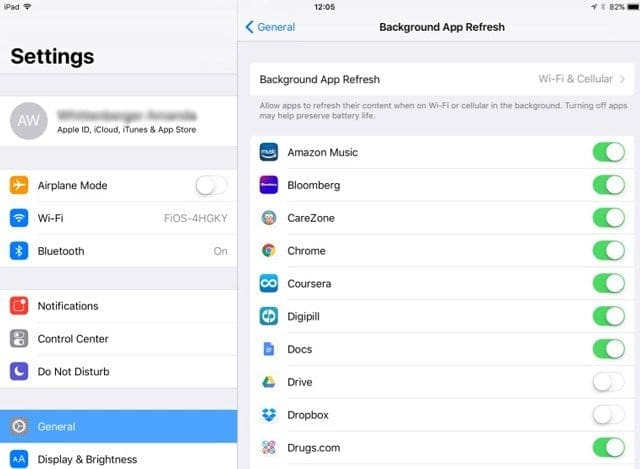
Disable Background App Refresh (this also helps you save battery life).
Simply tap Settings > General > Background App Refresh.
Or if you’d rather, toggle background app refresh on or off for all your apps one by one (yes, this is time consuming!)
Turn off Automatic App Updates
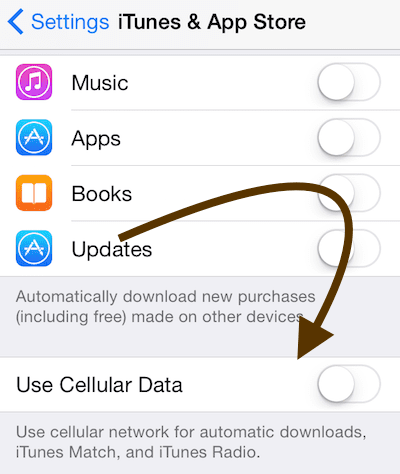
Disable cellular data for automatic downloads.
Simply tap Settings > iTunes & App Store > and tap the Use Cellular Data switch to turn off.
Look at your Safari Reading List settings
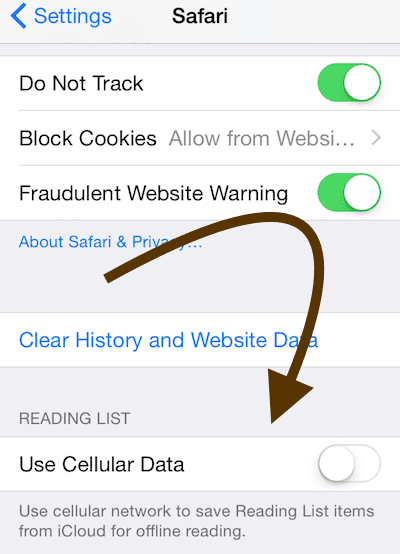
Disable cellular data for Safari’s Reading List. Go to Settings > Safari > and toggle off Automatically Save Offline. For older iOS, tap Settings > Safari > Use Cellular Data > OFF.
Don’t allow Apple Books (iBooks) to use your cellular date
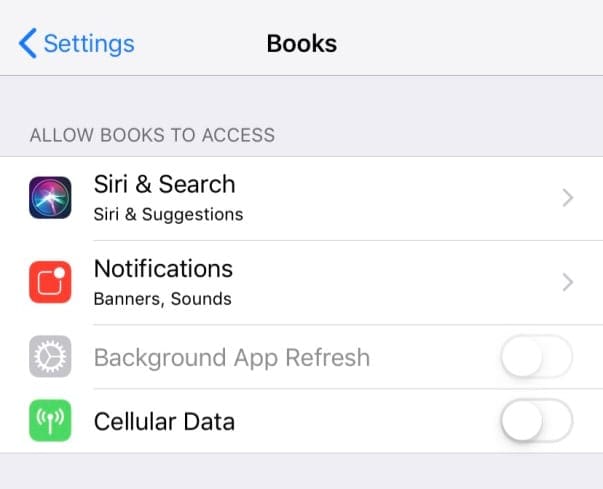
Disable cellular data for Apple Books (aka iBooks) by going to Settings > Books (iBooks) > Cellular Data
Turn off cellular data for the Files App (formerly, iCloud Drive)
Turn off cellular data for the Files App or for older iOS versions, iCloud Drive
Go to Settings > Cellular, scroll down and toggle off Files or iCloud Drive.
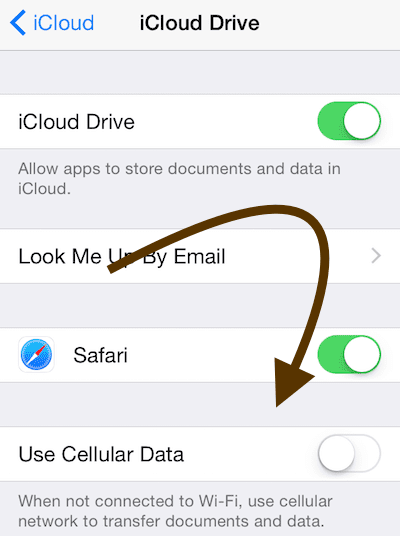
For older iOS versions, disable cellular data for iCloud Drive by going to Settings > iCloud > iCloud Drive > Use Cellular Data
Forget to data roam
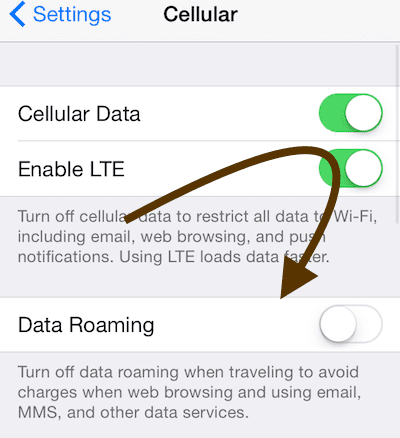
Turn off data roaming by going to Settings > Cellular > Data Roaming
Disable cellular data altogether!
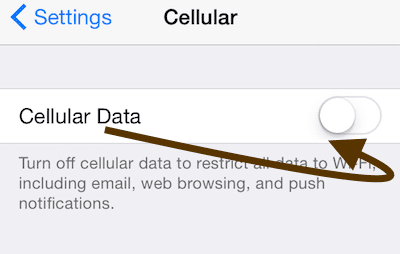
You may want to completely turn off cellular data. Simply tap Settings > Cellular on your iPhone or iPad.
When cellular data is off, you can’t use (a) personal hotspot and (b) MMS text messages
You may browse the Internet or check your mail over Wi-Fi.
If you let your children or others use your iPhone or cellular iPad, you may want to add in a restriction so they don’t abuse your data plan!
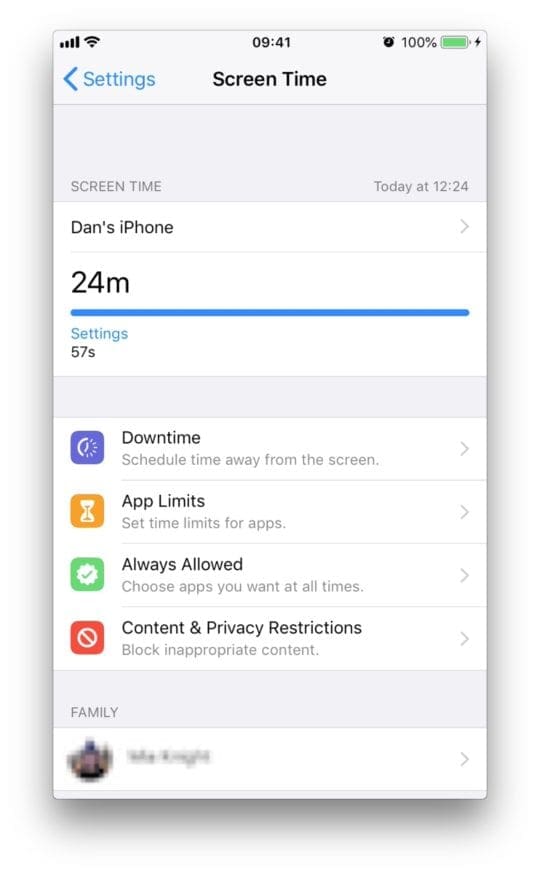
Luckily, Apple gives all of us some parental controls in the Screen Time setting (formerly, Restrictions settings) to make sure other folks can’t eat up all our data using unauthorized apps, at least without our okay.
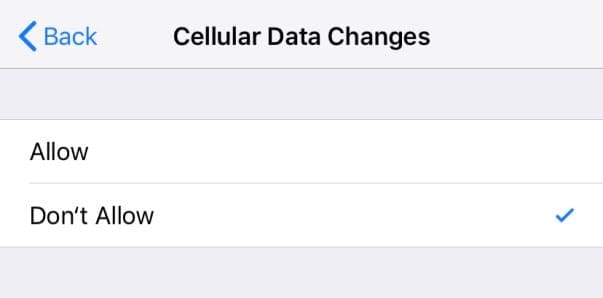
How to lock down your cellular data settings
Open Settings > Screen Time (or Settings > General > Restrictions for older iOS 11 and below)
Please explore our in-depth video tutorial to help you with these settings and more by checking out our video below.
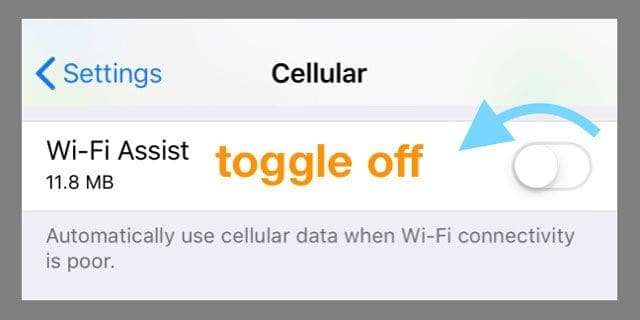
Turn Off WiFi Assist
For our readers who recently updated to the latest iOS versions, please make sure to double check the wi-fi assist setting.
After upgrading, many users found that the update changed this setting to ON by default. In order to check this tap on Settings > Cellular > and scroll down to the bottom to locate Wi-Fi Assist option.
Please let us know in the comments below if you have any questions or any additional tips to share.
Obsessed with tech since the early arrival of A/UX on Apple, Sudz (SK) is responsible for the original editorial direction of AppleToolBox. He is based out of Los Angeles, CA.
Sudz specializes in covering all things macOS, having reviewed dozens of OS X and macOS developments over the years.
In a former life, Sudz worked helping Fortune 100 companies with their technology and business transformation aspirations.
This is insane how this is ok on an iPhone. No way to have a data warning is nuts. Oh sorry , it’s a feature they will say they invented in a couple of years.
So… I still don’t understand. How can I set up an iPhone so that the data plan doesn’t get abused? I have a 10GB limit and I want the data to be turned off at 9.9 GB used.
According to your article the solution is to turn off data right now? I’m at 0.1 GB used so that’s not helpful. I want it to stop later, not now
Sorry that you are having such trouble with your iPhone and its data usage while on a ship.
One thing that might work is using the new Downtime feature in Screen Time. Go to Settings > Screen Time > Downtime.
Turn on Downtime and then set your Downtime schedule for all day (24 hours)–you need to set the From and To so it covers all day.
Then go back to the Screen Time main screen and tap Always Allowed–choose WhatApp by scrolling your list of apps and tapping on the green plus sign. Remove everything else (all other apps) listed in Allowed Apps.
Once set, restart your device and see if all your apps are grayed out except WhatsApp.
When you do connect to WiFi elsewhere like in a port, temporarily disable downtime and then turn it back on when you get back on the ship.
One of the few things I miss from Android is having a built in data manager.
It does seem that Apple doesn’t have one. So after doing ALL of the above and using my mobile service provider’s ability to cap my data so I don’t get overages, I now use a data tracker to self-monitor my data usage.
I use My Data Manager which is free on the App Store but there are other options.
Things I like about this app:
– it’s easy to use
– I can change my data plan and billing cycle
– I can even set it up on a joint data plan which monitors my use and another person’s use, to reduce fighting about bills.
I’m sure there are other options out there, but this one has worked for me.
However Apple is really not as amazing as it used to be. It really needs to step up its game otherwise people will start finding other options.
On phones that aren’t Apple iPhones, you can set a limit of how much data is used before it stops using cellular data. In this way, you avoid accidentally downloading something while using mobile data when using your phone or using it as a hotspot.
Hi Apple my son and I had Samsungs and I bought Pete an iphone 8. Does iphone have a feature like Samsung has of automatically cutting off data when the phone has used its monthly limit.
Exactly. My android’s all do this. Just received a work iPhone that will be hot spotting data from inside the desk all month. I need the data to auto turn off once cap is hit. I am not a computer and should not have to manually check how much data is used and manually reset the usages every set time period. I have better things to do. First day with an iPhone and realizing just how unsmart they are
Maria,
We don’t know of a way to turn off data when you reach your limit on iPhones or iPads. Sometimes your carriers support notifications when you are getting close to reaching your data limit. Check with your mobile or cellular provider and see if this is a service they offer.
My cellular data constantly goes over my plan because, even with IOS 10.1.1’s Wi-Fi Assist and cellular data turned off for problematic apps, they still use cellular data. Fix this problem as soon as possible!
I had the same problem for 3 months and tried everything. There is only one fix
Connect your phone to iTunes through PC or Mac / back the phone up and then do a factory reset (this needs to be done like this as the factory reset on the phone doesn’t fully clear the phone) then do a re-install from your back up. It’s the only thing that works
On iPhone 6, you have to make sure wifi assist is turned off. If not the phone will default to you use your cellular data if your wifi connectivity is slower than your carrier’s speed .
If you follow steps 3-8, will it inhibit downloads of new apps? I ask because I’m trying to help my Mother with her iPhone, and when I do the equivalent with my Android phone, I can’t download apps until I un-restrict background processes.
I had tried to convince my wife and kids not buy apple products. Being mindful of data usages we immediatly found the app mentioned above, and setup the plan, but what a piece of crap. Samsung and the android OS is the best in the market today.
I to have an iPhone 6 on my plan, 2 Samsung Actives 4&5, LG tablet. I use my tablet as gps & sometimes my Active 4. I started getting text messages of data warning, but it’s none other than the iPhone 6…in 2 days time it has jumped my phone bill $30 bucks for added data…That phone can be sitting next to the wifi box & it’s still gonna use my share data… hopefully it will be gone soon…IT SUCKS
After 1 hour and 4 minutes of lifetime usage in 2015 (from 3 pm Wed, 15 Jul – 10 am Tues, 21 Jul), Verizon sent a message that I had consumed 75 percent of my Verizon data plan at level 1.0. I have followed every recommendation in this article, but am not confident that I have succeeded in establishing control. I’ll make an appt with Apple 1-on-1 to discuss !
This is why I hate Apple. Every other company allows you to set a mobile data limit. Really!!!! We have to go to multiple spots so crap that comes with the phone stops eating your data???? Grow a brain Apple and catch up
Our plan has 3 iPhone6, and we too have seen our data use go up. Called provider and they said that i6 bounces back and forth between cell and wifi. Recommended that we manually turn off cell data when wifi is available. I wish that Apple would fix the bouncing back and forth or is it the provider that set the phone to bounce? Looking back when got upgrade the provider rep asked if wanted to up our data. SMH
So this brand new iPhone 6 does not let you turn off the data when it hits a limit you set. I should have gotten my son another Samsung or windows phone as they both let you do so.
Incredible. I just yelled at my daughter last night because she had used so much data on her iPhone 6 this month. I was very angry she didn’t use the “data warning” that SURELY would be in the iPhone 6 capabilities. Such a thing has been available on Android phones since…. wow…. 4 years ago or more??? Is Apple really that far behind on such a very simple, very import, consumer item? I can understand why Apple may not copy some Android features, but for heaven’s sake, data usage is a direct consumer burden due to cost. You’d think such a “user-minded” company would have started off with a user-protective feature like warnings when approaching an entered limit.
I guess I have to apologize to my daughter and then help her go get an app (hopefully free) that will let her set warnings on her piece of crap iPhone 6. Incredible.
This is complete B.S. from Apple. Typical crap that you get with unintended consequences. Apple is WELL AWARE of the problem with the data usage, yet you never get any kind of straight answer from Apple or cell phone carriers about data usage.
Why are there thousands of complaints about data usage, and yet you have to search message board, upon message board in an attempt to find an answer. Then when you do find answers it’s crap like this “well if you turn off all these services that are on your phone then it shouldn’t eat up your data”. REALLY? One, I had to search for this and two, if you KNOW there is an issue why not do something to prevent it in the first place.
Simple, your response to customer complaints absolutely SUCKS. And not just from a few customers here and there. Glad my daughter is dealing with your piece of crap and not me.
With the ios 8 update there have been new apps added to the market to watch data. One that I am trying, which has a good rating, is My Data Manager. If you search data usage into the app store, you can find it.
My wife just got her new iPhone 6 (Verizon/ ios 8.02) a few weeks ago, and despite no change in her browsing/streaming behavior from when she had the 4S, the new phone is gobbling up data at an unsustainable rate. She turned off everything cellular on her phone to the point that it’s inconvenient, she connects to wifi at work and at home, and still we are seeing a very strange pattern in data usage. According to data usage analysis on the Verizon wireless website, at 3:50 and 9:50 – both AM and PM – her phone is using between 30MB and 75MB of plan data. At 3:50AM she is sleeping at home with her phone connected to wifi. We are desperately trying to narrow down the culprit source of data usage. Does iCloud synchronize every 6 hours? Could it be the offender? Why would it prefer to use our data allowance rather than wifi when she is on wifi? If iCloud is the problem – how do we go about changing its behavior? Does wifi hibernate at 3:50AM when she is sleeping? Her iPhone 4S did not have this problem. Help us – we are desperate!! P.S. – we’ve seen a similar situation in the Apple Support Communities forum. I’ll post a link separately in case there is a problem. Thanks!
Go to settings>cellular>system services and see what’s using all the data. I got a new iphone 6 and it went berzerk using data while connected to wifi and even when I toggled cellular data to off. It said Voicemail used 700 MB in 30 minutes. My 5S had used 1.2 MB for Voicemail in a month. Apple told me to come in the store and they gave me a new phone and it’s fine. They said it was probably a faulty operating system.










This is insane how this is ok on an iPhone. No way to have a data warning is nuts. Oh sorry , it’s a feature they will say they invented in a couple of years.
Doesn’t answer how to stop before reaching data limit.
It can be done easy on Android. Set warning at specific usage level. Then up to you to decide.
There must be something Apple did on that.
Or they work for cellular company not their user.
Why can’t I turn my Wi-Fi Assist off? It appears to be shaded and does not respond to touch.
So… I still don’t understand. How can I set up an iPhone so that the data plan doesn’t get abused? I have a 10GB limit and I want the data to be turned off at 9.9 GB used.
According to your article the solution is to turn off data right now? I’m at 0.1 GB used so that’s not helpful. I want it to stop later, not now
Well done. Helpful information and easy to follow directions.
Thanks.
I can turn off and on WiFi assist even if changes to cellular data are NOT allowed by screen time Parental controls!
Kids are smart they will figure it out!
Why is WiFi assist not greyed out with parental controls on? Kinda defeats the purpose right?
What about android and do you have to turn your wi_off and on
On Android WIFI auto connects, no need to turn it off
How do I erase the overage on my phone,?
Hi Donald,
From what I understand you want to reset the statistics on your device and set them back to zero.
If that assumption is correct, go to Settings > Cellular.
Scroll all the way down, past all the apps.
At the very bottom, tap on Reset Statistics.
Let me know if you meant something else
Liz
In my ship i get wifi only 200 mb per month to use only whats app.
Tried to install no route firewall app like Android.
But it’s not possible for ios.
When I start using wifi all data get consumed within an hour though i change the background data refresh option off.
What is the solution. Please help
HI Tapas,
Sorry that you are having such trouble with your iPhone and its data usage while on a ship.
One thing that might work is using the new Downtime feature in Screen Time. Go to Settings > Screen Time > Downtime.
Turn on Downtime and then set your Downtime schedule for all day (24 hours)–you need to set the From and To so it covers all day.
Then go back to the Screen Time main screen and tap Always Allowed–choose WhatApp by scrolling your list of apps and tapping on the green plus sign. Remove everything else (all other apps) listed in Allowed Apps.
Once set, restart your device and see if all your apps are grayed out except WhatsApp.
When you do connect to WiFi elsewhere like in a port, temporarily disable downtime and then turn it back on when you get back on the ship.
I think this should work for you!
Sam
One of the few things I miss from Android is having a built in data manager.
It does seem that Apple doesn’t have one. So after doing ALL of the above and using my mobile service provider’s ability to cap my data so I don’t get overages, I now use a data tracker to self-monitor my data usage.
I use My Data Manager which is free on the App Store but there are other options.
Things I like about this app:
– it’s easy to use
– I can change my data plan and billing cycle
– I can even set it up on a joint data plan which monitors my use and another person’s use, to reduce fighting about bills.
I’m sure there are other options out there, but this one has worked for me.
However Apple is really not as amazing as it used to be. It really needs to step up its game otherwise people will start finding other options.
On phones that aren’t Apple iPhones, you can set a limit of how much data is used before it stops using cellular data. In this way, you avoid accidentally downloading something while using mobile data when using your phone or using it as a hotspot.
Hi Apple my son and I had Samsungs and I bought Pete an iphone 8. Does iphone have a feature like Samsung has of automatically cutting off data when the phone has used its monthly limit.
Hi Tony,
Unfortunately not! Please check out these tips to help manage cellular data.
Liz
Exactly. My android’s all do this. Just received a work iPhone that will be hot spotting data from inside the desk all month. I need the data to auto turn off once cap is hit. I am not a computer and should not have to manually check how much data is used and manually reset the usages every set time period. I have better things to do. First day with an iPhone and realizing just how unsmart they are
On an android, you can set the phone to turn off data when you reach your data limit. Can this be done on the Apple iphone?
Maria,
We don’t know of a way to turn off data when you reach your limit on iPhones or iPads. Sometimes your carriers support notifications when you are getting close to reaching your data limit. Check with your mobile or cellular provider and see if this is a service they offer.
Cheers,
Liz
My cellular data constantly goes over my plan because, even with IOS 10.1.1’s Wi-Fi Assist and cellular data turned off for problematic apps, they still use cellular data. Fix this problem as soon as possible!
Ha ha. Iphone6 -same here. Going back to nexus5. Data usage on android is simple to analyze .iOS is too simple for me- however it is hard to use.
my iphone 5 can’t activate? what should i do? can someone help me fixing this.ADVANCE THANKS FOR THOSE WHO HELP ME 🙂
I had the same problem for 3 months and tried everything. There is only one fix
Connect your phone to iTunes through PC or Mac / back the phone up and then do a factory reset (this needs to be done like this as the factory reset on the phone doesn’t fully clear the phone) then do a re-install from your back up. It’s the only thing that works
On iPhone 6, you have to make sure wifi assist is turned off. If not the phone will default to you use your cellular data if your wifi connectivity is slower than your carrier’s speed .
Yes! I have read about the wifi assist info (turning it off)and it does work!
If you follow steps 3-8, will it inhibit downloads of new apps? I ask because I’m trying to help my Mother with her iPhone, and when I do the equivalent with my Android phone, I can’t download apps until I un-restrict background processes.
I had tried to convince my wife and kids not buy apple products. Being mindful of data usages we immediatly found the app mentioned above, and setup the plan, but what a piece of crap. Samsung and the android OS is the best in the market today.
I to have an iPhone 6 on my plan, 2 Samsung Actives 4&5, LG tablet. I use my tablet as gps & sometimes my Active 4. I started getting text messages of data warning, but it’s none other than the iPhone 6…in 2 days time it has jumped my phone bill $30 bucks for added data…That phone can be sitting next to the wifi box & it’s still gonna use my share data… hopefully it will be gone soon…IT SUCKS
After 1 hour and 4 minutes of lifetime usage in 2015 (from 3 pm Wed, 15 Jul – 10 am Tues, 21 Jul), Verizon sent a message that I had consumed 75 percent of my Verizon data plan at level 1.0. I have followed every recommendation in this article, but am not confident that I have succeeded in establishing control. I’ll make an appt with Apple 1-on-1 to discuss !
Thanks, this solution fixed my data problem!! I read & apply this 8hours ago and now I can see a huge change on data consumed today! Thanks
Really? Which solution did you apply? I think we’d all like to know.
This is why I hate Apple. Every other company allows you to set a mobile data limit. Really!!!! We have to go to multiple spots so crap that comes with the phone stops eating your data???? Grow a brain Apple and catch up
Our plan has 3 iPhone6, and we too have seen our data use go up. Called provider and they said that i6 bounces back and forth between cell and wifi. Recommended that we manually turn off cell data when wifi is available. I wish that Apple would fix the bouncing back and forth or is it the provider that set the phone to bounce? Looking back when got upgrade the provider rep asked if wanted to up our data. SMH
So this brand new iPhone 6 does not let you turn off the data when it hits a limit you set. I should have gotten my son another Samsung or windows phone as they both let you do so.
Incredible. I just yelled at my daughter last night because she had used so much data on her iPhone 6 this month. I was very angry she didn’t use the “data warning” that SURELY would be in the iPhone 6 capabilities. Such a thing has been available on Android phones since…. wow…. 4 years ago or more??? Is Apple really that far behind on such a very simple, very import, consumer item? I can understand why Apple may not copy some Android features, but for heaven’s sake, data usage is a direct consumer burden due to cost. You’d think such a “user-minded” company would have started off with a user-protective feature like warnings when approaching an entered limit.
I guess I have to apologize to my daughter and then help her go get an app (hopefully free) that will let her set warnings on her piece of crap iPhone 6. Incredible.
So true. Can’t believe iphone doesn’t have this!
This is complete B.S. from Apple. Typical crap that you get with unintended consequences. Apple is WELL AWARE of the problem with the data usage, yet you never get any kind of straight answer from Apple or cell phone carriers about data usage.
Why are there thousands of complaints about data usage, and yet you have to search message board, upon message board in an attempt to find an answer. Then when you do find answers it’s crap like this “well if you turn off all these services that are on your phone then it shouldn’t eat up your data”. REALLY? One, I had to search for this and two, if you KNOW there is an issue why not do something to prevent it in the first place.
Simple, your response to customer complaints absolutely SUCKS. And not just from a few customers here and there. Glad my daughter is dealing with your piece of crap and not me.
It is my first time using iPhone and surprised that such an expensive phone doesn’t come with a built in tool to manage data usage! not very smart.
With the ios 8 update there have been new apps added to the market to watch data. One that I am trying, which has a good rating, is My Data Manager. If you search data usage into the app store, you can find it.
My wife just got her new iPhone 6 (Verizon/ ios 8.02) a few weeks ago, and despite no change in her browsing/streaming behavior from when she had the 4S, the new phone is gobbling up data at an unsustainable rate. She turned off everything cellular on her phone to the point that it’s inconvenient, she connects to wifi at work and at home, and still we are seeing a very strange pattern in data usage. According to data usage analysis on the Verizon wireless website, at 3:50 and 9:50 – both AM and PM – her phone is using between 30MB and 75MB of plan data. At 3:50AM she is sleeping at home with her phone connected to wifi. We are desperately trying to narrow down the culprit source of data usage. Does iCloud synchronize every 6 hours? Could it be the offender? Why would it prefer to use our data allowance rather than wifi when she is on wifi? If iCloud is the problem – how do we go about changing its behavior? Does wifi hibernate at 3:50AM when she is sleeping? Her iPhone 4S did not have this problem. Help us – we are desperate!! P.S. – we’ve seen a similar situation in the Apple Support Communities forum. I’ll post a link separately in case there is a problem. Thanks!
Here is the related Apple Support Community thread link, if linking is permitted here: https://discussions.apple.com/thread/6542316?start=0&tstart=0
Thanks again.
Go to settings>cellular>system services and see what’s using all the data. I got a new iphone 6 and it went berzerk using data while connected to wifi and even when I toggled cellular data to off. It said Voicemail used 700 MB in 30 minutes. My 5S had used 1.2 MB for Voicemail in a month. Apple told me to come in the store and they gave me a new phone and it’s fine. They said it was probably a faulty operating system.
Mine has been doing the same thing and using 18GB a month!
I don’t know what’s wrong with my phone!