While the world continues to change due to the ongoing pandemic, it has forced different companies to provide alternative options for using devices. Apple has been at the head of the pack as you can now unlock your iPhone without entering a passcode provided that you are wearing an Apple Watch.
The problem with unlocking the iPhone using your Apple Watch is that it does not always happen as quickly as you would hope. Additionally, the amount of time it takes to actually unlock your iPhone can vary, which causes frustrations. Luckily, Apple is working on something new.
What’s New in iOS 15.4
Apple has released the first Developer and Public beta for iOS 15.4. This comes after a rather uneventful iOS 15.3 release which really aimed to solve bugs than to provide any new features. With iOS 15.4, that is simply not the case as Apple has added a slew of new and exciting features.
One of these features enables iPhone owners to continue to use Face ID with a mask. Previously, if you wore a mask while trying to unlock your iPhone, it simply wouldn’t work. There were some workarounds, such as trying to hold up half of a mask to your face while registering Face ID and then performing the same steps again for the other half.
But with iOS 15.4, those workarounds are no longer required, and you don’t need to get an Apple Watch just to be able to unlock your iPhone while wearing a mask.
How To Use Face ID With a Mask
The expectation is that with the final release of iOS 15.4, Apple will bring the ability to use Face ID with a mask for all compatible devices. For the time being, it’s only available to those running either the Developer or Public beta program. And since only one version has been released at this time, we don’t recommend that you install the beta on your primary devices.
However, if you are running iOS 15.4 on your iPhone or iPadOS 15.4 on your iPad, here’s how you can set everything up to use Face ID with a mask:
Open the Settings app on your iPhone or compatible iPad.
Scroll down and tap Face ID & Passcode.
Enter your password or passcode.
Tap the toggle next to Use Face ID With a Mask.
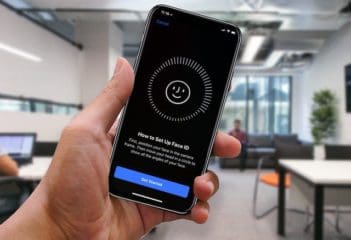
Follow the on-screen instructions to register the Face ID scan.
There is also another toggle below for those who may wear glasses from time to time. By enabling this, you’ll be asked to add another Face ID scan, but this time, wearing glasses. Apple warns that doing so is not as secure as the “normal” Face ID feature, but this new option is available if you want.
When activating Face ID with a mask, you don’t needto be wearing a mask in order to get things set up. Instead, your iPhone will scan the area around your eyes instead of your entire face. While you can wear glasses while using this feature, it will not work if you are wearing sunglasses.
Unfortunately, it seems that this new functionality is limited to the iPhone 12 or newer. That could change with future software releases as Face ID is available on iPhone models going back to the iPhone X.
Andrew Myrick is a freelance writer based on the East Coast of the US. He enjoys everything to do with technology, including tablets, smartphones, and everything in between. Perhaps his favorite past-time is having a never-ending supply of different keyboards and gaming handhelds that end up collecting more dust than the consoles that are being emulated.









Write a Comment