It’s normal for an iPhone to get warm when you’re using it quite frequently, and having your device in a place that’s warm could also increase your chances of your device getting hot. However, there comes a tipping point where your iPhone gets too hot. For example, some users suffer from the issue even when their devices are turned off. And sometimes, removing the charging cable appears not to fix the problem quickly.
The first thing we should mention is that it is okay for an iPhone to get warm, especially with prolonged use, but it should never get hot to the point that it feels uncomfortable to handle. Your iPhone will get warm when streaming video, gaming, etc. For instance, it is normal if your iPhone feels hot when you are downloading multiple apps simultaneously.
Potential Cause #1: Hot Weather
Heat takes a particular toll on your iPhone’s battery. In hot temperatures, batteries aren’t able to store energy efficiently, and performance often suffers. And the hotter the temperature, the faster they lose their storing ability. So, when using your iPhone, be mindful of your surroundings!
iPhones are designed to operate between 32ºF (0ºC) and 95ºF (35ºC). So, if you happen to find yourself in Nevada or Arizona in July, there’s a chance that your iPhone may get too hot. You will usually notice that your iPhone is too hot because you’ll see a message titled:
“iPhone needs to cool down before you can use it.”
This might happen while you’re outside, but it could also occur if you leave your iPhone in a car on a hot day. Just turn off your device and place it in a cooler place. This allows your device to cool down and function normally again.
Potential Cause #2: Your iPhone Case
If you think that your iPhone is getting too hot, the problem may be your case. This is because your iPhone’s exterior shell functions as a cooling surface, so heat is dissipated from your iPhone’s body. Your iPhone case might stop your device from cooling properly by not allowing heat to escape. Rubber is especially bad for trapping heat in as it acts as an insulator, which results in your iPhone being much hotter with it on.
Try a different case to see if this fixes the problem. You could also try using no case, but of course, you’ll need to consider the risks of not using an iPhone case if you drop your device.
Potential Cause #3: A Defective Battery
If your iPhone never cools down, even hours after shutdown, you could have issues with your battery. This will especially be a problem worth looking at if you have an older device. You should contact Apple Support or take your device to an Apple Store; here’s how to chat directly with Apple Support.
How to Cool Down Your iPhone and Prevent the Problem From Reoccurring
Fortunately, you can use several tips to cool down an iPhone that has become too hot. Below are some of our top recommendations.
1. Toggle Off Bluetooth
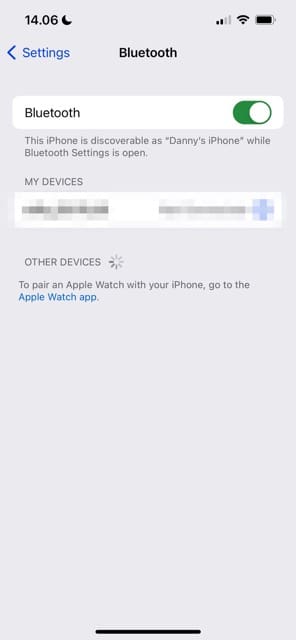
Having Bluetooth switched on can consume additional energy on your device, which could result in your iPhone overheating quicker than it otherwise would. To turn off Bluetooth, you can go to your Control Center and turn off the logo.
Alternatively, navigate to Settings > Bluetooth and switch the Bluetooth toggle off.
2. Switch Off Your iOS Location Services
Location Services is a helpful feature if you need to find directions or would like to share your current whereabouts with someone else. However, keeping the feature turned on can result in your iPhone overheating. If you’re short on time, check out our video on the topic instead.
To turn off Location Services:
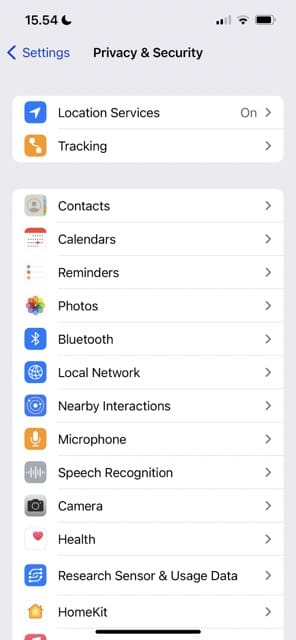
Go to Settings > Privacy & Security.
Select Location Services.
Toggle Location Services off.
You can also adjust the Location Services settings on your iPhone for each app. Click on the app you want to alter and pick from the options available.
3. Turn Off Background App Refresh
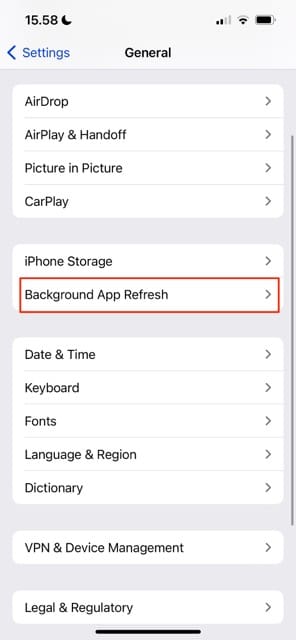
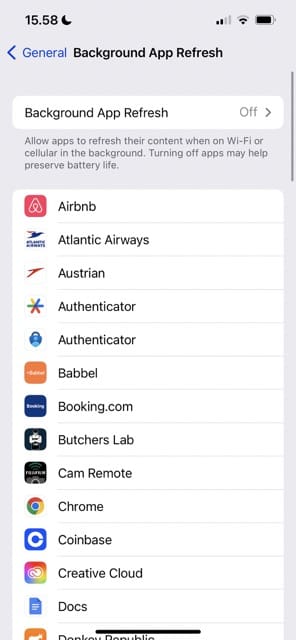
Background App Refresh keeps your apps updated without you needing to do any extra manual work. However, it’s also a big battery drainer and can stop your iPhone from performing at an optimal level. If you think that this setting could be what’s causing your iPhone to overheat, follow these steps to switch off the feature.
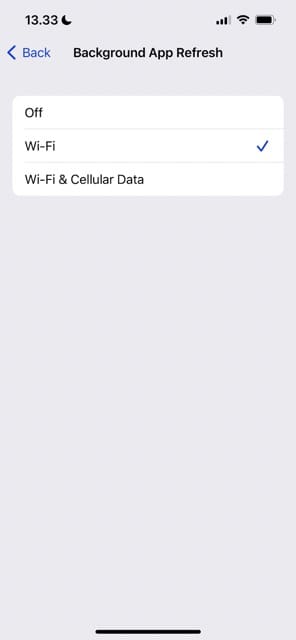
Go to Settings > General > Background App Refresh.
Toggle Background App Refresh off.
4. Disable iCloud
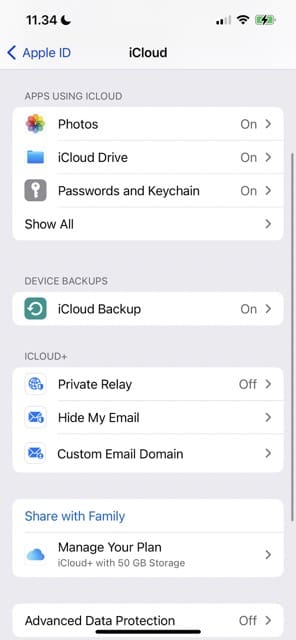
While having iCloud switched on can make it easier to sync your iPhone in real time, the feature could also result in your device overheating more than it should. Here’s how to disable iCloud on your iPhone:
Go to Settings and click on your Apple ID at the top of the screen.
Select iCloud.
Go to Device Backups and turn iCloud Backup off.
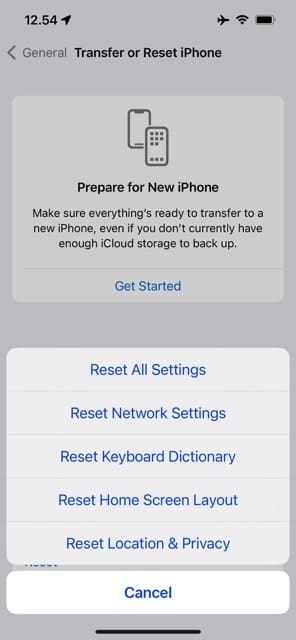
5. Reset All Settings on Your iPhone
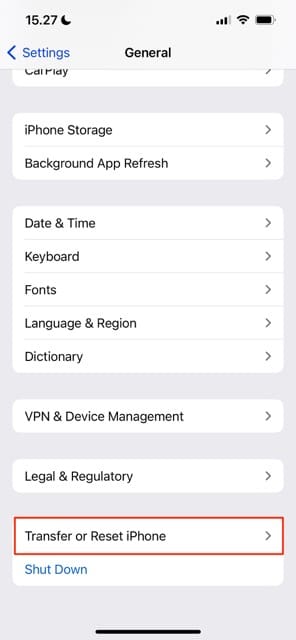
Another possible solution if your iPhone gets too hot is to reset all settings on your iPhone. Here’s how to do that:
Go to Settings > General > Transfer or Reset iPhone.
Select Reset.
Click on Reset All Settings when the menu appears at the bottom of your screen.
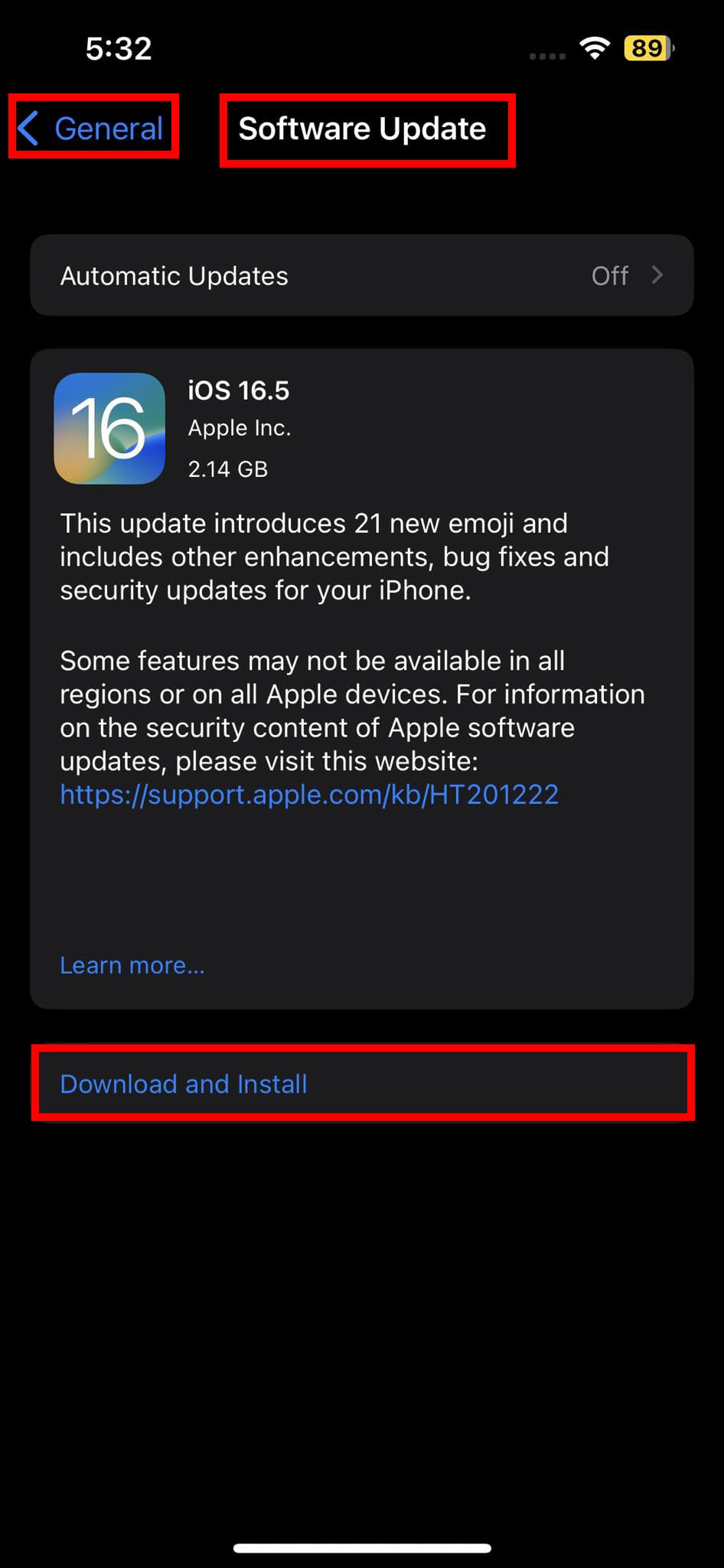
6. Check for an iOS Update
Some users have complained that their iPhone overheats after updating their iOS software. Apple normally releases intermittent updates to patch problems like this, and your device could be getting too hot because you haven’t upgraded to the latest software anyway. Here’s how to check for an iOS update:
Go to Settings > General.
Click on Software Update.
If a software update is available, tap Download and Install.
7. Change Your iPhone Charger
Make sure that you’re only using an original Apple charger. Sometimes, a faulty third-party charger can result in your iPhone overheating. It can also damage your battery life.
8. Reset Your Network Settings
Instead of resetting all settings on your iPhone, you may wish to simply reset your network settings. Wi-Fi issues could cause your device to get too hot.
Go to Settings > General > Transfer or Reset iPhone.
Click on Reset Network Settings.
Reconnect to your Wi-Fi network after the changes have taken place. It’s worth keeping a note of your passcode before resetting your network settings — that way, you won’t need to struggle with searching for the password later.
Other Things You Can Try:
Don’t charge your device and if it is plugged into anything, unplug it.
Avoid using turn-by-turn directions in Apps like Maps, Google Maps, Waze, etc. These not only drain your battery but they also really heat up your iPhone.
Close ALL apps on your iPhone. Double-click the home button or swipe up from the bottom of your screen slowly if your iPhone doesn’t have a home button. Then, swipe up to close every app you currently have open.
Check your device to make sure that you do not have a runaway app. This is usually a third party app that is stuck and is consuming an enormous amount of storage and processing. To check this out, Go to Settings > General> iPhone Storage. You should see a list of apps listed along with how much storage they consume. If you see any odd things here, choose to delete the app and reinstall it again.
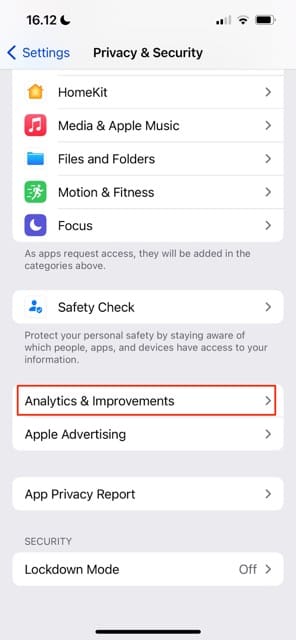
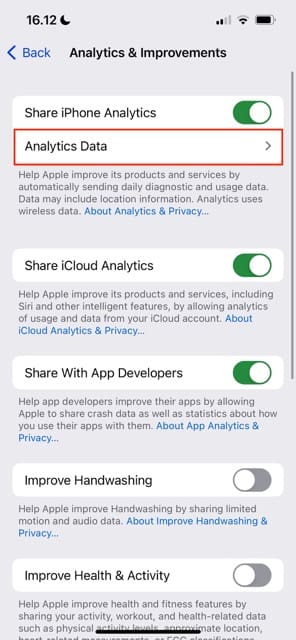
A Word on Analytics and Data
For people who really want to see what’s going on with their iPhones, take a look at your analytics. For most of us, this data doesn’t make much sense. But for folks in the know and service or repair shops, this data can help them figure out what’s going on. Get to your Analytics by going to Settings > Privacy & Security > Analytics & Improvements > Analytics Data. This information might point to a particular app or operation that’s causing your problem.
Reader Tips for Fixing an iPhone That Gets Too Hot
There’s a setting for your display’s brightness called “night shift.” When it’s turned OFF, games will make your iPhone or iPad heat up like crazy. When it’s turned ON to the MAX WARM setting, then games and other apps generate at least half as much heat.
One reader mentioned that using certain apps can cause an iPhone to overheat quicker than others. So, it’s worth looking at your app usage.
Getting a heat sink could also help stop your iPhone from overheating if you continue experiencing this problem.
Use These Tips to Stop Your iPhone From Getting Too Hot
If your iPhone keeps overheating, there could be several reasons why. You could be using a faulty charger, or perhaps you’re living in a region that’s too warm for your device’s optimal temperature range. Sometimes, it’s issues related to software.
There isn’t one single reason why your iPhone gets too hot, but these tips should hopefully have helped you understand what’s happening and get back on track.
Obsessed with tech since the early arrival of A/UX on Apple, Sudz (SK) is responsible for the original editorial direction of AppleToolBox. He is based out of Los Angeles, CA.
Sudz specializes in covering all things macOS, having reviewed dozens of OS X and macOS developments over the years.
In a former life, Sudz worked helping Fortune 100 companies with their technology and business transformation aspirations.
My iPhone 11 often has the problem of being too hot. The first reason is because it has been used for too long. The second reason is ios problem. I use TunesKit iOS System Recovery to fix them all. Although it improves every time, I feel like I need a new phone today. I want to buy iPhone15 series. Which one is the best choice?
Hello how are. You pls listen why very. Hot Battery. IPhone 6 how normal battery & how full. Charge to. My iPhone 6 you. Manage full control charge battery so. I greate to. You Thake. You
I do all of this frequently and IT NEVER STOPS THE OVERHEATING, my iPhone, I have notice overheats faster using maps and google compared to when I use Bing
Hi!
It might be cuz your battery is getting defective…
Go to settings…and go to Battery…check Battery Health…if it is lower than 100%, that indicates why your battery goes low early….my mom’s iPhone 6 had the capacity of 42% or something like that…and hence it was overheating too….so we just went to a mobile repair place/or you can ask Apple Support…they change the battery. 😀
I will be glad to know if this helps you
My I-phone 6s was getting really hot, then it went off and I wasn’t able to charge it. I had a new battery fitted but it is still getting hot, what could the problem be?
Hi..I have got a issue this afternoon.I left my iphone 8plus outside in sun for 15 min and when i get back to my phone i saw high temperature alert and it shut down till now i cannot power it on.What might be the issue and how much would be the cost???
Latest software update IOS 13.5 on my iPhone 6S Plus seems to be causing my battery to rapidly lose power even when phone not in use and phone becomes very hot to handle. Wasn’t this software update supposed to enhance battery life? These software updates seem to cause problems rather than solve them.
Hi. I have problem with my iPhone X use mobile data. when i use the data it starts to be hot in 2 or 3 minutes. Then network will fail after 10 to 15 minutes will shutdown mobile this is the only problem, do you think the problem is with CPU? please guide me.
Hi. I have just bought my iphone x, it doesn’t have any problem with heating except when i use mobile data. even when i am using the WiFi for 5 hr it doesn’t have any problem but when i use the data it starts to be hot in 2 or 3 minutes. this is the only problem, do you think the problem is with CPU? there is no any original apple company in my country, so I can not repair it easily. please guide me.
hiiii..
My phone is i phone 6s .it’s a new i phone.when i turn on wifi or mobile data it’s showing over heating alert.i was reset phone but mobile alert show same as above.how can i fix it?
I assume this iPhone was previously owned and is not new out of the box. If so, it’s quite possible that the battery needs replaced. Current costs for your model are $49 Plus shipping. Contact Apple Support and ask them to run some diagnostic tests remotely to determine if it is a battery issue.
If that is not something you wish to do at this time, try using just WIFi but not mobile and see if the alert appears. Then, try using just mobile but not WiFi and test again. What we want to do is see if we can isolate the problem to a WiFi and mobile isssue.
Another thing to do is close all open apps to ensure they aren’t using energy unnecessarily. Double press the home button to open the app switcher and then swipe off the top of your screen all the apps that appear in the switcher. Then restart.
It’s possible that your iPhone 6 needs a battery replacement–depending on the iOS version you use, check the Battery heath in Settings > Battery > Battery Health.
If it shows diminished capability, consider contacting Apple for its battery replacement service. For the iPhone 6 model, the cost is $49 plus $7 shipping/handling (if needed.) You can set-up an appointment at your local Apple Store and have them run tests and diagnostics on your device–these appointments are always at no cost, although repair are not, unless your device is covered under an Apple Care+ warranty.
I just bought mine for 3 weeks, my Iphone is not connecting to a wi-fi, then it started overheating and then just shut off. I brought it to Applecare, they said there’s a problem with the CPU and they told me to wait for two weeks to get it fixed. Now, I don’t have a nice phone to use.:(
So one day I had it taken from me by my father he claims it’s been it the house whole time.
But when I got it back it was warm like its been outside for a while I told him and he said we gone have to wait for it blow up (DO NOT DO THAT ITS GONNA MESS IT UP EVEN MORE)
But I think the cause of my phone heating up is the battery my case and the charger.
Sorry to hear about your problems with your iPhone overheating and not connecting to WiFi.
First, toggle Bluetooth off from the Settings app instead of using control center. Go to Settings > Bluetooth and toggle it off.
Then, if possible close all your open or suspended apps by double pressing the home button or swiping up the gesture bar and then swiping each app preview up off the top of your screen. Do this process for all apps until all you see is your home screen.
Once all apps close, power off your iPhone and let it rest, untouched for 20 minutes or so. Then power it back on.
Once on, go to Settings > General > Reset > Reset Network Settings.
After resetting these, go to Settings and check that Airplane Mode is off. Then go to Wifi and see if you can connect to a network.
i am using iphone xr yesterday i buyed when i logged my itunes id and i get backuped evrything and i used via mobile data and after completed backup my mobile still getting hot below the camera any suggestions for me
It’s possible there is a hardware problem or loose connection with or near your speaker. Please contact or set-up an appointment with Apple to take a look and inspect your iPhone.
my iPhone 6plus shut down yesterday after overheating while I was using snapchat I tried to let it cool for some time but it just kept getting hotter
I tried to use a cloth to cool down the temperature but now it has completely refused to go back on and if I try to charge it just shows the logo but still doesn’t go on either
Leave your iPhone off and not connected to charging for several hours, or preferably a day.
Then try turning it on. If it doesn’t turn on normally, try a force restart by pressing the Home and Power Buttons at the same time and maintain this hold until the Apple Logo appears on-screen, then release the buttons.
If your iPhone is still stuck on the logo, connect it to a computer with iTunes (doesn’t have to be your computer) and see if the computer recognizes the phone. If so, tap the Check for Update button.
My phone has been warming long time I thought it’s normal.
One day when my phone was connected to charger for an 1 hour 30 minutes and all of my sudden my temperature increased and I got the alert message such as IPHONE TEMPERATURE IS VERY HIGH AND NEED TO COOL DOWN THE DEVICE FOR USE.
Immediately I disconnected the charger and placed the device in front of cooler (as instructed on the website) after the temperature cools down my phone started issue of battery draining, phone microphone is not working and phone is heating weather my is off or On
That sounds like your iPhone’s battery needs replacement. We suggest you act now as it could pose a hazard.
Contact Apple Support in your home country and request a battery replacement–it’s free if your iPhone is still under warranty and Apple Care+. If not covered, batteries costs between 29-79 USD to replace.
Act quickly as the current $29 dollar replacement is good through December 31, 2018, only for all eligible iPhone 6 through iPhone X models. After December 31, 2018, the fee changes to $49 for all these products except iPhone X, which changes to $69.
I have an iPhone 6 and it all of a sudden got really hot and won’t come back on I’ve tried everything even hard reseting it and I even replaced the battery and it still won’t come on and every time I charge it it gets so hot just after a few seconds of being on charge that you can’t touch it and I have pictures I was really needing to get off if I could because they can’t be replaced so anything to help I’m open to try!!!
I don’t have idea sometime my touch is not working and seem phone is hang while charg after that my phone not working touch too please advise my display problem or something hardware looking forward your satisfactory reply
I have had a lot of problems with my iPhone 7 Plus getting way too hot and shutting down or showing that temperature message. So I finally decided to bit the bullet and buy a case that had a built in heat sink or heat dissipation. Problem solved! For the past few weeks, no more temperature warnings and no more iPhone that’s almost too hot to touch.
It works awesome now.
So if you’re having similar issues, look for a case that has a heat sink. It really does help–take it from me.
Hi having issue with Iphone 6 overheating at the back in the middle it gets so hot you cannot hold it.
We are now on our 3RD replacement phone the last one being replaced 4 days ago but are still getting the same issues.
All EE do is send another phone!! getting fed up as having to keep backing up and setting up phone again!!
HELP
Martin, Thats got to be the most annoying experience. 3rd Replacement? wow. I am wondering if there is a third party app that is the culprit here. If you want to to experiment a little, may I suggest offloading or deleting all the third party apps from you phone and use it for 3 – 4 days without them. See if that helps. If it helps, you can slowly introduce one app after the other and check to see if you have a runaway app that is causing this. Good Luck. Keep us posted.
yesterday evening I just plugged in my iPhone 7 (Original charger) after a couple of minutes phone turn very hot after that phone turned off automatically. The heat lasts for 1 hour.now software gets updated by the seller but still phone heating regularly.
Sudheesh, Since it is an iPhone 7 and fairly new device, we dont think it is a battery related issue. If your device is under Appelcare warranty, you should definitely call Apple and have them check it out for you. If you dont have Apple care, we suggest that you try to reset your Network settings and see if it helps. If not the next logical step would be to put the iPhone into Factory Settings and do a clean restore. Good luck and Thank you for stopping by at Appletoolbox.
I have a iPhone 6s had the screen replaced ever since as soon as u turn it on within 2-5 mins it overheats near the power button and shuts down, took it back had battery replaced still overheating, why would it be overheating still
I’m very sorry to hear about your problems with your iPhone 6S overheating. That must feel super frustrating!! It seems you have identified when the problem occurred–the LCD screen repair. As frustrating as it is, you must follow up with Apple (or the repair provider) and insist they run diagnostics to find out why the iPhone is consistently overheating and rendering it not usable. If you never experienced this behavior before the repair but have had in regularly AFTER the repair, then they did not repair it!
Given your evidence, it’s likely a hardware issue that only a hardware repair can solve.
If Apple “fixed” the phone, insist on either a certified repair or replacement. Make sure you document what’s happening and/or show them in person on-site.
So basically we need to turn everything off or toggle many of the features that make a smartphone a smartphone.
How about revert back to flip phones they don’t get hot, as I recall!
Hey me use iPhone 6 plus . When me talk with my family in video call . my iPhone 6 plus getting hot after shut down by himself. Please tell me how I can solve this problem . Please help me for solve this.
Sorry to hear about your problems with heat on your iPhone 6+. Have you tired removing the case? And performed a forced restart?
Make sure background app refresh is turned off. And limit the number of apps using location services.
What may also help is what we call a battery recalibration. You first need to completely drain the battery by leaving the phone on, unplugged, and streaming video content. What you want is for the battery to drain all the way down until it shuts down.
Then, let it sit and cool for a few hours. Then plug it into the wall overnight, if it turns on during the charging, shut it off manually. Let it charge for at least 12 hours, and don’t use it at all during this time.
Good luck,
Liz
After that 12 hours, power it up and perform another forced restart. Then try to use it normally.
Facebook app isn’t working anymore.
Facebook app isn’t showing anything. Sometimes it’s show something. But it’s okay with browser.
Update done
Uninstalled done
Setting reset done
Reboot done
Also try by changing Wifi
But it’s still not working
iPhone 6. Version 11.02
It’s not you. And it’s not your iPhone. Facebook had had problems all week—it’s definitely on problem on Facebook’s end, not apple. You did everything right—if the problem was your iPhone. It’s good practice to check a site like Down Detector or similar to see if others report problems too. That way, you know it’s not just you!
Am using iPhone 6. But it’s Facebook messenger photo/video Isn’t automatically saving.though I turned on automatic system.even I uninstalled it and updating it.
I’m not totally understanding your problem with your iPhone 6. Are you trying to save photos and videos to your Camera Roll from Facebook Messenger? For individual photos and videos, tap on the photo to display on the screen. Find the box with an arrow pointing out of it. Tap on that and save the photo should be a choice.
1.Go to settings on messenger
2 Switch on save photo
3.Go back to messenger, tap photo and the Share button (the little black square with a small white arrow appears in the bottom left-hand corner of photo)
4.Tap arrow to save
If you don’t see that option, you might not have given permission for the app to access your photos OR you might have a restriction set up. Check these in Settings > Privacy and Settings > General > Restrictions
Hi Guys,
I have been using IPhone since 2006. I have used IPhone 3, 4, 5 and now 6 plus. I bought my current iPhone in Dubai. Broke it and exchanged it for a new one in Bangkok in 2017, January. I now live in Spain. My iPhone 6 plus has started getting too hot (I get a warning message that your IPhone Temperature is too hot to be used) and takes long to charge and loses battery power in a matter of minutes. What can I do?
If none of these tips worked, you might have a defective battery. In that case, contact Apple Support and request their Battery Replacement Service.
Battery service
Your iPhone battery might be covered by AppleCare+ or consumer law (no cost). If not, there’s an out-of-warranty fee for battery service
Out of warranty: For all iPhone models € 89
All prices are in Euro and include VAT. Apple adds € 12.30 shipping fee if they need to ship your iPhone.
Hope your iPhone is still under warranty–which it might be since it was replaced this year!
Hi!
My name is john and I am from Sri Lanka. I recently bought iPhone 6s gold on 2017. 07.01 after that I couldn’t use it properly. I mean it was kept safe place in my locker.
I only recently had time to start using it I was playing a game via the internet, AND sometimes I’ll take videos.
BUT now, when I put on headphones to listen to some song, my phone is getting heat like a light bulb! In particular, it seems that the left corner near to volume switch keys is really hot.
Please help me to solve this problem please because I love my Apple iPhone and I bought it under very difficult situations.
Yes, this seems to be a big problem with the iPhone 6 models. If possible, do not use a case–that often traps heat. Alternatively, if you absolutely need a case consider purchasing a case that actually reduces (dissipates) heat.
Also, turning off LTE reduces heat–and if listening to music you may not need the speed of LTE.
Good day! I would like to raised this concerned.
My iphone 6+ is not working, when i used it to txt my friend, i was amazed because the monitor become white. I dont know why. I cant go back to the main menu. Its new and a month old. I get the phone in smart sm cebu, they offer it in promo.
What i might do? Are they going to replace me with thesame item?
I would like to ask your quick responce in this concern. I know this is small thing for you but for my self this is big problem because i used my own money just to buy this phone, and i dont have any savings now. This phone is reward for myself because i worked hard in my work.
Try restarting your iPhone by pressing BOTH the Home button and the Power button at the same time. Hold these buttons down until you see the Apple logo on your screen, then release the buttons. See if your iPhone now starts working as normal.
If not, since your iPhone is a new purchase, check the serial number at Apple’s warranty site to see if your iPhone is covered under warranty. If so, contact Apple Support and see if they can either fix the problem or replace your iPhone.
If your iPhone is not covered under Apple’s warranty, contact the Smart SM Cebu retailer and explain that your recent purchase is no longer working.
All new iPhone (never used, still in sealed box) are covered by an ONE (1) YEAR limited warranty from the date of original retail purchase.
Best of luck and so sorry to hear about your troubles.
My iPhone 6+ gets heated when i use cellular data for long time. I am so so much worried about it. I would be nice if any one could share the solution.
So I got an iPhone 6s about a week ago, and it’s already heated up at least 2 times. The second time, the same thing happened to me as with Jon — when I used SoundHound to search up one song, the iPhone got really hot. Maybe using apps/downloading stuff makes it warmer? Even now, after searching and reading through two articles, taking off my case, turning off Bluetooth, and deleting GarageBand (I don’t need it anyway), it’s still warm and getting warmer as I’m installing the newest update. Don’t get me wrong, I’m really grateful and happy to have a newer iPhone, but Apple really needs to fix this — this didn’t happen at all with the iPhone 4.
Yes, mine on. It all started after I updated the software to 10.1. I think the software is causing the processor to continually run, making the phones extremely hot to the touch and it drains all of the power. The phone starts to go haywire.
Whatever u do don’t ever take ur phone to ambulance repair I’m in the process of taking them to court for all kind of things is so sad u take ur phone to get fixed for one thing and when they return it is messed up from other things sad how they just take your money and try to play it of as nothing.. Smh they just rob people sad to know there is ugly people out there still
I’ve had my iPhone 6 for about a year with no problems. Got to work yesterday and was shocked when I grabbed my phone and it was extremely hot. I turned it on and the power was down to 70% ; which was disconcerning being when I left the house it was fully charged. By my first break it was at 30 so I turned if off, took the case off and put it in a cool place. When I checked it later before lunch the battery was dead but was still warm. I went straight to the Apple Store waited (and waited) for the associate and explained what happened. She took my phone in the back and came back about 5 minutes later saying it looked like the phone display had went out and that it powered up when she plugged it in in the back. When I asked how that was possible since the battery was dead (I did check by turning the vibrate on and off to see if it was still running) and if she could show me, she somewhat avoided the question and said they could TRY to recalibrate it to see if it would fix the phone display for about 130 but there wasn’t anything they could do if it didn’t work (mumbling something about being a manufacturer problem) and would probably need to buy a new phone. It didn’t feel right after leaving the store and after reading the problems other peeps are having am feeling angry and disappointed about the whole thing. Is there anyone out here there whose been able to get their dead battery charged enough to try these suggestions?..
i mistakenly left my iPhone 6s under my mac book and it went of overheated, i tried restarting it and it comes on and says ‘iPhone needs to cool down before use ‘ and then it goes of …. pleae help what should i do ?
My iPhone 6 I got a month ago gets very hot fast. And it charges slowly its charges 10 minutes to go up to 10%. This happens ever since I got the new iOS update 9.3.2 I’m really confused…. It’s at the point where I can’t hold it in my hand and, it’s summer …..
I am very sad. My iPhone 6 Plus just died last night apparently of overheat. I left it charging as usual after midnight but at 6am there was no vital sign on it.
Any tips to revive it are more than appreciated.
My iPhone is overheating when it is using every kind of apps or hardware type of signalizing to another place, why is that?
I read on a forum that it might be something that has been using over 35-40% in background usage that causes the case, but no…. it is something different… So I am wondering very much what is causing it… But I might investigate this problem, this is new and I might be the first user to experience something like this…. even thou, I will post what I find out… so far it is not the battery usage percentage that is the case, it is when I launch every app on the phone! so….. either way, I will try to recover the entire phone or something… let me know if you guys know something, it does this if I have a sim card in or out… Bluetooth or wifi on or off…. so what is causing this?
But as I said… This will go to investigation till I find the source!
I have had my iPhone 6 for 5 months now and it dose overheat when charging and takes around 20 minutes to cool down when unplugged it is not the cable or plug as they do not heat up it is the phone itself mainly at the top and sides. I haven’t noticed any changes in Temperature when using the phone unles it is constant use for hours lol (I’d guess normal) and yes the battery life is shocking on a 100% charge I get around 10 hours of life less if using, but agen typical for the iPhone I’m not surprised by this my concern and worry is with the heat the phone get when on charge any advice please it is not insured or on contract :/
my iphone 6 plus get hot even if it in my pocket it also drain fast I bourght a back-up battry pack and that drain fast my iphone get hot to the point that I can feel the heat coming throught my pocket and help
my iphone 6 plus get hot even if it in my pocket it also drain fast I bourght a back-up battry pack and that drain fast my iphone get hot to the point that I can feel the coming throught my pocket and help
Same issues here! I phone 6 running ok until a couple of weeks ago. Started with battery getting drained super fast , now overheating to the point it is unconfortable holding it. Also noticed charger gets very hot! Dissapointed:(
I had this problem and it has now resulted to me no longer having an Iphone 6 as its completely died I’ve tried several ways to turn the phone on including holding my home and lock button together. I also tried connecting it to iTunes and it won’t even recognise my device the phones that dead but my battery was on 68%. I rang my network provider and they said to contact apple them self’s which is what I have done. They are saying its a thing called internal software fault.
I’ve had my iPhone 6+ for six months and it just started overheating since I synced to iCloud photos. Never had a problem before. It gets soo hot that I need to remove the case and turn it off to cool it down. It is currently generating excessive heat to hold it and heats up in a matter of minutes with most applications but specially with photos from cloud. Anyone know possible causes ?
I was experiencing the same thing with my phone. It started with the IOS 8.1 upgrade for me. I would shut down the phone just to cool the phone. After dealing with this for a few months, Last week I had had enough. I resetted the phone back to factory default and set up my phone, and then restored the back up. That seemed to have fix the issue. At least I thought. The following day it began over heating. I took it to the Apple Store and after then running the diagnostic they said they couldn’t find anything because I had erased the phone. That is a lie because the phone ran hot prior to entering the Apple Store. I truly believe there is a defect in the ios8.1 coding. because They swamped my phone with a new phone and it still overheats. I’m on a quest to find out the actual cause and when I do I’ll post it!
-IPhone 6+ iOS 8.4.1 (getting really hot!)
-Bought Apple Watch v1.0.1 (paired to the 6+)
-updated phone to iOS 8.4.1 (because i wasnt able to put playlists on phone-still didnt help)
Dismissed a call on the phone by using watch dismiss call feature. After that phone was super hot- turned it off to clear condition.
Tried to reproduce – got warm but not as hit as the first time.
i bought i phone 6 128 GB 5-jan-2015 . after one month unfortunately its full in water and i give it apple center , the said it water damage and i have to pay 1249 dhs than the will give new i pay . the give the new phone. but its coming too hot. especially when im using Facebook and video calling.
before replaced it was not like that.
please suggest me what can i do now
my iPhone 6 is getting hot to touch it and the battery dying fast. I have to charge it several times a day and I hardly use it. All my apps are off and removed from the back scene and I also make sure they’re aren’t website pages open in the background. If I go to Apple I don’t want them to replace it with a refurbished phone since I bought this one brand new. Can you offer suggestions?
My iPhone 6 is fine it doesn’t overheat, the problem is my charger the actual plug when it is on charge feels very hot, I am wondering if this is dangerous, can this start fires? Should I get a new plus because it is a USB I have it plugged into a an extension lead because I have broken so many iPhone chargers from them bending so I haven’t bent this one, I am just scared I case the overheating of the plug causes any damage at all, can you suggest anything?
My IPhone 6 plus has heated from time to time but yesterday the screen went blank and it was really hot. I had it in a wallet case (not an Apple one) so I took it out of there and it cooled down pretty quickly and returned to normal. Hours later I put it back in the case (which has a plastic shell to hold the device in addition to the outer wallet case) and it heated up again. I had Apple run a remote diagnosis…nothing found to be wrong.
Got my phone in December. Never had a problem with earlier versions and I’ve had the IPhone from Day 1. I will try the screensave and other tips. I don’t stream videos but I do use it for browsing the Internet.
Hello from Finland. I’ve had my iPhone 6 for 8 months now and now it has suddenly generated heat like I was making video and the battery was draining really fast. I have original leather case but no problems before. I shut the phone using Home + Power and after that its working fine.
I also have odd problem with my Jawbone UP24 band. The app suddenly disappeared and when I installed the app again, it couldn’t pair anymore with the UP24. It’s working fine with iPad and iPhone’s Bluetooth seems working with iBeacon. These two problems started at the same time.
my iphone 6 always over heats to the point its burning hot if i uses facebook my phone gets hot if i call people my phone over heats im just worried that the battery might pop because this is not normal what do i do
I just got my new iPhone 6+ last June and sometime last month I noticed that its heating up even if it’s just in my bag or in my pocket. I had to turn it off just for it to cool down. What to do pls?? I don’t even have lots of apps installed and I always make sure not to have any idle apps running when not in use. Settings have been reset just a while ago and my phone still feels uncomfortably hot. Is this even normal?? Help. Tnx
Mine got so hot we thought it was going to catch on fire. We laid down on cold tile floor until it stopped. Now it is completely dead! 3 mph old iPhone 6 with ios8
I have an otter box phone case. When I’m charging I remove it and place my phone in a cool surface. It does help. When I’m done charging I put the case on and be in my way.
even i’m experiencing the same problem. the phone gets hot when streaming videos for 20 mins and the charger too gets hot while charging and even the phone. any suggestions or explanation?
My brand new iPhone 6 was hot to th touch after getting it. At the same time my wife got an iPhone 6 plus and hers was fine.
Difference was my screen brightness was all the way and hers was at half. So go to settings and brightness and adjust the brightness down a bit. Worked for my phone.
I have a iPhone 6. The last few days I’ve been having a lot of problems with it. I will try to send a text and it makes the sent sound, but it doesn’t show up in my messages. My apps crash for no reason. I open them and it instantly crashes repetitively. I try restarting, but I know it’s not restarting right, I just cannot pin point what part is wrong. It’s like it doesn’t actually shut down. It goes black at shut off. (I did slide the thing at the top that says, “slide to shut down). Well when I try to turn it back on its like my phone was just locked. My fb messenger is messing up. If I try to send a picture, the pictures flash over and over again at the bottom of the screen so it won’t let me select one to send. When I click on camera roll in the messenger app to see if I can try to select a picture there, they are all black. Now my phone is overheating when out in the open and not used…. Don’t know what else to do….
this iPhone 6 will not stay running for more than 5 minutes. when I cool it off in the fridge I can boot it up for around 5 minutes then it turns off or locks up and I have to hold the buttons to turn off.
I just got new I phone 6 plus. It’s a replacement phone. It is overheating. I can hold it but I can fell that it’s overheating. I don’t like spending hours on phone with Apple that’s why I don’t want to call them. If this problem will get to the point that it’s overwhelming than I will have to get new replacement phone AGAIN!
I started with my iPhone 6 plus today. It’s hanging a lot and it’s getting heated too! It’s a new set and it’s making me crazy! Is it possible that my iPhone is defective ??
My iphone 6 is new i got it from 4 months or less but it’s weird it gets extremely hot as if it boiling and all the apps are off i barely open too much things together. Event the charger gets screwed when i plug the iphone to get, about the battery it’s getting worst i charge it 4 times aday and it wasnt like that i dont use it 24/7 please i need help i feel that my iphone is goig to bomb someday
I too face the same problem .. Even while charging and also d battery drains out in a short while .. Sometimes my phone gets really heated up and i have replaced its case with a new one that is more open .. Plse suggest affective solutions to this problem
My phone is over heated. Even the charger becomes hot when plugged in. Please suggest ways to resolve it.
I have switched off all the softwares as described in your FAQ
Take it to the apple store. There may be a problem with the charger. Better safe than sorry. I waited too long and my phone died because there was a faulty connection for the charger.
Hi Team,
I have had a customer complain about their iphone 6 plus overheating and battery draining quickly, what advice or troubleshooting can you recommend ?
Jerry Moraitis
My iPhone 6 was delivered today! I live in the UK so the temperature of the climate won’t be any affect of the heat! My phone is getting hot not to the point where I cannot hold it but it doesnt feel good. It has charged very slowly, at one point I had gained 5% in 10 minutes im not sure if that’s normal or not as ive only had it for a matter of hours but my iPhone 5 seemed to charge a lot faster than the 6 is. Thank you, Luke














My iPhone 11 often has the problem of being too hot. The first reason is because it has been used for too long. The second reason is ios problem. I use TunesKit iOS System Recovery to fix them all. Although it improves every time, I feel like I need a new phone today. I want to buy iPhone15 series. Which one is the best choice?
is is the second day nthat my iphone 11 pro max has stopped due to overheating
Our phone is getting hot and will not let me reset it or put in a password that’s at the iPhone is disabled
Hello how are. You pls listen why very. Hot Battery. IPhone 6 how normal battery & how full. Charge to. My iPhone 6 you. Manage full control charge battery so. I greate to. You Thake. You
I do all of this frequently and IT NEVER STOPS THE OVERHEATING, my iPhone, I have notice overheats faster using maps and google compared to when I use Bing
My iPhone 6
I don’t no why when using it it makes hot when it is on charge tooo It makes hot and the battery goes low early
Hi!
It might be cuz your battery is getting defective…
Go to settings…and go to Battery…check Battery Health…if it is lower than 100%, that indicates why your battery goes low early….my mom’s iPhone 6 had the capacity of 42% or something like that…and hence it was overheating too….so we just went to a mobile repair place/or you can ask Apple Support…they change the battery. 😀
I will be glad to know if this helps you
My I-phone 6s was getting really hot, then it went off and I wasn’t able to charge it. I had a new battery fitted but it is still getting hot, what could the problem be?
Hi..I have got a issue this afternoon.I left my iphone 8plus outside in sun for 15 min and when i get back to my phone i saw high temperature alert and it shut down till now i cannot power it on.What might be the issue and how much would be the cost???
Latest software update IOS 13.5 on my iPhone 6S Plus seems to be causing my battery to rapidly lose power even when phone not in use and phone becomes very hot to handle. Wasn’t this software update supposed to enhance battery life? These software updates seem to cause problems rather than solve them.
My iPhone 6s is getting too hot during charging what is the cost to change battery if in case?
Hi Ram.
It should cost about $49 USD plus shipping. If an Apple Store is open, you can set up an appointment and take it in to avoid any shipping fees.
Hi. I have problem with my iPhone X use mobile data. when i use the data it starts to be hot in 2 or 3 minutes. Then network will fail after 10 to 15 minutes will shutdown mobile this is the only problem, do you think the problem is with CPU? please guide me.
Hi. I have just bought my iphone x, it doesn’t have any problem with heating except when i use mobile data. even when i am using the WiFi for 5 hr it doesn’t have any problem but when i use the data it starts to be hot in 2 or 3 minutes. this is the only problem, do you think the problem is with CPU? there is no any original apple company in my country, so I can not repair it easily. please guide me.
hiiii..
My phone is i phone 6s .it’s a new i phone.when i turn on wifi or mobile data it’s showing over heating alert.i was reset phone but mobile alert show same as above.how can i fix it?
Hi Deshan,
I assume this iPhone was previously owned and is not new out of the box. If so, it’s quite possible that the battery needs replaced. Current costs for your model are $49 Plus shipping. Contact Apple Support and ask them to run some diagnostic tests remotely to determine if it is a battery issue.
If that is not something you wish to do at this time, try using just WIFi but not mobile and see if the alert appears. Then, try using just mobile but not WiFi and test again. What we want to do is see if we can isolate the problem to a WiFi and mobile isssue.
Another thing to do is close all open apps to ensure they aren’t using energy unnecessarily. Double press the home button to open the app switcher and then swipe off the top of your screen all the apps that appear in the switcher. Then restart.
See if things improve.
My iPhone 6 is always hot when using it I don’t even understand
Hi Fred,
It’s possible that your iPhone 6 needs a battery replacement–depending on the iOS version you use, check the Battery heath in Settings > Battery > Battery Health.
If it shows diminished capability, consider contacting Apple for its battery replacement service. For the iPhone 6 model, the cost is $49 plus $7 shipping/handling (if needed.) You can set-up an appointment at your local Apple Store and have them run tests and diagnostics on your device–these appointments are always at no cost, although repair are not, unless your device is covered under an Apple Care+ warranty.
I just bought mine for 3 weeks, my Iphone is not connecting to a wi-fi, then it started overheating and then just shut off. I brought it to Applecare, they said there’s a problem with the CPU and they told me to wait for two weeks to get it fixed. Now, I don’t have a nice phone to use.:(
I had my iPhone 6s for 3 months.
So one day I had it taken from me by my father he claims it’s been it the house whole time.
But when I got it back it was warm like its been outside for a while I told him and he said we gone have to wait for it blow up (DO NOT DO THAT ITS GONNA MESS IT UP EVEN MORE)
But I think the cause of my phone heating up is the battery my case and the charger.
My iPhone always hot when power on or charging
Too complicated, at least for me
hello, guys, my phone is overheating and the wifi is grayed out.
I’ve turned the Bluetooth on using the control panel and it keeps on searching for the BT device and won’t stop.
why is that? and also I cant turn the wifi on. thx
Hi Tyron,
Sorry to hear about your problems with your iPhone overheating and not connecting to WiFi.
First, toggle Bluetooth off from the Settings app instead of using control center. Go to Settings > Bluetooth and toggle it off.
Then, if possible close all your open or suspended apps by double pressing the home button or swiping up the gesture bar and then swiping each app preview up off the top of your screen. Do this process for all apps until all you see is your home screen.
Once all apps close, power off your iPhone and let it rest, untouched for 20 minutes or so. Then power it back on.
Once on, go to Settings > General > Reset > Reset Network Settings.
After resetting these, go to Settings and check that Airplane Mode is off. Then go to Wifi and see if you can connect to a network.
i am using iphone xr yesterday i buyed when i logged my itunes id and i get backuped evrything and i used via mobile data and after completed backup my mobile still getting hot below the camera any suggestions for me
why does my phone still heating, speaker part only. im not doing anything, well except for texting, but then, can it be a cause of heating?
Hi Edemlyn,
It’s possible there is a hardware problem or loose connection with or near your speaker. Please contact or set-up an appointment with Apple to take a look and inspect your iPhone.
I’ve everything kept of cases, restarted my phone but every time my data is on it’s literally hot please help
Daizy,
Please set-up an appointment with Apple to check your device. It’s possible you need a battery replacement or it’s another hardware issue.
my device Iphone6..when my turn on my iphone getting so hot and drain battery so quickly..12.1.4 updated
my iPhone 6plus shut down yesterday after overheating while I was using snapchat I tried to let it cool for some time but it just kept getting hotter
I tried to use a cloth to cool down the temperature but now it has completely refused to go back on and if I try to charge it just shows the logo but still doesn’t go on either
what should I do
Hi Prudence,
Leave your iPhone off and not connected to charging for several hours, or preferably a day.
Then try turning it on. If it doesn’t turn on normally, try a force restart by pressing the Home and Power Buttons at the same time and maintain this hold until the Apple Logo appears on-screen, then release the buttons.
If your iPhone is still stuck on the logo, connect it to a computer with iTunes (doesn’t have to be your computer) and see if the computer recognizes the phone. If so, tap the Check for Update button.
My phone is getting hotter sometimes.Any remedies please
My phone has been warming long time I thought it’s normal.
One day when my phone was connected to charger for an 1 hour 30 minutes and all of my sudden my temperature increased and I got the alert message such as IPHONE TEMPERATURE IS VERY HIGH AND NEED TO COOL DOWN THE DEVICE FOR USE.
Immediately I disconnected the charger and placed the device in front of cooler (as instructed on the website) after the temperature cools down my phone started issue of battery draining, phone microphone is not working and phone is heating weather my is off or On
Please help me to isolate my phone issue
Hi Hyder Khan,
That sounds like your iPhone’s battery needs replacement. We suggest you act now as it could pose a hazard.
Contact Apple Support in your home country and request a battery replacement–it’s free if your iPhone is still under warranty and Apple Care+. If not covered, batteries costs between 29-79 USD to replace.
Act quickly as the current $29 dollar replacement is good through December 31, 2018, only for all eligible iPhone 6 through iPhone X models. After December 31, 2018, the fee changes to $49 for all these products except iPhone X, which changes to $69.
Sam
I have an iPhone 6 and it all of a sudden got really hot and won’t come back on I’ve tried everything even hard reseting it and I even replaced the battery and it still won’t come on and every time I charge it it gets so hot just after a few seconds of being on charge that you can’t touch it and I have pictures I was really needing to get off if I could because they can’t be replaced so anything to help I’m open to try!!!
I don’t have idea sometime my touch is not working and seem phone is hang while charg after that my phone not working touch too please advise my display problem or something hardware looking forward your satisfactory reply
Ahh! Endlich einen hilfreichen Beitrag zu diesem Thema gefunden! Vielen lieben Dank! 🙂
Gruss Gott Jawbone!
Danke, dass Sie uns wissen lassen.
Sam
I have had a lot of problems with my iPhone 7 Plus getting way too hot and shutting down or showing that temperature message. So I finally decided to bit the bullet and buy a case that had a built in heat sink or heat dissipation. Problem solved! For the past few weeks, no more temperature warnings and no more iPhone that’s almost too hot to touch.
It works awesome now.
So if you’re having similar issues, look for a case that has a heat sink. It really does help–take it from me.
my iphone 6s gets hot. how can i fix it?
Hi having issue with Iphone 6 overheating at the back in the middle it gets so hot you cannot hold it.
We are now on our 3RD replacement phone the last one being replaced 4 days ago but are still getting the same issues.
All EE do is send another phone!! getting fed up as having to keep backing up and setting up phone again!!
HELP
Martin, Thats got to be the most annoying experience. 3rd Replacement? wow. I am wondering if there is a third party app that is the culprit here. If you want to to experiment a little, may I suggest offloading or deleting all the third party apps from you phone and use it for 3 – 4 days without them. See if that helps. If it helps, you can slowly introduce one app after the other and check to see if you have a runaway app that is causing this. Good Luck. Keep us posted.
yesterday evening I just plugged in my iPhone 7 (Original charger) after a couple of minutes phone turn very hot after that phone turned off automatically. The heat lasts for 1 hour.now software gets updated by the seller but still phone heating regularly.
how can i get rectify it?
I little worried to use my phone.
Please help me
Sudheesh, Since it is an iPhone 7 and fairly new device, we dont think it is a battery related issue. If your device is under Appelcare warranty, you should definitely call Apple and have them check it out for you. If you dont have Apple care, we suggest that you try to reset your Network settings and see if it helps. If not the next logical step would be to put the iPhone into Factory Settings and do a clean restore. Good luck and Thank you for stopping by at Appletoolbox.
I have a iPhone 6s had the screen replaced ever since as soon as u turn it on within 2-5 mins it overheats near the power button and shuts down, took it back had battery replaced still overheating, why would it be overheating still
Hi Natalie,
I’m very sorry to hear about your problems with your iPhone 6S overheating. That must feel super frustrating!! It seems you have identified when the problem occurred–the LCD screen repair. As frustrating as it is, you must follow up with Apple (or the repair provider) and insist they run diagnostics to find out why the iPhone is consistently overheating and rendering it not usable. If you never experienced this behavior before the repair but have had in regularly AFTER the repair, then they did not repair it!
Given your evidence, it’s likely a hardware issue that only a hardware repair can solve.
If Apple “fixed” the phone, insist on either a certified repair or replacement. Make sure you document what’s happening and/or show them in person on-site.
Good luck,
Liz
So basically we need to turn everything off or toggle many of the features that make a smartphone a smartphone.
How about revert back to flip phones they don’t get hot, as I recall!
Hey me use iPhone 6 plus . When me talk with my family in video call . my iPhone 6 plus getting hot after shut down by himself. Please tell me how I can solve this problem . Please help me for solve this.
Hi Jatin,
Sorry to hear about your problems with heat on your iPhone 6+. Have you tired removing the case? And performed a forced restart?
Make sure background app refresh is turned off. And limit the number of apps using location services.
What may also help is what we call a battery recalibration. You first need to completely drain the battery by leaving the phone on, unplugged, and streaming video content. What you want is for the battery to drain all the way down until it shuts down.
Then, let it sit and cool for a few hours. Then plug it into the wall overnight, if it turns on during the charging, shut it off manually. Let it charge for at least 12 hours, and don’t use it at all during this time.
Good luck,
Liz
After that 12 hours, power it up and perform another forced restart. Then try to use it normally.
Hi my iPhone 6 has updated iOS 11.03 few days after my has getting heat solve my problem thank you ….
This helped me deal with my iPhone 7 getting too hot by turning off background app refresh. thx for tip.
Thank you so much! My iPhone 6S was getting really hot—these tips made it better and saved battery too! Thanks.
Facebook app isn’t working anymore.
Facebook app isn’t showing anything. Sometimes it’s show something. But it’s okay with browser.
Update done
Uninstalled done
Setting reset done
Reboot done
Also try by changing Wifi
But it’s still not working
iPhone 6. Version 11.02
Hi Yamin,
It’s not you. And it’s not your iPhone. Facebook had had problems all week—it’s definitely on problem on Facebook’s end, not apple. You did everything right—if the problem was your iPhone. It’s good practice to check a site like Down Detector or similar to see if others report problems too. That way, you know it’s not just you!
Am using iPhone 6. But it’s Facebook messenger photo/video Isn’t automatically saving.though I turned on automatic system.even I uninstalled it and updating it.
Hi Salah,
I’m not totally understanding your problem with your iPhone 6. Are you trying to save photos and videos to your Camera Roll from Facebook Messenger? For individual photos and videos, tap on the photo to display on the screen. Find the box with an arrow pointing out of it. Tap on that and save the photo should be a choice.
1.Go to settings on messenger
2 Switch on save photo
3.Go back to messenger, tap photo and the Share button (the little black square with a small white arrow appears in the bottom left-hand corner of photo)
4.Tap arrow to save
If you don’t see that option, you might not have given permission for the app to access your photos OR you might have a restriction set up. Check these in Settings > Privacy and Settings > General > Restrictions
Good Luck,
Liz
Hi Guys,
I have been using IPhone since 2006. I have used IPhone 3, 4, 5 and now 6 plus. I bought my current iPhone in Dubai. Broke it and exchanged it for a new one in Bangkok in 2017, January. I now live in Spain. My iPhone 6 plus has started getting too hot (I get a warning message that your IPhone Temperature is too hot to be used) and takes long to charge and loses battery power in a matter of minutes. What can I do?
Regards,
Charles
Hi Charles,
First, try the tips in these two articles.
iPhone Overheating
iPhone Gets Too Hot, how to fix it
We also have a YouTube video
If none of these tips worked, you might have a defective battery. In that case, contact Apple Support and request their Battery Replacement Service.
Battery service
Your iPhone battery might be covered by AppleCare+ or consumer law (no cost). If not, there’s an out-of-warranty fee for battery service
Out of warranty: For all iPhone models € 89
All prices are in Euro and include VAT. Apple adds € 12.30 shipping fee if they need to ship your iPhone.
Hope your iPhone is still under warranty–which it might be since it was replaced this year!
Sorry about all the troubles with your iPhones!
SK
Hi!
My name is john and I am from Sri Lanka. I recently bought iPhone 6s gold on 2017. 07.01 after that I couldn’t use it properly. I mean it was kept safe place in my locker.
I only recently had time to start using it I was playing a game via the internet, AND sometimes I’ll take videos.
BUT now, when I put on headphones to listen to some song, my phone is getting heat like a light bulb! In particular, it seems that the left corner near to volume switch keys is really hot.
Please help me to solve this problem please because I love my Apple iPhone and I bought it under very difficult situations.
Hi John,
I’m sorry your iPhone is getting hotter than you’d like. Please try the following:
Remove Your iPhone from its Case
Turn off Location Services (Settings > Privacy > Location Services)
Turn off background App Refresh (Settings > General > Background App Refresh)
Force Close iPhone apps
Double Click Home to see all open apps
Swipe up on app preview to close
Slide right or left to find all open apps and close them ALL
Turn On Auto-Brightness
Settings>Display & Brightness
Turn Auto-Brightness ON
Or Turn Auto-Brightness OFF and set Brightness to the lower settings
Turn Fitness Tracking Off
Settings>Privacy>Motion & Fitness
Turn Fitness Tracking OFF
Hope these tips help you!
SK
Our i phone 6 is very heat when I listens songs very bad service
Hi Ankush,
Yes, this seems to be a big problem with the iPhone 6 models. If possible, do not use a case–that often traps heat. Alternatively, if you absolutely need a case consider purchasing a case that actually reduces (dissipates) heat.
Also, turning off LTE reduces heat–and if listening to music you may not need the speed of LTE.
Keep us posted,
SK
iphone 6s plus overheats on normal use. too hot to carry. dangerous. unsafe. 3 mos old
Hi PW,
Please call Apple Support or visit an Apple Store regarding your iPhone 6S. This is not normal and needs check out.
SK
Good day! I would like to raised this concerned.
My iphone 6+ is not working, when i used it to txt my friend, i was amazed because the monitor become white. I dont know why. I cant go back to the main menu. Its new and a month old. I get the phone in smart sm cebu, they offer it in promo.
What i might do? Are they going to replace me with thesame item?
I would like to ask your quick responce in this concern. I know this is small thing for you but for my self this is big problem because i used my own money just to buy this phone, and i dont have any savings now. This phone is reward for myself because i worked hard in my work.
Hi Richard,
Try restarting your iPhone by pressing BOTH the Home button and the Power button at the same time. Hold these buttons down until you see the Apple logo on your screen, then release the buttons. See if your iPhone now starts working as normal.
If not, since your iPhone is a new purchase, check the serial number at Apple’s warranty site to see if your iPhone is covered under warranty. If so, contact Apple Support and see if they can either fix the problem or replace your iPhone.
If your iPhone is not covered under Apple’s warranty, contact the Smart SM Cebu retailer and explain that your recent purchase is no longer working.
All new iPhone (never used, still in sealed box) are covered by an ONE (1) YEAR limited warranty from the date of original retail purchase.
Best of luck and so sorry to hear about your troubles.
Cheers,
Liz
My iPhone 6+ gets heated when i use cellular data for long time. I am so so much worried about it. I would be nice if any one could share the solution.
So I got an iPhone 6s about a week ago, and it’s already heated up at least 2 times. The second time, the same thing happened to me as with Jon — when I used SoundHound to search up one song, the iPhone got really hot. Maybe using apps/downloading stuff makes it warmer? Even now, after searching and reading through two articles, taking off my case, turning off Bluetooth, and deleting GarageBand (I don’t need it anyway), it’s still warm and getting warmer as I’m installing the newest update. Don’t get me wrong, I’m really grateful and happy to have a newer iPhone, but Apple really needs to fix this — this didn’t happen at all with the iPhone 4.
Yes, mine on. It all started after I updated the software to 10.1. I think the software is causing the processor to continually run, making the phones extremely hot to the touch and it drains all of the power. The phone starts to go haywire.
My Iphone 6 is dangerous it is overheating like it is going to burst into flames it also drains all the battery power not good
Whatever u do don’t ever take ur phone to ambulance repair I’m in the process of taking them to court for all kind of things is so sad u take ur phone to get fixed for one thing and when they return it is messed up from other things sad how they just take your money and try to play it of as nothing.. Smh they just rob people sad to know there is ugly people out there still
I’ve had my iPhone 6 for about a year with no problems. Got to work yesterday and was shocked when I grabbed my phone and it was extremely hot. I turned it on and the power was down to 70% ; which was disconcerning being when I left the house it was fully charged. By my first break it was at 30 so I turned if off, took the case off and put it in a cool place. When I checked it later before lunch the battery was dead but was still warm. I went straight to the Apple Store waited (and waited) for the associate and explained what happened. She took my phone in the back and came back about 5 minutes later saying it looked like the phone display had went out and that it powered up when she plugged it in in the back. When I asked how that was possible since the battery was dead (I did check by turning the vibrate on and off to see if it was still running) and if she could show me, she somewhat avoided the question and said they could TRY to recalibrate it to see if it would fix the phone display for about 130 but there wasn’t anything they could do if it didn’t work (mumbling something about being a manufacturer problem) and would probably need to buy a new phone. It didn’t feel right after leaving the store and after reading the problems other peeps are having am feeling angry and disappointed about the whole thing. Is there anyone out here there whose been able to get their dead battery charged enough to try these suggestions?..
i mistakenly left my iPhone 6s under my mac book and it went of overheated, i tried restarting it and it comes on and says ‘iPhone needs to cool down before use ‘ and then it goes of …. pleae help what should i do ?
My iPhone 6 I got a month ago gets very hot fast. And it charges slowly its charges 10 minutes to go up to 10%. This happens ever since I got the new iOS update 9.3.2 I’m really confused…. It’s at the point where I can’t hold it in my hand and, it’s summer …..
I am very sad. My iPhone 6 Plus just died last night apparently of overheat. I left it charging as usual after midnight but at 6am there was no vital sign on it.
Any tips to revive it are more than appreciated.
My iPhone is overheating when it is using every kind of apps or hardware type of signalizing to another place, why is that?
I read on a forum that it might be something that has been using over 35-40% in background usage that causes the case, but no…. it is something different… So I am wondering very much what is causing it… But I might investigate this problem, this is new and I might be the first user to experience something like this…. even thou, I will post what I find out… so far it is not the battery usage percentage that is the case, it is when I launch every app on the phone! so….. either way, I will try to recover the entire phone or something… let me know if you guys know something, it does this if I have a sim card in or out… Bluetooth or wifi on or off…. so what is causing this?
But as I said… This will go to investigation till I find the source!
My iphone 6 is getting very hot. And also it is consuming very much battery when i turn on mobile data. Please help me out what to do.
I have had my iPhone 6 for 5 months now and it dose overheat when charging and takes around 20 minutes to cool down when unplugged it is not the cable or plug as they do not heat up it is the phone itself mainly at the top and sides. I haven’t noticed any changes in Temperature when using the phone unles it is constant use for hours lol (I’d guess normal) and yes the battery life is shocking on a 100% charge I get around 10 hours of life less if using, but agen typical for the iPhone I’m not surprised by this my concern and worry is with the heat the phone get when on charge any advice please it is not insured or on contract :/
I’m seeing ALOT of questions, but NO answers. This is disappointing.. Anyone ever find out what it was?!?
my iphone 6 plus get hot even if it in my pocket it also drain fast I bourght a back-up battry pack and that drain fast my iphone get hot to the point that I can feel the heat coming throught my pocket and help
my iphone 6 plus get hot even if it in my pocket it also drain fast I bourght a back-up battry pack and that drain fast my iphone get hot to the point that I can feel the coming throught my pocket and help
Same issues here! I phone 6 running ok until a couple of weeks ago. Started with battery getting drained super fast , now overheating to the point it is unconfortable holding it. Also noticed charger gets very hot! Dissapointed:(
I had this problem and it has now resulted to me no longer having an Iphone 6 as its completely died I’ve tried several ways to turn the phone on including holding my home and lock button together. I also tried connecting it to iTunes and it won’t even recognise my device the phones that dead but my battery was on 68%. I rang my network provider and they said to contact apple them self’s which is what I have done. They are saying its a thing called internal software fault.
I’ve had my iPhone 6+ for six months and it just started overheating since I synced to iCloud photos. Never had a problem before. It gets soo hot that I need to remove the case and turn it off to cool it down. It is currently generating excessive heat to hold it and heats up in a matter of minutes with most applications but specially with photos from cloud. Anyone know possible causes ?
I was experiencing the same thing with my phone. It started with the IOS 8.1 upgrade for me. I would shut down the phone just to cool the phone. After dealing with this for a few months, Last week I had had enough. I resetted the phone back to factory default and set up my phone, and then restored the back up. That seemed to have fix the issue. At least I thought. The following day it began over heating. I took it to the Apple Store and after then running the diagnostic they said they couldn’t find anything because I had erased the phone. That is a lie because the phone ran hot prior to entering the Apple Store. I truly believe there is a defect in the ios8.1 coding. because They swamped my phone with a new phone and it still overheats. I’m on a quest to find out the actual cause and when I do I’ll post it!
-IPhone 6+ iOS 8.4.1 (getting really hot!)
-Bought Apple Watch v1.0.1 (paired to the 6+)
-updated phone to iOS 8.4.1 (because i wasnt able to put playlists on phone-still didnt help)
Dismissed a call on the phone by using watch dismiss call feature. After that phone was super hot- turned it off to clear condition.
Tried to reproduce – got warm but not as hit as the first time.
i bought i phone 6 128 GB 5-jan-2015 . after one month unfortunately its full in water and i give it apple center , the said it water damage and i have to pay 1249 dhs than the will give new i pay . the give the new phone. but its coming too hot. especially when im using Facebook and video calling.
before replaced it was not like that.
please suggest me what can i do now
my iPhone 6 is getting hot to touch it and the battery dying fast. I have to charge it several times a day and I hardly use it. All my apps are off and removed from the back scene and I also make sure they’re aren’t website pages open in the background. If I go to Apple I don’t want them to replace it with a refurbished phone since I bought this one brand new. Can you offer suggestions?
My iPhone 6 is fine it doesn’t overheat, the problem is my charger the actual plug when it is on charge feels very hot, I am wondering if this is dangerous, can this start fires? Should I get a new plus because it is a USB I have it plugged into a an extension lead because I have broken so many iPhone chargers from them bending so I haven’t bent this one, I am just scared I case the overheating of the plug causes any damage at all, can you suggest anything?
My IPhone 6 plus has heated from time to time but yesterday the screen went blank and it was really hot. I had it in a wallet case (not an Apple one) so I took it out of there and it cooled down pretty quickly and returned to normal. Hours later I put it back in the case (which has a plastic shell to hold the device in addition to the outer wallet case) and it heated up again. I had Apple run a remote diagnosis…nothing found to be wrong.
Got my phone in December. Never had a problem with earlier versions and I’ve had the IPhone from Day 1. I will try the screensave and other tips. I don’t stream videos but I do use it for browsing the Internet.
Hello, how come u solve ur problem. I m facing same problem with my I phone 6.
Hello from Finland. I’ve had my iPhone 6 for 8 months now and now it has suddenly generated heat like I was making video and the battery was draining really fast. I have original leather case but no problems before. I shut the phone using Home + Power and after that its working fine.
I also have odd problem with my Jawbone UP24 band. The app suddenly disappeared and when I installed the app again, it couldn’t pair anymore with the UP24. It’s working fine with iPad and iPhone’s Bluetooth seems working with iBeacon. These two problems started at the same time.
Can this be a virus or something?
my iphone 6 always over heats to the point its burning hot if i uses facebook my phone gets hot if i call people my phone over heats im just worried that the battery might pop because this is not normal what do i do
My iphone 6 plus will be hot when i use 3g
I just got my new iPhone 6+ last June and sometime last month I noticed that its heating up even if it’s just in my bag or in my pocket. I had to turn it off just for it to cool down. What to do pls?? I don’t even have lots of apps installed and I always make sure not to have any idle apps running when not in use. Settings have been reset just a while ago and my phone still feels uncomfortably hot. Is this even normal?? Help. Tnx
Mine got so hot we thought it was going to catch on fire. We laid down on cold tile floor until it stopped. Now it is completely dead! 3 mph old iPhone 6 with ios8
I know recently my iphone 6+ Overheats and run out of battery fast i am concern abut this issue.
I have an otter box phone case. When I’m charging I remove it and place my phone in a cool surface. It does help. When I’m done charging I put the case on and be in my way.
I have the same problem since I upgraded to IOS 8.4. I was not suffering from overheating while using previous IOS.
Same here
Same here.
The plug is hot when I was charging my iPhone 6
Hi
Just got a brand new two days old phone overheating
Please suggest
Regards
Pankaj Tripathi
even i’m experiencing the same problem. the phone gets hot when streaming videos for 20 mins and the charger too gets hot while charging and even the phone. any suggestions or explanation?
Solution:
My brand new iPhone 6 was hot to th touch after getting it. At the same time my wife got an iPhone 6 plus and hers was fine.
Difference was my screen brightness was all the way and hers was at half. So go to settings and brightness and adjust the brightness down a bit. Worked for my phone.
I have a iPhone 6. The last few days I’ve been having a lot of problems with it. I will try to send a text and it makes the sent sound, but it doesn’t show up in my messages. My apps crash for no reason. I open them and it instantly crashes repetitively. I try restarting, but I know it’s not restarting right, I just cannot pin point what part is wrong. It’s like it doesn’t actually shut down. It goes black at shut off. (I did slide the thing at the top that says, “slide to shut down). Well when I try to turn it back on its like my phone was just locked. My fb messenger is messing up. If I try to send a picture, the pictures flash over and over again at the bottom of the screen so it won’t let me select one to send. When I click on camera roll in the messenger app to see if I can try to select a picture there, they are all black. Now my phone is overheating when out in the open and not used…. Don’t know what else to do….
this iPhone 6 will not stay running for more than 5 minutes. when I cool it off in the fridge I can boot it up for around 5 minutes then it turns off or locks up and I have to hold the buttons to turn off.
I just got new I phone 6 plus. It’s a replacement phone. It is overheating. I can hold it but I can fell that it’s overheating. I don’t like spending hours on phone with Apple that’s why I don’t want to call them. If this problem will get to the point that it’s overwhelming than I will have to get new replacement phone AGAIN!
I started with my iPhone 6 plus today. It’s hanging a lot and it’s getting heated too! It’s a new set and it’s making me crazy! Is it possible that my iPhone is defective ??
My iphone 6 is new i got it from 4 months or less but it’s weird it gets extremely hot as if it boiling and all the apps are off i barely open too much things together. Event the charger gets screwed when i plug the iphone to get, about the battery it’s getting worst i charge it 4 times aday and it wasnt like that i dont use it 24/7 please i need help i feel that my iphone is goig to bomb someday
I too face the same problem .. Even while charging and also d battery drains out in a short while .. Sometimes my phone gets really heated up and i have replaced its case with a new one that is more open .. Plse suggest affective solutions to this problem
My phone is over heated. Even the charger becomes hot when plugged in. Please suggest ways to resolve it.
I have switched off all the softwares as described in your FAQ
Take it to the apple store. There may be a problem with the charger. Better safe than sorry. I waited too long and my phone died because there was a faulty connection for the charger.
This happens to me as well and it gets hot to where it burns when I touch it
Hi Team,
I have had a customer complain about their iphone 6 plus overheating and battery draining quickly, what advice or troubleshooting can you recommend ?
Jerry Moraitis
It’s just the garbage Apple company. They only care about the money their getting.
*bitter, party of 1
*they’re
I do not have an iCloud account and my storage is full ? Can u tell me how to access the account ?
My iPhone 6 was delivered today! I live in the UK so the temperature of the climate won’t be any affect of the heat! My phone is getting hot not to the point where I cannot hold it but it doesnt feel good. It has charged very slowly, at one point I had gained 5% in 10 minutes im not sure if that’s normal or not as ive only had it for a matter of hours but my iPhone 5 seemed to charge a lot faster than the 6 is. Thank you, Luke
My iPhone 6+ gets very hot , tried everything unless I turn it off then it cools down but this should not be the case, I have had it only for 6 months