• Skip to primary navigation
  • Skip to main content
  • Skip to primary sidebar
  • Skip to footer

AppleToolBox

Tools and Fixes for Mac, iPad, iPhone & iWatch

Search posts

  • About
  • Contact

CONNECT WITH US

CATEGORIES

  • iPhone
  • iPad
  • iPod
  • Apple Watch
  • Mac/MacBook
  • AirPods
  • Apple TV
  • News
  • Apple Services
  • HomePod
  • Reviews

SITE

  • Home
  • About Us
  • Contact
  • Advertise

Search posts

You are here: Home / News / Focus Sessions Is the Windows 11 Equivalent of Focus Mode in macOS Monterey

Focus Sessions Is the Windows 11 Equivalent of Focus Mode in macOS Monterey

By Andrew Myrick 0 comments Last updated August 6, 2021

Earlier this year, Apple took the wraps off of macOS Monterey, including many of the same features we’ll be enjoying with iOS 15 and iPadOS 15. One such feature is called “Focus Mode” and essentially Do Not Disturb on steroids. It allows you to set different modes based on different scenarios. For example, you can create a Work Focus that mutes notifications from non-work applications, and it can automatically turn on at specific times.

  • Here’s Everything That’s Coming to macOS Monterey This Fall
  • Apple Wants You To Stay Focused With iOS 15
  • Here Are All of the Macs Compatible With macOS Monterey
  • What To Expect From Apple in the Next 12 Months
  • How to Download Safari 15 on macOS Big Sur and Catalina

A few weeks ago, Microsoft unveiled Windows 11, perhaps the biggest update to Windows ever. Many assumed that Microsoft already showed off all of the features coming this Fall, but that’s not the case. Earlier today, Microsoft Chief Product Office Panos Panay revealed our first look at “Focus Sessions”.

Another first look from the team…#FocusSessions on #Windows11 coming soon. This has been a game-changer for me, especially with @Spotify integration #Productivity #Creativity #WindowsInsiders pic.twitter.com/HfJh4niDiS

— Panos Panay (@panos_panay) August 5, 2021

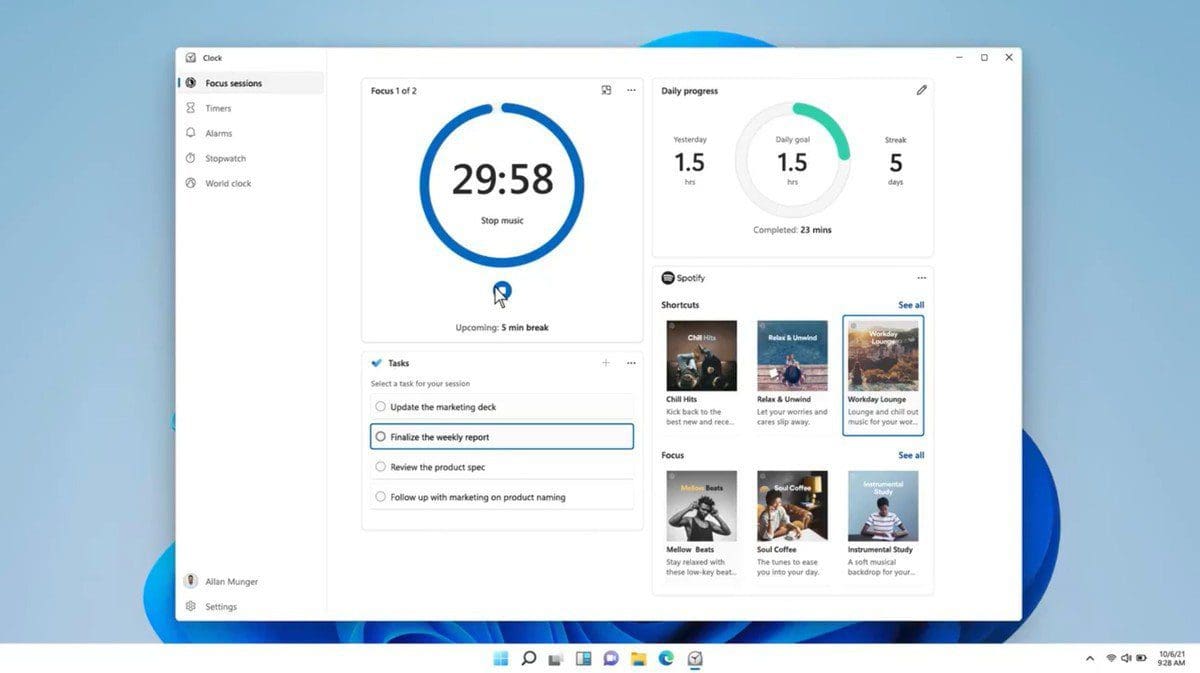
With Focus Sessions enabled in Windows 11, the feature essentially merges Microsoft To Do with Spotify and the built-in Clock app. While in use, you are able to listen to your favorite Spotify tracks, while keeping track of any upcoming breaks, the remainder of your task lists, and more.

Focus Sessions vs Focus Mode

Focus Sessions in Windows 11

With macOS Monterey, Apple wants you to set the scene for yourself, based on what you need. This means allowing notifications for certain apps and contacts, while sending others to the Notification Summary for later. And one of the biggest benefits is that these modes sync across all of your Apple devices. A Focus Mode created on the iPhone for work will turn on at the same time as your Mac and your iPad.

Focus Sessions offers a different approach to productivity. With Microsoft To Do acting as the backbone, you pick a certain task from your to-do list to work on. Then, you can set the session to be as long (or as short) as you want it to be. And with Spotify integration, you are able to enjoy all of your favorite music while getting some work done.

Further more, Microsoft is also integrating a series of dashboards for Focus Sessions. These show you how many breaks you have taken, while another one shows the progresss you’ve made on different tasks and overall goals.

Currently, Focus Sessions are not available in the latest build of Windows 11. However, with this introduction by Panay, it’s only a matter of time before it makes its way to one of the beta releases. It will be interesting to pit Focus Sessions against Focus Mode to see which is the better for your productivity needs.

Related Posts:

  • pexels-cottonbro-5082579
    Getting Started With iOS 15: Everything Good And Bad
  • WWDC 2021 Hero
    WWDC21 Recap: Everything You Missed In Apple's 2-Hour Event
  • Disable Do Not Disturb iPhone Header
    How to Turn Off Do Not Disturb on iPhone 14
  • Apple Focus Mode Hero
    How To Use Focus Mode on macOS Monterey
  • two iphones standing up
    How to Silence Notifications on iPhone
  • photo showing the front of an iphone home screen
    How to Silence Text Notifications on iPhone
  • Games coming to macOS Sonoma
    How to Play Windows Games on Mac
  • How to Install Windows 11 on Mac
    Want iMessage on Your Windows PC? How-To
  • iPadOS 17 Widgets
    Best Interactive Widgets for iPadOS 17
Andrew Myrick
Andrew Myrick

Andrew Myrick is a freelance writer based on the East Coast of the US. He enjoys everything to do with technology, including tablets, smartphones, and everything in between. Perhaps his favorite past-time is having a never-ending supply of different keyboards and gaming handhelds that end up collecting more dust than the consoles that are being emulated.

Reader Interactions

Write a Comment Cancel reply

Primary Sidebar

Recent Posts

  • How to Manage Your iPhone Call Log
  • Are Apple’s Safety Precautions Enough for AirTags?
  • How to Hide Username and Photo on the Mac Lock Screen
  • Microsoft Resume vs. Apple Handoff – Which Wins for Cross-Device Work?
  • How to Export iTunes Library to New Computer
  • What the Gemini Desktop App Will Bring to Mac

Connect with us

Footer

ABOUT

  • About Us
  • Contact us
  • Advertise
  • Privacy
  • Terms of Use

GUIDES

  • iOS & iPadOS
  • Apple ID
  • iCloud
  • App Store
  • iTunes
  • FaceTime
  • iMessage
  • Siri
  • Books and iBooks
  • Game Center
  • AirPlay

CONNECT

  • Facebook
  • Twitter
  • FeedBurner
  • YouTube

© Copyright 2010-2024 Guiding Tech Media · All Rights Reserved

This site and its content are in no way affiliated or endorsed by Apple, Inc. · Reproduction without explicit permission is prohibited