If you have trouble browsing the web using Apple’s Safari browser, it’s frustrating! So, let’s get into how to fix it fast.
Web browsers like Safari usually work great on a Mac. Once a while, Safari has issues like running very slow, crashing, or not allowing you to access pages or not loading pages properly. If these problems sound familiar, you aren’t alone! And we are here to help.
Try another app or web browser that connects to the Internet
Make sure cables are connected, and that your router and modem are turned on
If your computer is connected to the Internet but with problems, close all your open apps and restart your Mac, then wait a few minutes as your Mac fully boots, and try again to use Safari
When webpages appear incomplete, or the text is too small, open Safari’s preferences and check your settings
If AutoFill is not working in Safari on Mac, change your AutoFill options in Safari preferences
Pages load slowly or only on a second try
Sometimes, removing Safari’s history of where you’ve browsed previously helps your Safari run better.
Be aware that if your Mac and your other devices have Safari turned on in iCloud preferences, your browsing history is removed from all of them.
Clear your Safari’s history, cache, and website data
Open the Safari app on your Mac, choose History > Clear History
Choose how far back you want your browsing history cleared
Confirm by pressing Clear History again
When you clear your history, Safari removes data it saves as a result of your browsing:
History of webpages you visited
The back and forward list for open webpages
Websites added for Quick Website Search, asked to use your location or send you notifications
Websites with plug-in content you started by clicking a Safari Power Saver notice
Top Sites that aren’t marked as permanent
Frequently visited site list
Recent searches
Icons for webpages
Snapshots saved for open webpages
List of items you downloaded (downloaded files aren’t removed)
Clearing your browsing history in Safari doesn’t clear any browsing histories kept independently by websites you visited.
Clear cookies and website data in Safari on Mac
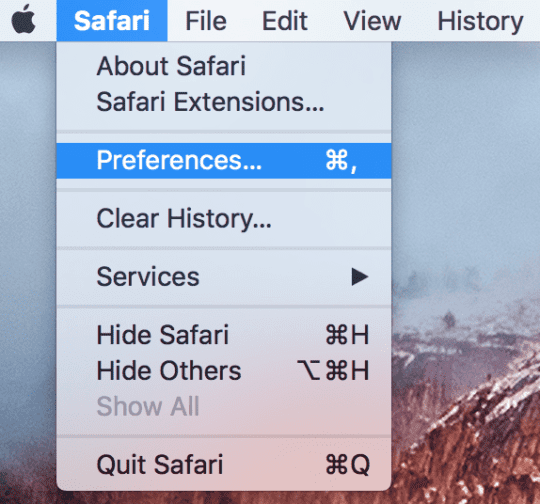
Open Safari on your Mac, choose Safari > Preferences
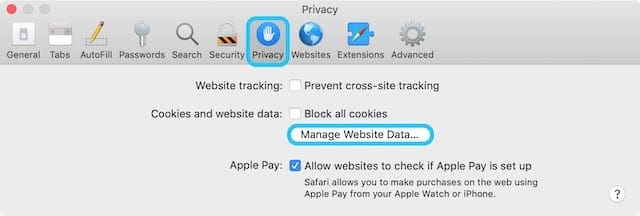
Click Privacy
Click Manage Website Data, select Remove All to remove stored cookies and data
Removing the data may reduce tracking, but may also log you out of websites or change website behavior
If you want, select Prevent cross-site tracking to prevent trackers from using cookies and website data to track you
Cookies and website data are deleted unless you visit and interact with the trackers’ websites
You might also want to select Block all cookies always to block cookies
Websites, third parties, and advertisers can’t store cookies and other data on your Mac. This may prevent some websites from working properly
Changing your cookie preferences or removing cookies and website data in Safari may change or remove them in other apps.
Reset Safari (for older Mac OS X)
Although you’ll lose some potentially valuable stored data, this very simple procedure can resolve the slowness in some cases
Simply go to Safari > Reset Safari (in the Safari menu bar) and check all items
Change your DNS settings
Safari may exhibit some odd DNS issues that can cause three problems:
hangs while loading pages or inordinate slowness
pages do not load on the first try but load properly on a second try
disruption of a local router’s (wireless or wired) network connection
Things like downloading Safari and finding it slow to open common URLs?
Clearing the cache and deleting the history does nothing and sites still load very slow.
Anecdotal evidence suggests that this issue is caused by a problem with Safari DNS prefetching mechanism, which appears to send more requests than allowed by some ISPs. This issue may also cause problems with some routers.
The fix for both of these issues is generally to switch DNS servers from those generated by your ISP to those offered by OpenDNS or Google Public DNS.
How to change a Mac’s DNS settings
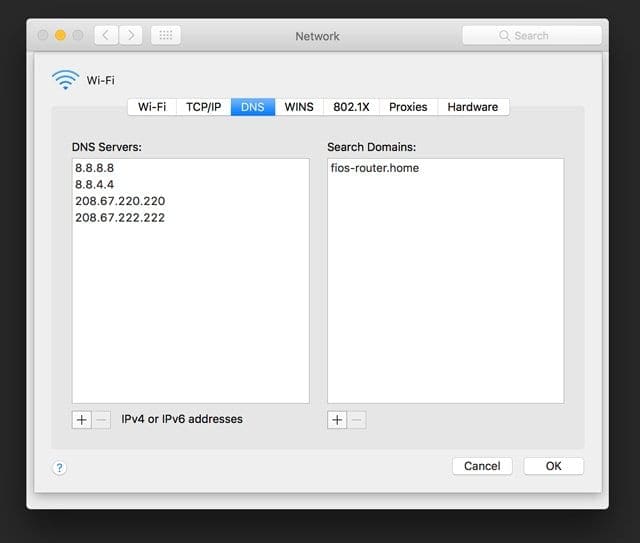
Open System Preferences and click “Network.”
Select your connection method (AirPort, Ethernet, etc.)
Enter the following items in the “DNS Server” field: 208.67.222.222, 208.67.220.220 for OpenDNS or 8.8.8.8 and 8.8.4.4 for Google Public DNS
Click Apply
Disable errant plug-ins and add-ons
Some plug-ins and add-ons may be incompatible with the new release of Safari, causing performance issues.
In Safari, go to Safari > Preferences in the menu bar
Click the “Security” tab, then deselect “Enable plug-ins.” Restart Safari
If the slowness is gone, a plug-in may be to blame
Look in the folders ~/Library/Internet Plug-Ins and /Library/Internet Plug-Ins and remove the items to a safe location (but don’t delete them)
You can then re-enable plug-ins in the “Security tab,” and add the things back one by one, restarting Safari after each, to identify the problem plug-in
Perform the same process for any items in the following folders
/Library/Input Methods/
/Library/InputManagers/
~/Library/Input Methods/
~/Library/InputManagers/
One such add-on that has been identified as culpable is CosmoPod, a tool that allows you to download Flash videos and audio content.
To resolve the issue, download the CosmoPod package and launch the installer, then select the “Uninstall” option and follow the steps.
You may also need to uninstall SIMBL by following the same process; download the SIMBL package and run the included uninstaller.
Clear AutoFill and Forms
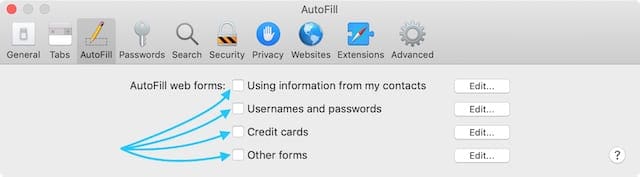
Go to Safari > Preferences and select AutoFill
Uncheck all the options for AutoFill on a Mac to make Safari faster
Uncheck all the items or click the “Edit” option next to “Other Forms” and remove all of the items
Next, navigate to ~/Library/Safari and drag the folder “Icons” to the trash, then restart Safari
Interface slowness (jerky scrolling, etc.)
Some users have reported slow or lagging scrolling in Safari. In some cases, it appears that this issue is caused by the installation of Flash, which includes several security fixes but may degrade performance in some regards.
Flash Fix
The fix for this issue is generally to downgrade Flash to the previous iteration, although this will eliminate several important security refinements and other enhancements. As such, you should avoid the downgrade if you can live with the slow scrolling.
Several users have reported that Safari crashes (unexpectedly quits) randomly during regular use. The crashes may occur during page loading, when Safari starts up, when the Mac wakes up from sleep, or when a new page or tab is opened.
There are several potential fixes for this issue, including:
Delete cache folder
Navigate to ~/Library/Caches (this is the Library folder inside your user folder), and drag the folder com.apple.Safari to the trash. Quit then relaunch Safari.
Reset Safari
Although you’ll lose some potentially valuable stored data, this very simple procedure can resolve the crashing issue in some cases. Simply go to Safari > Reset Safari (in the Safari menu bar) and check all items.
Delete add-ons
Some plug-ins and add-ons may be incompatible with the new release of Safari, causing crashes.
In Safari, go to Safari > Preferences in the menu bar. Click the “Security” tab, then deselect “Enable plug-ins.” Restart Safari. If the slowness is gone, a plug-in may be to blame. Look in the folders ~/Library/Internet Plug-Ins and /Library/Internet Plug-Ins and remove the items. You can then re-enable plug-ins, and add the things back one by one, restarting Safari after each, to identify the problem plug-in.
Perform the same process for any items in the following folders:
/Library/Input Methods/
/Library/InputManagers/
~/Library/Input Methods/
~/Library/InputManagers/
CT Loader has also been known to cause crashes. Delete all of the following files, then restart your Mac and launch Safari.
As a last resort to crashing and performance issues with Safari, you can downgrade to an earlier version of Safari. Unfortunately, although Apple maintains a Safari download page, the earlier Safari installer will not run once the latest Safari is present; its states that an older version of Safari cannot be installed over a new one.
To get around this problem, you’ll need to use one of the following options:
Archive and Install macOS or OS X
Use your Mac OS X installation disc to perform an archive and install process as described for OS X here and macOS here.
Download Pacifist and the Safari installer. Drag the Safari installer package onto the Pacifist application icon to open it.
Once the Safari package is open in Pacifist, select it from the list, then click “Install” in the upper left corner of the Pacifist window. Leave the “Use administrator privileges” box checked.
You’ll be presented with a dialog box that states, “Application already exists.” Check “Don’t ask again for this installation” then click “Replace.”
After performing this process, restart your Mac. You’ll be left with an earlier version of Safari.
Obsessed with tech since the early arrival of A/UX on Apple, Sudz (SK) is responsible for the original editorial direction of AppleToolBox. He is based out of Los Angeles, CA.
Sudz specializes in covering all things macOS, having reviewed dozens of OS X and macOS developments over the years.
In a former life, Sudz worked helping Fortune 100 companies with their technology and business transformation aspirations.
I have been in living hell since mid February 2012, trying everything I could think of the get safari working again. It was slow as a pig, hanging and forcing reloads. The spinning beach ball of death was becoming my closest companion, like a bad smell you can’t shake off! So, three weeks into trying everything offered by punters on Mac forums, I found you and decided to try what you recommended, even though the article is almost two years old.
I discovered that the issue was the plugins from the latest version of Flash Player, which updated itself sometime around mid freaking february. What a coincidence.
I simply uninstalled Flash player and went back to the previous version. I’ll deal with any fall out from using an older version when and if it arises. In the mean time, I owe you at least an hour per day… so if you need a testimonial, as they say in the classics, ‘call me’.
Thank you so much,
Chris Gibson
PS The jerks at Apple could care less. My next computer will be a PC. At least my expectations of PC are not so high. I bought my daughter a Samsung Laptop for Christmas. It leaves my Mac for dead…








I have been in living hell since mid February 2012, trying everything I could think of the get safari working again. It was slow as a pig, hanging and forcing reloads. The spinning beach ball of death was becoming my closest companion, like a bad smell you can’t shake off! So, three weeks into trying everything offered by punters on Mac forums, I found you and decided to try what you recommended, even though the article is almost two years old.
I discovered that the issue was the plugins from the latest version of Flash Player, which updated itself sometime around mid freaking february. What a coincidence.
I simply uninstalled Flash player and went back to the previous version. I’ll deal with any fall out from using an older version when and if it arises. In the mean time, I owe you at least an hour per day… so if you need a testimonial, as they say in the classics, ‘call me’.
Thank you so much,
Chris Gibson
PS The jerks at Apple could care less. My next computer will be a PC. At least my expectations of PC are not so high. I bought my daughter a Samsung Laptop for Christmas. It leaves my Mac for dead…
Swapping out the DSN numbers did the trick. Safari loads up very quickly now. Thanks for the advice.
Your suggestion to switch DNS servers worked beautifully.
Thanks Much.