What good is an iPhone without apps? Or an iPad without movies? Not much good at all really, as many users have discovered when their device says it “Cannot connect to App Store” or “Cannot connect to iTunes Store.” If that’s happened to you, this post has all the information you need to fix it.
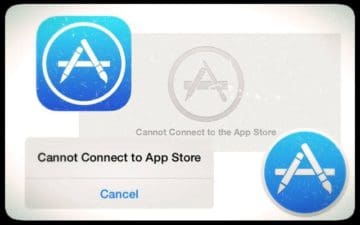
A range of different messages could pop up when you cannot connect to the App Store.
When any Apple device — from iPods to Apple TVs — can’t connect to a store you won’t be able to buy, download, update or even browse apps and media.
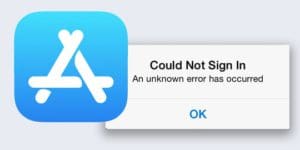
These connection issues also affect other Apple services like the iBooks Store, iCloud, or even Apple Pay. When this happens there are several different alert notifications you might receive:
We’ve explained these troubleshooting tips and more in full detail below.
Why does it keep saying “Cannot connect to iTunes store”?
Your Apple device regularly reaches out to iTunes or the App Store to download media, check for updates, or refresh background content.
If that connection fails, for any number of potential reasons, you’ll be alerted with a message.
Apple devices, like an iPhone or iPad, cannot connect to the App Store or iTunes Store without an internet connection.
They may also be hindered by system maintenance, account inconsistencies, or other software bugs.
How do I connect to the iTunes Store or App store?
If you cannot connect to the iTunes Store on iPhone, iPad, Mac, or any other Apple device the troubleshooting tips in this post will help.
They can resolve connection problems caused by common software bugs, sign in errors, or issues with your device settings. They will also alert you to any system downtime.
Try each of the troubleshooting tips outlined below. They will help you to reconnect to the iTunes Store or App Store. Make sure to try connecting again after each step.
Close down every app and restart your device
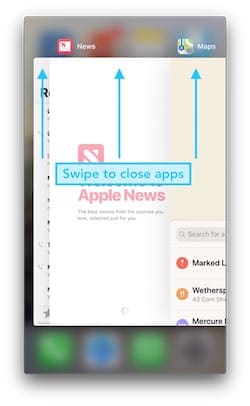
Double-click the home button or swipe up on an iOS device to close all the apps running in the background. Doing this stops frozen or malfunctioning apps from taking up processing power and allows the store to operate as usual.
Swipe up to close apps running in the background.
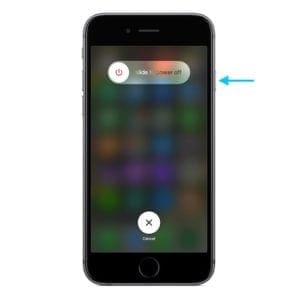
After closing every app, press and hold the Sleep/Wake or power button until you see the option to power off your device. Wait 30 seconds before you power it on again.
Restart your phone to fix many software issues
Check your internet connection is working
Your iPhone or iPad cannot connect to the App Store or iTunes if your internet has stopped working.
Test your connection by loading a new webpage or streaming an online video. If it’s slow to load, restart your router or contact your Internet Service Provider.
They can provide further troubleshooting instructions.
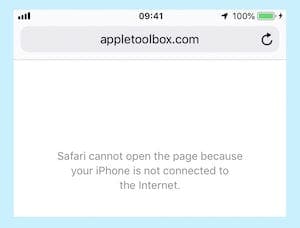
Test your internet connection by loading a web page in Safari
If you usually connect over Wi-Fi try using cellular data instead, and vice versa.
Ensure that cellular data is switched on for iTunes or the App Store in your Cellular settings, then turn off Wi-Fi and open the store again.
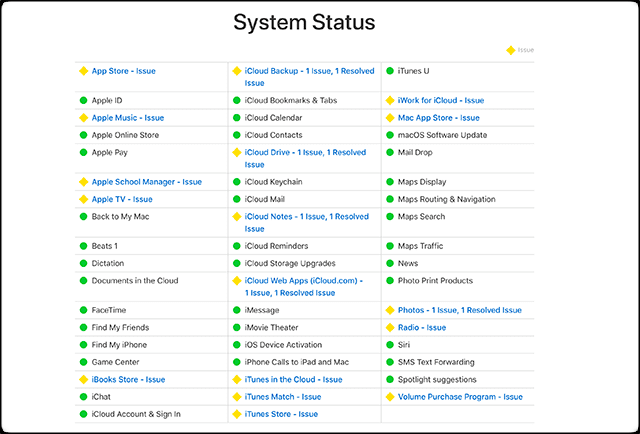
Take a look at Apple’s system status website
There’s a chance the store you’re trying to access is down for maintenance or that Apple is experiencing problems with it. You can check this by visiting Apple’s system status website.
Look at services like the App Store, Apple ID, Mac App Store, iCloud, and iTunes Store.
Anything other than a green circle next to it means Apple is experiencing problems. Unfortunately, if this is the case, there’s nothing you can do except wait for Apple to resolve it at their end.
Anything with a green circle is working normally — hopefully, that’s everything!
Sign out of everything on your device, then sign in again
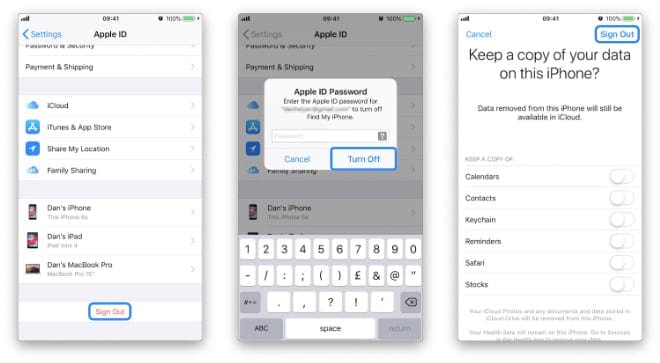
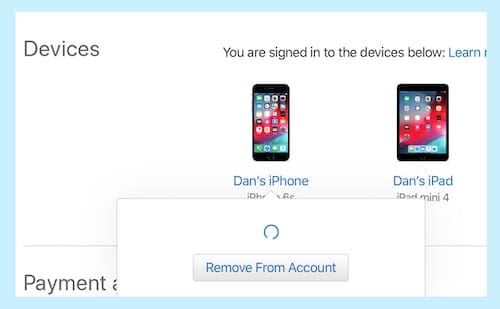
An issue with your Apple ID could be causing problems with the App Store or iTunes Store. Follow the steps below to sign out of everything on your iOS device, then restart it and sign in again.
Go to Settings > [Your Name] > Sign Out.
Enter your Apple ID password and choose whether to keep a copy of iCloud data on your device.
This signs you out of everything on your Apple device: iTunes, App Store, iCloud, etc.Go to [Your Name] > Sign Out in your device Settings to log out of Apple ID
Restart your device using the Sleep/Wake or power button, then return to the Settings to sign in to your Apple ID once again.
Some readers report they had to do this step twice before it worked.
Turn off any content and privacy restrictions
There might be content and privacy restrictions on your device that block access to apps and other media.
Therefore, you should check your restrictions
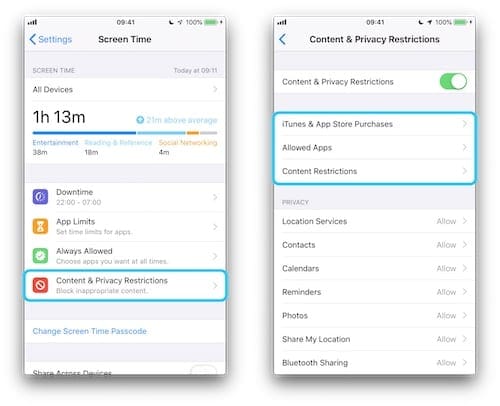
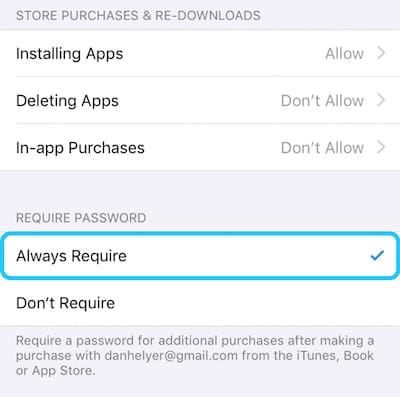
Go to Settings > Screen Time > Content & Privacy Restrictions
Check the following places in your restrictions to ensure they aren’t interfering with App Store or iTunes access:
iTunes & App Store Purchases
Allowed Apps
Content Restrictions
Check your Content & Privacy Restrictions for any App Store or iTunes Store restrictions.
Make sure the store is available in your region
Although Apple is about as international as a brand can get, their content isn’t available everywhere.
Visit Apple’s availability website to check that the country or region you’re in has access to all of Apple’s stores.
If your country isn’t listed, that the reason your iPhone or iPad cannot connect to the App Store or iTunes.
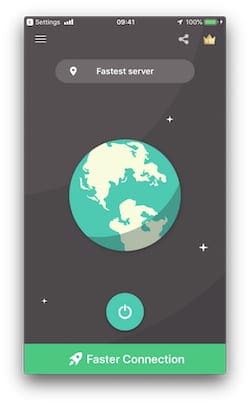
Turn off your VPN if you have one as it could be causing the store to think you’re in a country without full availability.
Similarly, if you are in a country without availability, try using a VPN to convince the store you’re somewhere else!
Most VPNs offer the option to select a different country. Image: VPN Proxy Master
Remove beta or testing profiles from your device
If you’ve ever signed up for a software beta program, you probably had to install a special profile onto your device.
Some users are also required to do this for their jobs. Removing these configuration profiles just in case they’re interfering with the App Store or iTunes Store.
You can remove profiles on iOS by going to Settings > General > Profiles. If there isn’t a Profiles option, then you don’t have any installed.
On macOS, open the System Preferences and select View > Profiles. Like before, if there isn’t a Profiles option that means you don’t have any installed.
However, be warned!
Removing work-related profiles might mean you’re unable to access secure servers needed for your work. You should check with your employer’s IT department first.
Update your device to the latest software
There could be a bug in your OS that is causing problems with the iTunes Store or App Store.
When this happens, Apple will release a patch update that fixes the issue. Similarly, if you’re running a much older version of iOS or OS X/macOS, you’re likely to encounter more problems as Apple doesn’t maintain or update anymore.
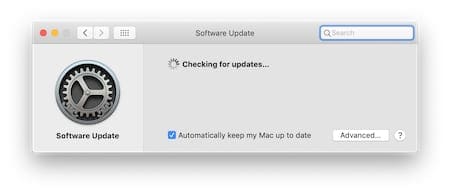
Check for new software updates in the Settings or System Preferences on your device. Be sure to download and install any updates that you find.
Updating to the latest software could patch bugs in your software.
Five tips from our readers
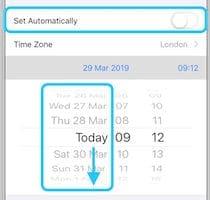
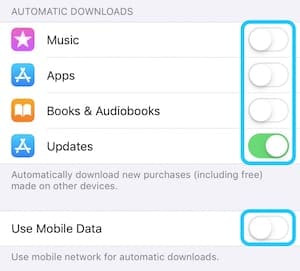
Sometimes logic isn’t the best tool when troubleshooting software problems. Below, we’ve listed five tips from AppleToolBox readers that defy all logic but appear to be effective solutions.
They’ve each been shown to resolve connection issues with the iTunes Store or App Store. Be sure to try each tip before moving on to our final solution at the bottom.
Not only could this allow you to access the App Store and iTunes Store again, but it might also speed up Safari and other internet applications!
Finally: Reset or restore your device
If you still cannot connect to the iTunes Store on iPhone, it’s time to reset some of the settings on your device or restore the device entirely.
Try to connect to the App Store or the iTunes Store after resetting each of the options below.
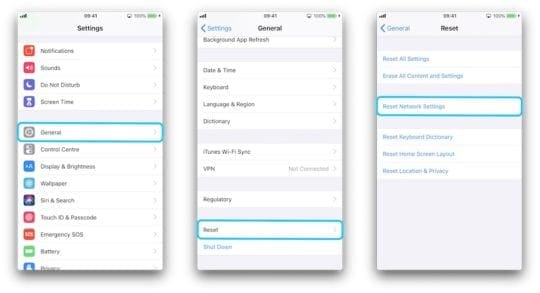
Reset Network Settings
Start by resetting the network settings on your device. That means your device will forget any saved Wi-Fi passwords or preferred connections.
However, other than that you shouldn’t notice any difference.
Go to Settings > General > Reset > Reset Network Settings.
After you Reset Network Settings you’ll need to connect to Wi-Fi again.
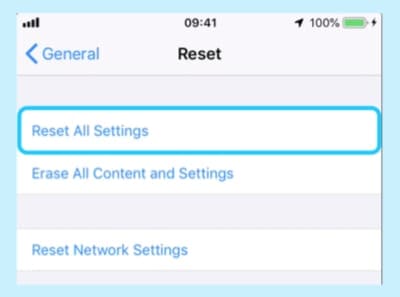
Reset All Settings
Resetting all the settings on your device won’t delete any content like photos or apps. But it will set your preferences back to their default state.
That means things like moving apps back to their original position or changing your notification settings.
Go to Settings > General > Reset > Reset All Settings.
Choosing to Reset All Settings shouldn’t delete any content from your device.
After the reset is complete, you’ll want to spend a few minutes going through your device settings to put everything back to normal.
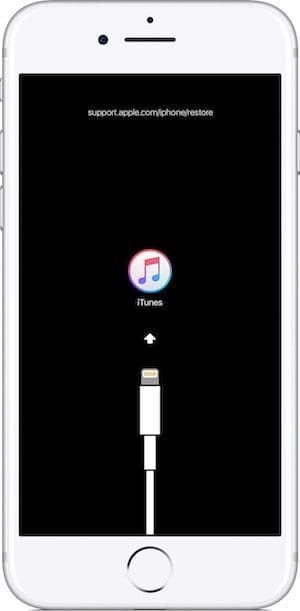
Restore your device using DFU mode
The final option is to completely erase your device and return it to its default state. That means you need to make a backup of all your content before going any further.
DFU mode is the most complete way to restore your device as it also reinstalls software and firmware. Follow this guide to complete a restore using DFU mode.
An iPhone must be connected to iTunes to access DFU mode.
Please leave a comment telling us which troubleshooting step worked for you.
Obsessed with tech since the early arrival of A/UX on Apple, Sudz (SK) is responsible for the original editorial direction of AppleToolBox. He is based out of Los Angeles, CA.
Sudz specializes in covering all things macOS, having reviewed dozens of OS X and macOS developments over the years.
In a former life, Sudz worked helping Fortune 100 companies with their technology and business transformation aspirations.
I don’t what’s wrong wit my iPad is not connect to iTunes Store
And it will written my phone is not compatible with the I want to down when an in Apple Store
My WHO magazine app is constantly displaying “in app error”
I have a current subscription but I can’t download the magazine
I tried buying an individual magazine as well – purchase successful but I was unable to download the mag – again the message “in app error”
I have turned my IPAD off then on
I have reinstalled the app
Is anyone able to help ??
I have reset my iPad and forgot my old user I’d so I created a new one. When signing into the app store it says the user ID has not been used to sign into the app store and tells me to click the review button. After that I get a blank box with the spinning wheel and does nothing else. Can you help me to rectify this problem please.
What worked for me:
1- Reset all settings and re-installed. That was not a lot of pain in my case, because it was my son’s first iPhone and we noticed the glitch just after the first setup
2- Installed manually. Did not pair with his iPad, as we did initially.
3- Restarted the phone
For some reason my iPad air 2 will not connect to either iTunes store and App Store. I have tried resetting the time and date, restarting my iPad, my internet is fine what the hell is going on???
well.. trying for 4 hours and a half to fix it .. and all what i had to do was to just play with the dates and the wifi connection as well as oppening the app store and the itunes loads of times one after the onther.. so u go lik ” app – itunes- app – itunes ” lol .. wtf apple , grow up
I don’t think I’ll ever buy another apple product again after this…I’ve been trying for about a week now to download apps. I changed the time, didn’t work, rebooted it, didn’t work and I tried deleting all of the memory from it, didn’t work. You should be ashamed apple.
I have a iPad 2 and when I updated iOS6.1 it has told me that I can’t connect to server cause I was connected to another server? I tried everything to get rid of it but there’s nothing that worked? Can someone help me?
i am a loyal customer to i phone, i would not look at any type of other smart phones, but when it comes to the complication of how to connect to i tunes and did my i phone 5 not connect to i-tune i started feeling frustrated.
Can’t connect to iTunes for my iPhone 5 and Mac book air . I have tried to change the date, it worked for a minute but when I tried to update some purchased apps, it didn’t work again. Really disappointed! It is definitely a big bug, why apple can’t fix it!
Iget in app store fine but when I click on apps to find out more about them I get can’t connect to iTunes it worked on dec 28/2012 now on jan 1/2013 it is giving me that error
Nothing has worked for me. I cannot connect to the App Store, my iMessage doesn’t work, I cannot upload pictures to Instagram and twitter. All this iPhone has done for me is cause me a lot of frustration. Very dissapionted in apple right now.
I’m the same, can’t download previous purchases to my iphone, have tried changing the date, so frustrated and fed up with apple, and disgusted that there is obviously a problem, but apple can’t be bothered to get it sorted.
I’m really loving the theme/design of your weblog. Do you ever run into any browser compatibility problems? A handful of my blog audience have complained about my site not working correctly in Explorer but looks great in Firefox. Do you have any advice to help fix this problem?
Took a loong time to resolve – brand new iPhone 5 for my gf set up yesterday. Tried a whole heap of the above, it finally worked when:
1. Set date time to manual
2. Set year to 2020
3. Closed all apps, tried to access App Store and got the error message
4. Set yea to 2012 (manually)
5. Closed all apps, relaunched App Store.
6. We’re in!
Also have disabled Notes, Passbook, Photo Stream and Documents and Data from iCloud (that was a previous instruction from another thread).
Did Exactly step by step as you did + i’m also in. Thankyou very much for the help. Now i can quit playing around trying to access the store + get back to work now!!
Temporary works on my iPad2, but iPhone 5 is with no luck. The only way I can go to the AppStore is thru Passbook.app. But even that, I still cannot download ANY APP or updte!!!!
I also have serious issues with wifi on both iPad2 and iPhone 5. Sometime it is slow as hell, sometime it doesn’t even work.
I don’t think I have ever been this frustrated with Apple. Thank you all for the advice but nothing worked. I think maybe switching to a Samsung Galaxy may help the problem.
Tried all that and nothing! Comon apple play the game! I’m having to do everything back on the old faithful blackberry torch. Showed so much promise! Great at the gate but a sucker for stamina
Tried all the tricks, like changing the date to 2019 and later.
Still cannot connect to the App Store, after I upgraded to ios6.
It is useless piece of device for me as I bought it new and at this time can only browse the Internet…that’s it..
Very poor show apple. Play like a market leader, have the guts to come out of the cocoon make a statement.
I can’t believe this! What a lame excuse, and I tried it and it didn’t work anyway. Was considering getting iPads for my 3 grandchildren for Christmas but no more. It will be PC laptops now — at least I can troubleshoot them. So what am I supposed to do if I have 9 year olds trying to download apps — do a workaround each time? I don’t think so.
I have done everything for my iPad that could possibly be done and I still can not connect to the iTunes store. I am trying to download my school app is there any solutions?
Shut down router and phone, iPhone 5 then connected, although my iPad connects without any problem.
That said my iPhone 5 stopped connecting to app store and iTunes again today …….iPad still works !
Any help from apple would be great !
Changed the date several times and tried connecting to the App Store and still no go, yet I can use my phone as a hot spot for my laptop and connect through iTunes on the laptop but it won’t work on my iphone 5.
None of this worked. Running iOS 6 on iPhone 5. Not only will iTunes not open, but I am
Unable to playback any song I’ve purchased prior from iTunes. Looks like apple doesn’t want me buying stuff from iTunes!
This worked, any idea when Apple will fix the bug? This is very Non-Apple to have to make your calendar not working to get itunes to work. Come on guys… Steve Jobs is watching you!
Tried playing aroud with it, switches the year all the way to 2019…and for some reason that worked. (Sidenote: I also had a wifi connection whereas the other times I was using 4G, not sure if that made a difference.) *** changing the date also turns off ur FaceTime and iMessage… Be sure to turn these back on when finished
OHMIZZ seems to have solved the problem using the instructions given, but others have failed
I am one of those. It is really frustrating. There must be more simple solution. I am a layman
I have been trying to update my apps.I recently switched cable companies.I updated my new email address to apple from my home computer.When I use my IPad,it still list my old email address as my apple ID.If you respond to this comment,do not send email to ICLOUD,it still uses my old email.My new email is moliver22@sccoast.net.My old email was moliver22@sc.rr.com.If you help me in anyway,it will be greatly appreciated
This works, I tried an tried setting only one year ahead then put my date to 2020 and followed same instruction.. Worked I can explain further if you email me
Afraid I’m one of the sad ones stuck with a passbook that just will not work.
Changing the date etc did nothing but kill a couple of minutes of an afternoon shift. 🙁














I don’t what’s wrong wit my iPad is not connect to iTunes Store
And it will written my phone is not compatible with the I want to down when an in Apple Store
Cannot connect to Itunes Store from my iphone x. I have checked all necessary setting and they are in place.
Kindly advise on the way forward.
My WHO magazine app is constantly displaying “in app error”
I have a current subscription but I can’t download the magazine
I tried buying an individual magazine as well – purchase successful but I was unable to download the mag – again the message “in app error”
I have turned my IPAD off then on
I have reinstalled the app
Is anyone able to help ??
I have reset my iPad and forgot my old user I’d so I created a new one. When signing into the app store it says the user ID has not been used to sign into the app store and tells me to click the review button. After that I get a blank box with the spinning wheel and does nothing else. Can you help me to rectify this problem please.
What worked for me:
1- Reset all settings and re-installed. That was not a lot of pain in my case, because it was my son’s first iPhone and we noticed the glitch just after the first setup
2- Installed manually. Did not pair with his iPad, as we did initially.
3- Restarted the phone
THANK YOU SO MUCH
It worked!!!
Это крайне полезный совет, особенно для тех, кто новичок в данном вопросе !
This is extremely useful advice, especially for those who are new to this issue!
For some reason my iPad air 2 will not connect to either iTunes store and App Store. I have tried resetting the time and date, restarting my iPad, my internet is fine what the hell is going on???
How to switch to Singapore store
Account not in this store
Account not in use of this store
well.. trying for 4 hours and a half to fix it .. and all what i had to do was to just play with the dates and the wifi connection as well as oppening the app store and the itunes loads of times one after the onther.. so u go lik ” app – itunes- app – itunes ” lol .. wtf apple , grow up
Dear Apple,
How is crazy of apple, I have buy Iphone 5 but I cannot connect to App Store? How can I do? Do u really crazy for this?
I’m new to apple can anyone help me by telling me how can I link my email add to the istore
Im kinda stupid.. how do you get to settings?
I don’t think I’ll ever buy another apple product again after this…I’ve been trying for about a week now to download apps. I changed the time, didn’t work, rebooted it, didn’t work and I tried deleting all of the memory from it, didn’t work. You should be ashamed apple.
nothing worked for me fed up of this iphone .
where is settings can’t find them
is it the same if ur itouch is jailbroken
Brand new iPhone 5 iTunes and AppStore not working and can not be fixed what do I do now
Reset/restart phone by holding the sleep/wake button until the red slider appears. It works!
this doesn’t work for me tried even uninstaling and reinstalling any way to fix this
I have a iPad 2 and when I updated iOS6.1 it has told me that I can’t connect to server cause I was connected to another server? I tried everything to get rid of it but there’s nothing that worked? Can someone help me?
After a few tries with this, it finally worked. Have to change the year to 2019 then back to 2013.
i am a loyal customer to i phone, i would not look at any type of other smart phones, but when it comes to the complication of how to connect to i tunes and did my i phone 5 not connect to i-tune i started feeling frustrated.
Can’t connect to iTunes for my iPhone 5 and Mac book air . I have tried to change the date, it worked for a minute but when I tried to update some purchased apps, it didn’t work again. Really disappointed! It is definitely a big bug, why apple can’t fix it!
Iget in app store fine but when I click on apps to find out more about them I get can’t connect to iTunes it worked on dec 28/2012 now on jan 1/2013 it is giving me that error
Nothing has worked for me. I cannot connect to the App Store, my iMessage doesn’t work, I cannot upload pictures to Instagram and twitter. All this iPhone has done for me is cause me a lot of frustration. Very dissapionted in apple right now.
I’m the same, can’t download previous purchases to my iphone, have tried changing the date, so frustrated and fed up with apple, and disgusted that there is obviously a problem, but apple can’t be bothered to get it sorted.
I’m really loving the theme/design of your weblog. Do you ever run into any browser compatibility problems? A handful of my blog audience have complained about my site not working correctly in Explorer but looks great in Firefox. Do you have any advice to help fix this problem?
Took a loong time to resolve – brand new iPhone 5 for my gf set up yesterday. Tried a whole heap of the above, it finally worked when:
1. Set date time to manual
2. Set year to 2020
3. Closed all apps, tried to access App Store and got the error message
4. Set yea to 2012 (manually)
5. Closed all apps, relaunched App Store.
6. We’re in!
Also have disabled Notes, Passbook, Photo Stream and Documents and Data from iCloud (that was a previous instruction from another thread).
Good luck!
Did Exactly step by step as you did + i’m also in. Thankyou very much for the help. Now i can quit playing around trying to access the store + get back to work now!!
Did exactly as you said, worked like a charm! Thank you so much, Pranil! And no thank you, Apple.
i cannot still get over the problem after changing the year also could nt access to app store
Temporary works on my iPad2, but iPhone 5 is with no luck. The only way I can go to the AppStore is thru Passbook.app. But even that, I still cannot download ANY APP or updte!!!!
I also have serious issues with wifi on both iPad2 and iPhone 5. Sometime it is slow as hell, sometime it doesn’t even work.
RUNNING 6.0.1. This is PAIN!!
I don’t think I have ever been this frustrated with Apple. Thank you all for the advice but nothing worked. I think maybe switching to a Samsung Galaxy may help the problem.
I tried everything change the date n year Bt still cannot connect to itune store
just lost time ,did not work for me.I feel stupid now!
Tried all that and nothing! Comon apple play the game! I’m having to do everything back on the old faithful blackberry torch. Showed so much promise! Great at the gate but a sucker for stamina
don’t forget to close all apps(by double clicking the home button) when you change the time BACK to auto…now its working for me..
Changing the date to 2019 and then reverting back to 2012 worked for me.
Thanks!!!! IT WORKEDS!!!!!
Tried all the tricks, like changing the date to 2019 and later.
Still cannot connect to the App Store, after I upgraded to ios6.
It is useless piece of device for me as I bought it new and at this time can only browse the Internet…that’s it..
Very poor show apple. Play like a market leader, have the guts to come out of the cocoon make a statement.
I can’t believe this! What a lame excuse, and I tried it and it didn’t work anyway. Was considering getting iPads for my 3 grandchildren for Christmas but no more. It will be PC laptops now — at least I can troubleshoot them. So what am I supposed to do if I have 9 year olds trying to download apps — do a workaround each time? I don’t think so.
I have done everything for my iPad that could possibly be done and I still can not connect to the iTunes store. I am trying to download my school app is there any solutions?
Good method
I have tried every thing and nothing works someone help me please P.S my device is a iPod touch and is connected to the Internet
iOS 6.0.1 installed iphone5 loads app store and iTunes again………… What a coincidence !
Shut down router and phone, iPhone 5 then connected, although my iPad connects without any problem.
That said my iPhone 5 stopped connecting to app store and iTunes again today …….iPad still works !
Any help from apple would be great !
This doesn’t,t work for my iPad 3 … Help please?
Yes me too….. I tunes and app store will no longer open on my iPhone 5, can,t be network as my iPad is fine !
Still not working
Changed the date several times and tried connecting to the App Store and still no go, yet I can use my phone as a hot spot for my laptop and connect through iTunes on the laptop but it won’t work on my iphone 5.
Not working for me
No go here in NZ. One of the few luxuries I have and this won’t let other apps update, even the crucial earthquake ones! Dissapointed.
None of this worked. Running iOS 6 on iPhone 5. Not only will iTunes not open, but I am
Unable to playback any song I’ve purchased prior from iTunes. Looks like apple doesn’t want me buying stuff from iTunes!
Did not work. Sadly, in the post Jobs era Apple is quickly heading towards mediocrity again. Time to short the stock???
This worked, any idea when Apple will fix the bug? This is very Non-Apple to have to make your calendar not working to get itunes to work. Come on guys… Steve Jobs is watching you!
Tried playing aroud with it, switches the year all the way to 2019…and for some reason that worked. (Sidenote: I also had a wifi connection whereas the other times I was using 4G, not sure if that made a difference.) *** changing the date also turns off ur FaceTime and iMessage… Be sure to turn these back on when finished
Thank you! setting it to 2013 didn’t work but setting it to 2019 worked the first time.
It works!!
OHMIZZ seems to have solved the problem using the instructions given, but others have failed
I am one of those. It is really frustrating. There must be more simple solution. I am a layman
I have been trying to update my apps.I recently switched cable companies.I updated my new email address to apple from my home computer.When I use my IPad,it still list my old email address as my apple ID.If you respond to this comment,do not send email to ICLOUD,it still uses my old email.My new email is moliver22@sccoast.net.My old email was moliver22@sc.rr.com.If you help me in anyway,it will be greatly appreciated
This works, I tried an tried setting only one year ahead then put my date to 2020 and followed same instruction.. Worked I can explain further if you email me
After you set the date ahead do you then set it back? and how long do you have to wait?
Thanks for any replies.
Dan
Hi
Been trying my iphone 5 apps but nothing happens. i tried chenging dates many times still nothing happens. Please help.
Ricky.
Thank you that worked!!!
Really Apple!? Tried it like 10 million times, no luck, super frustrating!
Really Apple!!?? Tried it like 10 million times….no luck, super frustrating!!
Tried changing the time/date and that did nothing! So frustrated with Apple right now!!
Tried this over and over on iPhone 5 passbook still does not connect
Afraid I’m one of the sad ones stuck with a passbook that just will not work.
Changing the date etc did nothing but kill a couple of minutes of an afternoon shift. 🙁