Synchronizing your iPhone or iPad with macOS is often a seamless process, enabling the transfer of photos, music, contacts, and more between devices. Yet, at times, hiccups occur, preventing this synchronization and leaving users in a lurch. Whether it’s an error message, a stalled sync, or an unresponsive device, troubleshooting these issues is essential to restore the harmony between your Apple devices. This article dives into common challenges and their solutions, guiding you toward a smooth sync once again.
Firstly, ensure you’re connecting your iPhone or iPad to your Mac using its original cable. If you don’t have the original cable at hand, it’s advisable to opt for an Apple-branded cable over a third-party one. It’s surprising how often a simple switch to an authentic Apple cable can resolve syncing issues.
After connecting your iPhone to your Mac, select ‘Trust’ and input your iPhone’s passcode to continue. Then, follow the subsequent steps mentioned below.
For thorough troubleshooting, consider testing multiple Apple-branded cables when connecting your iPhone or iPad to your Mac. This helps in ascertaining and eliminating any potential cable-related problems.
Sync iPhone or iPad with macOS over Wi-Fi
Gone are the days when cables were the sole means to synchronize your Apple devices. With the evolution of technology, wireless solutions have emerged, offering convenience and efficiency. Syncing your iPhone or iPad with macOS over Wi-Fi is one such wireless marvel, allowing for effortless data transfer without the physical constraints of a cable. This section will guide you through the steps to set up and utilize this wireless sync feature, ensuring your devices are always updated and in harmony.
Plug your iPhone or iPad into your Mac using the cable included with your device.
Open the Finder app.
Under the Locations section, select your iPhone or iPad.
On the right side of the window, click the General button.
Under the Options section, click the checkbox next to Show this iPhone when on Wi-Fi to enable it.
Click the checkbox next to Automatically sync when this iPhone is connected.
Leveraging the power of Wi-Fi to synchronize your iPhone or iPad with macOS not only declutters your workspace from unnecessary cables but also brings a level of flexibility to your device management. With the steps outlined in this section, you’re now equipped to enjoy seamless wireless synchronization. As technology continues to innovate, embracing these advancements ensures you’re making the most of what your Apple devices have to offer.
Check Finder Preferences
The macOS Finder is your gateway to all the files and connected devices on your Mac, including your iPhone or iPad. Yet, sometimes, these devices might not readily appear in Finder, leaving users puzzled. Before diving into complex troubleshooting, a simple but often overlooked step involves checking the Finder Preferences. Ensuring these preferences are set up correctly can be the key to making your iPhone visible in Finder.
Open the Finder app on your Mac.
In the Menu Bar, click the Finder button in the top left corner.
From the drop-down menu that appears, click Settings…
At the top of the window that appears, click Sidebar.
Under the Locations section, click the checkbox next to CDs, DVDs, and iOS Devices.
Click the General button at the top of the window.
Click the checkbox next to Open folders in tabs instead of new windows so that it is unchecked.
Select your iPhone from the Locations section within the sidebar of the Finder app.
When the new Finder window appears, click the Go button in the Menu Bar.
From the drop-down menu, highlight and select Go To Folder.
Enter the following location without the quotation marks:
“~/Library/Preferences”
Click the Go button.
From the list of files, locate the com.apple.finder.plist file.
Drag it to the Trash.
On your keyboard, press command + option + escape at the same time.
Scroll to the bottom of the list of applications, and highlight Finder.
Click the Relaunch button in the bottom right corner of the window.
Confirm that you want to quit the Finder app by clicking the Relaunch button again.
Disconnect and then reconnect your iPhone with the provided cable.
Open the Finder app and see if your iPhone appears under the Locations section.
Ensuring your Finder Preferences are correctly configured is a foundational step in making certain that your iPhone or iPad shows up in Finder as expected. By regularly reviewing and tweaking these settings, you can save time and prevent potential hitches, facilitating seamless interactions between your Mac and iOS devices. When your iPhone consistently appears in Finder, it’s a testament to the harmonious syncing and integration Apple users value so much.
Check Permissions
One of the marvels of the Apple ecosystem is its seamless integration across devices. However, occasionally, you might encounter a hiccup—such as your iPhone not appearing in Finder on your Mac. Before diving into complex troubleshooting, it’s essential to examine a fundamental aspect: Finder permissions. Proper permissions ensure your Mac recognizes and communicates with your iPhone effortlessly, making data transfers and syncs a breeze.
Open the Finder app on your Mac.
Click the Go button in the Menu Bar.
From the drop-down menu that appears, highlight and select Home.
Click the File button in the Menu Bar.
From the drop-down menu that appears, highlight and select Get Info.
Click the arrow next to Sharing & Permissions.
In the bottom right corner, click the Lock button.
Enter the admin password for your Mac.
Click the Action Menu button in the bottom left corner.
Select Apply to enclosed items…
Log out of your Mac.
Log back into your Mac.
Finder permissions, while often overlooked, play a crucial role in the flawless interaction between your Mac and iPhone. By ensuring these permissions are correctly set, you lay a strong foundation for seamless device integration. If your iPhone still doesn’t appear in Finder after adjusting permissions, consider exploring other potential solutions. However, regularly checking and updating Finder permissions remains a proactive step in ensuring consistent device connectivity.
Allow Accessories To Connect
For macOS users, ensuring that the Mac seamlessly connects with these accessories is pivotal. However, there might be times when these connections aren’t as smooth as expected. This section sheds light on how to allow accessories to effortlessly connect with your Mac, ensuring a harmonized digital experience.
Open the System Settings app on your Mac.
In the sidebar on the left, locate and click Privacy & Security.
On the right side of the window, scroll down until you reach the Security section.
Click the drop-down menu next to Allow accessories to connect.
Select Always.
Your Mac’s ability to connect with accessories extends its functionalities and enriches the user experience. By ensuring that these connections are uninterrupted and seamless, you pave the way for a holistic and efficient digital environment. We hope the guidance provided in this section empowers you to optimize your Mac’s interactions with its accessory counterparts, leading to a productive and hassle-free computing journey.
Restart Your Devices
One of the easier things to try if you are unable to sync iPhone or iPad with macOS is to simply restart everything. This includes your iPhone, iPad, and Mac, as restarting the devices could solve any potential hang-ups that were holding you back from being able to sync everything together. Here’s how you can restart your various devices:
Restart Your iPhone
Press and hold the Side Button with either the Volume Up or Volume Down buttons at the same time.
Once the Slide to Power Off slider appears, slide the toggle to turn off your iPhone.
Restart Your Mac
Click the Apple logo in the top left corner of your Mac’s Menu Bar.
From the drop-down menu that appears, highlight and select Restart
Try a Different Port on Your Mac
In the realm of tech troubleshooting, sometimes the simplest solutions are the most effective. If you’re facing challenges while attempting to sync your iPhone or iPad with your Mac, the problem might be more superficial than you think. One often overlooked but common cause of sync issues can be the very port you’re connecting to on your Mac.
The intricacies of hardware and software interactions mean that even minor glitches, like a malfunctioning port, can hinder processes we often take for granted, such as device synchronization. By simply switching to a different port on your Mac, you might overcome the barriers preventing your iPhone or iPad from syncing. Remember, when troubleshooting, always consider both the complex and the straightforward solutions to ensure every potential issue is addressed.
Sync and Transfer Home Videos over to iPad or iPhone using macOS
The digital age has made capturing and sharing moments easier than ever. Home videos, once relegated to dusty VHS tapes, now come to life on our portable screens. If you’ve got a collection of these cherished memories or other video files on your macOS and wish to enjoy them on the go, transferring them to your iPad or iPhone is the way to go. This section will guide you step by step, ensuring that your favorite home videos are readily available on your Apple device, whenever and wherever you want.
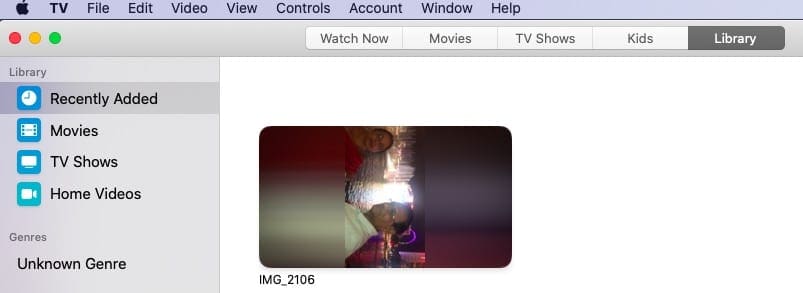
Open the TV app on your Mac
You will find only the folders ‘Recently added’, ‘Movies’ and ‘TV Shows’ by default.
Drag your Home movie out of the iTunes Folders to TV app OR
Right-click on the file and choose ‘Edit With’ > Select TV app
You can also try dragging the movie file into the tv app
This operation automatically creates a new ‘Home Videos’ library on the TV app
The imported home video gets moved to this new folder
Connect your iPhone or iPad to your MacBook using the cable
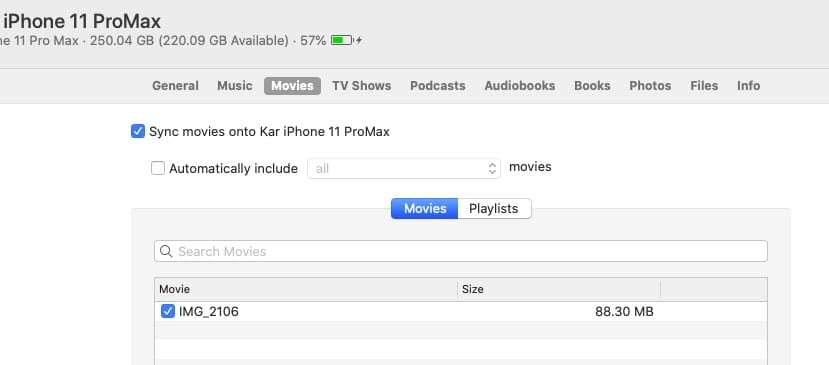
Launch Finder app and head to ‘Movies’ tab
Choose the Home Video from the folder and apply Sync
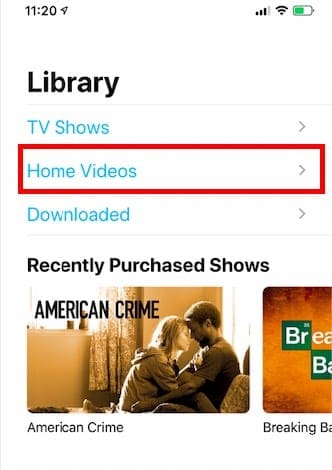
Now When you open up the TV App on your iPhone, you should find the home video in its own library.
Transferring home videos from your macOS to your iPad or iPhone allows you to carry a piece of cherished nostalgia or valuable content with you. By following the guidelines and steps provided, you’ve transformed your Apple device into a personal cinema that can play your favorite moments at your fingertips. Whether it’s for sharing, editing, or simply reminiscing, having these videos on your portable device ensures your memories are always within reach.
Conclusion
In the interconnected world of Apple’s ecosystem, the ability to sync your iPhone or iPad with macOS isn’t just a convenience—it’s a necessity. While roadblocks might appear now and then, with the right knowledge and a systematic approach, they can be swiftly addressed. We hope this article has equipped you with the tools and insights to resolve synchronization issues, ensuring your devices work in unison, amplifying the seamless Apple experience we’ve come to love and expect.
Obsessed with tech since the early arrival of A/UX on Apple, Sudz (SK) is responsible for the original editorial direction of AppleToolBox. He is based out of Los Angeles, CA.
Sudz specializes in covering all things macOS, having reviewed dozens of OS X and macOS developments over the years.
In a former life, Sudz worked helping Fortune 100 companies with their technology and business transformation aspirations.
safe my iphone 8 and screen stop sharing and my iphone 8 in used all data end to end aaps google and chrom and gmail face book inista gram account other all to all isues clear and virus problems all clear and my 8 month back to all bissiness profite is bandeing my profit is trasfar my account i need this hakers hak my apple acount and froad for my bank account this haker i apley clam my loses pleeas help today i pay rint my basment my bank account is 0 balance help me
Each time I come across this site and many others like it with similar info, I try to fix my problem with USB ports on my 2020 MacBook Pro running Catalina. Each time sadly, none work. Apple phone support couldn’t help over a 2 hour call and never rang me back as promised. I guess I don’t blame them.
Out of the blue after updating to Catalina both this MacBook and a similar slightly older machine fail to recognise my GoPro, iPad , iPhone and several other devices while working with some eg most USB drives work and I can do a time machine backup, and all devices are charged
I have tried PRAM resets a million different cables,restarts up the wazoo, and don’t even start on sidebar—first thing I did. I am resisting taking the 2 machines to the Genius Bar but guess I have to if only to find out which of the Mac gods is tormenting me.
Very pleased to have come across your site. Have had the iPhone/iPad syncing problem for awhile and was getting desperate with not major help from the Apple Community site etc.
The steps outlined where clear and easy to follow and resolved the problem by number 6. However, for good measure I continued through the list including the ‘home folder permissions’ tip just in case some of the ‘funny stuff’ that has been coming up from time to time might be fixed. I will have to see what happens.
(I did the same on my wife’s iMac as well since I originally set it up in the same way I set up mine and she has had more issues that me.)
Here’s hoping for the best.
Ken
For a long time, and even before I got Catalina on my Mac, I have been unable to sync my iPhone X for the calendar. I really live by my calendar and when I am away from home it is very convenient to have the calendar update on the phone. I was ready to give up when I found your website. I could give you a big hug – because I went to “permissions” as you suggested and did what you said. The Mac then spent some time updating it and then I shut down the Mac. When I opened it again and synced – low and behold the calendar is now updated on the phone. I found your help no place else! THANK YOU, THANK YOU, THANK YOU!!!!!
I was having the problem of my iPhone slashing in the Finder Sidebar constantly. I had done all the other troubleshooting tips, but switching from my really high quality Anker USB cable (which has *always* worked for *everything* else) to the stock iPhone OEM USB cable made the problem change from quick, short flashes to slower intermittent flashing, but still unusable. Then I tried the other USB port on my MBP mid 2015 and the problem went away completely.
Thanks so much for the help! I went through the steps up until number 8, shut down the computer, restarted, held my breath (with little optimism) and lo and behold, there was the access for my wife’s old iPad!
THANK YOU SO MUCH FOR THIS POST!
I kept googling why it wouldn’t recognize my photo library when I clearly had photos in there and could see it when I’m checking albums to sync. I came across another (old) post that mentioned that I should check the permissions on the photo library file as well as pictures folder, but that did not work. So glad I found this one because it’s more relevant to the iOS system I have.
Have a terrific day!!
I was having the problem of my iMac Finder not recognizing my two iPads and three iPhones. The solution that worked for me was, dumping the com.apple.finder.plist file in Thrash and restarting the Finder. Thank you
THANK YOU! deleting that file apple.finder. plist + relaunching finder app fixed the problem of my iphone X not showing up in iTunes on my MAC w/ the new Catalina OS.
I had a problem syncing music and Home video from Mac – Catalina to iPhone 11max too.
The icon keeps turning non-stop.
I had tried all that I could find from the internet but still fail.
I call helpline this morning but it did not solve my problems. They will call back and wanted me to try out in another older phone to determine if it is my phone or computer problem … just funny…
When I want to sync my MBP music with my iPhone 7, it says “The iPhone cannot be synced. An unknown error occurred (-42032)”. So I can’t put music on my phone. It’s been like that since I installed Catalina and I am very frustrated.
What iOS version does that older iPad2 run? To check go to Settings > General > About. It might help to reset the trust settings on the iPad: Settings > General > Reset > Reset Location & Privacy.
Then try connecting the iPad to the Mac using the cable.
Are you signed in with the same Apple ID on the iPad as the Mac? Try that too.
Problem I’m having is that in finder I am able to see the device, but every time I plug it in it seems to be doing some other sync first and won’t let me cancel that to do what i want it to. I uncheck all “sync tvshows/movies/music/etc.” to my iPhone and the second any of them uncheck the clickable “Sync” button down below turns in to a Greyed Out ‘Restore’ and a Greyed out ‘Apply’. I can’t change the sync settings at all. Any ideas?
so, my problem is when i plug the phone in, it connects and charges. (this is using the original apple cable that came with the device, an iphone 7+), the computer recognises the device, but seems to believe it is a new device, and only gives me the option to set up as a new device, or restore from a back up. however the device is not new, and has been running for just a bit over a month now, both computer and iphone are up to date
Sorry, you’re having problems with your iPhone 7 Plus.
Have you backed up your iPhone to this Mac before? Are you backing up via iCloud? Did you see a message on your Mac and your iPhone to trust the device?
First, let’s try resetting those trust settings and see if that makes a difference: go to Settings > General > Reset > Reset Location & Privacy. Once done, connect your iPhone to your Mac again and launch Finder.
If it’s the first time you’ve connected your iPhone 7 Plus to your Mac, this might be normal behavior–we used to see this a lot in iTunes but have not heard this same issue with Finder. In the case with iTunes, choosing set up as new did not delete any data since it’s was the first time it was syncing that device with the Mac.
But since you are the first reader to report this same issue with macOS Catalina and Finder, we suggest being more cautious.
First, backup up your iPhone with iCloud BEFORE proceeding–think of it as extra insurance just in case something does happen in the process of macOS Catalina recognizing and registering your iPhone 7 Plus.
Then, if you are comfortable, move forward with setting it up as new. That could work the same way as it did in iTunes or it could indeed set your device up again–we just don’t know. That’s why that backup is so important.
If you are at all uncertain or uncomfortable, we suggest you give Apple Support a call or chat
and have them walk you through the steps.
Keep us posted on this one, if time allows. We’re curious about this issue and it’s likely impacting others out there.
I am having this same issue with my iPhone 7 – it is over a year old and seems to have other glitches, but when I plug in to my Mac and go to finder, it wants to set up up as a new device or restore from an old backup. i’d be interested if you were able to get anywhere with your issue!
In Music, click on Sync Settings. Find your device on the sidebar and click on it. Click on Trust this Computer on both the device and the settings window. It should now work.
Although I was able to sync my iPhone X to Catalina, I still cannot transfer iBooks from my iPhone X to Catalina on my MacBook Pro. I can move iBooks from Catalina to the iPhone X, but cannot move books to Catalina from my iPhone.
First, in the Books app on your Mac, choose Books > Preferences, click Store, then select “Download new purchases automatically.”
Then, if the books still aren’t showing on your Mac, try automatic syncing.
To turn on auto sync, select General then select Automatically sync when this [device] is connected. See if that works.
If not, make sure Books is enabled on both device’s iCloud account and that both use the same Apple ID
On your Mac: Choose Apple menu > System Preferences, click Apple ID, then click iCloud. Next to iCloud Drive (make sure it’s selected), click Options, then select Books.
On your iDevice: Go to Settings > [your name] > iCloud (or Settings > iCloud), turn on iCloud Drive, then turn on Books. Next, go to Settings > Books, then turn on iCloud Drive.
Great… Apple writes crappy software.. i.e. Music and then publish fix it articles with multiple steps to correct it. Why doesn’t Apple just WRITE GOOD WORKING SOFTWARE?
I absolutely HATE iTunes and Music APP!!!!!! THEY HAVE NEVER WORKED PROPERLY!!!!!!!!!!!!
After several hours reading through various fixes and an iphone system upgrade – none of which worked – I simply switched to a proprietary apple cable to connect the phone to my apple laptop – and EVERYTHING WORKED AS IT SHOULD IMMEDIATELY. It’s as if Catalina now won’t let Finder ‘see’ the iphone unless it is connected with an apple cable.
Thanks this actually worked for me. I started to have the problem after changing setting ins Finder to “Show this iPhone when on Wi-Fi”. What solved it was steps 9 through 10 (shutdown and restart iPhone and Mac).
when you connect your iPod on your Mac with macOS Catalina, open the Finder app and look for your device under “Locations” to sync–if you don’t see it, make sure you go to the View menu and choose Show Sidebar
I resolved syncing an iPod Nano 3rd Generation with a click wheel on Catalina which means that Catalina does support the device and most likely everything released afterwards.
Before I say what I did, try the following: Boot with the iPod plugged in and then immediately open any folder and see if the iPod appears in the sidebar. If so, click on it (the iPod icon that looks like the iPod, not the second icon that looks like a disc or SD Drive) and see if it loads/syncs in the window. After doing what I did, (to be explained below) it would not sync / load for me if I plugged it in after I had booted in Catalina (it would just say loading with a spinning wheel forever) but if I booted in Catalina with the iPod plugged in, and immediately opened a finder folder and clicked on the iPod icon, it would sync and load and allow me to add and remove songs in the finder widows in Catalina. Interestingly enough, if I then ejected it and plugged it right back in again, it would not sync/load, I would just get “Loading” and an infinite spinning wheel. Only rebooting with the iPod connected and going immediately to a folder and clicking on the iPod icon allowed the iPod to sync and then be worked with. So try simply booting in Catalina with the iPod connected at the time of booting and then immediately accessing the iPod thru the Finder as explained above. if it doesn’t work, do the following and then try booting in Catalina with it connected:
What I did before simply booting with it connected to Catalina:
I booted under Mojave. I reset the iPod to factory settings. I put my library back on it using iTunes. Then I booted under Catalina with the iPod connected and it worked. If I then ejected the iPod and then pulled the cable out and then plugged the cable back, Finder would show the iPod but it would not sync and load. But if I rebooted with the cable in connected to the iPod, and then immediately opened a window and clicked on the iPod icon, it would sync and load in Catalina. All of this begs the questions, did I ever need to reset and resync under iTunes in Mojave or is getting it to work under Catalina simply a matter of having it connected when it boots and immediately using finder to access the iPod and sync.
My MBP detects my iPad in Finder, but when I hit the “Trust” CTA, I get the loading circle and nothing happens on either device. My iPad always has the message “iPad is disabled, connect to iTunes” – Any suggestions?
2) Settings > General > Reset and tap Reset Network Settings–this does reset all your stored WiFi networks and passwords, cellular settings, and VPN and APN settings
I note that at step 7 point 3, it says to enter ‘/~Library/Preferences/’ but the example image shows ‘~/Library/Preferences/’. The tilde (~) is the second character in the former but the second character in the latter. I think it should be the latter.
My wife and I syncronize and back-up both of our iPhone SE’s on the same Mac Power Book.
After installing Catalina, the Powerbook could not syncronize my wife’s iPhone (the iPhone was detected, but the associated Finder window would not accept any inputs and turned blank after some seconds).
Your trouble shooting guide solved the problem.
Thank you very much 🙂
It seems that the Apple Music app on OS Catalina re-syncs the entire music library EVERY time and it can take hours for this of us with large libraries.
To make it worse, if you quit the sync, all of the songs it hasn’t finished resending will be greyed out and on the phone will read as “Unable to play in this region” on the phone.
This was never an issue in iTunes and needs a fix NOW!
After doing the Catalina update on my MacBook Pro I’ve had nothing but problems, everything I own is Apple except for a Seagate central and a Seagate Personal Cloud (NAS devices) which were the first things I lost connection with, the Seagate Central is my primary time machine backup device.
I also have a Mac mini with 3 HDD’s which I could normally access in finder along with the Seagate drives but now the only way to connect to the Mac mini was through screen sharing, I notified Apple tech support and was told they were aware of these problems and were working on them.
The next thing I noticed (which is a huge deal to me) was my iPhone, iPad 11”, iPad 10.5” had only 1 password stored in my accounts and passwords, I had an iPhone 5s, 8 and 8 plus in my drawer that hadn’t been used since I got the XS and the 8 had 160 passwords stored, the 8 plus had 168.
I was on the phone to a call center technician for 1.5 hours and waited 2 hours for him to look into a solution, when he called back he got me to do a cloud backup on the 8 and my 160 passwords went down to 4 (I added 3 through the week) and that was it.
I only have my 8 plus with the 168 passwords that I wasn’t willing to lose by trying unknown practices, I called my local Apple store today and told to call the call center for technical support….. NO WAY, let me speak to the store manager I asked, they’re busy with customers but I can take your name and number and email them and one of them will get back to you within the next 3 days.
I couldn’t believe what I was hearing, I’ve taken screenshots and will restore my passwords and accounts that Some I’ve had for several years and some have the Apple generated passwords.
I’m so pissed off with all the ordeals I’ve had since updating to Catalina (I haven’t added my Apple watch asking me to input my Apple ID about 4 times).
I’d like to hear if anyone else has had similar problems or know how I can retrieve my passwords.
Before Catalina, all my Macs (IMac home and work, MacBook pro) received messages or phone calls from my iPhone when I was in the vicinity.
Since then, they are not connected. I went through all the steps listed under “macOS Catalina not connecting to iPhone or iPad” but to no avail. A pain because my texting abilities are very poor.
I would much rather use a keyboard for sending messages.
As far as I can tell (not being a techy) this is beyond my control…
After getting Catalina I imported a photo from my Ipadair to the IMac.
Then I discovered that all my synchronized photo albums had disappeared from the iPad.
I could not put them back on.
I bought a new iPad ( not only, therefore!)
Also on the new Ipad, I cannot synchronize any photo albums . The wheel starts and then it stops.
After trying 30 times or so, using a brand new and also an old cable having the latest driving system on the iPad, it only synchronized two small photo albums. That was at the beginning of the process. Since then, it synchronized nothing.
Forgive my amateur video. However, it does work. Get your photos back on your iOS device now. Super easy. Time consuming for those of us with thousands of pics… But easy. No non-apple software required. Give my video a look. It’s 4 minutes well spent.
A good solution Matthew, but not efficient. I don’t want my photos on Camera Roll and then create albums for them. Before Catalina, all my photos got syncronized on my iphone/ipad without putting them on camera roll, just with iTunes syncro…
I can connect my iphone7 to a iMac2015 running Catalina; it can be seen, it backs up and updates: but then the Finder crashes leaving the phone connected (by cable). Connecting an iphone7-Plus is worse – it connects, but then the iMac Finder immediately crashes. I’ve had to force-quit the computer and shut down the phones to disconnect them. This isn’t good!
None of the tabs in the finder window had the sync box checked.
But, when I choose the “sync music onto iPhone” box, I get a drop-down window that says “Are you sure you want to remove existing music, movies, TV shows, and books from this iPhone and sync with this library?”
It seems to be a problem with the “library”.
I am the same person, with the same music, but the fact that installing Catalina wiped my hard drive seems to have screwed me.
Maybe Time Machine was supposed to prevent this but it failed me also (see original post). Not good.
Am I being sacrificed to Apple’s desire to inhibit copyright violations?
If the security surrounding publisher’s interests is the root of this problem, Apple should have some sort of verification process by which I can force the Music app to sync with the previous library (a simple match between items in each would reveal that the iPhone library is a subset of the new library).
Just not good on Apple’s part.
A little thought for its actual paying customers could eliminate this problem and still maintain the current level of security, which, I might add, stops only causal copyright thieves.
If I can’t get a solution, I will invest in a third-party app to manage my media on my devices and say screw you to Music.app and its relatives.
At least then, I can drag and drop individual items between the two, which seems not to be the case with Music.app as it has only groups (albums, playlists, etc.) available for syncing.










safe my iphone 8 and screen stop sharing and my iphone 8 in used all data end to end aaps google and chrom and gmail face book inista gram account other all to all isues clear and virus problems all clear and my 8 month back to all bissiness profite is bandeing my profit is trasfar my account i need this hakers hak my apple acount and froad for my bank account this haker i apley clam my loses pleeas help today i pay rint my basment my bank account is 0 balance help me
Thanks for this step-by-step explanation. It worked perfectly.
Each time I come across this site and many others like it with similar info, I try to fix my problem with USB ports on my 2020 MacBook Pro running Catalina. Each time sadly, none work. Apple phone support couldn’t help over a 2 hour call and never rang me back as promised. I guess I don’t blame them.
Out of the blue after updating to Catalina both this MacBook and a similar slightly older machine fail to recognise my GoPro, iPad , iPhone and several other devices while working with some eg most USB drives work and I can do a time machine backup, and all devices are charged
I have tried PRAM resets a million different cables,restarts up the wazoo, and don’t even start on sidebar—first thing I did. I am resisting taking the 2 machines to the Genius Bar but guess I have to if only to find out which of the Mac gods is tormenting me.
I bought an USB Hub with an external power supply, that did the trick for me. No need for an extra cable or change some strange software settings.
All the way to step 7, until it finally worked. Phew! Thansk!
I tried everything on the internet. only your solutions solved my problem. Thank you so much
Very pleased to have come across your site. Have had the iPhone/iPad syncing problem for awhile and was getting desperate with not major help from the Apple Community site etc.
The steps outlined where clear and easy to follow and resolved the problem by number 6. However, for good measure I continued through the list including the ‘home folder permissions’ tip just in case some of the ‘funny stuff’ that has been coming up from time to time might be fixed. I will have to see what happens.
(I did the same on my wife’s iMac as well since I originally set it up in the same way I set up mine and she has had more issues that me.)
Here’s hoping for the best.
Ken
It’s very helpfully! Thanks a lot!! I solve my problem by the way which change the preferences of siderbar ~
This fixed my issue by the time I got to Step 6! Super helpful!
For a long time, and even before I got Catalina on my Mac, I have been unable to sync my iPhone X for the calendar. I really live by my calendar and when I am away from home it is very convenient to have the calendar update on the phone. I was ready to give up when I found your website. I could give you a big hug – because I went to “permissions” as you suggested and did what you said. The Mac then spent some time updating it and then I shut down the Mac. When I opened it again and synced – low and behold the calendar is now updated on the phone. I found your help no place else! THANK YOU, THANK YOU, THANK YOU!!!!!
I was having the problem of my iPhone slashing in the Finder Sidebar constantly. I had done all the other troubleshooting tips, but switching from my really high quality Anker USB cable (which has *always* worked for *everything* else) to the stock iPhone OEM USB cable made the problem change from quick, short flashes to slower intermittent flashing, but still unusable. Then I tried the other USB port on my MBP mid 2015 and the problem went away completely.
Thanks!! Finder, Sidebar worked!
Hi,
Thanks so much for the help! I went through the steps up until number 8, shut down the computer, restarted, held my breath (with little optimism) and lo and behold, there was the access for my wife’s old iPad!
Thanks a million! You made my day!
Garrett
This post really saves me lots of nights (I spent some already) just to find out why my iPhone doesn’t appear in my computer. Thank you very so much!
I could kiss you, thank you!!
Deleting the “finder.plist” helped!!
Was trying to restore from a back-up I did to my new Xs.
Hopefully will help with my iPod nano troubles as well.
Thanks a bunch.
THANK YOU SO MUCH FOR THIS POST!
I kept googling why it wouldn’t recognize my photo library when I clearly had photos in there and could see it when I’m checking albums to sync. I came across another (old) post that mentioned that I should check the permissions on the photo library file as well as pictures folder, but that did not work. So glad I found this one because it’s more relevant to the iOS system I have.
Have a terrific day!!
I was having the problem of my iMac Finder not recognizing my two iPads and three iPhones. The solution that worked for me was, dumping the com.apple.finder.plist file in Thrash and restarting the Finder. Thank you
THANK YOU! deleting that file apple.finder. plist + relaunching finder app fixed the problem of my iphone X not showing up in iTunes on my MAC w/ the new Catalina OS.
I followed the easy steps, one by one and was able to have my Mac pro detect my pad and my pod and was now able to sync all my music!
thank you.
You might add to your list: If you are a Virtual Machine user, make sure it didn’t connect to a client OS. That recently bit me.
I had a problem syncing music and Home video from Mac – Catalina to iPhone 11max too.
The icon keeps turning non-stop.
I had tried all that I could find from the internet but still fail.
I call helpline this morning but it did not solve my problems. They will call back and wanted me to try out in another older phone to determine if it is my phone or computer problem … just funny…
Dude, I’ve had the exact same issue.
I have two iPads, one old mini and the 10.5″ and this issue occurs on both of them.
I have tried restarting my computer, my iPads, and tried syncing different things but the same issue occurs.
It just spins to death then nothing gets synced. So frustrating.
When I want to sync my MBP music with my iPhone 7, it says “The iPhone cannot be synced. An unknown error occurred (-42032)”. So I can’t put music on my phone. It’s been like that since I installed Catalina and I am very frustrated.
HI hi! I need help with connecting iTunes to my iPad2 (old version).
Currently, my iPad states that it can’t act as the server is unavailable, etc.
So i am trying to connect it to my mac iTunes. My mac is updated and all but it does not detect my iPad when I connect it.
Please help!
Hi Cheryl,
What iOS version does that older iPad2 run? To check go to Settings > General > About. It might help to reset the trust settings on the iPad: Settings > General > Reset > Reset Location & Privacy.
Then try connecting the iPad to the Mac using the cable.
Are you signed in with the same Apple ID on the iPad as the Mac? Try that too.
It seems like my iPhone (11 Pro) can take a security backup in my finder, but I can’t synchronize the photos or anything else that I want to change.
Have the newest update on my mac, Catalina 10.15.3, but regret updating now. Is there any solution to this?
HI Trine,
If you have iCloud photos enabled on your iPhone, then Photos do not sync via Finder, even if you do not have iCloud Photos enabled on your Mac.
The same holds true for Apple Music. With iCloud enabled on your iPhone, your photos and music are set up to sync via iCloud.
That may be the reason that when you use Finder, you don’t see syncing options for Photos and Music (and other services that iCloud handles.)
Problem I’m having is that in finder I am able to see the device, but every time I plug it in it seems to be doing some other sync first and won’t let me cancel that to do what i want it to. I uncheck all “sync tvshows/movies/music/etc.” to my iPhone and the second any of them uncheck the clickable “Sync” button down below turns in to a Greyed Out ‘Restore’ and a Greyed out ‘Apply’. I can’t change the sync settings at all. Any ideas?
so, my problem is when i plug the phone in, it connects and charges. (this is using the original apple cable that came with the device, an iphone 7+), the computer recognises the device, but seems to believe it is a new device, and only gives me the option to set up as a new device, or restore from a back up. however the device is not new, and has been running for just a bit over a month now, both computer and iphone are up to date
Hi Stephan,
Sorry, you’re having problems with your iPhone 7 Plus.
Have you backed up your iPhone to this Mac before? Are you backing up via iCloud? Did you see a message on your Mac and your iPhone to trust the device?
First, let’s try resetting those trust settings and see if that makes a difference: go to Settings > General > Reset > Reset Location & Privacy. Once done, connect your iPhone to your Mac again and launch Finder.
If it’s the first time you’ve connected your iPhone 7 Plus to your Mac, this might be normal behavior–we used to see this a lot in iTunes but have not heard this same issue with Finder. In the case with iTunes, choosing set up as new did not delete any data since it’s was the first time it was syncing that device with the Mac.
But since you are the first reader to report this same issue with macOS Catalina and Finder, we suggest being more cautious.
First, backup up your iPhone with iCloud BEFORE proceeding–think of it as extra insurance just in case something does happen in the process of macOS Catalina recognizing and registering your iPhone 7 Plus.
Then, if you are comfortable, move forward with setting it up as new. That could work the same way as it did in iTunes or it could indeed set your device up again–we just don’t know. That’s why that backup is so important.
If you are at all uncertain or uncomfortable, we suggest you give Apple Support a call or chat
and have them walk you through the steps.
Keep us posted on this one, if time allows. We’re curious about this issue and it’s likely impacting others out there.
Liz
I am having this same issue with my iPhone 7 – it is over a year old and seems to have other glitches, but when I plug in to my Mac and go to finder, it wants to set up up as a new device or restore from an old backup. i’d be interested if you were able to get anywhere with your issue!
Thanks!
In Music, click on Sync Settings. Find your device on the sidebar and click on it. Click on Trust this Computer on both the device and the settings window. It should now work.
Although I was able to sync my iPhone X to Catalina, I still cannot transfer iBooks from my iPhone X to Catalina on my MacBook Pro. I can move iBooks from Catalina to the iPhone X, but cannot move books to Catalina from my iPhone.
Thanks Again
Hi John,
First, in the Books app on your Mac, choose Books > Preferences, click Store, then select “Download new purchases automatically.”
Then, if the books still aren’t showing on your Mac, try automatic syncing.
To turn on auto sync, select General then select Automatically sync when this [device] is connected. See if that works.
If not, make sure Books is enabled on both device’s iCloud account and that both use the same Apple ID
On your Mac: Choose Apple menu > System Preferences, click Apple ID, then click iCloud. Next to iCloud Drive (make sure it’s selected), click Options, then select Books.
On your iDevice: Go to Settings > [your name] > iCloud (or Settings > iCloud), turn on iCloud Drive, then turn on Books. Next, go to Settings > Books, then turn on iCloud Drive.
Thank you for posting this help article.
I have been trying to sync my iPhone for a long time with no luck. I’ve tried everything I can think of.
I never thought to try using an Apple-branded cable! I’m so happy to finally have my music synced!
THANK YOU! Finder Pref iOS Device was unchecked.
Great… Apple writes crappy software.. i.e. Music and then publish fix it articles with multiple steps to correct it. Why doesn’t Apple just WRITE GOOD WORKING SOFTWARE?
I absolutely HATE iTunes and Music APP!!!!!! THEY HAVE NEVER WORKED PROPERLY!!!!!!!!!!!!
This comment was aimed towards Apple. Not you guys. Sorry, I’ve been searching a lot for a fix. Thank you because yours worked!
After several hours reading through various fixes and an iphone system upgrade – none of which worked – I simply switched to a proprietary apple cable to connect the phone to my apple laptop – and EVERYTHING WORKED AS IT SHOULD IMMEDIATELY. It’s as if Catalina now won’t let Finder ‘see’ the iphone unless it is connected with an apple cable.
That worked! Thank you!
Thanks this actually worked for me. I started to have the problem after changing setting ins Finder to “Show this iPhone when on Wi-Fi”. What solved it was steps 9 through 10 (shutdown and restart iPhone and Mac).
nice worked for me. thanks. apple support was not able to help me
Hi, I can’t get my MacBook to see my old iPod Classic.
I tried to sync it last night before I upgraded to Catalina from High Sierra, the sync failed and my iPod reset and wiped out all my music.
I disconnected and rebooted everything, and it did not show in the sidebar, yet I could see it in the system information under USB tree.
I upgraded to Catalina this morning and it is the same, my iPod shows in the USB Device Tree, but not in Finder nor on iTunes.
Any advice/help appreciated, in gentle terms please, I had a stroke and need easy info.
Thanks
Hi Lyn,
when you connect your iPod on your Mac with macOS Catalina, open the Finder app and look for your device under “Locations” to sync–if you don’t see it, make sure you go to the View menu and choose Show Sidebar
Thank you!!. so simple and NO ONE had been able to answer, not even Apple!
I resolved syncing an iPod Nano 3rd Generation with a click wheel on Catalina which means that Catalina does support the device and most likely everything released afterwards.
Before I say what I did, try the following: Boot with the iPod plugged in and then immediately open any folder and see if the iPod appears in the sidebar. If so, click on it (the iPod icon that looks like the iPod, not the second icon that looks like a disc or SD Drive) and see if it loads/syncs in the window. After doing what I did, (to be explained below) it would not sync / load for me if I plugged it in after I had booted in Catalina (it would just say loading with a spinning wheel forever) but if I booted in Catalina with the iPod plugged in, and immediately opened a finder folder and clicked on the iPod icon, it would sync and load and allow me to add and remove songs in the finder widows in Catalina. Interestingly enough, if I then ejected it and plugged it right back in again, it would not sync/load, I would just get “Loading” and an infinite spinning wheel. Only rebooting with the iPod connected and going immediately to a folder and clicking on the iPod icon allowed the iPod to sync and then be worked with. So try simply booting in Catalina with the iPod connected at the time of booting and then immediately accessing the iPod thru the Finder as explained above. if it doesn’t work, do the following and then try booting in Catalina with it connected:
What I did before simply booting with it connected to Catalina:
I booted under Mojave. I reset the iPod to factory settings. I put my library back on it using iTunes. Then I booted under Catalina with the iPod connected and it worked. If I then ejected the iPod and then pulled the cable out and then plugged the cable back, Finder would show the iPod but it would not sync and load. But if I rebooted with the cable in connected to the iPod, and then immediately opened a window and clicked on the iPod icon, it would sync and load in Catalina. All of this begs the questions, did I ever need to reset and resync under iTunes in Mojave or is getting it to work under Catalina simply a matter of having it connected when it boots and immediately using finder to access the iPod and sync.
My MBP detects my iPad in Finder, but when I hit the “Trust” CTA, I get the loading circle and nothing happens on either device. My iPad always has the message “iPad is disabled, connect to iTunes” – Any suggestions?
Hi Cash,
Try resetting your trust settings and your network settings on your iPad.
1) Settings > General > Reset > Reset Location & Privacy
2) Settings > General > Reset and tap Reset Network Settings–this does reset all your stored WiFi networks and passwords, cellular settings, and VPN and APN settings
Thanks for this tutorial! I have read through some articles which did not help but this did!
Hope you have a good holiday season!
Brilliant fix, thank you – your advice has sorted my problem (macOS Catalina not connecting to iPhone) – on the first attempt.
I shutdown my Iphone 7 – Then turned it back on.
Recognised and syncing in finder now.
I note that at step 7 point 3, it says to enter ‘/~Library/Preferences/’ but the example image shows ‘~/Library/Preferences/’. The tilde (~) is the second character in the former but the second character in the latter. I think it should be the latter.
Hi Chris,
Correct! Good catch. We made that change. Thank you for letting us know. We appreciate it.
Liz
My wife and I syncronize and back-up both of our iPhone SE’s on the same Mac Power Book.
After installing Catalina, the Powerbook could not syncronize my wife’s iPhone (the iPhone was detected, but the associated Finder window would not accept any inputs and turned blank after some seconds).
Your trouble shooting guide solved the problem.
Thank you very much 🙂
It seems that the Apple Music app on OS Catalina re-syncs the entire music library EVERY time and it can take hours for this of us with large libraries.
To make it worse, if you quit the sync, all of the songs it hasn’t finished resending will be greyed out and on the phone will read as “Unable to play in this region” on the phone.
This was never an issue in iTunes and needs a fix NOW!
After doing the Catalina update on my MacBook Pro I’ve had nothing but problems, everything I own is Apple except for a Seagate central and a Seagate Personal Cloud (NAS devices) which were the first things I lost connection with, the Seagate Central is my primary time machine backup device.
I also have a Mac mini with 3 HDD’s which I could normally access in finder along with the Seagate drives but now the only way to connect to the Mac mini was through screen sharing, I notified Apple tech support and was told they were aware of these problems and were working on them.
The next thing I noticed (which is a huge deal to me) was my iPhone, iPad 11”, iPad 10.5” had only 1 password stored in my accounts and passwords, I had an iPhone 5s, 8 and 8 plus in my drawer that hadn’t been used since I got the XS and the 8 had 160 passwords stored, the 8 plus had 168.
I was on the phone to a call center technician for 1.5 hours and waited 2 hours for him to look into a solution, when he called back he got me to do a cloud backup on the 8 and my 160 passwords went down to 4 (I added 3 through the week) and that was it.
I only have my 8 plus with the 168 passwords that I wasn’t willing to lose by trying unknown practices, I called my local Apple store today and told to call the call center for technical support….. NO WAY, let me speak to the store manager I asked, they’re busy with customers but I can take your name and number and email them and one of them will get back to you within the next 3 days.
I couldn’t believe what I was hearing, I’ve taken screenshots and will restore my passwords and accounts that Some I’ve had for several years and some have the Apple generated passwords.
I’m so pissed off with all the ordeals I’ve had since updating to Catalina (I haven’t added my Apple watch asking me to input my Apple ID about 4 times).
I’d like to hear if anyone else has had similar problems or know how I can retrieve my passwords.
Regards,
Fred.
Before Catalina, all my Macs (IMac home and work, MacBook pro) received messages or phone calls from my iPhone when I was in the vicinity.
Since then, they are not connected. I went through all the steps listed under “macOS Catalina not connecting to iPhone or iPad” but to no avail. A pain because my texting abilities are very poor.
I would much rather use a keyboard for sending messages.
As far as I can tell (not being a techy) this is beyond my control…
Helpful. Thanks!
After getting Catalina I imported a photo from my Ipadair to the IMac.
Then I discovered that all my synchronized photo albums had disappeared from the iPad.
I could not put them back on.
I bought a new iPad ( not only, therefore!)
Also on the new Ipad, I cannot synchronize any photo albums . The wheel starts and then it stops.
After trying 30 times or so, using a brand new and also an old cable having the latest driving system on the iPad, it only synchronized two small photo albums. That was at the beginning of the process. Since then, it synchronized nothing.
https://youtu.be/ElIQGHMaEck
Forgive my amateur video. However, it does work. Get your photos back on your iOS device now. Super easy. Time consuming for those of us with thousands of pics… But easy. No non-apple software required. Give my video a look. It’s 4 minutes well spent.
Matthew
A good solution Matthew, but not efficient. I don’t want my photos on Camera Roll and then create albums for them. Before Catalina, all my photos got syncronized on my iphone/ipad without putting them on camera roll, just with iTunes syncro…
I can connect my iphone7 to a iMac2015 running Catalina; it can be seen, it backs up and updates: but then the Finder crashes leaving the phone connected (by cable). Connecting an iphone7-Plus is worse – it connects, but then the iMac Finder immediately crashes. I’ve had to force-quit the computer and shut down the phones to disconnect them. This isn’t good!
Finder recognizes my iOS devices but won’t properly sync my playlists between Mac and phone.
It works properly on iPad running latest OS but not iPhone X following the latest OS updates. It appears to sync.
I see the progress wheel but a quick check after it completes and I see I’m missing songs.
I can’t find any direct help with this problem.
I had to wipe my computer to install 10.15.
I restored almost everything with Time Machine but, with only a couple of minutes to go, I suddenly got an error message.
I restarted and all of my files seem to be restored.
I include this because it may be germane to my problem.
I can see my devices in the list of locations in any finder window.
The problem comes when I choose to sync the first time.
I get a dialog box that asks if I want to wipe music, etc. from my iPhone, which I most certainly do not wish.
How can I get the finder to just update what I want without wiping out what I have?
Is there a third-party app that will solve the problem?
Hi Phil,
Uncheck the box for Sync onto your device under each tab (Music, Movies, TV Shows, and so forth,) chick Apply, and then update.
We’d like to investigate your problem more–do you see any error message in that dialog box? Can you provide us with the exact wording?
None of the tabs in the finder window had the sync box checked.
But, when I choose the “sync music onto iPhone” box, I get a drop-down window that says “Are you sure you want to remove existing music, movies, TV shows, and books from this iPhone and sync with this library?”
It seems to be a problem with the “library”.
I am the same person, with the same music, but the fact that installing Catalina wiped my hard drive seems to have screwed me.
Maybe Time Machine was supposed to prevent this but it failed me also (see original post). Not good.
Am I being sacrificed to Apple’s desire to inhibit copyright violations?
If the security surrounding publisher’s interests is the root of this problem, Apple should have some sort of verification process by which I can force the Music app to sync with the previous library (a simple match between items in each would reveal that the iPhone library is a subset of the new library).
Just not good on Apple’s part.
A little thought for its actual paying customers could eliminate this problem and still maintain the current level of security, which, I might add, stops only causal copyright thieves.
If I can’t get a solution, I will invest in a third-party app to manage my media on my devices and say screw you to Music.app and its relatives.
At least then, I can drag and drop individual items between the two, which seems not to be the case with Music.app as it has only groups (albums, playlists, etc.) available for syncing.
Hi Phil.
Sorry, this didn’t help. I need to look more into this issue, which I will do over the coming days.
HELPED! Thanks man!
What a rigmarole!
Following all steps resulted on problem fixed (10 steps)
Thank you