There are some factors that may affect your iPads performance and lead to your iPad running slow, including a full cache and required device updates. If your iPad is running slow, don’t panic. This issue is not an uncommon problem, and there are a few easy ways to fix it.
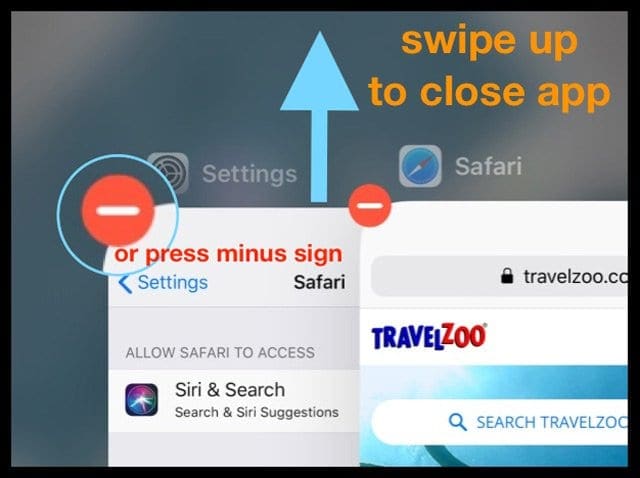
To close apps running in the background on an iPad with a Home Button, follow these steps
Double-click the Home button to show your most recently used apps
Swipe up on the app’s preview to close the app
For some iOS, you need to tap and hold an app and tap the red minus sign
Doing this does not remove the app from your iPad. It just removes it from running as a background process (multitasking)
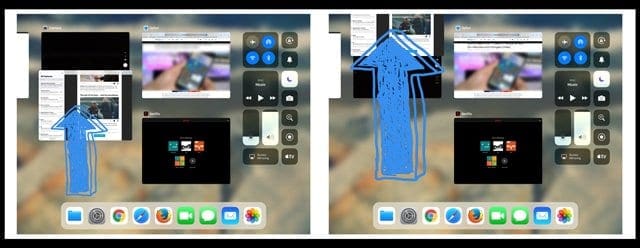
To close background apps on an iPad with no Home Button running iOS 12 or newer
Swipe up from the bottom of the home screen and pause for a moment mid-screen
This process should show you all of your recently used apps
Swipe left or right to get to the one you want, and then swipe up to close it
Clear out your cache
If the iPad internet is slow, it might be due to the cache being full of temporary data. The iPad safari app can slow things down
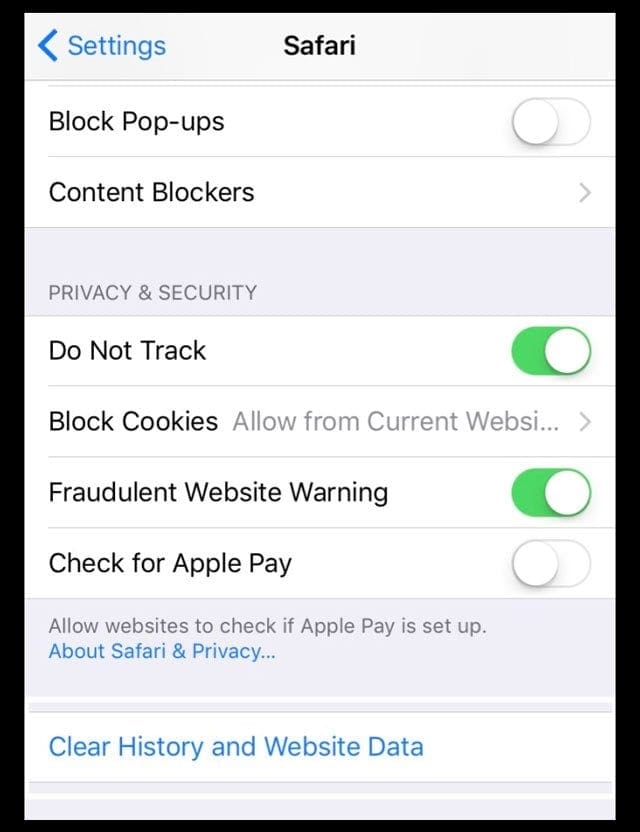
From time to time you may want to clear your cache
To do that, just tap Settings > Safari > Clear History and Website Data
Check your storage
If your device’s internal storage is getting full, your iPad may not run smoothly. So it’s a good idea to check your storage and see what you have available.
Open Settings > General > iPad Storage
Take a look at the top graph and look at your used vs. available storage numbers
Scroll down for a list of iOS recommendations
Look further down and scroll the list of apps to see how much storage your apps currently use
If your iPad runs low on available space, check out our top ways to clear out the clutter and free space with iOS storage tools and leverage iCloud too!
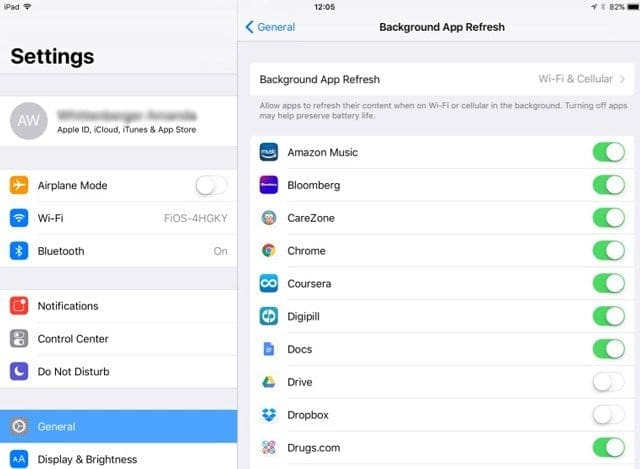
Stop Background App Refresh on your iPad
A lot of folks don’t understand that after you stop actively using an app, that app is sometimes updating and refreshing its data in the background.
Some apps update a lot in the background while others are in a suspended like state. So let’s turn off this setting either as a whole or app-by-app.
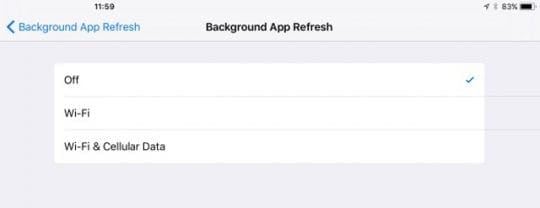
Adjust Background App Refresh
Open Settings > General > Background App Refresh
Turn it completely off or pick and choose which apps you don’t want to refresh when not using
Restart your device
If the above tips do not do the trick, you may try rebooting your device
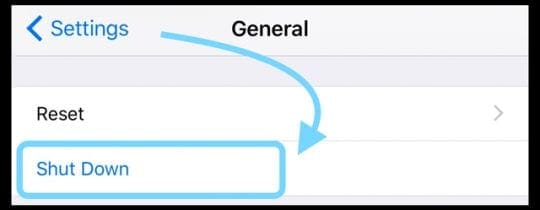
For folks using iOS 11 +, go to Settings > General > Shut Down. Once it’s off, wait 30 seconds before you power up
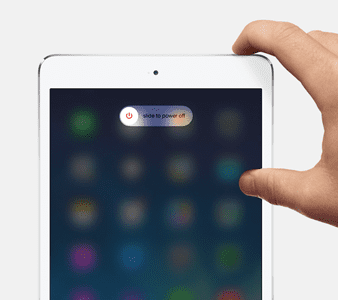
Press and Hold the Sleep/Wake button for a few seconds until the red “slide to power off” slider appears, and then slide the slider. Then, turn it on again by holding down the sleep/wake button again
Force Restart your iPad
On an iPad Pro with no Home Button: Press and quickly release the Volume Up button. Press and quickly release the Volume Down button. Then press and hold the Power button until the device restarts
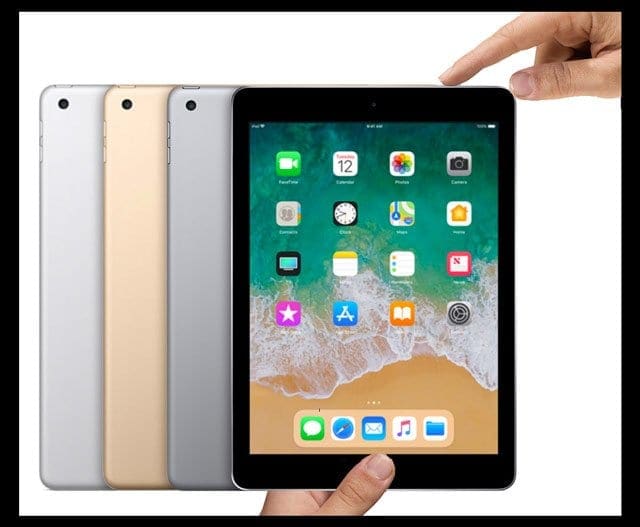
On an iPad with a Home Button: Press and hold both the Home and the Top (or Side) buttons for at least 10 seconds, until you see the Apple logo
Sometimes, the iPad runs slow after you have updated your iOS
This is especially the case when you have an older iPad that you upgrade to a newer iOS.
This can cause motion blurs and slow response issues, or make the iPad’s internet slow.
If you noticed that your iPad is slow after updating to the latest update, you might want to explore our article that shows you some of the simple fixes that can be made to the settings to get a better responsive device.
Before you decide to invest in a brand new iPad, please read our article below and try out some of the tricks to see if it helps with your issues.
Obsessed with tech since the early arrival of A/UX on Apple, Sudz (SK) is responsible for the original editorial direction of AppleToolBox. He is based out of Los Angeles, CA.
Sudz specializes in covering all things macOS, having reviewed dozens of OS X and macOS developments over the years.
In a former life, Sudz worked helping Fortune 100 companies with their technology and business transformation aspirations.
My iPad was running slow and I tried all the tips and hints that I could find, all to no avail. Eventually I was advised to restart my router and lo and behold it did the trick.
It could be your internet service. But it’s also possible that it’s your iPad. So, let’s do a couple of things.
First, if your WiFi offer both a 5 GHz and a 2.4 GHz, try connecting to the 5 GHz signal and see if things improve.
Definitely try clearing your browser’s stored data–go to Settings > Safari > Clear History and Website Data. Then go to Settings > Safari > Advanced and tap Website Data > choose to Remove All Website Data.
Restart your device by powering off, waiting 30 minutes, and powering back up. Then check and see if internet performance improved.
If not, toggle off Bluetooth and see if that makes any difference. Go to Settings > Bluetooth and toggle off. Alternatively, switch on Airplane Mode and see if internet performance improves.
If it does not improve, try disabling Wi-Fi Networking under Settings > Privacy > Location Services > System Services > Wi-Fi Networking.
The speaker works fine for a minute and them becomes very muffled . Sometimes it doesn’t work at all and then suddenly it is fine again. This is when I send messages on voxer.
Just get a new I pad! I was doe for an upgrade and when I got a new iPad of course it wasn’t glichy or slow but I could get newer software updates without it being so annoying. Try and get a new iPad if yours doesn’t work.
Same issue for me on an iPad mini : “I ran the Passmark benchmark app and received a score of 2.1 Mb/s disk write speed while my friends ipad 2 gets 30Mb/s write speed.”
Was 5-7Mb/s.
Then I backup the device, boot in DFU to restore it completely, and back to 30Mb/s
I have an iPad 2 that used to run great. Something happened to Gamecenter that pretty much wrecked my iPad. If I try to access gamecenter directly, it locks up my iPad (can only be cured by a reboot). Any game that accesses gamecenter, locks up when gamecenter does its handshake with the game. I can’t go into gamecenter to turn it off, because it locks up. I can’t delete gamecenter from my iPad, because it’s one of those apps that doesn’t give you an ‘x’ option, when you press and hold it’s icon. Any suggestions, before I throw it in the trash?
I agree. Apple in their absence of recognition to these issues and in their continued implementation of these stupid and nonsensical fixes remove any responsibility unto just user errors or application issues. Denial and sidestepping resolves nothing but the continuation of a company selling producer freely with out taking any action to their customers true and real issues. Way to go! Oops, time to reboot again!
following a suggestion by my son, I struggled through updating all mt apps. This took many freezes and restarts, but seemed to have remedied the slowness and freezes. Go figure.
my ipad is 2 and half year old and its jailbroken. i was playng a game, after playng it like 20min, fps went down to 1-2 i didnt know what happend, and i closed app and ipad is still 1-2 fps so i cant even unjailbreak or reset ipad. can someone help me??
My ipad air is so slow. I am planning to return it if this keeps up. My old ipad was very fast
and now, that is very slow. It makes me not want to use at all. What could be the problem?
I deleted all history and cookies to safari but that didn’t help.
I would like help in resolving this issue.
thanks so much,
Bernardine
I’ve had so many problems with Apple I decided to try Android, and wow is it so much better. Everything is laid out intuitively and it is easy to access features and settings and notifications, and runs quite reliably and fast. Plus no more proprietary crap like greedy Apple!
I have an ipad 2 and it is about 1 and a half years old right now with ios 7.1 installed. I actually runs just fine with the only issued being its aging hardware( mainly noticed while playing RealRacing 3). I only have one problem that worries me. I ran the Passmark benchmark app and received a score of 2.1 Mb/s disk write speed while my friends ipad 2 gets 30Mb/s write speed. These ipads are EXACTLY the same. I am wondering if flash memory eventually dies. Thanks
hi there my comadore 64 ran a 1 mhz cpu 64 kb flash memory 2,400 buad modem and the comadore 64 had a whopping 2 mb/s read write speeds with only a 1 mhz cpu
My ipad has gone totally to poo since update last week to iso7.1 .Its not worth a carrot now come on apple sort out what has been a total mess from this update.
Great info, never had a real problem with ipad but noted a drop off on speed. After your suggestion, and also realised we could select what we want to search. Improved the speed.
Unlike you though, I have all my pictures and music on the ipad. I think perhaps I might change that when I synchro next time.
I had tried all the above and was also very frustrated with the tips as they didn’t have any impact but turning off spotlight seems to have made big improvement.. Thanks
You guys can speed up a laggy ipad by disabling spotlight doing this : settings>general>spotlight search. If u guys are like me. A person who likes to save space and downloads NO music and videos. OR contacts. (You guys dont really need contacts to begin with. An ipad is not a phone.) Then disabling spotlight search is perfect for you.
You guys can speed up a laggy ipad by disabling spotlight doing this : settings>general>spotlight search. If u guys are like me. A person who likes to save space and downloads NO music and videos. OR contacts. (You guys dont really need contacts to begin with. An ipad is not a phone.) Then spotlight search is perfect for you.
Yep. I’ve been trying to reply to this chat since may 13 and my ipad 3 has only just let me…seriously. What good is a tablet that wont function. My iPhone runs 10 times faster at least and is never slow. Now on the pad, you tube inaccessible,many URL need 3 or 4 attempts to e and frequently just hang, and im using it less and less. What IS interesting is that if i use wireless hotspot on the ipad, the laptop i connect it to runs fast and sweet on all apps. So its not safari in my ire but the tablet guts. Whatever that is. But a heap of crap it is at present. Just crap
I’m too having slow experiences on my ipad 2.. I’ve noticed this is since the 6.1.3 update as it was running normal on 6.1.2
Apple pull your finger out your arse and get this problem sorted! Otherwise I’m off to Samsung …
I’m not sure if you even know what your talking about, you should be on the 8.1.3 by now and your only on 6? Don’t complain about them when it’s obviously you cause you have the historic version, get your finger out of your arse and update to where the world is today. even with the little problems I’ve had I love apple so much that it’s not worth the time to be upset with them. They’re obviously smarter then you and you need to upgrade and shut your pie hole.
This is quite obviously an Apple problem. There are too many people on many forums across the web in different countries all havi the same problem that only stated since upgrading to IOS 6.1 . We have all carried out ALL of the suggested tips and non make a different therefore ……..
We will all have to wait until Apple get there finger out and correct this error, this error that they will never admit is an error as per usual.
This problem is horrible. Worse is Apple’s arrogance in not having a solution to thenproblem. Their absolute silence over the years (this is by no means a recent problem) is saying, “It is not our fault!”
I too have done all of the steps, including resetting the network settings, and nothing. Stuff I enjoyed last year (Twitter) I cannot now because the linked pages load slowly and the images hardly at all; just the white rectangular box with the question mark in the middle!
He guys… This is not a problem, but a feature Apple give you trough updates… They want you to need the next ipad… I never update my apple products and everything run fine.
Your advise didn’t help one bit. I close all running apps, cleared out cash, deleted all unnecessary apps. Still my brand new ipad 3 is considerably slower than it was a month ago. Pls advise me what else I can do to improve its performance.
If you are using iOS 7, the OS itself lags. One good way to speed it up and eliminate lag is to DISABLE AssistiveTouch. Try playing Temple Run with the AssistiveTouch and try playing it without AssistiveTouch. You’ll see what I mean. 🙂












My iPad was running slow and I tried all the tips and hints that I could find, all to no avail. Eventually I was advised to restart my router and lo and behold it did the trick.
Apple is no good. I have good internet and a couple of apps installed on my mine and has been slow since always.
Nothing fixes it. I want my money back.
I very regularly have a message appear across my screen which states
“slow internet connection”
Is the message refer to internet speed provided by my supplier or will clearing the “history option on my iPad solve the problem.?
Hi Jim,
It could be your internet service. But it’s also possible that it’s your iPad. So, let’s do a couple of things.
First, if your WiFi offer both a 5 GHz and a 2.4 GHz, try connecting to the 5 GHz signal and see if things improve.
Definitely try clearing your browser’s stored data–go to Settings > Safari > Clear History and Website Data. Then go to Settings > Safari > Advanced and tap Website Data > choose to Remove All Website Data.
Restart your device by powering off, waiting 30 minutes, and powering back up. Then check and see if internet performance improved.
If not, toggle off Bluetooth and see if that makes any difference. Go to Settings > Bluetooth and toggle off. Alternatively, switch on Airplane Mode and see if internet performance improves.
If it does not improve, try disabling Wi-Fi Networking under Settings > Privacy > Location Services > System Services > Wi-Fi Networking.
hope something helps,
Sam
The speaker works fine for a minute and them becomes very muffled . Sometimes it doesn’t work at all and then suddenly it is fine again. This is when I send messages on voxer.
Apple does not give a toss about its customers. And they do not know how to fix half the problems there are. I personally NEVER UPDATE.
Just get a new I pad! I was doe for an upgrade and when I got a new iPad of course it wasn’t glichy or slow but I could get newer software updates without it being so annoying. Try and get a new iPad if yours doesn’t work.
Are you gonna slide me the $600 or so it takes to buy one? You make it sound so easy.
Same issue for me on an iPad mini : “I ran the Passmark benchmark app and received a score of 2.1 Mb/s disk write speed while my friends ipad 2 gets 30Mb/s write speed.”
Was 5-7Mb/s.
Then I backup the device, boot in DFU to restore it completely, and back to 30Mb/s
What is DFU?
I have an iPad 2 that used to run great. Something happened to Gamecenter that pretty much wrecked my iPad. If I try to access gamecenter directly, it locks up my iPad (can only be cured by a reboot). Any game that accesses gamecenter, locks up when gamecenter does its handshake with the game. I can’t go into gamecenter to turn it off, because it locks up. I can’t delete gamecenter from my iPad, because it’s one of those apps that doesn’t give you an ‘x’ option, when you press and hold it’s icon. Any suggestions, before I throw it in the trash?
I pad 2 user here it kicked in and done the trick
I agree. Apple in their absence of recognition to these issues and in their continued implementation of these stupid and nonsensical fixes remove any responsibility unto just user errors or application issues. Denial and sidestepping resolves nothing but the continuation of a company selling producer freely with out taking any action to their customers true and real issues. Way to go! Oops, time to reboot again!
Sorry, that should have been be products, not producer. My bad, Autocorrect, and my lack of proof reading,
My iPad 2 is very slow and freezes also. What is the latest suggestion for fixing this? It’s very annoying. Please explain in layman’s terms 🙂
Turning off the spotlight search has made a tremendous difference! Thanks for the tip! I hope it stays that way!
following a suggestion by my son, I struggled through updating all mt apps. This took many freezes and restarts, but seemed to have remedied the slowness and freezes. Go figure.
my ipad is 2 and half year old and its jailbroken. i was playng a game, after playng it like 20min, fps went down to 1-2 i didnt know what happend, and i closed app and ipad is still 1-2 fps so i cant even unjailbreak or reset ipad. can someone help me??
Why my youtube on my ipad 2 lag
How i fix it
Was this article composed by a 2 yr old?
Disabiling spot search seems to have worked on my iPad 2 now I have to do a comparison with my wife’s. Thx
My iPad2 keeps freezing and running slow since the last update any help would be appreciated
Delete Facebook app. It will run faster.
Don’t have the facebook app or spotlight search. problem remains since update 8.1
My ipad air is so slow. I am planning to return it if this keeps up. My old ipad was very fast
and now, that is very slow. It makes me not want to use at all. What could be the problem?
I deleted all history and cookies to safari but that didn’t help.
I would like help in resolving this issue.
thanks so much,
Bernardine
Delete Facebook app. That app slows ipad.
I’ve had so many problems with Apple I decided to try Android, and wow is it so much better. Everything is laid out intuitively and it is easy to access features and settings and notifications, and runs quite reliably and fast. Plus no more proprietary crap like greedy Apple!
I have an ipad 2 and it is about 1 and a half years old right now with ios 7.1 installed. I actually runs just fine with the only issued being its aging hardware( mainly noticed while playing RealRacing 3). I only have one problem that worries me. I ran the Passmark benchmark app and received a score of 2.1 Mb/s disk write speed while my friends ipad 2 gets 30Mb/s write speed. These ipads are EXACTLY the same. I am wondering if flash memory eventually dies. Thanks
hi there my comadore 64 ran a 1 mhz cpu 64 kb flash memory 2,400 buad modem and the comadore 64 had a whopping 2 mb/s read write speeds with only a 1 mhz cpu
My ipad has gone totally to poo since update last week to iso7.1 .Its not worth a carrot now come on apple sort out what has been a total mess from this update.
Hi john,
Great info, never had a real problem with ipad but noted a drop off on speed. After your suggestion, and also realised we could select what we want to search. Improved the speed.
Unlike you though, I have all my pictures and music on the ipad. I think perhaps I might change that when I synchro next time.
Thanks again
yeah it worked!
I had tried all the above and was also very frustrated with the tips as they didn’t have any impact but turning off spotlight seems to have made big improvement.. Thanks
wow disabling spotlight under settings>general really did work !!!
I tried this and all above suggestions and mine still isnt working right
Disabling spotlight search worked fine for me (MC825LL) thanks for the tip!
Greetings from Zurich
Benjamin
You guys can speed up a laggy ipad by disabling spotlight doing this : settings>general>spotlight search. If u guys are like me. A person who likes to save space and downloads NO music and videos. OR contacts. (You guys dont really need contacts to begin with. An ipad is not a phone.) Then disabling spotlight search is perfect for you.
You guys can speed up a laggy ipad by disabling spotlight doing this : settings>general>spotlight search. If u guys are like me. A person who likes to save space and downloads NO music and videos. OR contacts. (You guys dont really need contacts to begin with. An ipad is not a phone.) Then spotlight search is perfect for you.
Yep. I’ve been trying to reply to this chat since may 13 and my ipad 3 has only just let me…seriously. What good is a tablet that wont function. My iPhone runs 10 times faster at least and is never slow. Now on the pad, you tube inaccessible,many URL need 3 or 4 attempts to e and frequently just hang, and im using it less and less. What IS interesting is that if i use wireless hotspot on the ipad, the laptop i connect it to runs fast and sweet on all apps. So its not safari in my ire but the tablet guts. Whatever that is. But a heap of crap it is at present. Just crap
I’m too having slow experiences on my ipad 2.. I’ve noticed this is since the 6.1.3 update as it was running normal on 6.1.2
Apple pull your finger out your arse and get this problem sorted! Otherwise I’m off to Samsung …
I’m not sure if you even know what your talking about, you should be on the 8.1.3 by now and your only on 6? Don’t complain about them when it’s obviously you cause you have the historic version, get your finger out of your arse and update to where the world is today. even with the little problems I’ve had I love apple so much that it’s not worth the time to be upset with them. They’re obviously smarter then you and you need to upgrade and shut your pie hole.
Nate…you may want to pay attention to what you are reading BEFORE you comment. This post is from 2013…back when the latest version WAS IOS 6…
Hahaha quality, that’s called being put in your place Nate ha.
This is quite obviously an Apple problem. There are too many people on many forums across the web in different countries all havi the same problem that only stated since upgrading to IOS 6.1 . We have all carried out ALL of the suggested tips and non make a different therefore ……..
We will all have to wait until Apple get there finger out and correct this error, this error that they will never admit is an error as per usual.
This problem is horrible. Worse is Apple’s arrogance in not having a solution to thenproblem. Their absolute silence over the years (this is by no means a recent problem) is saying, “It is not our fault!”
I too have done all of the steps, including resetting the network settings, and nothing. Stuff I enjoyed last year (Twitter) I cannot now because the linked pages load slowly and the images hardly at all; just the white rectangular box with the question mark in the middle!
Brava!
He guys… This is not a problem, but a feature Apple give you trough updates… They want you to need the next ipad… I never update my apple products and everything run fine.
Good point! Touche!
Your advise didn’t help one bit. I close all running apps, cleared out cash, deleted all unnecessary apps. Still my brand new ipad 3 is considerably slower than it was a month ago. Pls advise me what else I can do to improve its performance.
Brgds,
Ara
Did you try restarting it ?
If you are using iOS 7, the OS itself lags. One good way to speed it up and eliminate lag is to DISABLE AssistiveTouch. Try playing Temple Run with the AssistiveTouch and try playing it without AssistiveTouch. You’ll see what I mean. 🙂
Delete Facebook app. That app slows your iPad.