Emojis are a cornerstone of our conversations these days, and you probably use a lot of them on social media as well. But unfortunately, they are not exempt from malfunctioning every now and then.
Several users report that occasionally their emojis stop working properly on iPhones, iPads, and other iDevices. Messages with emoji either are not delivered to recipients, or their texts show some strange icons instead of legible words. These problems have gotten better in recent years, but they can still cause issues.
Have you noticed that emojis aren’t working properly on your iPhone or iPad? If so, don’t worry — we’re here to help you out. Keep reading to discover some of the main things you can try to solve this problem.
Emoji Keyboard Disappeared, or No Emoji Shortcut Button
In some cases, you might notice that the emoji keyboard is missing from your keyboards. Normally, this problem occurs after updating to the latest version of iOS or iPadOS. Luckily, it’s an easy fix in most cases.
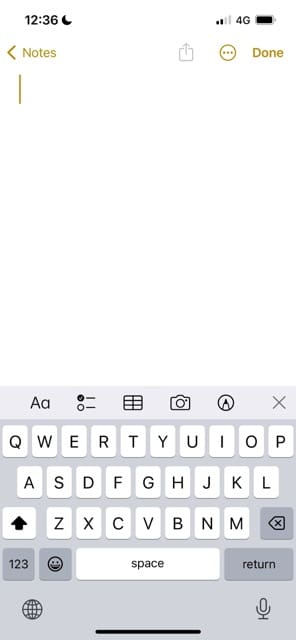
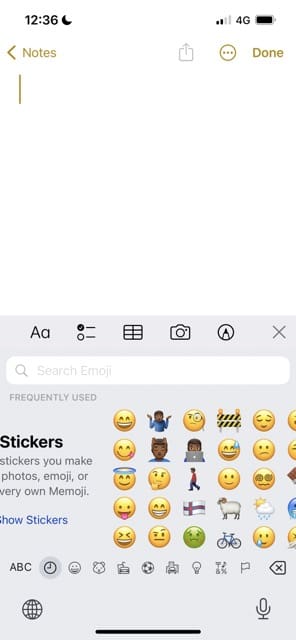
You have two options here. The first is to tap the smiley icon, which you will see next to the space button. After doing that, the list of emojis — plus any stickers you’ve created — should appear.
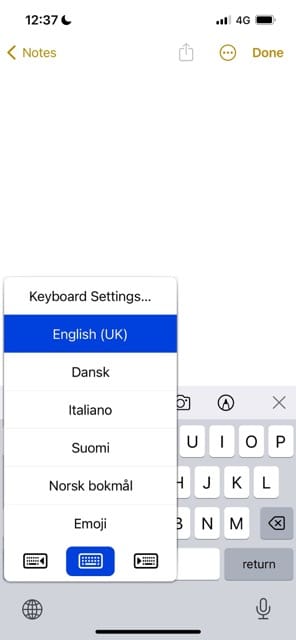
Another option is to press and hold on to the globe icon. Here, you’ll see your list of installed keyboards. Click on Emoji, and you should see all of the different emojis on your device.
I Can’t See My Emoji Keyboard
If you can’t see your emoji keyboard, one potential fix that you can try is to reinstall it from your iPhone or iPad settings. Here are the steps that you should follow:
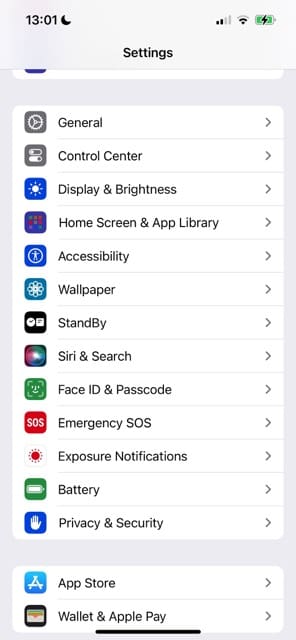
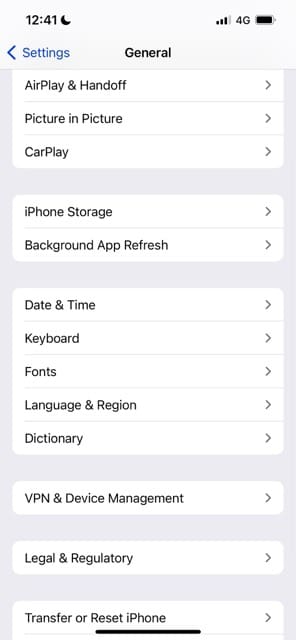
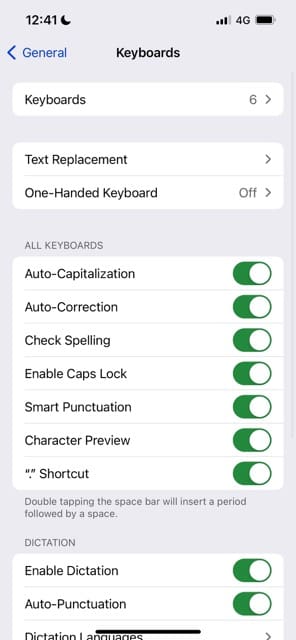
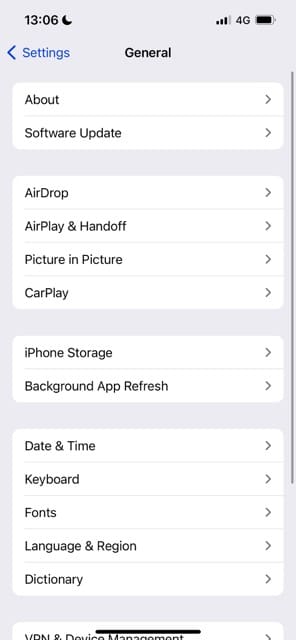
Go to Settings > General > Keyboard.
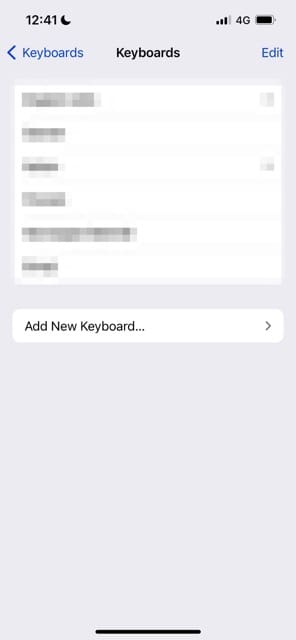
Select the Keyboards tab in the next window.
Go to the bottom and tap Add New Keyboard.
Search for Emoji and add this keyboard to your list.
If needed, restart your device. Then, check to see if you can now see your emojis.
Emoji Keyboard Not Working? Update Your iOS or iPadOS Software
Another possible way to fix the problem of emojis not appearing is by updating your iOS or iPadOS software. Follow these instructions to do that.
Go to Settings > General.
Select Software Update. Wait for your device to check for a potential software update.
Tap Download and Install if you have a software update available.
Why Do My Emojis Look Like Strange Symbols?
Emoji may appear as strange or gibberish if you send emoji messages to a device that does not support emojis. This will largely occur when you’re sending messages to older iOS devices.
In these cases, there isn’t much that you can do. The only things that the other person can try are to update their software or, if the latest version isn’t supported, upgrade their devices.
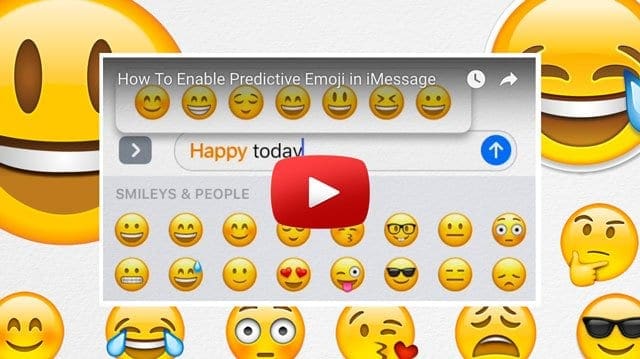
No Time? Check Out Our Video
If you want to sort out this problem but would rather listen or see our tips instead, you can always check out the video we’ve listed below.
Nothing Fixing Emoji (Emoticons) Not Working on Your iPhone, iPad, or iPod?
Try backing up your phone (via iCloud or iTunes/Finder). Then, set up your phone as new and restore your phone from that recent backup.
Otherwise, it’s time to contact Apple Support.
If you live near an Apple Store, set up an appointment with an Apple Store Genius for device inspection and diagnosis.
Emoji Not Working? It’s Usually Easy to Solve
If you need to get emojis back on your iPhone or iPad, you usually don’t have to do a huge amount to complete the process. In many cases, you simply need to either add it back or navigate where the emojis exist on your keyboard. You can also try updating your iOS or iPadOS software, as this usually fixes glitches and similar issues that may arise.
Should anything have worked for you that we didn’t mention, feel free to let us know in the comments. And if you’re still having issues after reading what we’ve discussed, it might be a good time to contact the Apple Support team.
Danny has been a professional writer since graduating from university in 2016, but he’s been writing online for over a decade. He has been intrigued by Apple products ever since getting an iPod Shuffle in 2008 and particularly enjoys writing about iPhones and iPads. Danny prides himself on making complex topics easy to understand. In his spare time, he’s a keen photographer.
I can’t get emojis to work on my ipadpro. Software is up to date, emoji keyboard is still showing in settings. When I click on the emoji button (world icon on my logitech keyboard, I get an A and that is all.
Hi, Even though the Emoji keyboard is turned on in Keyboard Settings I still can’t access emojis. I have tried deleted the keyboard and reading it and still can’t access. I have tried all the recommendations and nothing worked. Please advise. Thanks
I spent the last half hour trying to get my emojis back. I don’t even know why they disappeared. I didn’t update. Anyway, I had to delete Bitmoji from the keyboard, then emojis came back. Very bazaar
Hi!
My iPhone is updated, I have tried restarting my phone and deleting the emoji keyboard and add it again but no matte what I do, the new emojis won’t show up. I have an iPhone 6.
What do I do?
Hello,
My heart emoji all of a sudden stopped fluttering on my end. I have an Iphone XR, I have uninstalled and reinstalled my emoji app. Not sure what else can be done.
First, close all open apps by double-pressing the home button or swiping up from the bottom of your screen until you app tiles in the app switcher. Then swipe each app tile off the top of your screen. Repeat until you see no more app tiles and just are on the home screen.
Then, go to Settings > General > Keyboard > Keyboards and swipe on the Emoji keyboard to delete it.
Once deleted, restart your iPhone.
After restarting, go back to Settings > General > Keyboard > Keyboards and choose Add New Keyboard. Locate Emoji and tap it to reinstall it.
I have followed all instructions to make emoji keyboard work ,to no avail.
What can possibly be wrong?
I deleted it, then added it , done everything possible.
Please help.
When you go to Settings > General > Keyboard > Keyboards, does Emoji show up on the list of active keyboards?
If not, tap Add New Keyboard and select Emoji from the list.
Once confirmed or added, let’s close all open apps
1. On an iPhone or an iPad with no home button from the Home screen, swipe up from the bottom of the screen and pause slightly in the middle of the screen
2. On an iDevice with a home button, double-click the Home button and swipe right or left to find the app that you want to close
3. Swipe right or left to locate the app you want to close
4. Swipe up on the app’s preview to close it
5. Repeat for all apps in the app switcher until all you see is the home screen when double pressing home or swiping up
After closing your apps, restart your device by going to Settings > General > Shut Down.
Wait 2-3 minutes after shutting down, then power back up.
Go to the Apple Messages app (not FB Messenger) and create a new message. Tap the smiley face icon next to the space bar and see if emojis appear. If you don’t see a smiley face icon, locate the globe icon and tap that then select Emoji.
Hello!
I’m using iPhone 7 plus and I mistakenly delete my emoji keyboard in Settings> General > Keyboard>
I then deleted my emoji keyboard, after I’ve tried to get back but I can’t because it’s not even showing emoji keyboard in the list of the keyboards> add new keyboard > it’s not showing emoji keyboard there.
Hello!
Someone sent me a message with new emojis on Facebook messenger, but I can’t see them. I only see symbols like “?”, “¿”.
I have to mention that I’m using IOS 13.3.1. Any idea??
If you refer to the iOS Messages app, first look to ensure the emoji keyboard is installed at Settings > General > Keyboard > Keyboards. If not, tap add new keyboard and select emoji to add it.
If the emoji keyboard is listed in your keyboard settings, open the Messages app and look for a smiley face or globe icon
You see emojis with question marks when your device or the sender’s device does not support those emojis–this usually indicates that one of the devices is not updated to its latest operating system (for iPhone, that’s iOS). For example, if your iPhone is an older model that only supports iOS 12 or lower and the person sending you emojis is using the latest iOS 13 AND sends you one of the new emoji included with iOS 13, you will see a question mark instead of that emoji because your operating system doesn’t support it.
If possible, update your iPhone or ask the person receiving the question mark emoji to update their device (if possible).
If you are seeing quesiton marks and already updated to iOS 13.3, then try removing your emoji keyboard and add it back in via Settings > General > Keyboard > Keyboards.
I’ve tried several proposed ‘fixes’ for the lost emoji feature on my iPhone 8+ to no avail. I’ve been able to type in ‘emoji’ keyboard but it doesn’t turn on.
If you press and hold the globe icon on your keyboard, do you see the emoji keyboard as an option?
If you installed Bitmoji, try removing that keyboard and restarting. To remove go to Settings > General > Keyboard > Keyboards and press Edit to delete the bitmoji keyboard.
My emoji keyboard has disappeared. I haven’t done anything new. I have tried going into settings and deleting keyboard, restarting and then when going into add new keyboard the emoji word is there but no little arrow next to it. It will not click. What am I doing wrong? Thank you for any help you can offer.
If you see the emoji keyboard listed in your keyboards, then it should already be installed.
Try opening the Messages App and see if you see a globe or smiley face icon in the on-screen keyboard or just below it, in the lower-left corner. Tap and hold on that icon and see if you see emoji options.
Hello my new iPad 7 does not show the emojis! I have tried deleting and adding it back but nothing is working. Any ideas I’d appreciate greatly. Thanks!
Try having a friend or family member that has an iPhone or other Apple device send you a random bunch of emojis. See if this kicks in your emojis to show up!
Since updating to iOS 13.1.3 I still have the emoji pro keyboard but only 50% of the emojis work. The rest show ??? even when sent to recipients that have the emoji pro keyboard . I got the app in May 2018, never had a problem before.
Any suggestions?
Thank you,
Jo Lee
Sorry that your emojis for emoji keyboard pro aren’t showing up! That’s a pain.
It looks like the app developers have not updated it for iOS 13/iPadOS–and that’s likely why so many are not displaying.
The app as last updated in May, so they are behind the times–we suggest reaching out to the app developer and ask them to update the app for the latest iOS.
That’s about all you can do since this product is a third-party, not Apple.
On iPhone 7, I can see the emojis and can add them to an iMessage. When I send the iMessage, the text bounces back as ‘not delivered’ with the red exclamation mark. In the settings, iMessage is on and MMS Messaging is also on. I’m using IOS 13.1.2. Any ideas?
Are you sending some of the new emoji or the memoji stickers? If so, the person you send them to must also be on iOS 13 (and ideally, the same iOS version you use of 13.1.2) to receive them.
If this happens across the board, with new and old emoji, we recommend removing the emoji keyboard and then adding it back in. It’s also a good idea to close the Messages app and then remove/re-add the emoji keybaord.
Go to Settings > General and tap Keyboard
Tap Keyboards
Swipe to delete Emoji
Restart your device
Go back to Settings > General and tap Keyboard
Tap Add New Keyboard.
Tap Emoji
Close an app
1. On an iPhone or an iPad with no home button from the Home screen, swipe up from the bottom of the screen and pause slightly in the middle of the screen
2. On an iDevice with a home button, double-click the Home button and swipe right or left to find the app that you want to close
3. Swipe right or left to locate the app you want to close
4. Swipe up on the app’s preview to close it
Sorry to hear about your problems with emoji not showing up. First, make sure you have the emoji keyboard installed. If the emoji keyboard is installed, try uninstalling and then reinstalling it. Look further at tips in this article for additional ideas to assist with your problem.
On my iPhone 5S every time I try and click on any of my emojis it closes out of whatever I am in and my Facebook keeps logging me out every few minutes. HELP?!










I can’t get emojis to work on my ipadpro. Software is up to date, emoji keyboard is still showing in settings. When I click on the emoji button (world icon on my logitech keyboard, I get an A and that is all.
My iPad is a samsung and emoji on facebook are there but not working can’t like anything etc
Fix for emoji didn’t work. Emoji word there and shows 2 keyboards but no arrow, not there.
During Facebook live the emojis are not working for iPad or iphone
Hi, Even though the Emoji keyboard is turned on in Keyboard Settings I still can’t access emojis. I have tried deleted the keyboard and reading it and still can’t access. I have tried all the recommendations and nothing worked. Please advise. Thanks
I spent the last half hour trying to get my emojis back. I don’t even know why they disappeared. I didn’t update. Anyway, I had to delete Bitmoji from the keyboard, then emojis came back. Very bazaar
Hi!
My iPhone is updated, I have tried restarting my phone and deleting the emoji keyboard and add it again but no matte what I do, the new emojis won’t show up. I have an iPhone 6.
What do I do?
Hello,
My heart emoji all of a sudden stopped fluttering on my end. I have an Iphone XR, I have uninstalled and reinstalled my emoji app. Not sure what else can be done.
The smiley faces went away replaced with a microphone how do I fix this
emojis sent from my iPhone 9+and those I get are just a bunch of ????????? Literally. Need a simple answer, not tech savvy please.
Hi Teresa,
Let’s reinstall your emoji keyboard.
First, close all open apps by double-pressing the home button or swiping up from the bottom of your screen until you app tiles in the app switcher. Then swipe each app tile off the top of your screen. Repeat until you see no more app tiles and just are on the home screen.
Then, go to Settings > General > Keyboard > Keyboards and swipe on the Emoji keyboard to delete it.
Once deleted, restart your iPhone.
After restarting, go back to Settings > General > Keyboard > Keyboards and choose Add New Keyboard. Locate Emoji and tap it to reinstall it.
Once added, restart again.
Then test if emoji work.
Aloha – Yaaay….my emojis are back!!! thank you so much….
I have followed all instructions to make emoji keyboard work ,to no avail.
What can possibly be wrong?
I deleted it, then added it , done everything possible.
Please help.
Hi Fatima,
When you go to Settings > General > Keyboard > Keyboards, does Emoji show up on the list of active keyboards?
If not, tap Add New Keyboard and select Emoji from the list.
Once confirmed or added, let’s close all open apps
1. On an iPhone or an iPad with no home button from the Home screen, swipe up from the bottom of the screen and pause slightly in the middle of the screen
2. On an iDevice with a home button, double-click the Home button and swipe right or left to find the app that you want to close
3. Swipe right or left to locate the app you want to close
4. Swipe up on the app’s preview to close it
5. Repeat for all apps in the app switcher until all you see is the home screen when double pressing home or swiping up
After closing your apps, restart your device by going to Settings > General > Shut Down.
Wait 2-3 minutes after shutting down, then power back up.
Go to the Apple Messages app (not FB Messenger) and create a new message. Tap the smiley face icon next to the space bar and see if emojis appear. If you don’t see a smiley face icon, locate the globe icon and tap that then select Emoji.
Let us know if you now get emoji working.
Liz
I tried everything that Liz suggested above and still can’t get emoji’s back. Any other suggestions?
Hello!
I’m using iPhone 7 plus and I mistakenly delete my emoji keyboard in Settings> General > Keyboard>
I then deleted my emoji keyboard, after I’ve tried to get back but I can’t because it’s not even showing emoji keyboard in the list of the keyboards> add new keyboard > it’s not showing emoji keyboard there.
Can you pls help me find it out?
Hello!
Someone sent me a message with new emojis on Facebook messenger, but I can’t see them. I only see symbols like “?”, “¿”.
I have to mention that I’m using IOS 13.3.1. Any idea??
I am unable to use my emoji on my messenger any more. It just disappeared from use. How do I get it back?
Hi Sue,
If you refer to the iOS Messages app, first look to ensure the emoji keyboard is installed at Settings > General > Keyboard > Keyboards. If not, tap add new keyboard and select emoji to add it.
If the emoji keyboard is listed in your keyboard settings, open the Messages app and look for a smiley face or globe icon
Thank you! This was the only place I could find that helped me get my emoji keyboard working!
How do I fix my emojis? Anywhere there’s an emoji a box with a question mark comes up even the whole emoji keyboard is just the question mark boxes?
Hi Rhyann,
You see emojis with question marks when your device or the sender’s device does not support those emojis–this usually indicates that one of the devices is not updated to its latest operating system (for iPhone, that’s iOS). For example, if your iPhone is an older model that only supports iOS 12 or lower and the person sending you emojis is using the latest iOS 13 AND sends you one of the new emoji included with iOS 13, you will see a question mark instead of that emoji because your operating system doesn’t support it.
If possible, update your iPhone or ask the person receiving the question mark emoji to update their device (if possible).
If you are seeing quesiton marks and already updated to iOS 13.3, then try removing your emoji keyboard and add it back in via Settings > General > Keyboard > Keyboards.
I am using IPhone 5s os 12.4.4 . In my phone new emoji updates are not coming . Please help .
Hi Sharmita,
New emojis are released with iOS updates so your iPhone 5S can only have the emojis available through iOS 12.4.4
Any new emoji released with iOS 13 and above will not be available on your device.
I’ve tried several proposed ‘fixes’ for the lost emoji feature on my iPhone 8+ to no avail. I’ve been able to type in ‘emoji’ keyboard but it doesn’t turn on.
HI Lalin,
If you press and hold the globe icon on your keyboard, do you see the emoji keyboard as an option?
If you installed Bitmoji, try removing that keyboard and restarting. To remove go to Settings > General > Keyboard > Keyboards and press Edit to delete the bitmoji keyboard.
My emoji keyboard has disappeared. I haven’t done anything new. I have tried going into settings and deleting keyboard, restarting and then when going into add new keyboard the emoji word is there but no little arrow next to it. It will not click. What am I doing wrong? Thank you for any help you can offer.
Hi Colleen,
If you see the emoji keyboard listed in your keyboards, then it should already be installed.
Try opening the Messages App and see if you see a globe or smiley face icon in the on-screen keyboard or just below it, in the lower-left corner. Tap and hold on that icon and see if you see emoji options.
Liz
Hello my new iPad 7 does not show the emojis! I have tried deleting and adding it back but nothing is working. Any ideas I’d appreciate greatly. Thanks!
Hi June,
Try having a friend or family member that has an iPhone or other Apple device send you a random bunch of emojis. See if this kicks in your emojis to show up!
Since updating to iOS 13.1.3 I still have the emoji pro keyboard but only 50% of the emojis work. The rest show ??? even when sent to recipients that have the emoji pro keyboard . I got the app in May 2018, never had a problem before.
Any suggestions?
Thank you,
Jo Lee
Hi Jo Lee,
Sorry that your emojis for emoji keyboard pro aren’t showing up! That’s a pain.
It looks like the app developers have not updated it for iOS 13/iPadOS–and that’s likely why so many are not displaying.
The app as last updated in May, so they are behind the times–we suggest reaching out to the app developer and ask them to update the app for the latest iOS.
That’s about all you can do since this product is a third-party, not Apple.
Liz
On iPhone 7, I can see the emojis and can add them to an iMessage. When I send the iMessage, the text bounces back as ‘not delivered’ with the red exclamation mark. In the settings, iMessage is on and MMS Messaging is also on. I’m using IOS 13.1.2. Any ideas?
Hi Dave,
Are you sending some of the new emoji or the memoji stickers? If so, the person you send them to must also be on iOS 13 (and ideally, the same iOS version you use of 13.1.2) to receive them.
If this happens across the board, with new and old emoji, we recommend removing the emoji keyboard and then adding it back in. It’s also a good idea to close the Messages app and then remove/re-add the emoji keybaord.
Go to Settings > General and tap Keyboard
Tap Keyboards
Swipe to delete Emoji
Restart your device
Go back to Settings > General and tap Keyboard
Tap Add New Keyboard.
Tap Emoji
Close an app
1. On an iPhone or an iPad with no home button from the Home screen, swipe up from the bottom of the screen and pause slightly in the middle of the screen
2. On an iDevice with a home button, double-click the Home button and swipe right or left to find the app that you want to close
3. Swipe right or left to locate the app you want to close
4. Swipe up on the app’s preview to close it
I’ve done this procedure on my iPhone 8 and iPad. It doesn’t work. What next?
Hi Vicki,
Try removing the emoji keyboard and then adding it back in. Remember to restart before and after removing/adding back the emoji keyboard.
Liz
Thank you. It’s working now.
All new emojis from latest update just show as “?” To all phones. Not sure why this is like this
What about for my iPod touch 5 wont show the emoji option no matter what I do
Hi Ava,
Sorry to hear about your problems with emoji not showing up. First, make sure you have the emoji keyboard installed. If the emoji keyboard is installed, try uninstalling and then reinstalling it. Look further at tips in this article for additional ideas to assist with your problem.
Best of luck,
SK
My emojis wont show
On my iPhone 5S every time I try and click on any of my emojis it closes out of whatever I am in and my Facebook keeps logging me out every few minutes. HELP?!