iDevice errors always seem to happen at the most inconvenient of times! Over the weekend, I was enjoying a relaxing Sunday at home trolling the iTunes Store on my iPad looking up some good movies to watch later. As I was making a list of what I want to see or even possibly purchase, all of a sudden all I see is a white blank screen. What the heck?
Several readers report this exact same error of the App Store (and sometimes the iTunes Store) not working on their iPhones, iPads, or iPods.
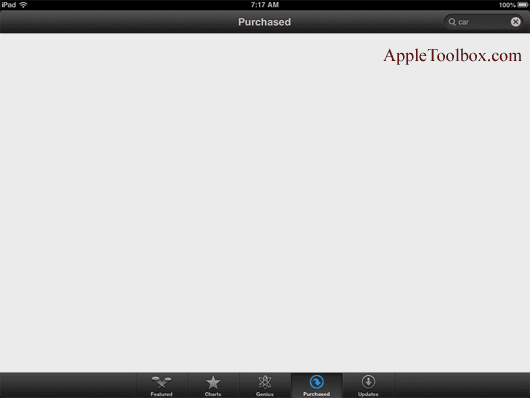
When they tap one of the tab at the bottom, all they see is a blank page!
Nothing loads when they want to use the App Store on an iPad or iPhone. No matter what you do your App Store shows a blank white screen–and it’s very frustrating!
Several people also report that this problem started after they updated to the latest version of iOS.
But for others, the App Store was working fine until, without warning or apparent cause, the App Store or iTunes Store just goes blank. Some report they receive the error message “cannot connect to the app store.” Ugh…
It’s not you; it’s Apple! Like any technology, Apple system goes down time to time, whether for maintenance or unexpectedly. It happens. It’s part of life.
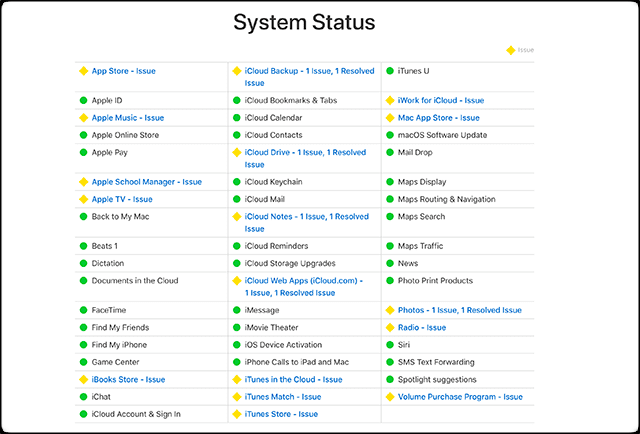
So before you unnecessarily perform a bunch of troubleshooting steps, check Apple’s System Status page. Make sure there aren’t any problems with the App Store.
Problems are denoted in yellow and list any issues. To learn more, tap on the problem for an update window of the latest information.
Before You Do Anything, Try This–Restart!
Restart An Individual App
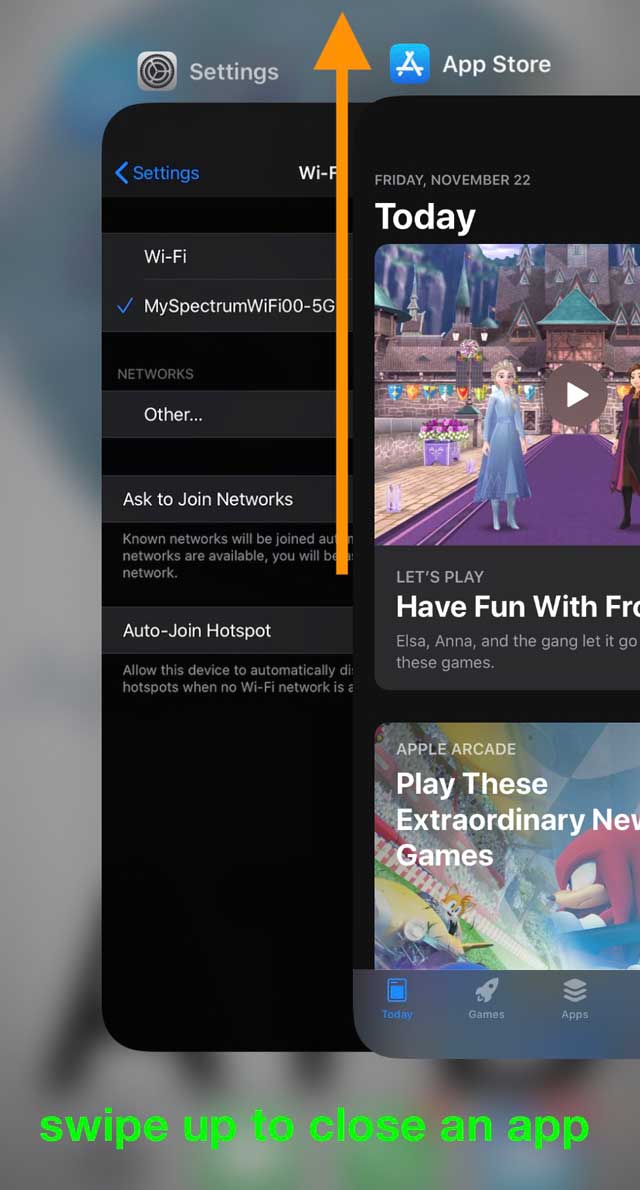
Double-tap your Home button or swipe up the Home Gesture Bar, find the App Store, and swipe up towards the top of the screen to close the app. Now, open the app the same way as always.
When you double-tap the Home button or swipe up the Gesture Bar and then swipe up on an app preview, the app closes and goes into a Not Running state.
So when you open it, you refresh entirely that app!
Check and see if your App Store is now working. If not, perform a full iDevice restart.
For older iOS
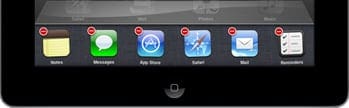
Close the App Store entirely by pressing the home button twice, pressing and hold the App Store icon until it starts to wiggle, then tapping the minus sign to close it.
Then relaunch the App Store.
How to restart
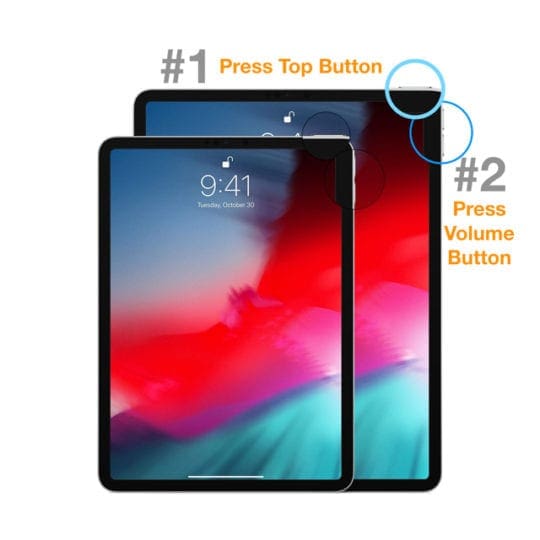
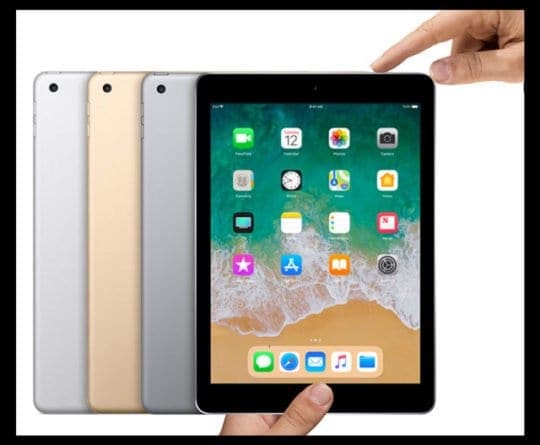
On an iPad with no Home Button and iPhones X or later: press and hold the Side/Top/Power button and either volume button until the slider appears
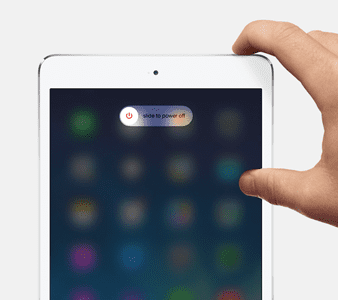
On an iPad or iPhone with a Home Button and iPod Touch: press and hold the Side/Top/Power button until the slider appears
Drag the slider to turn the device off and after the device turns off, press and hold that Side/Top/Power button again until you see the Apple Logo
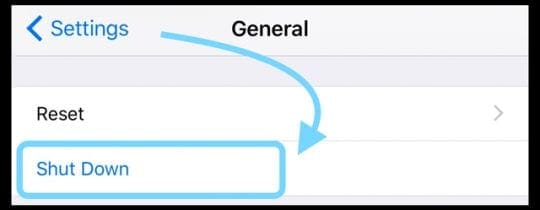
With iOS 11 and above, restart using Settings > General > Shut Down
If restarting didn’t work, try a forced reboot on your iPhone, iPad, or iPod touch. Perform this only if your iDevice and the iTunes or App Store is still not responding.
How to force restart
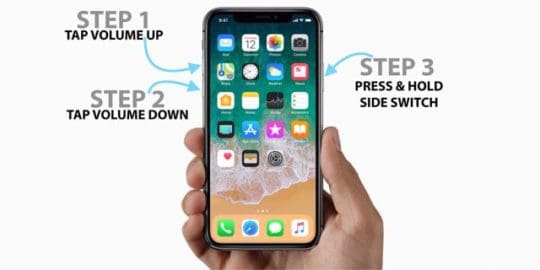
On an iPhone X Series and above, newer iPad model, iPhone 8, or iPhone 8 Plus: Press and quickly release the Volume Up button. Press and quickly release the Volume Down button. Then, press and hold the Side button until you see the Apple logo
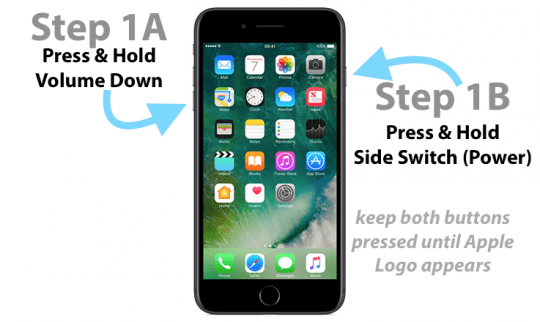
On an iPhone 7 or iPhone 7 Plus: Press and hold both the Side and Volume Down buttons for at least 10 seconds, until you see the Apple logo
On an iPhone 6s and earlier, older iPad, or iPod touch: Press and hold both the Home and the Top (or Side) buttons for at least 10 seconds, until you see the Apple logo
What To Do When The App Store’s Not Working and Showing a Blank Page
Sign Out and then back INTO Your App Store’s Apple ID
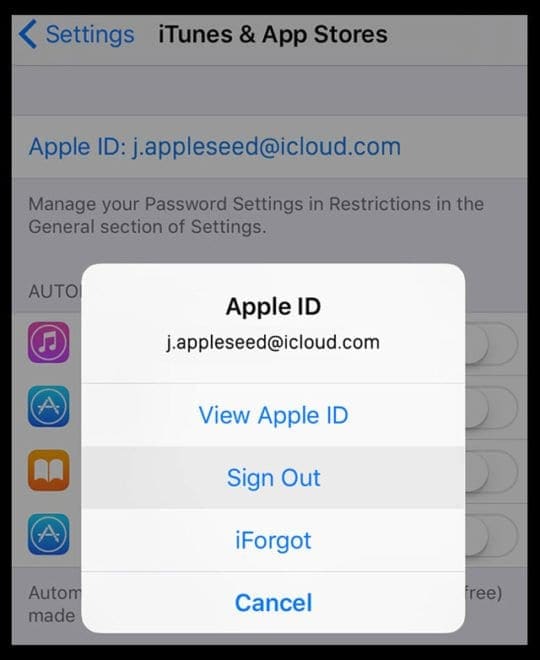
Go to Settings> iTunes & App Store> Tap your Apple ID and select Sign Out
Wait 10-20 seconds and sign back into your account with your Apple ID
Alternatively, Open Settings > iTunes & App Store
Tap on Apple ID and sign out
Now try and open your App Store
Wait a bit for content to load–be patient
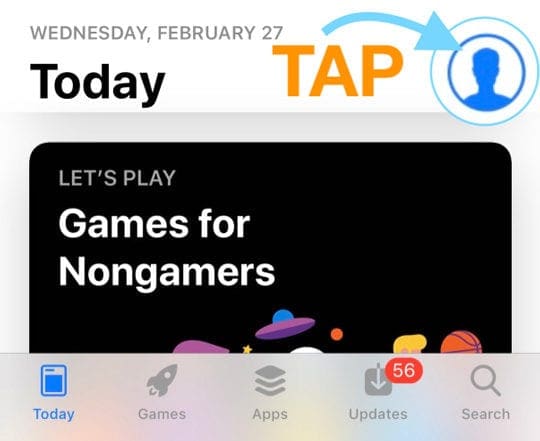
Once content loads, tap the profile icon and sign in with your Apple ID
For older iOS, go to the Purchases section and Sign In
Force Refresh the App Store and Clear Its Cache (for iOS 12 and below)
For iOS 13+ and iPadOS, force close (restart) the app store app and relaunch it
For older iOS (12 and below), repeatedly tap the App Store Updates button (available in older iOS only) or any of the tab icons at the bottom. All you have to do is look at the bottom menu, pick a tab, and then tap on it ten times or even more. This eventually deletes the cache from your App Store.
Readers report this works, but sometimes you need to tap it upwards of 25 times or even more!
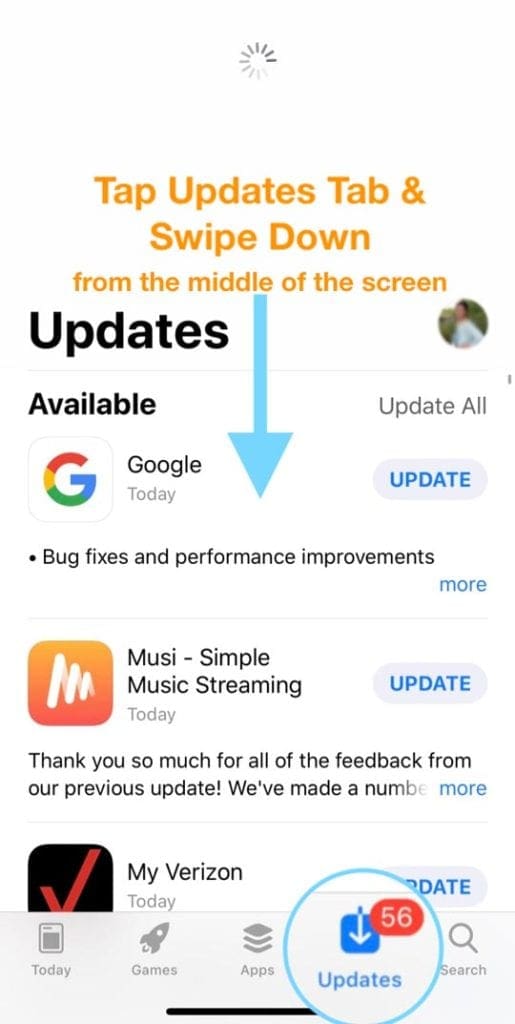
Select the Updates tab and swipe down from the middle of the screen until you see the spinning connections wheel
Update Date and Time Settings
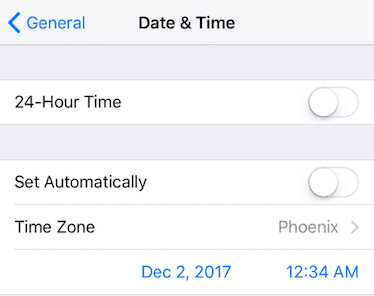
Tap Settings > General > Date and Time > Set Automatically > Off. Wait 10-20 second and turn it back ON
If that doesn’t work, turn Set Automatically OFF and then manually set the date one year ahead
Then try to access the App Store
If you see the message “cannot connect”
Go back and update the Date & Time to the actual settings by entering it manually or toggling Set Automatically ON
Then reopen the App Store
Switch Your Internet Connection
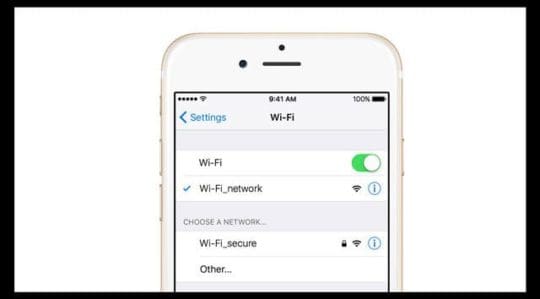
If using WiFi, toggle it off and try Cellular or vice-versa (use WiFi and turn off Cellular)
Use a different WiFi network or try a WiFi network somewhere else, like your neighbors or a nearby coffee shop
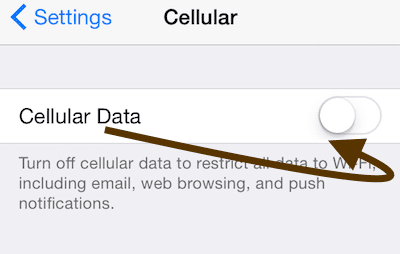
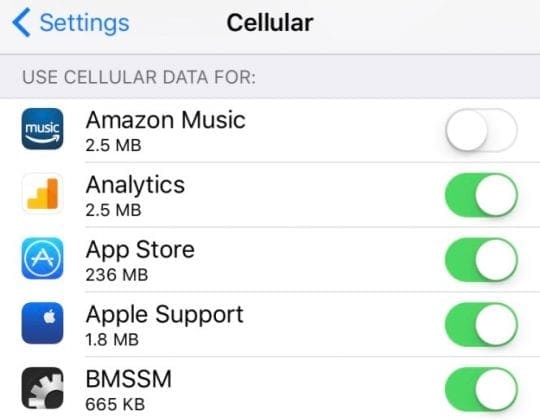
Go to Settings > Mobile or Cellular > and turn Mobile/Cellular Data OFF
Wait 10-20 seconds and then switch it back ON
Now scroll down to Use Mobile/Cellular Data For and toggle App Store ON if it’s off
If App Store is already toggled ON, toggle it OFF and wait 10-20 seconds and toggle the App Store back ON
See if your App Store is now working normally, i.e., the blank screen has disappeared
Have a Monthly Data Limit?
If your cellular plan includes a maximum limit and you are close or exceeded that limit, you may have just identified the problem.
Try adding more data onto your plan and see if that makes a difference.
Reset Your Network
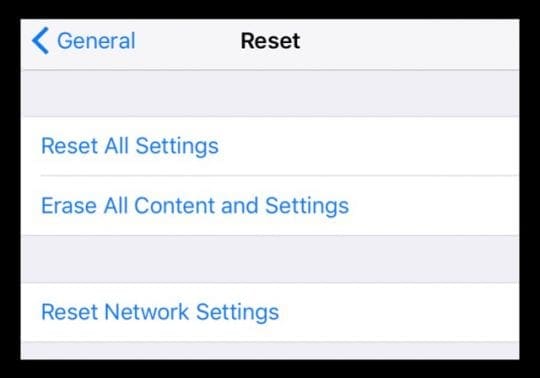
Try Resetting. Go to Settings > General> Reset> Reset All Settings. This does not delete any of your data.
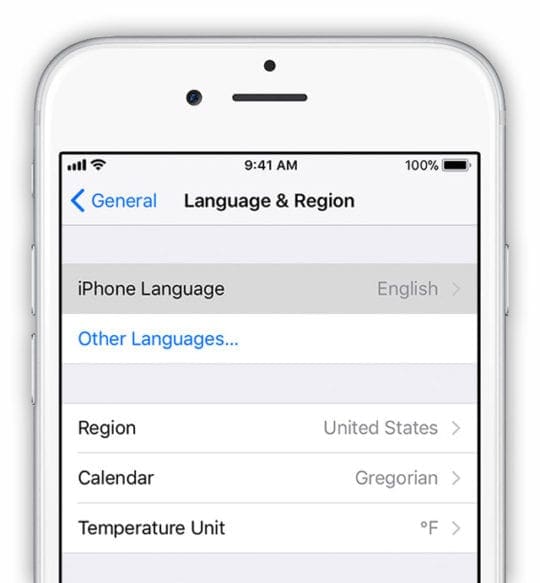
Tap Settings > General > Language & Region > iPhone Language
Tap Other Languages
Pick any language other than your current. If possible, try and choose any other second language you already know or are familiar with
Once the new language downloads, check if the App Store or iTunes Store works
If everything’s good to go, return to Settings > General > Language & Region and change the language back to your original
Then delete that second language, if desired
Yup, this is definitely a weird one–but it seems to work. Just remember that when you modify the language, first check the App Store, and only then change the language back to what it was originally.
Ask Friends To Help
A reader let us know that this one worked for him–strange but true.
Just ask a friend, co-worker, family member, or pretty much anyone you know to send you a link via SMS to any app in the App Store.
For whatever reason, the app store reappears normally!
No Time? Check Out Our Step-by-Step Video
Wrap Up
There are a lot of reasons why the App Store stops working. Hopefully, one of the tips listed above in the article or video helped you out.
If something else worked for you, let us know! We love paying it forward and adding it to our Reader Tips section.
Reader Tips
I had the same problem on my Mac Pro. Repeatedly clicking the “updates” tab fixed the problem
Sign out of your Apple ID by tapping Settings > iTunes & App Store, tap your Apple ID and select “Sign Out.” Wait one minute and sign back in by reentering your Apple ID and password
Turned off the phone and wait for a minute and turn back on. Then, log out of your Apple ID from Settings > Apple ID Account Management > Sign Out. Then sign back in. If you get an error message, wait a few minutes and try logging in again. You might need to try logging in a few times. Once logged in, close the App Store App if open and then open it again and see if your issue resolves and you can see the Search Bar, all the categories, etc.
Just turn off both of your internet connections–WiFi and Cellular Data. The try to load the App Store. You get the error that your internet connection is lost and then close the App Store app. Reconnect the internet by turning both WiFi and Cellular Data ON. Then load the App Store again. Worked for me!
Toggle ON Airplane Mode, then try to open the app store. You get an error message but ignore it! Just shut down your App Store app and then open it again straight away. Then turn off airplane mode and within 30 seconds the App Store re-populated.
Tap on any one of the toolbar buttons (Featured, Search, Updates, etc.) on the bottom of the screen rapidly ten times. It sounds counter-intuitive, but it refreshes the App Store and should solve your problem.
Obsessed with tech since the early arrival of A/UX on Apple, Sudz (SK) is responsible for the original editorial direction of AppleToolBox. He is based out of Los Angeles, CA.
Sudz specializes in covering all things macOS, having reviewed dozens of OS X and macOS developments over the years.
In a former life, Sudz worked helping Fortune 100 companies with their technology and business transformation aspirations.
I keep getting the “Cannot Connect to App Store” message when I check the apps that I’ve purchased to see if they need updating and I’ve tried everything that I’ve been told to try on the internet but I still keep getting that message.
What can I do to fix this issue ?
The AppStore icon has disappeared from my son’s iPad, and I’m not sure how to restore it. Without AppStore, we can’t add any new apps, so we’re stuck. Any suggestions?
Check if you set any Screen Time Restrictions on your son’s device. Go to Settings > Screen Time and temporarily disable any restrictions–see if the app store returns. If so, it’s likely you set up a restriction in Screen Time (usually in Content & Privacy Restrictions but could also be Allowed Apps)
Betty, Are you on the older iOS 11? It appears that some Apple users who are still on iOS 11 are having issues with accessing the app store and Apple music. Apple is aware of this issue and may be working towards a resolution.
Awesome! I even took my ipad minis to the Apple store which didn’t work! I did EVERYTHING you suggested and the only one that worked was changing the language!!! How weird! So glad I can finally get into the App store! Thank you thank you!!
I got it to work by adding ,8.8.8.8 to my DNS setting, not deleting original.
After proving it worked, I removed this change to leave at original.
Tested again, it still works.
Let’s see for how long!
Turned my iPhone 5S off but that didn’t work. Be careful changing languages. I changed mine to French, thinking I’d remember my college French. Wrong, I did not remember. Wish I would have just immediately switched back to English. Anyway lucked out and everything back and working. Wonder how much Apple lost by locking us all out? Such simple fixes for most of us.
OH MY GOODNESS, thank you. This helped tremendously. I changed the DNS for my wifi to 8.8.8.8, and my App Store magically started doing its thing again! Very pleased!
To fix that problem the only thing you have to do is…settings> iTunes & appstore> tap your apple id to desconnect it and just log back in into your itunes account.
You guys are geniuses.My App Store was off for 2 months after I upgraded to iOS 9 but some minutes ago it started working .Thanks a lot for the procedures.
Hello SK, Thx for advice. After pressing home button twice and closing the App Store and later putting off the power and then on, the AppStore has started working properly. Thank you SK.
turn off wifi
turn off 3G/4G
Multitask > Close appstore.
open app store again when you dont have the connection.
click ok. to error.
close app store from multitask
turn on 3G 4G and open appstore
i’ve had the same problem, tried every possible solution. Because so many option we’re given which had to do with general settings i thought it had to do with some setting that probably wasn’t correct.
So -> go to the settings theme -> scoll down – Choose for -> Reset All Settings
Voila ->No Blank Fields anymore
Drawback -> you have to set some custom setting you liked
The steps didn’t work for me ..but I saw on one of the comments from Anne which I tried and it worked immediately .. Settings>general>reset>reset network settings
i had the same problem, but have now fixed it! it does require some patience…
change language from english (uk) to plain english. it will say ‘setting language’. it may seem like it crashes as this takes about a minute and a half to work on my iPhone. Just let it load and it should take you back to the General settings. Come out of that and back to the main screen. Give it a few seconds, then go back in. Now change the settings back. Once you are brought back to the General settings, then head over to the App Store. Now when you sign in it may still be blank. I left my phone for 2minutes, then suddenly it all appeared!! I hope this helps! J
Tried everything listed above and then some. Still a blank white screen. How frustrating. I’ve been on Apple from Android a little over a week….some experience this has been.
So glad I found this! My husband swore I broke my phone! This started happening a couple of weeks ago on my new iPhone 6 which was frustrating as I needed to download an app to keep in touch with my son’s teacher. I finally was able to get on a computer to search it out and found this site. I tried the date switch first which didn’t work. Then when setting it back to automatic I realized it had me in the wrong time zone! So I changed that and now it works. So odd!
how much i love you !! … thanks admin.. its worked ..
“f still nothing appears, try changing the device’s language by tapping Settings > General > International > Language. Pick a language. Pick any other second language you already know or be familiar with. If you don’t, do not forget to navigate back in a different language. Change the language, launch the App Store, then change the language back to what it was originally.”
Spent a lot of money on my iMac and would like to purchase some apps. But I can’t as the app screen goes blank. It’s frustrating to contemplate some of the apparent solutions presented here. Time to go back to Windows I guess.
I went to settings>general>restrictions (entered pin code) then turned off installing apps.
(you may not have your restrictions enabled – so that would be another possible step first)
I then exited settings and saw that the App store icon was gone.
Then returned to settings>general>restrictions (entered in code) then turned on installing apps.
I then exited settings, tapped the restored App Store icon and it was working again.
To be sure I got off my home wifi first but I doubt this had an impact.
I also updated my credit card info (had an expired credit card). I wonder if that affected it.
I was in the same boat as people here who said NOTHING worked for them. I was getting really frustrated. I finally tried the the suggestions of changing date, language, etc. I am not sure but after about the fourth or fifth time, it worked. keep in mind, I did restart my device after each change of couple of changes.
Initially, I tried each suggestion step by step, but it didn’t work. I guess it takes a couple of tries…
Hope this helps… and this is absolutely unacceptable, as someone mentioned, this is not a toy, these devices cost hundreds of dollars… Apple needs to do something about this…
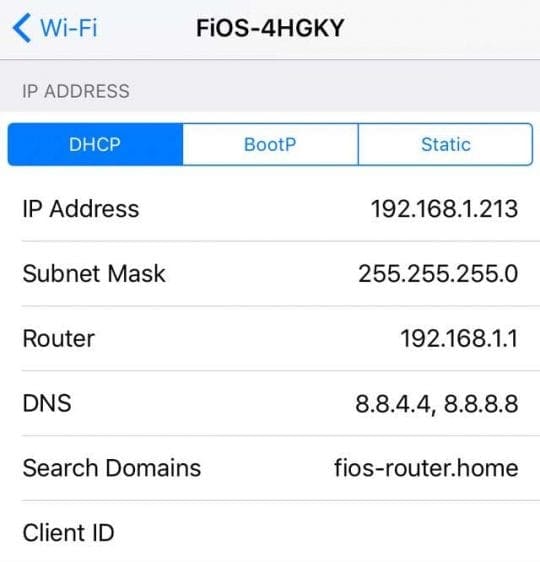
Try going into WiFi, and then change your DNS to 8.8.8.8 which is the google DNS. Worked for me. Once you’ve changed it, close the app store app by double tapping your home button and then reopen it. Worked for me when all other ways/options failed.
Ugh I was really hoping to download an app which I need for a project I’m doing.. .None worked. Last time I called Apple they didn’t help for my broken on button… Now I have to use assistive touch and my computer to turn it on…
Apple Store is completely white on every section. It’s been occuring for at least a week.
This really sucks. I guess if I have to buy another device, it’ll have to be a brand like Asus. I’m not going through Apple again.
I got it to work. Do everything that they said to do at the same time. Change these things in this order. Change the wifi DNS, change the date one year ahead, log out. turn the iPad off and back on. change the year to the correct day and login again. Hope it works.
To do this you join an affiliate program for free and then
perform a specific action for the merchant you are representing.
It is also a good idea to add an alt tag which provides text instead of the banner, if for some reason the banner
cannot be displayed. They study the concept on which the poster is based, very extensively.
Sorted! Change date by one year, force App Store to close (home button, minus), try to open App Store again…if that doesn’t work, reset date, and close App Store again, then re-open. Tried everything else and this worked for me!
This is really helpful.
I just followed 1st part,restarted my iphone and it rest my network settings..it worked…hurray…..Awesome..luv to xplore ..but Apple should take care of these bugs.
Anyway Thanks for the online help.
Thanks a lot. 🙂 🙂
“Tap Settings > General > Date and Time > Set Automatically > Off. Set the date one year ahead. Then try to access the App Store.”
i tried this one and its works for me. i just set the Date and Time to Off. but i dont set the year one ahead, then i try to access the app store, and pop i see the update. try it.
My update screen on my iphone is also blank. Even though it says there are three updates pending. Have tried all the above suggestions but still not working. Very annoying!
Settings -> iTunes & App Stores -> Apple ID: -> View Apple ID -> Country/Region -> Change Country or Region -> Next -> Agree -> (click Next and whatever is needed to finish the process. no need to change the settings themselves.)
i think it re-registers the device with the local app store and in doing so solving our problem.
I’m using iOS 6.1.2 on the iPhone 5. I was facing the perpetually blank “Updates” screen too, even though it showed two updates pending.
The year-change tip seemed to work–or else it was a huge coincidence.
• I set the year to 2014
• Tried to open the App Store, which failed to open
• I set the Date & Time back to Set Automatically
• Opened the app store again, and my updates were now visible.
Not sure if the fix is repeatable in my case…I guess I’ll see if the blank screen comes up again.
None of these solutions worked for me, I still have blank screen on updates. I have updated the apps one by one searching them manually but it is very tedius!! any idea??? please…
Hey,
I tried all these things too and nothing worked. Finally tried settings>general>reset>reset network settings and that fixed it immediately. Doesn’t seem to have affected anything in the way of service or anything either so I would recommend trying this. Hope it helps!!!
I have tried a few of these but my Updates screen is still white (even though the icon shows there are 3 updates ready). The icon seems to update. Clearly Apple can’t find their 6utts with both hands if they can’t give a definitive fix for this.
Starting to look like an android may be in my future…….
App updates show after changing language to French but stopped working again when I reverted back to English. Odd. Looks like I will have to start speaking French!
I have an iPod touch 4th generation and I cannot open the updates but everything else works. I have tried these tips and nothing works. I hate seeing the notification on it but cannot update any app to get rid of it. Please help.
I have tried every possible way also but still the update portion on my App Store appears blank.. I need to update 15 apps but every time I open the update portion it doesn’t load at all.. It always appears blank/white.. Can anyone help me… Pleeeeaaaaseee!!!!!
Thanks so much! Setting the year one year ahead made the app store not open at all, but when I then changed the year back to normal, everything worked.
Guys be patient! I’ve also experienced your problems. Try doing each suggested solutions above and just wait. I tried changing date and reboot, waited about 10-12 minutes then its OK. The App Store now loads.
Your a life saver this solved my problem I was messing with Ifile on a jailbroken ipad an I changed the systemversion.plist I couldn’t figure out what I did. And logging in and out then changing the language solved it for me. Thank you so much!
I finally installed again io6 and the problem was fixed. This took me time and losing configuration (thanks to Dropbox I did not lose pictures…).
Though this was over and today I faced AGAIN the same problem!!!
No way: apple starts having Microsoft behaviour!!!
I came from Nokia when they start going to Microsoft. Next time I will shift to android…
After the iOS 6 update,you many have found that your iPhone has problems connecting to the App Store. Some may have had trouble updating apps, while others are unable to view Passbook apps when connecting from the Passbook application.
I’ve spotted a solution on how to get around the issue:
Go to Settings>General>Date and Time>Set Automatically>Off. . Try to [update the apps again or press the button from Passbook]. If that fails, Set the date one year ahead and see if that helps you for now 🙂
Mine fixed itself this morning. I sent a note to Apple Support but I doubt they did anything on their end. The App Store was back by itself when I woke up.
None of the above worked for me however I went to settings-> messages and turned iMessages on and that fixed the App Store for me. If you already have iMessages on I would try toggling it
Tried all tips except google DNS one. For date and language change – I started getting an error ‘cannot connect to iTunes store’. Now I get this error for charts, gt blank screen for featured and search.. But all others tabs work such as genius and purchased.
When I tried my iPad this morning, App Store worked just fine.
I believe there is nothing wrong with the device itself.
It could be simply server issue.
Same problem here. Tried everything: changing date/time, setting diff. language, soft reboot, hard reboot, close and relaunch, sign-off and sign-in.
It still shows blank screen for featured and chart tabs.
I have blank white screens on featured and charts and I cannot install apps. I contacted AppleCare but they were no help. I hope this issue clears up!!
Tried all steps & still not working. I was accessing the app store with no issues earlier this week. I have the ipad2, loaded iOS 6 update back in September & had no issues with the app store until today. When I open the app store, it shows genius results, purchased apps & updates, but only shows a blank screen under ‘Featured’ & ‘Charts’. I have no ability to purchase any new apps now. I am so frustrated!! Any other ideas?
I have a new iPad upgraded to iOS 6. A few days ago the App Store started went blank. I set the date one year forward, and the App Store came back. I reset the date to the current date, and the App Store is still working. Thanks for the help.















I keep getting the “Cannot Connect to App Store” message when I check the apps that I’ve purchased to see if they need updating and I’ve tried everything that I’ve been told to try on the internet but I still keep getting that message.
What can I do to fix this issue ?
The AppStore icon has disappeared from my son’s iPad, and I’m not sure how to restore it. Without AppStore, we can’t add any new apps, so we’re stuck. Any suggestions?
Hi David,
Check if you set any Screen Time Restrictions on your son’s device. Go to Settings > Screen Time and temporarily disable any restrictions–see if the app store returns. If so, it’s likely you set up a restriction in Screen Time (usually in Content & Privacy Restrictions but could also be Allowed Apps)
I think you should use android
So when I went into the Apple App Store it said Can’t Connect to iPod and I was wondering how I could fix that pls
Hi Maeve,
Sorry to hear about the problems with your iPod. Please check out this article: App Store: “An unknown error has occurred”; can’t connect to the App Store
Can not get apple App Store ? Blank screen ! Three days now I have try all tips please help thank you .
Betty, Are you on the older iOS 11? It appears that some Apple users who are still on iOS 11 are having issues with accessing the app store and Apple music. Apple is aware of this issue and may be working towards a resolution.
I think I am still on 10 ?
Yea, Appears to be an issue affecting some users. https://www.iclarified.com/69368/app-store-itunes-store-and-apple-music-are-down-for-some-users . Hopefully Apple will be able to address this issue soon.
I had the same problem on my Mac Pro. Repeatedly clicking the “updates” tab fixed the problem.
Thanks, Bill for sharing what worked for you!
SK
Good job thank youuuuu very much for the help
Awesome! I even took my ipad minis to the Apple store which didn’t work! I did EVERYTHING you suggested and the only one that worked was changing the language!!! How weird! So glad I can finally get into the App store! Thank you thank you!!
My phone: iphone 7
Thanks a lot!!!
Mobile Data was Off for: App Store!
Thanks a ton!
Had turned it off yesterday!
Silly mistake!
Thanks!
Thanks, these tips worked for my iPhone 5s when the App Store didn’t load.
Perfect works very well
Thank you for the great tips! Tried the first one and it worked. You’re awesome
For My case, the issue was to enable Localisation of my iPad by the App Store.
Awesome! Many days my App Store was not working BUT NOW it is working with these tips! I just tell others to use this site. Thanks.
thanks for ur information guys..really fantastic guys. i am amazed.wonderful information
Weird but changing date and time worked for me. Thanks
Thanks you very much its working………
In starting iPhone App Store installed app free but now it’s showing “make purchases ” on any type of app
What should i do?
Nothing mentioned above worked.
I just changed setting for App Store under Mobile data . It was switched off, I switched it on and App store blank screen has disappeared
Changing language works form me, after tried all the scenario above only change language make it works properly, thanks
I got it to work by adding ,8.8.8.8 to my DNS setting, not deleting original.
After proving it worked, I removed this change to leave at original.
Tested again, it still works.
Let’s see for how long!
Have someone send you a link via SMS to a app in your store. I clicked the link and everything worked
Thought tapping the tabs trick 10 times was gonna be BS but this fixed it for me!! Thanks!!!!
Turned my iPhone 5S off but that didn’t work. Be careful changing languages. I changed mine to French, thinking I’d remember my college French. Wrong, I did not remember. Wish I would have just immediately switched back to English. Anyway lucked out and everything back and working. Wonder how much Apple lost by locking us all out? Such simple fixes for most of us.
OH MY GOODNESS, thank you. This helped tremendously. I changed the DNS for my wifi to 8.8.8.8, and my App Store magically started doing its thing again! Very pleased!
go into languages, make sure you only have English there, get rid of any others. It should come back. Worked for me.
Worked like a charm!!! Changed the date and relaunched. It’s there. !! Thanks.
Double clicking the home button, swiping away the AppStore page then going back into it worked perfectly. Thanks.
changing the language and time zone working for me , thanks for help..
I reset the setting over all and made sure that the data was on for the app store.
but none of the above worked.
To fix that problem the only thing you have to do is…settings> iTunes & appstore> tap your apple id to desconnect it and just log back in into your itunes account.
The first step, turning off set time and date automatically, worked for me. Thanks!
You guys are geniuses.My App Store was off for 2 months after I upgraded to iOS 9 but some minutes ago it started working .Thanks a lot for the procedures.
FYI I had this issue on my Macbook Air 2012 with OSX El Capitan 10.11.3, NOT an iphone or ipad and restarting the system solved it.
Hello SK, Thx for advice. After pressing home button twice and closing the App Store and later putting off the power and then on, the AppStore has started working properly. Thank you SK.
Clearing cache fixed the App Store!
cumhur, you’re a genius !!! Thanks 🙂
Language change fixed my problem, thanks for the tip
I tried the stuff at the beginning of the thread and realized that it was an iOS 6 issue. Jumped to the bottom of the thread and this fixed it. Thanks
I have iPhone 6plus. App Store went blank without any reason. Based on the previous suggestions I changed language to English (us) which worked
here is the solution.
turn off wifi
turn off 3G/4G
Multitask > Close appstore.
open app store again when you dont have the connection.
click ok. to error.
close app store from multitask
turn on 3G 4G and open appstore
This works
Thank you very much, my problem of blank screen started after upgrading to iso 9, and resolved by complete closing AppStore and restart again.
thanks !!! its working by changing dns 🙂
Resetting the time seemed silly but it worked! Strange that this bug is still around 4 years and many iOS updates later.
Thankyou. Language change worked
The Google DNS worked for me. Thanks
Sorry, someone was a little bit more clever one week earlier, anyhow good luck!
i’ve had the same problem, tried every possible solution. Because so many option we’re given which had to do with general settings i thought it had to do with some setting that probably wasn’t correct.
So -> go to the settings theme -> scoll down – Choose for -> Reset All Settings
Voila ->No Blank Fields anymore
Drawback -> you have to set some custom setting you liked
Good luck!
Finally done! Thank you so much! Changing language approach worked for my iPad.
The steps didn’t work for me ..but I saw on one of the comments from Anne which I tried and it worked immediately .. Settings>general>reset>reset network settings
Language change worked for me ..i changed to language English ( India)
language change worked for me. thanks for tips.
Thank you Anne.this only trick worked.just reset the network in setting.
Thank you for the tips
I changed the region and it worked
It worked like a charn! I just turned on “set date automatically” and then app store worked again 😉
i had the same problem, but have now fixed it! it does require some patience…
change language from english (uk) to plain english. it will say ‘setting language’. it may seem like it crashes as this takes about a minute and a half to work on my iPhone. Just let it load and it should take you back to the General settings. Come out of that and back to the main screen. Give it a few seconds, then go back in. Now change the settings back. Once you are brought back to the General settings, then head over to the App Store. Now when you sign in it may still be blank. I left my phone for 2minutes, then suddenly it all appeared!! I hope this helps! J
Thanks … Languadge change and once iphone switched off n on did my aap store working …. Thanks …..!
Language fixed it
Same issue with the apps not loading, hold the App store until it vibrates and then press the center button
the language change worked for me.
the language fixed it for me.
thank you
Tried everything listed above and then some. Still a blank white screen. How frustrating. I’ve been on Apple from Android a little over a week….some experience this has been.
So glad I found this! My husband swore I broke my phone! This started happening a couple of weeks ago on my new iPhone 6 which was frustrating as I needed to download an app to keep in touch with my son’s teacher. I finally was able to get on a computer to search it out and found this site. I tried the date switch first which didn’t work. Then when setting it back to automatic I realized it had me in the wrong time zone! So I changed that and now it works. So odd!
how much i love you !! … thanks admin.. its worked ..
“f still nothing appears, try changing the device’s language by tapping Settings > General > International > Language. Pick a language. Pick any other second language you already know or be familiar with. If you don’t, do not forget to navigate back in a different language. Change the language, launch the App Store, then change the language back to what it was originally.”
Changing the language works for me.
Spent a lot of money on my iMac and would like to purchase some apps. But I can’t as the app screen goes blank. It’s frustrating to contemplate some of the apparent solutions presented here. Time to go back to Windows I guess.
Guys just change your language to english UK or English US and reopen the app. It works !!
Change of language setting worked for iPad Air 2. Thank you very much!
I can’t even get rid of App Store and put it back on their is no x up on the corner?
iPhone 5c please help nothing’s working!! It get very frustrating
Thanks so much the date worked for me!
change of language setting worked thanks
This just worked for me…
I went to settings>general>restrictions (entered pin code) then turned off installing apps.
(you may not have your restrictions enabled – so that would be another possible step first)
I then exited settings and saw that the App store icon was gone.
Then returned to settings>general>restrictions (entered in code) then turned on installing apps.
I then exited settings, tapped the restored App Store icon and it was working again.
To be sure I got off my home wifi first but I doubt this had an impact.
I also updated my credit card info (had an expired credit card). I wonder if that affected it.
FINALLY!!!! I tried EVERYTHING else and this finally worked, thank you!!!!
thanks budd, changing the DNS to 8.8.8.8 worked for me. app store was like “cannot connect to istore” before.
Language change worked for me
Hello Everyone,
I was in the same boat as people here who said NOTHING worked for them. I was getting really frustrated. I finally tried the the suggestions of changing date, language, etc. I am not sure but after about the fourth or fifth time, it worked. keep in mind, I did restart my device after each change of couple of changes.
Initially, I tried each suggestion step by step, but it didn’t work. I guess it takes a couple of tries…
Hope this helps… and this is absolutely unacceptable, as someone mentioned, this is not a toy, these devices cost hundreds of dollars… Apple needs to do something about this…
I agree with you 100%! It’s a shame!
IM SO HAPPY! Thanks for sharing! The change in language fixed my App prob! 😀
Your changing of the the Language suggestion worked for me…. (thanks)
I’ve tried all the tips and it still doesn’t work! It’s really frustrating. Hope yall can fix it or is there any other tips?
Try going into WiFi, and then change your DNS to 8.8.8.8 which is the google DNS. Worked for me. Once you’ve changed it, close the app store app by double tapping your home button and then reopen it. Worked for me when all other ways/options failed.
None of the solutions worked for me until I reset all settings. Settings-General-Reset-Reset All Settings
Thanks at lot. It helped a lot.
dns worked for me
I tried the third option, that is, “Close the App Store completely…” and it worked for me. Thanks.
Ugh I was really hoping to download an app which I need for a project I’m doing.. .None worked. Last time I called Apple they didn’t help for my broken on button… Now I have to use assistive touch and my computer to turn it on…
Apple Store is completely white on every section. It’s been occuring for at least a week.
This really sucks. I guess if I have to buy another device, it’ll have to be a brand like Asus. I’m not going through Apple again.
Owns Apple iPod 4th generation.
I got it to work. Do everything that they said to do at the same time. Change these things in this order. Change the wifi DNS, change the date one year ahead, log out. turn the iPad off and back on. change the year to the correct day and login again. Hope it works.
Hi
Changing language helped me , Thanks !!
The DNS solution worked with me.. Thanks a lot.
Still not working!!!
IPod 4th gen iOS 6.1.6
It worked. Thanks
I almost threw my Ipod. I thought it’s broken. Good thing, I’ve found this! Awesome! Thanks, guys!
resetting network works for me! thnx a lot!
Thanx
It works using DSN step
Best regards
To do this you join an affiliate program for free and then
perform a specific action for the merchant you are representing.
It is also a good idea to add an alt tag which provides text instead of the banner, if for some reason the banner
cannot be displayed. They study the concept on which the poster is based, very extensively.
i signedout of itunes n resigned in and it worked for me…. thanks very much
Thnks a lot.
thank you very much.
Sorted! Change date by one year, force App Store to close (home button, minus), try to open App Store again…if that doesn’t work, reset date, and close App Store again, then re-open. Tried everything else and this worked for me!
This is really helpful.
I just followed 1st part,restarted my iphone and it rest my network settings..it worked…hurray…..Awesome..luv to xplore ..but Apple should take care of these bugs.
Anyway Thanks for the online help.
Thanks a lot. 🙂 🙂
Thanx very very veryveye…………………. X 1000000…..… times
U are the saviour
Hats off
The DNS to 8.8.8.8 works for me. Is there any problem leaving the DNS that way or do I need to change it back to its original numbers?
Thanks!
Resetting network worked for me.
Resetting the DNS to 8.8.8.8 worked for me.
thanks for your useful explanation. I have been tried almost everything, finally changing DSN was useful.
it worked,
it was great
thanks
i tries the 8.8.8.8 one
dont know what the problem was though
thanks again
Thank you very much
“Tap Settings > General > Date and Time > Set Automatically > Off. Set the date one year ahead. Then try to access the App Store.”
i tried this one and its works for me. i just set the Date and Time to Off. but i dont set the year one ahead, then i try to access the app store, and pop i see the update. try it.
I have same issue with my ipad mini… (This needs a fix) ….
I have same issue with my ipad mini… (This needs a fix)
My update screen on my iphone is also blank. Even though it says there are three updates pending. Have tried all the above suggestions but still not working. Very annoying!
This has been going on for a week! I have 4 apps that I can not update because the updates section is blank!! Please help, I’ve tried it all!!!
SOLVED ! (at least for me, on iPhone 4 v.6)
Settings -> iTunes & App Stores -> Apple ID: -> View Apple ID -> Country/Region -> Change Country or Region -> Next -> Agree -> (click Next and whatever is needed to finish the process. no need to change the settings themselves.)
i think it re-registers the device with the local app store and in doing so solving our problem.
Brilliant, that worked. Thanks for letting me know.
thanks , this worked for me.
Nothing is working:-(
Thanks for the tips.
I’m using iOS 6.1.2 on the iPhone 5. I was facing the perpetually blank “Updates” screen too, even though it showed two updates pending.
The year-change tip seemed to work–or else it was a huge coincidence.
• I set the year to 2014
• Tried to open the App Store, which failed to open
• I set the Date & Time back to Set Automatically
• Opened the app store again, and my updates were now visible.
Not sure if the fix is repeatable in my case…I guess I’ll see if the blank screen comes up again.
Tried all off these!! Still not working. Been a week now and the update icon is now at 7. Very disappointing
I’m ready to throw this phone. I have tried everything that has been suggested and nothing has worked.
I’m ready to throw this phone. I have tried everything that has been suggested and nothing has worked. Going to the apple store tomorrow .
None of these solutions worked for me, I still have blank screen on updates. I have updated the apps one by one searching them manually but it is very tedius!! any idea??? please…
Hey,
I tried all these things too and nothing worked. Finally tried settings>general>reset>reset network settings and that fixed it immediately. Doesn’t seem to have affected anything in the way of service or anything either so I would recommend trying this. Hope it helps!!!
It worked for me, thank you ^-^
I’m so glad! 🙂
Well finally this work u have to update to last version,Then go to General>Reset>Reset Network Settings, I did it Nd it worked ^_^ hopemit works
it works for me thanks lot anne (nothing else worked)
Hi Anne ..it worked for me,thank you
I have tried a few of these but my Updates screen is still white (even though the icon shows there are 3 updates ready). The icon seems to update. Clearly Apple can’t find their 6utts with both hands if they can’t give a definitive fix for this.
Starting to look like an android may be in my future…….
The changing of language from english to british english worked for me.
Only the updates wasn’t working turning auto time date off worked for me
App updates show after changing language to French but stopped working again when I reverted back to English. Odd. Looks like I will have to start speaking French!
I have an iPod touch 4th generation and I cannot open the updates but everything else works. I have tried these tips and nothing works. I hate seeing the notification on it but cannot update any app to get rid of it. Please help.
I have tried every possible way also but still the update portion on my App Store appears blank.. I need to update 15 apps but every time I open the update portion it doesn’t load at all.. It always appears blank/white.. Can anyone help me… Pleeeeaaaaseee!!!!!
… Switchi’n the Language made it!
The language change did it \m/ thank u
The language change did it \m/ thanksssssssss
None of these solutions work, I only have a blank screen on updates. It still comes up wih the number of updates I need (5) in red
Please help??
hei same problem here…updated last night to ios 6.1…then its happening now…did you using latest version ios or just happening…….
Thanks so much! Setting the year one year ahead made the app store not open at all, but when I then changed the year back to normal, everything worked.
Well I tried it all and nothing. Very frustrating. Haven’t been able to launch app store for months and months. Any more ideas?
Hi,
I tried all steps ever reset all the settings still it’s not working… Please suggest me how to tackle this… Requesting reply on this… Thanks
B
Turn off Wifi and go to App Store in 3G mode. Download any updates or a free App. Turn on Wifi again.
nothing else worked but this! thank you!
Hello I just finished fixing my iPhone4s White Screen because it was shattered.
After I fixed I had to charge it because it was flat after 30mins of charging I went to turn on the phone
I didn’t see anything come up my sceen is completely blank I can here the volume when I turn it on or
Off but the screen is completely blank can you please help me.
Thank you
Joyce
Guys be patient! I’ve also experienced your problems. Try doing each suggested solutions above and just wait. I tried changing date and reboot, waited about 10-12 minutes then its OK. The App Store now loads.
Your a life saver this solved my problem I was messing with Ifile on a jailbroken ipad an I changed the systemversion.plist I couldn’t figure out what I did. And logging in and out then changing the language solved it for me. Thank you so much!
my iphone are notworking for charger
language worked for me
I finally installed again io6 and the problem was fixed. This took me time and losing configuration (thanks to Dropbox I did not lose pictures…).
Though this was over and today I faced AGAIN the same problem!!!
No way: apple starts having Microsoft behaviour!!!
I came from Nokia when they start going to Microsoft. Next time I will shift to android…
Nice issue: it is solved again without doing anything else.
Look like a temporary conflict between the device and iTunes/App Store servers…
Same here – tried every hint I got (including Google Public DNS and Language settings). Nothing worked
Changing the language setting worked for me.
After the iOS 6 update,you many have found that your iPhone has problems connecting to the App Store. Some may have had trouble updating apps, while others are unable to view Passbook apps when connecting from the Passbook application.
I’ve spotted a solution on how to get around the issue:
Go to Settings>General>Date and Time>Set Automatically>Off. . Try to [update the apps again or press the button from Passbook]. If that fails, Set the date one year ahead and see if that helps you for now 🙂
this worked for me – thank you!
tried all the tips but still not working ……
what is going on with apple …..
disappoint
The hard log out (double click and close) worked for me – I closed everything off and freed up some space – worked straight away
Is It a problem on the iPhone or to the app store system itself?
Mine fixed itself this morning. I sent a note to Apple Support but I doubt they did anything on their end. The App Store was back by itself when I woke up.
None of the above worked for me however I went to settings-> messages and turned iMessages on and that fixed the App Store for me. If you already have iMessages on I would try toggling it
Tried them all and nothing.
This just started happening to me yesterday. I tried all of the tricks and I’m still getting a blank screen. Frustrating to say the least.
Tried all tips except google DNS one. For date and language change – I started getting an error ‘cannot connect to iTunes store’. Now I get this error for charts, gt blank screen for featured and search.. But all others tabs work such as genius and purchased.
This just started happening yesterday.
Any more thoughts would be appreciated!
Do the google DNS it worked for me
i have found itunes in ios6 haveing no errors,but the appstore encountered. is it supposed to purchase directly?
Tried everything and it is not working.
Tried everything and it is not working…
When I tried my iPad this morning, App Store worked just fine.
I believe there is nothing wrong with the device itself.
It could be simply server issue.
Tried to download free apps but asks me extra security questions the screen goes white when I touch to Answer, any suggestions ?
Mine is also not working! Tried all those tips. Please help
Nothing works, what i see is that the language of itunes and the app store doesn’t change when i change the language of the ipad3.
Same problem here. Tried everything: changing date/time, setting diff. language, soft reboot, hard reboot, close and relaunch, sign-off and sign-in.
It still shows blank screen for featured and chart tabs.
What is going on? is it server issue?
Please provide serious solutions, this is not a toy I`m becoming upset to pay that much for this
I have blank white screens on featured and charts and I cannot install apps. I contacted AppleCare but they were no help. I hope this issue clears up!!
Changing the language worked for me. Thanks so much.
Nothing has worked for me, so frustrating.
Same here, none of these suggestions work, extremely frustrating!
Tried all steps & still not working. I was accessing the app store with no issues earlier this week. I have the ipad2, loaded iOS 6 update back in September & had no issues with the app store until today. When I open the app store, it shows genius results, purchased apps & updates, but only shows a blank screen under ‘Featured’ & ‘Charts’. I have no ability to purchase any new apps now. I am so frustrated!! Any other ideas?
Nothing works here also, this is crap need help
Tried everything and still not working!! Very frustrating!!
Help nothing works. Any tips?
I tried all the tips but nothing happens. Can you suggest what I can do to fix this. Thanks
The language changed sorted it for me where all else had failed – thanks for the tip!
I tried language change , and now it works…
Did the language change – back in business!
Time n language change worked for me
I have a new iPad upgraded to iOS 6. A few days ago the App Store started went blank. I set the date one year forward, and the App Store came back. I reset the date to the current date, and the App Store is still working. Thanks for the help.
Wow
Mine was not working because it was in a shared wifi.